Insider KB5095058 Windows 11 Insider Experimental (26H2) build 26300.8697 - June 19


 Windows Insider Blog:

Changes and improvements gradually being rolled out

[General]​

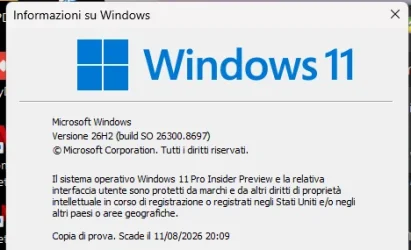
  • With today’s build, Windows Insiders in the Experimental channel will see the versioning updated under Settings > System > About (and winver) to version 26H2. For more information, see the Windows Insiders blog.

    26H2 Enablement Package (if needed)

    Download

[File Explorer]​

  • We’ve improved the visual consistency and reliability of the Copy dialog in Dark mode, including its launch experience and the expanded progress view.

[Start menu]​

  • Improved reliability of Start menu reflecting newly installed or removed apps without requiring sign-out or restart.

[Taskbar]​

  • Fixed an issue for Insiders using the new smaller taskbar option, where the system tray might get cut off or pushed off screen.

[Settings]​

  • Improved reliability of Settings > Apps > Startup.

[Virtualization]​

  • This update addresses an issue that could result in bugchecks citing HYPERVISOR_ERROR (0x20001) and KMODE_EXCEPTION_NOT_HANDLED (0x1E) errors after installing the latest flights on some devices during system restarts, virtual machine operations, or while running some gaming applications.

Reminders for Windows Insiders in the Experimental channel

  • Updates are based on Windows 11, version 26H2 via an enablement package (Build 26300.8697).
  • Many features are rolled out using Controlled Feature Rollout technology, starting with a subset of Insiders and ramping up over time as we monitor feedback to see how they land before pushing them out to everyone in this channel.
  • For Windows Insiders who want to be the first to try new features, see the available list of features to toggle on at the Feature flags page under Settings > Windows Update > Windows Insider Program.
  • The desktop watermark shown at the lower right corner of the desktop is normal for Windows Insider pre-release builds.
  • Features and experiences included in these builds may never get released as we try out different concepts and get feedback. Features may change over time, be removed, or replaced and never get released beyond Windows Insiders. Some of these features and experiences could show up in future Windows releases when they're ready.
  • Some features in active development we preview with Windows Insiders may not be fully localized and localization will happen over time as features are finalized. As you see issues with localization in your language, please report those issues to us via Feedback Hub.
  • Check out Flight Hub for a complete look at what build is in which Insider channel.


 Source:


Check Windows Updates


UUP Dump:

64-bit ISO download:

ARM64 ISO download:

 

Attachments

Last edited:
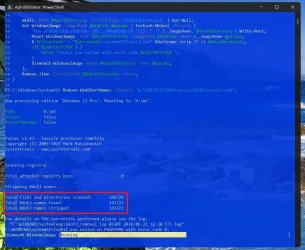
I've always run RestoreHealth. It's just within the last month or so, it's started to take MUCH longer to complete than in prior builds.
Does it show a long pause at 62.3% or around that number?
In that case it will sit there for a long time while repairing some components that were found repairable. 🤷‍♂️

"When DISM gets stuck at 62.3%, it usually means the tool is actively downloading missing files from Windows Update to repair your system image. This process can be slow, but it almost always completes if you give it enough time. [1, 2, 3, 4]
Before doing anything else, wait it out."
 

My Computer My Computer

At a glance

Windows 11 Pro 25H2Intel I9-9900K64GBNVIDIA RTX 2060
OS
Windows 11 Pro 25H2
Computer type
PC/Desktop
Manufacturer/Model
Dell XPS 8930
CPU
Intel I9-9900K
Memory
64GB
Graphics Card(s)
NVIDIA RTX 2060
Sound Card
NVIDIA High Definition Audio
Monitor(s) Displays
4k Samsung
Screen Resolution
3840 x 2160
Hard Drives
512GB NVMe, ADATA SU 800, 2TB HDD
1781937228830.webp
Edizione Windows 11 Pro Insider Preview
Versione 26H2
Data installazione: ‎28/‎01/‎2026
Data di scadenza della valutazione ‎11/‎08/‎2026 20:09
Build sistema operativo 26300.8697
Feature Pack Pacchetto di esperienze per funzionalità Windows 1000.26100.398.0
1781937358326.webp

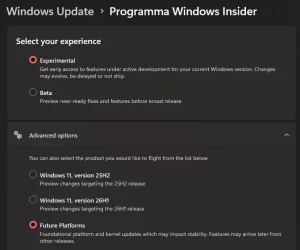
This morning I found the new Build installed and at the same time in the Insider program I also find myself in the Advance options I flashed Future Platform since the next builds will be 26H2 directly. Was this done well or is it better to flash "Windows 11 version 26H1"? Who can tell me which version is better? Thanks
 

My Computer My Computer

At a glance

Windows 11 Pro Insider Preview DevAMD Ryzen™ 5 5600G with Radeon Graphics 3.90 GHz16,0 GBNVIDIA GeForce GT 720, NVIDIA compatible
OS
Windows 11 Pro Insider Preview Dev
Computer type
PC/Desktop
Manufacturer/Model
To be filled by O.E.M.
CPU
AMD Ryzen™ 5 5600G with Radeon Graphics 3.90 GHz
Motherboard
MSI B450 GAMING PLUS MAX
Memory
16,0 GB
Graphics Card(s)
NVIDIA GeForce GT 720, NVIDIA compatible
Sound Card
NVIDIA High Definition Audio
Monitor(s) Displays
BenQ GW2270 Color Profile.D6500
Screen Resolution
1920 x 1080
Hard Drives
Samsung SSD 850 EVO 250GB + CT1000BX500SSD1 + ST2000DM006-2DM164 + WDC WD5000AAKS-07TMA0 +WDC WD10EARX-00N0YB0
PSU
EVGA 600 W2, 80+ WHITE 600W, 3 Year Warranty, Power Supply 100-W2-0600-K2 (EU)
Case
RAIJINTEK Agos - mid tower - ATX
Cooling
Cooler Master Hyper 212 Evo heatsink + Fans: 2 front+1 back+1 up
Keyboard
Logitech Internet 350 Keyboard
Mouse
Logitech MX Revolution
Internet Speed
Download 159.29 Mbps - Upload 80.14 Mbps
Browser
Google Crome Dev
Antivirus
Microsoft Windows Security
Hidden in build 26300.8697 is the long-awaited option to turn off web searches in Windows Search for good under a new "Show suggested search results" section, as seen at the SF Windows Insider meetup. A long time coming!

vivetool /enable /id:48433719,61267302,61344081,61482515,61532758,61760679


Last edited:

My Computers My Computers

  • At a glance

    Windows 11 Pro for WorkstationsIntel i7-8700K 5 GHz64 GB (4x16GB) G.SKILL TridentZ RGB DDR4 3600...ASUS ROG-STRIX-GTX1080TI-O11G-GAMING (11GB GD...
    OS
    Windows 11 Pro for Workstations
    Computer type
    PC/Desktop
    Manufacturer/Model
    Custom self build
    CPU
    Intel i7-8700K 5 GHz
    Motherboard
    ASUS ROG Maximus XI Formula Z390
    Memory
    64 GB (4x16GB) G.SKILL TridentZ RGB DDR4 3600 MHz (F4-3600C18D-32GTZR)
    Graphics Card(s)
    ASUS ROG-STRIX-GTX1080TI-O11G-GAMING (11GB GDDR5X)
    Sound Card
    Integrated Digital Audio (S/PDIF)
    Monitor(s) Displays
    2 x Samsung Odyssey G75 27"
    Screen Resolution
    2560x1440
    Hard Drives
    1TB Samsung 990 PRO M.2,
    4TB Samsung 990 PRO M.2,
    TerraMaster F8 SSD Plus NAS
    PSU
    Seasonic Prime Titanium 850W
    Case
    Thermaltake Core P3 wall mounted
    Cooling
    Corsair Hydro H115i
    Keyboard
    Amazon Basics Wired Full Keyboard MD005
    Mouse
    Logitech MX Master 4
    Internet Speed
    2 Gbps Download and 100 Mbps Upload
    Browser
    Chrome and Edge
    Antivirus
    Microsoft Defender
    Other Info
    Logitech Z625 speaker system,
    Logitech BRIO 4K Pro webcam,
    HP Color LaserJet Pro MFP M477fdn,
    CyberPower CP1500PFCLCD
    Galaxy S23 Plus phone
  • At a glance

    Windows 11 ProSnapdragon X Elite (12 core) 3.42 GHz16 GB LPDDR5x-7467 MHz
    Operating System
    Windows 11 Pro
    Computer type
    Laptop
    Manufacturer/Model
    Surface Laptop 7 Copilot+ PC
    CPU
    Snapdragon X Elite (12 core) 3.42 GHz
    Memory
    16 GB LPDDR5x-7467 MHz
    Monitor(s) Displays
    15" HDR
    Screen Resolution
    2496 x 1664
    Hard Drives
    1 TB SSD
    Internet Speed
    Wi-Fi 7 and Bluetooth 5.4
    Browser
    Chrome and Edge
    Antivirus
    Microsoft Defender
Hidden in build 26300.8697 is the long-awaited option to turn off web searches in Windows Search for good under a new "Show suggested search results" section, as seen at the SF Windows Insider meetup. A long time coming!

The page not exist.
 

My Computers My Computers

  • At a glance

    26200.8037i5-11400F32GBGeforce GT-1030
    OS
    26200.8037
    Computer type
    PC/Desktop
    CPU
    i5-11400F
    Motherboard
    Gigabyte
    Memory
    32GB
    Graphics Card(s)
    Geforce GT-1030
    Keyboard
    Logitech K400
    Mouse
    Logitech M720
    Internet Speed
    600 Mb
    Browser
    Edge
  • At a glance

    Pentium N42004GBIntel HD Graphics 505
    Computer type
    Laptop
    CPU
    Pentium N4200
    Motherboard
    ASUS
    Memory
    4GB
    Graphics card(s)
    Intel HD Graphics 505
    Sound Card
    HD Definition Audio Device
    Screen Resolution
    1366 x 768
    Mouse
    M510
    Internet Speed
    100Mb +
    Browser
    Edge
    Antivirus
    Windows Security

My Computers My Computers

  • At a glance

    Windows 11 Pro for WorkstationsIntel i7-8700K 5 GHz64 GB (4x16GB) G.SKILL TridentZ RGB DDR4 3600...ASUS ROG-STRIX-GTX1080TI-O11G-GAMING (11GB GD...
    OS
    Windows 11 Pro for Workstations
    Computer type
    PC/Desktop
    Manufacturer/Model
    Custom self build
    CPU
    Intel i7-8700K 5 GHz
    Motherboard
    ASUS ROG Maximus XI Formula Z390
    Memory
    64 GB (4x16GB) G.SKILL TridentZ RGB DDR4 3600 MHz (F4-3600C18D-32GTZR)
    Graphics Card(s)
    ASUS ROG-STRIX-GTX1080TI-O11G-GAMING (11GB GDDR5X)
    Sound Card
    Integrated Digital Audio (S/PDIF)
    Monitor(s) Displays
    2 x Samsung Odyssey G75 27"
    Screen Resolution
    2560x1440
    Hard Drives
    1TB Samsung 990 PRO M.2,
    4TB Samsung 990 PRO M.2,
    TerraMaster F8 SSD Plus NAS
    PSU
    Seasonic Prime Titanium 850W
    Case
    Thermaltake Core P3 wall mounted
    Cooling
    Corsair Hydro H115i
    Keyboard
    Amazon Basics Wired Full Keyboard MD005
    Mouse
    Logitech MX Master 4
    Internet Speed
    2 Gbps Download and 100 Mbps Upload
    Browser
    Chrome and Edge
    Antivirus
    Microsoft Defender
    Other Info
    Logitech Z625 speaker system,
    Logitech BRIO 4K Pro webcam,
    HP Color LaserJet Pro MFP M477fdn,
    CyberPower CP1500PFCLCD
    Galaxy S23 Plus phone
  • At a glance

    Windows 11 ProSnapdragon X Elite (12 core) 3.42 GHz16 GB LPDDR5x-7467 MHz
    Operating System
    Windows 11 Pro
    Computer type
    Laptop
    Manufacturer/Model
    Surface Laptop 7 Copilot+ PC
    CPU
    Snapdragon X Elite (12 core) 3.42 GHz
    Memory
    16 GB LPDDR5x-7467 MHz
    Monitor(s) Displays
    15" HDR
    Screen Resolution
    2496 x 1664
    Hard Drives
    1 TB SSD
    Internet Speed
    Wi-Fi 7 and Bluetooth 5.4
    Browser
    Chrome and Edge
    Antivirus
    Microsoft Defender
View attachment 174707
Edizione Windows 11 Pro Insider Preview
Versione 26H2
Data installazione: ‎28/‎01/‎2026
Data di scadenza della valutazione ‎11/‎08/‎2026 20:09
Build sistema operativo 26300.8697
Feature Pack Pacchetto di esperienze per funzionalità Windows 1000.26100.398.0
View attachment 174708

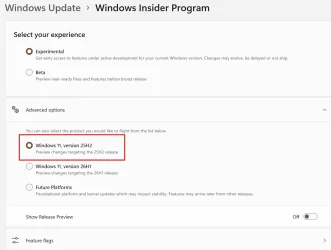
This morning I found the new Build installed and at the same time in the Insider program I also find myself in the Advance options I flashed Future Platform since the next builds will be 26H2 directly. Was this done well or is it better to flash "Windows 11 version 26H1"? Who can tell me which version is better? Thanks
That is weird, I thought that Future Platform was for Build 29613.1000.
This 26300.8697 on my machines, still shows 25H2 even if it is 26H2. 😵‍💫🤷‍♂️
Same in 3 machines. 🤷‍♂️ Typical Microsoft confusing mess. 🤬🤷‍♂️

Edition Windows 11 Pro Insider Preview
Version 26H2
Installed on ‎5/‎22/‎2026
Evaluation expires on ‎8/‎11/‎2026 11:09 AM
OS build 26300.8697
Experience Windows Feature Experience Pack 1000.26100.398.0

1781980456837.webp
 

My Computer My Computer

At a glance

Windows 11 Pro 25H2Intel I9-9900K64GBNVIDIA RTX 2060
OS
Windows 11 Pro 25H2
Computer type
PC/Desktop
Manufacturer/Model
Dell XPS 8930
CPU
Intel I9-9900K
Memory
64GB
Graphics Card(s)
NVIDIA RTX 2060
Sound Card
NVIDIA High Definition Audio
Monitor(s) Displays
4k Samsung
Screen Resolution
3840 x 2160
Hard Drives
512GB NVMe, ADATA SU 800, 2TB HDD
Installed. No issues so far
 

My Computers My Computers

  • At a glance

    windows 10 & 11AMD Ryzen 7X64GbRadeon RX 480 8Gb
    OS
    windows 10 & 11
    Computer type
    PC/Desktop
    Manufacturer/Model
    iBuyPower (special build)
    CPU
    AMD Ryzen 7X
    Motherboard
    Asus Prime x370 Pro
    Memory
    64Gb
    Graphics Card(s)
    Radeon RX 480 8Gb
    Monitor(s) Displays
    Samsung UHD 27 inch
    Screen Resolution
    UHD
    Hard Drives
    3 Samsung 1 TB SSD each; 1 Samsung PCIe M.2 at 2 TB
  • At a glance

    Windows 11 proAMD 9 5900X32 GbNvidia GeForce RTX 3080 Ti 12 GB GDDR6X
    Operating System
    Windows 11 pro
    Computer type
    PC/Desktop
    Manufacturer/Model
    IBuyPower
    CPU
    AMD 9 5900X
    Motherboard
    Asus x570 ROG Crosshair VIII Dark Hero WI-FI 6E ARGB
    Memory
    32 Gb
    Graphics card(s)
    Nvidia GeForce RTX 3080 Ti 12 GB GDDR6X
    Sound Card
    3D PREMIUM surround sound onboard
    Monitor(s) Displays
    Samsung 32 inch UHD curved monitor
    Screen Resolution
    UHD
    Hard Drives
    Samsung 980 pro 2 tb gen 4 NVMe ssd
    PSU
    850 watt consair RM850X
    Case
    Lian Li LANCOOL ONE tempered glass RGB gaming case
    Cooling
    DEEPCOOL GAMERSTORM RGB 240 mm CASTLE 240EX liquid cooler
    Keyboard
    Ares m.2 gaming keyboard
    Mouse
    Ares m.2 gaming optical mouse
    Internet Speed
    450
    Browser
    Firefox / Edge
    Antivirus
    Windows defender
    Other Info
    With all this gaming rig I am not a gamer!
That is weird, I thought that Future Platform was for Build 29613.1000.
This 26300.8697 on my machines, still shows 25H2 even if it is 26H2. 😵‍💫🤷‍♂️
Same in 3 machines. 🤷‍♂️ Typical Microsoft confusing mess. 🤬🤷‍♂️

View attachment 174768
Mine shows the same. I guess they haven't updated it to say version 26H2 yet in Windows Update.
 

My Computer My Computer

At a glance

Windows 11 Pro 26H2AMD Ryzen 9 9950X3D 16-Core Processor64GB Corsair DDR5 RAM @ 6000 MT/sASUS TUF Gaming GeForce RTX 4090 OC Edition 2...
OS
Windows 11 Pro 26H2
Computer type
PC/Desktop
Manufacturer/Model
Skytech / Central Computers
CPU
AMD Ryzen 9 9950X3D 16-Core Processor
Motherboard
Gigabyte X870E AORUS PRO ICE
Memory
64GB Corsair DDR5 RAM @ 6000 MT/s
Graphics Card(s)
ASUS TUF Gaming GeForce RTX 4090 OC Edition 24GB GDDR6X
Sound Card
Sound Blaster Audigy Fx V2
Monitor(s) Displays
Sony SDMU27M90 (DP HDR), Acer KA272, ASUS VG328QA1A
Screen Resolution
3840x2160 HDR
Hard Drives
Samsung SSD 990 PRO 4TB, Samsung SSD 860 EVO 1TB, Seagate ST8000DM004-2CX88 8TB
Case
Fractal Meshify 2
Cooling
Arctic Freezer III 360mm
mine does to on a unsupported machine .
 

My Computer My Computer

At a glance

WINDOWS 11 WINDOWS 10Intel(R) Core(TM) i7 -3770K CPU 3.50 GZ 3501 ...32.0 GB (31.9 GB usable)AMD RADEON TM R5240 INTELL HD GRAPHICS 4600 T...
OS
WINDOWS 11 WINDOWS 10
Computer type
PC/Desktop
Manufacturer/Model
HP H8 1360T
CPU
Intel(R) Core(TM) i7 -3770K CPU 3.50 GZ 3501 4 CORE
Motherboard
PEGATRON 2AD5
Memory
32.0 GB (31.9 GB usable)
Graphics Card(s)
AMD RADEON TM R5240 INTELL HD GRAPHICS 4600 TIGER 1+1 USB
Sound Card
AMD HD . IDT
Monitor(s) Displays
AOC WAL MART SPECIAL . HP 2311 IX IPS LED DELL 1708 FP
Screen Resolution
1920 X 1080 1600X900 1280X940
Hard Drives
1 FAXING S 100 512GB 1 KINGSTON 120 GB SSD 1 X12 SSD 512 GB
PSU
300 WATT HP
Case
FULL
Cooling
ON BOARD FAN
Keyboard
LOGITEC K 520 WIRELESS
Mouse
LOGITEC M 510 WIRELESS
Internet Speed
55 UP 11.2 DOWN
Browser
CHROME EDGE
Antivirus
WINDOWS SECUIRTY
Other Info
NON SUPPORTED HARDWARE FOR WINDOWS 11
Back
Top Bottom