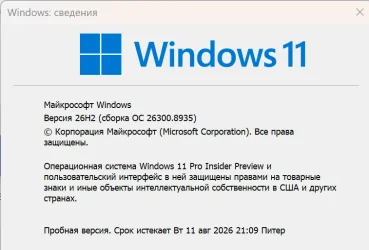
Insider KB5101589 Windows 11 Insider Experimental (26H2) build 26300.8935 - July 20


 Windows Insider Blog:

Changes and improvements gradually being rolled out

[File Explorer]​

  • File deletion in File Explorer is now faster in certain scenarios when deleting large, fragmented files.
  • Launching File Explorer Home is now faster and more responsive.
  • The Recommended section on Home now supports touch scrolling, making it easier to browse files in the carousel.

[Desktop Background]​

  • Improved desktop background persistence across multiple scenarios, including when using multiple desktops.
  • Made small cosmetic improvements to Settings > Personalization > Background.

[Widgets]​

  • We're expanding support for animated icons on the Widgets taskbar entry point. In addition to the animated experiences already available today for Insiders who have dashboard notifications enabled in Widgets Settings, users might begin seeing a broader set of dynamically updated animated content from supported widget providers to make content updates more noticeable and engaging at a glance.

[Windows Update]​

  • Fixed an issue that could result in recent Insider flights failing to install with error 0xc0000409.

[Run]​

  • Pressing F4 now expands the suggestions dropdown for command completion when using the new Run design.

[Taskbar]​

  • Fixed a few small visual issues when using the taskbar in an alternate position.
  • Fixed an issue where Notification Center appeared in the wrong location when the taskbar was on top.

[Search]​

  • Increased the height of the search box by 4 pixels.

[Input]​

  • Fixed an issue causing the mouse cursor to blink repeatedly for some Insiders after recent flights.
  • Improved persistence of mouse cursor size.
  • Improved persistence of voice typing settings for automatic punctuation and launcher.

Reminders for Windows Insiders in the Experimental channel

  • Updates are based on Windows 11, version 26H2 via an enablement package (Build 26300.8935).
  • Many features are rolled out using Controlled Feature Rollout technology, starting with a subset of Insiders and ramping up over time. We monitor feedback to see how they land before pushing them out to everyone in this channel.
  • For Windows Insiders who want to be the first to try new features, see the available list of features to toggle on at the Feature flags page under Settings > Windows Update > Windows Insider Program.
  • The desktop watermark shown at the lower right corner of the desktop is normal for Windows Insider pre-release builds.
  • Features and experiences included in these builds might never get released as we try out different concepts and get feedback. Features might change over time, be removed, or replaced and never get released beyond Windows Insiders. Some of these features and experiences could show up in future Windows releases when they're ready.
  • Some features in active development we preview with Windows Insiders might not be fully localized, and localization will happen over time as features are finalized. As you see issues with localization in your language, please report those issues to us via Feedback Hub.
  • Check out Flight Hub for a complete look at what build is in which Insider channel.


 Source:


Check Windows Updates


UUP Dump:
64-bit ISO download:

ARM64 ISO download:

 
Last edited:
  • Like
Reactions: OAT
2026-07-21_000458.webp
 

Attachments

  • 2026-07-21_003337.webp
    2026-07-21_003337.webp
    37.2 KB · Views: 1
Last edited:

My Computer My Computer

At a glance

Windows 11
OS
Windows 11
winver.webp
 

My Computers My Computers

  • At a glance

    Windows 11 Pro x 2 + Insider DevIntel Core i9 12900K @ 5.2 GHz2 x Corsair Dominator Platinum RGB (4x16GB To...EVGA GeForce RTX 3080 XC3 ULTRA GAMING 10GB G...
    OS
    Windows 11 Pro x 2 + Insider Dev
    Computer type
    PC/Desktop
    Manufacturer/Model
    My first abomination, I call it the Money Pit One
    CPU
    Intel Core i9 12900K @ 5.2 GHz
    Motherboard
    ASUS ROG MAXIMUS Z690 HERO
    Memory
    2 x Corsair Dominator Platinum RGB (4x16GB Total) DDR5-6200 CL36 Dual Channel Kit
    Graphics Card(s)
    EVGA GeForce RTX 3080 XC3 ULTRA GAMING 10GB GDDR6X
    Sound Card
    ROG SupremeFX ALC4082 with ESS® ES9018Q2C DAC for pinpoint positioning and dynamics
    Monitor(s) Displays
    2 x Samsung 43" HDR Neo QLED Mini-LED Tizen Smart TV (QN43QN90DAFXZC) 2024
    Screen Resolution
    1920 x 1080 @ 150 DPI & 120Hz
    Hard Drives
    2 x Samsung 980 Series - 250GB PCIe Gen3. X4 NVMe 1.4 - M.2 Internal SSD (Windows 11 Pro Dual boot)
    PSU
    Corsair HX1000i 80+ Platinum Modular Power Supply 1000W
    Case
    Phanteks Enthoo Luxe Tempered Glass Full Tower Case - Black
    Cooling
    CORSAIR iCUE H150i RGB Elite 360mm Liquid CPU Cooler
    Keyboard
    Perixx PERIBOARD-732B Wireless Mini Backlit USB Keyboard with Low Profile Keys - US Layout
    Mouse
    Logitech MX Anywhere 2S Wireless Mouse
    Internet Speed
    1000 Mbps
    Browser
    Latest Version Of Firefox & Microsoft Edge Chromium Stable
    Antivirus
    ESET Internet Security
    Other Info
    LG Electronics 14x Sata Blu-ray Disk Rewriter - WH14NS4O
    2 x OREI 4K 4x2 HDMI Matrix Switch With ARC Audio Extraction, HDR & Downscaling (UHD-402D) so I can send the output of my Cable Box, Roku, or any of my 4 computers to either of my TV's separately or simultaneously.
  • At a glance

    Windows 11 Pro x 2Intel Core i9 12900K @ 5.2 GHz2 x Vengeance RGB 32GB DDR5 6400MHz CL32 Dual...ASUS TUF Gaming GeForce RTX 3070 Ti OC Editio...
    Operating System
    Windows 11 Pro x 2
    Computer type
    PC/Desktop
    Manufacturer/Model
    My second abomination, I call it the Money Pit Two
    CPU
    Intel Core i9 12900K @ 5.2 GHz
    Motherboard
    ASUS ROG STRIX Z690-F GAMING WIFI
    Memory
    2 x Vengeance RGB 32GB DDR5 6400MHz CL32 Dual Channel Kit (4x16GB Total) Black
    Graphics card(s)
    ASUS TUF Gaming GeForce RTX 3070 Ti OC Edition 8 GB GDDR6X
    Sound Card
    ROG SupremeFX ALC4082 with ESS® ES9018Q2C DAC for pinpoint positioning and dynamics
    Monitor(s) Displays
    2 x Samsung 43" HDR Neo QLED Mini-LED Tizen Smart TV (QN43QN90DAFXZC) 2024
    Screen Resolution
    1920 x 1080 @ 150 DPI & 120Hz
    Hard Drives
    2 x Samsung 980 Series - 250GB PCIe Gen3. X4 NVMe 1.4 - M.2 Internal SSD (Windows 11 Pro Dual boot)
    PSU
    Corsair AX860 - 860W Modular Power Supply
    Case
    Phanteks Enthoo Pro Tempered Glass Full Tower Case - Black
    Cooling
    CORSAIR iCUE H150i RGB Elite 360mm Liquid CPU Cooler
    Keyboard
    Perixx PERIBOARD-326 Wireless Mini Backlit USB Keyboard with Low Profile Keys - US Layout
    Mouse
    Logitech MX Anywhere 2S Wireless Mouse
    Internet Speed
    1000 Mbps
    Browser
    Latest Version Of Firefox & EDGE Chromium Stable
    Antivirus
    ESET Internet Security
    Other Info
    LG Electronics 14x Sata Blu-ray Disk Rewriter - WH14NS4O
    2 x OREI 4K 4x2 HDMI Matrix Switch With ARC Audio Extraction, HDR & Downscaling (UHD-402D) so I can send the output of my Cable Box, Roku, or any of my 4 computers to either of my TV's separately or simultaneously.
  • 2021 ASUS TUF Gaming A17 - FA706QM Gaming Laptop with a AMD Ryzen™ 7 5800H Mobile Processor, NVIDIA GeForce RTX 3060 Laptop GPU and AMD Graphics (512 MB), 17.3-inch, FHD (1920 x 1080) 16:9, Value IPS-level, Anti-glare display, 2 x 8GB DDR4 3200 SDRAM, Samsung 980 Series - 250GB PCIe Gen3. X4 NVMe 1.4 - M.2 Internal SSD running Windows 11 Pro , Backlit Chiclet Keyboard 1-Zone RGB, Touchpad, 720P HD camera, Wi-Fi 6(802.11ax) (Dual band) 2*2 + Bluetooth® 5.3 Wireless Card

    External Keyboard: Perixx PERIBOARD-326 Wireless Mini Backlit USB Keyboard with Low Profile Keys - US Layout

    External Mouse: Logitech MX Anywhere 2S Wireless Mouse

    External Monitor: Samsung 43" HDR Neo QLED Mini-LED Tizen Smart TV (QN43QN90DAFXZC) 2024
Build 26300.8935 updates the new (upcoming) L1 Privacy & Security Settings page yet again. MS has ditched the fancy hero control in favour of a "core privacy settings" section with the location/camera/mic options, and Windows Security is back to being listed under "Security".


My Computers My Computers

  • At a glance

    Windows 11 Pro for WorkstationsIntel i7-8700K 5 GHz64 GB (4x16GB) G.SKILL TridentZ RGB DDR4 3600...ASUS ROG-STRIX-GTX1080TI-O11G-GAMING (11GB GD...
    OS
    Windows 11 Pro for Workstations
    Computer type
    PC/Desktop
    Manufacturer/Model
    Custom self build
    CPU
    Intel i7-8700K 5 GHz
    Motherboard
    ASUS ROG Maximus XI Formula Z390
    Memory
    64 GB (4x16GB) G.SKILL TridentZ RGB DDR4 3600 MHz (F4-3600C18D-32GTZR)
    Graphics Card(s)
    ASUS ROG-STRIX-GTX1080TI-O11G-GAMING (11GB GDDR5X)
    Sound Card
    Integrated Digital Audio (S/PDIF)
    Monitor(s) Displays
    2 x Samsung Odyssey G75 27"
    Screen Resolution
    2560x1440
    Hard Drives
    1TB Samsung 990 PRO M.2,
    4TB Samsung 990 PRO M.2,
    TerraMaster F8 SSD Plus NAS
    PSU
    Seasonic Prime Titanium 850W
    Case
    Thermaltake Core P3 wall mounted
    Cooling
    Corsair Hydro H115i
    Keyboard
    Amazon Basics Wired Full Keyboard MD005
    Mouse
    Logitech MX Master 4
    Internet Speed
    2 Gbps Download and 100 Mbps Upload
    Browser
    Chrome and Edge
    Antivirus
    Microsoft Defender
    Other Info
    Logitech Z625 speaker system,
    Logitech BRIO 4K Pro webcam,
    HP Color LaserJet Pro MFP M477fdn,
    CyberPower CP1500PFCLCD
    Galaxy S23 Plus phone
  • At a glance

    Windows 11 ProSnapdragon X Elite (12 core) 3.42 GHz16 GB LPDDR5x-7467 MHz
    Operating System
    Windows 11 Pro
    Computer type
    Laptop
    Manufacturer/Model
    Surface Laptop 7 Copilot+ PC
    CPU
    Snapdragon X Elite (12 core) 3.42 GHz
    Memory
    16 GB LPDDR5x-7467 MHz
    Monitor(s) Displays
    15" HDR
    Screen Resolution
    2496 x 1664
    Hard Drives
    1 TB SSD
    Internet Speed
    Wi-Fi 7 and Bluetooth 5.4
    Browser
    Chrome and Edge
    Antivirus
    Microsoft Defender
Hmm, it upgraded fine, but still seeing the DISM issue.

Deployment Image Servicing and Management tool​
Version: 10.0.26100.8772​
Image Version: 10.0.26300.8935​
[==========================100.0%==========================]​
Error: 0x800f0915​
The repair content could not be found anywhere.​
Check the internet connectivity or use the "Source" option to specify the location of the files that are required to restore the image. For more information on specifying a source location, see Configure a Windows Repair Source.​
The DISM log file can be found at C:\WINDOWS\Logs\DISM\dism.log​
 

My Computer My Computer

At a glance

Windows 11 Pro 26H2AMD Ryzen 9 9950X3D 16-Core Processor64GB Corsair DDR5 RAM @ 6000 MT/sASUS TUF Gaming GeForce RTX 4090 OC Edition 2...
OS
Windows 11 Pro 26H2
Computer type
PC/Desktop
Manufacturer/Model
Skytech / Central Computers
CPU
AMD Ryzen 9 9950X3D 16-Core Processor
Motherboard
Gigabyte X870E AORUS PRO ICE
Memory
64GB Corsair DDR5 RAM @ 6000 MT/s
Graphics Card(s)
ASUS TUF Gaming GeForce RTX 4090 OC Edition 24GB GDDR6X
Sound Card
Sound Blaster Audigy Fx V2
Monitor(s) Displays
Sony SDMU27M90 (DP HDR), Acer KA272, ASUS VG328QA1A
Screen Resolution
3840x2160 HDR
Hard Drives
Samsung SSD 990 PRO 4TB, Samsung SSD 860 EVO 1TB, Seagate ST8000DM004-2CX88 8TB
Case
Fractal Meshify 2
Cooling
Arctic Freezer III 360mm
Downloading now!
 

My Computers My Computers

  • At a glance

    windows 10 & 11AMD Ryzen 7X64GbRadeon RX 480 8Gb
    OS
    windows 10 & 11
    Computer type
    PC/Desktop
    Manufacturer/Model
    iBuyPower (special build)
    CPU
    AMD Ryzen 7X
    Motherboard
    Asus Prime x370 Pro
    Memory
    64Gb
    Graphics Card(s)
    Radeon RX 480 8Gb
    Monitor(s) Displays
    Samsung UHD 27 inch
    Screen Resolution
    UHD
    Hard Drives
    3 Samsung 1 TB SSD each; 1 Samsung PCIe M.2 at 2 TB
  • At a glance

    Windows 11 proAMD 9 5900X32 GbNvidia GeForce RTX 3080 Ti 12 GB GDDR6X
    Operating System
    Windows 11 pro
    Computer type
    PC/Desktop
    Manufacturer/Model
    IBuyPower
    CPU
    AMD 9 5900X
    Motherboard
    Asus x570 ROG Crosshair VIII Dark Hero WI-FI 6E ARGB
    Memory
    32 Gb
    Graphics card(s)
    Nvidia GeForce RTX 3080 Ti 12 GB GDDR6X
    Sound Card
    3D PREMIUM surround sound onboard
    Monitor(s) Displays
    Samsung 32 inch UHD curved monitor
    Screen Resolution
    UHD
    Hard Drives
    Samsung 980 pro 2 tb gen 4 NVMe ssd
    PSU
    850 watt consair RM850X
    Case
    Lian Li LANCOOL ONE tempered glass RGB gaming case
    Cooling
    DEEPCOOL GAMERSTORM RGB 240 mm CASTLE 240EX liquid cooler
    Keyboard
    Ares m.2 gaming keyboard
    Mouse
    Ares m.2 gaming optical mouse
    Internet Speed
    450
    Browser
    Firefox / Edge
    Antivirus
    Windows defender
    Other Info
    With all this gaming rig I am not a gamer!
Downloading and installing.

1784596110571.webp
1784596140042.webp

Done:

Edition Windows 11 Pro Insider Preview
Version 26H2
Installed on ‎7/‎6/‎2026
Evaluation expires on ‎8/‎11/‎2026 11:09 AM
OS build 26300.8935
Experience Windows Feature Experience Pack 1000.26100.416.0
 
Last edited:

My Computer My Computer

At a glance

Windows 11 Pro 25H2Intel I9-9900K64GBNVIDIA RTX 2060
OS
Windows 11 Pro 25H2
Computer type
PC/Desktop
Manufacturer/Model
Dell XPS 8930
CPU
Intel I9-9900K
Memory
64GB
Graphics Card(s)
NVIDIA RTX 2060
Sound Card
NVIDIA High Definition Audio
Monitor(s) Displays
4k Samsung
Screen Resolution
3840 x 2160
Hard Drives
512GB NVMe, ADATA SU 800, 2TB HDD
installed fine it seems.
 

My Computer My Computer

At a glance

windows 11 proIntel Core i5 14500 Raptor Lake 10nm Technology32.0GB Unknown @ 2394MHzPHL 438P1 (3840x2160@60Hz) Intel UHD Graphics...
OS
windows 11 pro
Computer type
PC/Desktop
Manufacturer/Model
HP
CPU
Intel Core i5 14500 Raptor Lake 10nm Technology
Motherboard
HP 8AC3 (U3E1)
Memory
32.0GB Unknown @ 2394MHz
Graphics Card(s)
PHL 438P1 (3840x2160@60Hz) Intel UHD Graphics 770
Sound Card
onboard
Monitor(s) Displays
40" philips
Screen Resolution
3840x2160
Hard Drives
3726GB Crucial CT4000P3PSSD8
Case
HP mini
Cooling
air
Keyboard
Logitech
Mouse
cmstorm devastator
Internet Speed
500-50
Browser
firefox
Antivirus
defender
Found repairable components, waiting for /RESTOREHEALTH to complete. I hope it works, it is pretty slow.🤞

1784598455367.webp

1784598768323.webp

1784599194866.webp

and it failed. 😖🤬🤷‍♂️

1784599395764.webp


The same problem was already happening with 26300.8772 and the same after this update to 26300.8935. Same issue on multiple machines with the same 26H2 Windows build. 🤷‍♂️

 
Last edited:

My Computer My Computer

At a glance

Windows 11 Pro 25H2Intel I9-9900K64GBNVIDIA RTX 2060
OS
Windows 11 Pro 25H2
Computer type
PC/Desktop
Manufacturer/Model
Dell XPS 8930
CPU
Intel I9-9900K
Memory
64GB
Graphics Card(s)
NVIDIA RTX 2060
Sound Card
NVIDIA High Definition Audio
Monitor(s) Displays
4k Samsung
Screen Resolution
3840 x 2160
Hard Drives
512GB NVMe, ADATA SU 800, 2TB HDD
The same problem was already happening with 26300.8772 and the same after this update to 26300.8935. Same issue on multiple machines with the same 26H2 Windows build. 🤷‍♂️
Yup.
 

My Computer My Computer

At a glance

Windows 11 Pro 26H2AMD Ryzen 9 9950X3D 16-Core Processor64GB Corsair DDR5 RAM @ 6000 MT/sASUS TUF Gaming GeForce RTX 4090 OC Edition 2...
OS
Windows 11 Pro 26H2
Computer type
PC/Desktop
Manufacturer/Model
Skytech / Central Computers
CPU
AMD Ryzen 9 9950X3D 16-Core Processor
Motherboard
Gigabyte X870E AORUS PRO ICE
Memory
64GB Corsair DDR5 RAM @ 6000 MT/s
Graphics Card(s)
ASUS TUF Gaming GeForce RTX 4090 OC Edition 24GB GDDR6X
Sound Card
Sound Blaster Audigy Fx V2
Monitor(s) Displays
Sony SDMU27M90 (DP HDR), Acer KA272, ASUS VG328QA1A
Screen Resolution
3840x2160 HDR
Hard Drives
Samsung SSD 990 PRO 4TB, Samsung SSD 860 EVO 1TB, Seagate ST8000DM004-2CX88 8TB
Case
Fractal Meshify 2
Cooling
Arctic Freezer III 360mm
Hmm, it upgraded fine, but still seeing the DISM issue.

Deployment Image Servicing and Management tool​
Version: 10.0.26100.8772​
Image Version: 10.0.26300.8935​
[==========================100.0%==========================]​
Error: 0x800f0915​
The repair content could not be found anywhere.​
Check the internet connectivity or use the "Source" option to specify the location of the files that are required to restore the image. For more information on specifying a source location, see Configure a Windows Repair Source.​
The DISM log file can be found at C:\WINDOWS\Logs\DISM\dism.log​

Try this and see if it works...

Please save any work you have open, and close all programs.
Download the SFCFix.zip below and save it to your desktop. Now extract the SFCFix.exe file from the .zip to your desktop.
Run the file and wait for it to complete. Once done, a file will appear on your desktop, called SFCFix.txt.
Now run the usual DISM command from admin Command Prompt:
Code:
DISM /online /cleanup-image /RestoreHealth
Restart your device and see if your problem is solved.
 

Attachments

My Computer My Computer

At a glance

Windows 11 25H2 Pro (RP Build 26200.8968)
OS
Windows 11 25H2 Pro (RP Build 26200.8968)
Computer type
PC/Desktop
Manufacturer/Model
Alienware
Try this and see if it works...

Please save any work you have open, and close all programs.
Download the SFCFix.zip below and save it to your desktop. Now extract the SFCFix.exe file from the .zip to your desktop.
Run the file and wait for it to complete. Once done, a file will appear on your desktop, called SFCFix.txt.
Now run the usual DISM command from admin Command Prompt:
Code:
DISM /online /cleanup-image /RestoreHealth
Restart your device and see if your problem is solved.
Can you please explain what this mystery executable is, where it comes from, and what it does?
 

My Computer My Computer

At a glance

Windows 11 Pro 26H2AMD Ryzen 9 9950X3D 16-Core Processor64GB Corsair DDR5 RAM @ 6000 MT/sASUS TUF Gaming GeForce RTX 4090 OC Edition 2...
OS
Windows 11 Pro 26H2
Computer type
PC/Desktop
Manufacturer/Model
Skytech / Central Computers
CPU
AMD Ryzen 9 9950X3D 16-Core Processor
Motherboard
Gigabyte X870E AORUS PRO ICE
Memory
64GB Corsair DDR5 RAM @ 6000 MT/s
Graphics Card(s)
ASUS TUF Gaming GeForce RTX 4090 OC Edition 24GB GDDR6X
Sound Card
Sound Blaster Audigy Fx V2
Monitor(s) Displays
Sony SDMU27M90 (DP HDR), Acer KA272, ASUS VG328QA1A
Screen Resolution
3840x2160 HDR
Hard Drives
Samsung SSD 990 PRO 4TB, Samsung SSD 860 EVO 1TB, Seagate ST8000DM004-2CX88 8TB
Case
Fractal Meshify 2
Cooling
Arctic Freezer III 360mm
Can you please explain what this mystery executable is, where it comes from, and what it does?

It is supposed to restore modules missing from the component store. It was created by a certain "niemiro" of Sysnative forums. And no, it does NOT contain viruses, before you ask.
 

My Computer My Computer

At a glance

Windows 11 25H2 Pro (RP Build 26200.8968)
OS
Windows 11 25H2 Pro (RP Build 26200.8968)
Computer type
PC/Desktop
Manufacturer/Model
Alienware
Try this and see if it works...

Please save any work you have open, and close all programs.
Download the SFCFix.zip below and save it to your desktop. Now extract the SFCFix.exe file from the .zip to your desktop.
Run the file and wait for it to complete. Once done, a file will appear on your desktop, called SFCFix.txt.
Now run the usual DISM command from admin Command Prompt:
Code:
DISM /online /cleanup-image /RestoreHealth
Restart your device and see if your problem is solved.
I have the same problem with 3 different machines, It started with 26300.8772 and now the same with 26300.8935.
Looks like Microsoft is screwing up some components and also changed the /RESTOREHEALTH process in 26H2, which does not work anymore. 🤬🤷‍♂️
 

My Computer My Computer

At a glance

Windows 11 Pro 25H2Intel I9-9900K64GBNVIDIA RTX 2060
OS
Windows 11 Pro 25H2
Computer type
PC/Desktop
Manufacturer/Model
Dell XPS 8930
CPU
Intel I9-9900K
Memory
64GB
Graphics Card(s)
NVIDIA RTX 2060
Sound Card
NVIDIA High Definition Audio
Monitor(s) Displays
4k Samsung
Screen Resolution
3840 x 2160
Hard Drives
512GB NVMe, ADATA SU 800, 2TB HDD
I didn't even saw this coming... Just check now and it was already installed!

1784607760205.webp
 

My Computer My Computer

At a glance

Windows 11Intel® Xeon® X5690 3.47GHz Six-CoreG.Skill PC3-12800 1600MHz 24GBNVIDIA GeForce GTX 1050
OS
Windows 11
Computer type
PC/Desktop
Manufacturer/Model
Asus/Custom Build
CPU
Intel® Xeon® X5690 3.47GHz Six-Core
Motherboard
Asus P6T Deluxe v2
Memory
G.Skill PC3-12800 1600MHz 24GB
Graphics Card(s)
NVIDIA GeForce GTX 1050
Sound Card
SoundMAX ADI AD2000B HD Audio
Monitor(s) Displays
Acer T232HL Touch Screen
Screen Resolution
1920 x 1080 @ 60Hz
Hard Drives
6 Crucial MX500 SSD 1TB each.
PSU
Thermaltake Toughpower Gold 850W
Case
Thermaltake Armor VA8000SWA
Cooling
Thermaltake Air Cooling System
Keyboard
Illuminated Multimedia LED Keyboard
Mouse
M16 Dual Mode Illuminated Mouse - Bluetooth / 2.4 GHz Mode
Internet Speed
800 Mbps
Browser
Edge / Opera / Vivaldi / Chrome / Firefox / Brave
Antivirus
Windows Defender Security
This is even more puzzling,
On this machine the /RESTOREHEALTH worked without the error, but the /SCANHEALTH still found repairable. 😵‍💫😂🤷‍♂️
Thanks a lot, Microsoft/ 😝🤬🤷‍♂️

1784615426196.webp
 

My Computer My Computer

At a glance

Windows 11 Pro 25H2Intel I9-9900K64GBNVIDIA RTX 2060
OS
Windows 11 Pro 25H2
Computer type
PC/Desktop
Manufacturer/Model
Dell XPS 8930
CPU
Intel I9-9900K
Memory
64GB
Graphics Card(s)
NVIDIA RTX 2060
Sound Card
NVIDIA High Definition Audio
Monitor(s) Displays
4k Samsung
Screen Resolution
3840 x 2160
Hard Drives
512GB NVMe, ADATA SU 800, 2TB HDD
2026-07-21 10_02_43-Πληροφορίες_ Windows.webp
 

My Computer My Computer

At a glance

Windows 10Ultra Core Ultra 9 185H32GBIntel Arc
OS
Windows 10
Computer type
Laptop
Manufacturer/Model
Lenovo Yoga 7 Pro
CPU
Ultra Core Ultra 9 185H
Motherboard
Lenovo
Memory
32GB
Graphics Card(s)
Intel Arc
1784619619326.webp
Edizione Windows 11 Pro Insider Anteprima
Versione 26H2
Data installazione: ‎28/‎01/‎2026
Dati di scadenza della valutazione ‎11/‎08/‎2026 20:09
Costruisci il sistema operativo 26300.8935
Feature Pack Pacchetto di esperienze per funzionalità Windows 1000.26100.416.0
 

My Computer My Computer

At a glance

Windows 11 Pro Insider Preview DevAMD Ryzen™ 5 5600G with Radeon Graphics 3.90 GHz16,0 GBNVIDIA GeForce GT 720, NVIDIA compatible
OS
Windows 11 Pro Insider Preview Dev
Computer type
PC/Desktop
Manufacturer/Model
To be filled by O.E.M.
CPU
AMD Ryzen™ 5 5600G with Radeon Graphics 3.90 GHz
Motherboard
MSI B450 GAMING PLUS MAX
Memory
16,0 GB
Graphics Card(s)
NVIDIA GeForce GT 720, NVIDIA compatible
Sound Card
NVIDIA High Definition Audio
Monitor(s) Displays
BenQ GW2270 Color Profile.D6500
Screen Resolution
1920 x 1080
Hard Drives
Samsung SSD 850 EVO 250GB + CT1000BX500SSD1 + ST2000DM006-2DM164 + WDC WD5000AAKS-07TMA0 +WDC WD10EARX-00N0YB0
PSU
EVGA 600 W2, 80+ WHITE 600W, 3 Year Warranty, Power Supply 100-W2-0600-K2 (EU)
Case
RAIJINTEK Agos - mid tower - ATX
Cooling
Cooler Master Hyper 212 Evo heatsink + Fans: 2 front+1 back+1 up
Keyboard
Logitech Internet 350 Keyboard
Mouse
Logitech MX Revolution
Internet Speed
Download 159.29 Mbps - Upload 80.14 Mbps
Browser
Google Crome Dev
Antivirus
Microsoft Windows Security
26300.8935 Downloading...and installing. If I encounter problems I'll come back and comment.

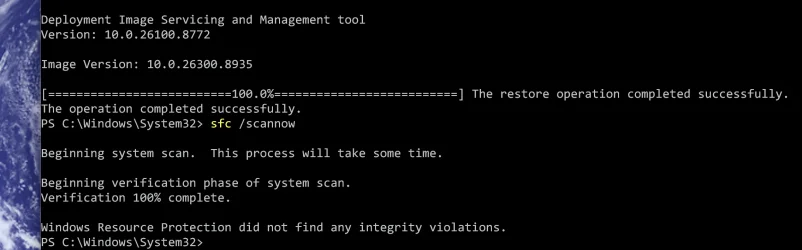
sfc /scannow completed with no errors, however, dism /online /cleanup-image /restorehealth is simply not working for me. I ran scanhealth first, and was told the component store was repairable, so I ran restorehealth multiple times to 100%, only to be informed of an error--said it could not find the source files it needed to completely the restore. The "online" option means it gets those from Microsoft servers. So they aren't there, I guess. Or it's just a bug in their DISM program. SFC /scannow and DISM restorhealth each look at different core files, so it's sort of important, I would think...;)

DISM restorehealth fails with:

Error: 0x800f0915

The repair content could not be found anywhere.
Check the internet connectivity or use the "Source" option to specify the location of the files that are required to restore the image. For more information on specifying a source location, see Configure a Windows Repair Source.

The DISM log file can be found at C:\WINDOWS\Logs\DISM\dism.log
 
Last edited:

My Computer My Computer

At a glance

Win11 Experimental Channel for 26H2 buildsAMD R7 7800X3DGSkill 2x16GB @ 6400MT/sXFX 9070 XT SWIFT tri-fan (PCIe5.0)
OS
Win11 Experimental Channel for 26H2 builds
Computer type
PC/Desktop
Manufacturer/Model
a cherry-picked assembly
CPU
AMD R7 7800X3D
Motherboard
MSI x870 Tomahawk Wi-Fi, 8-layer, 2 oz copper, server PCB
Memory
GSkill 2x16GB @ 6400MT/s
Graphics Card(s)
XFX 9070 XT SWIFT tri-fan (PCIe5.0)
Sound Card
Creative Labs G8 USB External Sound device, Gaming DAC, Sound Card & Earphone AMP.. HIGHLY RECOMMENDED, btw. Totally changed my opinion of external USB sound. I like!...;)
Monitor(s) Displays
Philips 42" OLED @ 4k
Screen Resolution
3840x2160
Hard Drives
*Boot: Samsung 980 Pro 2 TB NVMe (PCIe4x4)
*Samsung 980 EVO NVMe 500GB (PCIe 4x4)
*Kingston SNV3S2000G 2TB NVMe (PCIe4x4)
*Samsung 960 EVO 250GB NVMe(PCIe3x2)
*8TB Toshiba x300 HDD
*ST4000DM004 S3 4TB HDD
PSU
Gigabyte 850W Gold, Rev 2
Case
Lian Li Lancool 217, white, with wood trim, very nice looking--tired of black, 5-fans standard
Cooling
Air coutesy Lian Li
Keyboard
Cherry MX 2.0S RGB
Mouse
Razer Basilisk V3 24k DPI
Internet Speed
~950Mbps down and up!
Browser
Firefox x64 DE
Antivirus
Defender
Other Info
Great New system. Exceeds my expectations by quite a bit, btw. I love the USB G8 SoundBlaster, it's quite an improvement over the G6!
1784641609011.webp
New vs. Old.
1784641643886.webp

Nice change in this update.... Size is displayed by MB, GB instead of just kb'S
 

My Computer My Computer

At a glance

Windows 11 ProRyzen 9 5950X128GB G Skill Trident Z RGB F4-3600C18-32GTZRXFX Speedster MERC310 Radeon RX 7900XT
OS
Windows 11 Pro
Computer type
PC/Desktop
CPU
Ryzen 9 5950X
Motherboard
Asus TUF GAMING X570-PLUS
Memory
128GB G Skill Trident Z RGB F4-3600C18-32GTZR
Graphics Card(s)
XFX Speedster MERC310 Radeon RX 7900XT
Sound Card
HDMI
Monitor(s) Displays
SAMSUNG C27F390 X2, Samsung 55" 4k
Screen Resolution
1920x1080
Hard Drives
SAMSUNG 990PRO W/heatsink (PCI-E 4.0 x4) 1TB and a 2TB
8 Seagate ST6000NM0034 6TB in Raid 6
PSU
Corsair RM1000x
Case
Phanteks Enthoo Prime
Cooling
15 Enermax Squa Rgb fans Enermax Auquafusion 360 AIO
Keyboard
Microsoft wireless keyboard 5050
Mouse
Microsoft wireless mouse 5000
Internet Speed
Gigabit
Browser
Edge
Antivirus
Norton 360
Other Info
4 LG WH16NS60 Blu-Ray burners flashed for 4k ripping.
Hauppauge dual tuner tv card
Silverstone internal flash card reader
Dell Perc H700 Raid controller

Latest Support Threads

Back
Top Bottom