Win Update KB5121003 Windows 11 Cumulative Update build 26100.9168 (24H2) and 26200.9168 (25H2) - Aug. 11


 Microsoft Support:

Announcements and messages

This section provides key notifications related to this release, including announcements, change logs, and end-of-support notices.

Windows Secure Boot certificate expiration
Important

Secure Boot certificates used by most Windows devices were set to expire starting in June 2026. Microsoft has been updating these certificates on PCs and non-managed business devices for the past months. Devices that haven’t received the newer certificates will continue to start, and standard Windows updates will continue to install. We will continue to install the newer certificates via Windows updates in the coming months.

End of updates
Windows 11, version 24H2 Home and Pro editions will reach end of updates on October 13, 2026. Devices running these editions will no longer receive fixes for known issues, time zone updates, technical support, or monthly security and preview updates containing protections from the latest security threats. Enterprise and Education editions remain supported until October 12, 2027.

To stay protected and up to date, we recommend you upgrade to the latest version of Windows 11.


Improvements

This update includes improvements from the following previously released updates:
The following summary outlines key quality improvements addressed by this update. The bold text within the brackets indicates the item or area of the change.
  • [Security updates] This update provides security improvements. For more information about the security vulnerabilities resolved by this update, see the Security Update Guide
  • [Secure Boot] This update includes additional high confidence device targeting data, increasing coverage of devices eligible to automatically receive new Secure Boot certificates. Certificate deployment via Windows updates continues across supported PCs and non-managed business devices in the coming months.
If you've already installed previous updates, your device will download and install only the new updates included in this package.

Components updates

AI components
This release updates the following AI components to version 1.2605.856.0: Image Search, Content Extraction, Semantic Analysis, and Settings Model. To learn more, see Release information for AI components.

Servicing stack update
Includes KB5123304 (Build 26100.9156), which improves the reliability of the Windows update installation process. To learn more about SSUs, see Simplifying on-premises deployment of servicing stack updates.

Known issues in this update

Microsoft is not currently aware of any issues with this update.

How to get this update

Before you install this update

Microsoft combines the latest servicing stack update (SSU) for your operating system with the latest cumulative update (LCU). For general information about SSUs, see Servicing stack updates.

Deployment​

If you deploy dynamic updates such as this update to an existing Windows image, ensure the boot.stl file is included as part of the installation media. Failure to include the file might prevent devices from successfully starting from the installation media and can result in error code 0xc0430001.

Note
The boot.stl file is used during Secure Boot validation and must match the Windows version and architecture of the image you are updating.

To ensure the boot.stl file is included as part of the installation media, do one of the following:
  • Use the Update WinPE script to update an existing Windows image. (Recommended)
  • Manually copy the boot.stl file from the device Windows\Boot\EFI folder to the corresponding folder on your installation media before deploying the update.
For information about how to apply Dynamic Update packages to existing Windows images, see Update Windows installation media with Dynamic Update.

Install this update​

To install this update, use one of the following Windows and Microsoft release channels.

Available​
Next Step​
✅This update downloads and installs automatically from Windows Update and Microsoft Update.
✅To install this release from the Microsoft Update Catalog, select the option that matches your device architecture (arm64 or x64), and then follow the instructions.

File information

For a list of the files provided in this update, download the file information for cumulative update KB5121003.

For a list of the files provided in the servicing stack update, download the file information for the SSU (KB5123304) - version 26100.9156.


 Source:


Check Windows Updates


UUP Dump:

64-bit ISO download:

ARM64 ISO download:

 
Last edited:
I’ve updated the solution with a more reliable method. It turns out the registry values can be restored by Windows Defender after being manually deleted.

I’ve added the PowerShell method to the original post, which should prevent the values from coming back after a reboot.

I think I'll let Microsoft deal with this. 😵‍💫🤷‍♂️
Yeah, now that I know the cause and that it's a beta bug I'll just wait to see when they fix it. It doesn't hurt anything or effect Defender performance.
 

My Computers My Computers

  • At a glance

    Windows 11 25H2Intel Core Ultra 9 275HX (24-Core)64GB DDR5 6400MT/sNVIDIA GeForce RTX 5080 and Intel UHD Graphics
    OS
    Windows 11 25H2
    Computer type
    Laptop
    Manufacturer/Model
    Alienware 18 Area-51
    CPU
    Intel Core Ultra 9 275HX (24-Core)
    Motherboard
    Alienware
    Memory
    64GB DDR5 6400MT/s
    Graphics Card(s)
    NVIDIA GeForce RTX 5080 and Intel UHD Graphics
    Sound Card
    Onboard, Realtek high-performance Audio chips (ALC3329 & ALC1708))
    Monitor(s) Displays
    300HZ 18-inch QHD 500 nit Comfort View+
    Screen Resolution
    2560 x 1600
    Hard Drives
    2TB NVMe M.2 PCIe Gen 5 SSD
    Case
    Magnesium Alloy
    Cooling
    Advanced Cryo-Tech Quad-Fan Cooling system & large vapor chamber
    Keyboard
    Cherry MX ultra low profile mechanical keyboard with per key AlienFX RGB lighting
    Mouse
    Logitech MX Master 4
    Browser
    Vivaldi (main), Firefox, Chrome, Edge
    Antivirus
    MS Defender and Malwarebytes Free
  • At a glance

    Windows 11 25H2Qualcomm Snapdragon X Elite (12 Core) ARM bas...16GB LPDDR5Qualcomm Adreno X1-85
    Operating System
    Windows 11 25H2
    Computer type
    Laptop
    Manufacturer/Model
    Microsoft Surface Laptop 7
    CPU
    Qualcomm Snapdragon X Elite (12 Core) ARM based CPU
    Motherboard
    Microsoft Corp.
    Memory
    16GB LPDDR5
    Graphics card(s)
    Qualcomm Adreno X1-85
    Sound Card
    Omnisonic speakers with Dolby Atmos spatial sound
    Monitor(s) Displays
    120 Hz 13.8-inch 600 nit PixelSense Flow touchscreen
    Screen Resolution
    2304x1536
    Hard Drives
    1TB NVMe Gen 4 SSD
    Case
    Anodized Aluminum
    Cooling
    Traditional active cooling fan system
    Keyboard
    Mechanical QWERTY, backlit when in use
    Mouse
    Logitech MX Master 4 and Surface Arc Mouse
    Browser
    Vivaldi (main), Firefox, Chrome, Edge
    Antivirus
    MS Defender and Malwarebytes Free
I would agree that is the reasonable method to sit and be patient for the next update unless you get OCD like some of us sometimes do and can't wait. 🤣
I have OCD, but I am trying to kerb the urge. This error and the random crap that appears in Event Viewer from time to time.
 

My Computers My Computers

  • At a glance

    Windows 11 25H2Intel i9 14900KF64GB Corsair Vengeance RGBMSI 4090 Suprim X
    OS
    Windows 11 25H2
    Computer type
    PC/Desktop
    Manufacturer/Model
    Custom Built
    CPU
    Intel i9 14900KF
    Motherboard
    ASUS Z790 ProArt Creator WiFi
    Memory
    64GB Corsair Vengeance RGB
    Graphics Card(s)
    MSI 4090 Suprim X
    Sound Card
    Onboard
    Monitor(s) Displays
    1 x Asus 24". 1 x Asus 32"
    Screen Resolution
    1920 x 1080 & 2560 x 1440
    Hard Drives
    Multiple
    PSU
    Corsair 1200HX
    Case
    Corsair 7000D RGB
    Cooling
    Corsair H150I Capellix XT
    Keyboard
    Corsair K70 RGB PRO
    Mouse
    Corsair M55 RGB Pro
    Internet Speed
    1000Mbps
    Browser
    Edge
    Antivirus
    Windows Default
  • At a glance

    Windows 11 25H2Intel i7 6800K32GB DDR4 (Corsair)ASUS GTX 1080ti
    Operating System
    Windows 11 25H2
    Computer type
    PC/Desktop
    Manufacturer/Model
    Custom Built
    CPU
    Intel i7 6800K
    Motherboard
    ASUS Z99 Deluxe
    Memory
    32GB DDR4 (Corsair)
    Graphics card(s)
    ASUS GTX 1080ti
    Sound Card
    Onboard
    Monitor(s) Displays
    1x Viewsonic 24" 1x LG 19"
    Screen Resolution
    1920 x 1080 & 1600 x 900
    Hard Drives
    3 x SATA SSD
    PSU
    650W Gigabyte Bronze
    Case
    Coolermaster HAF-X
    Cooling
    Noctua NH-15 Chroma black
    Keyboard
    Generic RGB
    Mouse
    Microsoft Basic
    Internet Speed
    1000Mbps
    Browser
    Edge
    Antivirus
    Windows Default
I have OCD, but I am trying to kerb the urge. This error and the random crap that appears in Event Viewer from time to time.
Oh Event Viewer lol, unless I need to look for a specific error I try to avoid it as much as possible lol.
 

My Computers My Computers

  • At a glance

    Windows 11 25H2Intel Core Ultra 9 275HX (24-Core)64GB DDR5 6400MT/sNVIDIA GeForce RTX 5080 and Intel UHD Graphics
    OS
    Windows 11 25H2
    Computer type
    Laptop
    Manufacturer/Model
    Alienware 18 Area-51
    CPU
    Intel Core Ultra 9 275HX (24-Core)
    Motherboard
    Alienware
    Memory
    64GB DDR5 6400MT/s
    Graphics Card(s)
    NVIDIA GeForce RTX 5080 and Intel UHD Graphics
    Sound Card
    Onboard, Realtek high-performance Audio chips (ALC3329 & ALC1708))
    Monitor(s) Displays
    300HZ 18-inch QHD 500 nit Comfort View+
    Screen Resolution
    2560 x 1600
    Hard Drives
    2TB NVMe M.2 PCIe Gen 5 SSD
    Case
    Magnesium Alloy
    Cooling
    Advanced Cryo-Tech Quad-Fan Cooling system & large vapor chamber
    Keyboard
    Cherry MX ultra low profile mechanical keyboard with per key AlienFX RGB lighting
    Mouse
    Logitech MX Master 4
    Browser
    Vivaldi (main), Firefox, Chrome, Edge
    Antivirus
    MS Defender and Malwarebytes Free
  • At a glance

    Windows 11 25H2Qualcomm Snapdragon X Elite (12 Core) ARM bas...16GB LPDDR5Qualcomm Adreno X1-85
    Operating System
    Windows 11 25H2
    Computer type
    Laptop
    Manufacturer/Model
    Microsoft Surface Laptop 7
    CPU
    Qualcomm Snapdragon X Elite (12 Core) ARM based CPU
    Motherboard
    Microsoft Corp.
    Memory
    16GB LPDDR5
    Graphics card(s)
    Qualcomm Adreno X1-85
    Sound Card
    Omnisonic speakers with Dolby Atmos spatial sound
    Monitor(s) Displays
    120 Hz 13.8-inch 600 nit PixelSense Flow touchscreen
    Screen Resolution
    2304x1536
    Hard Drives
    1TB NVMe Gen 4 SSD
    Case
    Anodized Aluminum
    Cooling
    Traditional active cooling fan system
    Keyboard
    Mechanical QWERTY, backlit when in use
    Mouse
    Logitech MX Master 4 and Surface Arc Mouse
    Browser
    Vivaldi (main), Firefox, Chrome, Edge
    Antivirus
    MS Defender and Malwarebytes Free
Installed fine and quickly.

Still getting Event 87 CertificateServicesClient-CertEnroll errors in Event Viewer (under Applications) on very logon. This was introduced at least one update ago.

TPM is functioning correctly. PC is working as expected.
 

My Computer My Computer

At a glance

windows 11 25h214700KF32GB DDR5MSI 4090 VENTUS 3X
OS
windows 11 25h2
Computer type
PC/Desktop
CPU
14700KF
Motherboard
MSI MAG Z790 Tomahawk WiFi
Memory
32GB DDR5
Graphics Card(s)
MSI 4090 VENTUS 3X
Monitor(s) Displays
CORSAIR XENEON 27QHD240 OLED
Screen Resolution
1440p
Hard Drives
M.2 SSD
PSU
HX1000i 2023
Case
Corsair 4000D
Cooling
Noctua Nh-U12A
Keyboard
WOOTING HE Full
Mouse
Logitech G502 X Wired
As a follow up today, I wanted to see on 2 systems if after upgrading to .9168, it would break any of the things I encountered. To my surprise...
Loaded a fresh install of 26200.8875 ran all the commands that I saw or had issues running before. None failed. I said hmm ok, lets remove the reclaimable packages,succeeded... now the real test was to let it update .9168... Proceeded to update successfully WITH those 2 packages removed... Has to be something else causing the failures
 

My Computer My Computer

At a glance

Windows 11 Enterprise x64 26200.9168AMD 5950xHyper X Renegade 3600 x64 GBAMD 7700XT
OS
Windows 11 Enterprise x64 26200.9168
Computer type
PC/Desktop
Manufacturer/Model
Me
CPU
AMD 5950x
Motherboard
ASUS ROG CROSSHAIR VIII FORMULA
Memory
Hyper X Renegade 3600 x64 GB
Graphics Card(s)
AMD 7700XT
Sound Card
Onboard
Monitor(s) Displays
ASUS ProArt 32'
Screen Resolution
3840x2160
Hard Drives
WD 2tb SN850x WD 4tb SN850x
PSU
ASUS Thor 1200w II Platinum
Case
Thermaltake F31
Cooling
ASUS ROG RYUYJIN III 360 ARGB Extreme
@JBish

Here's ten points for filling out your computer specs. :-)

And removing the last two reclaimable packages doesn't break everyone's Windows Update.
 

My Computers My Computers

  • At a glance

    Win 11 Home ♦♦♦26200.9168 ♦♦♦♦♦♦♦25H2AMD Ryzen 7 3700XG.Skill (F4-3200C14D-16GTZKW)EVGA RTX 2070 (08G-P4-2171-KR)
    OS
    Win 11 Home ♦♦♦26200.9168 ♦♦♦♦♦♦♦25H2
    Computer type
    PC/Desktop
    Manufacturer/Model
    Built by Ghot® [May 2020]
    CPU
    AMD Ryzen 7 3700X
    Motherboard
    Asus Pro WS X570-ACE (BIOS 5302)
    Memory
    G.Skill (F4-3200C14D-16GTZKW)
    Graphics Card(s)
    EVGA RTX 2070 (08G-P4-2171-KR)
    Sound Card
    Realtek ALC1220P / ALC S1220A
    Monitor(s) Displays
    Dell U3011 30"
    Screen Resolution
    2560 x 1600
    Hard Drives
    2x Samsung 860 EVO 500GB,
    WD 4TB Black FZBX - SATA III,
    WD 8TB Black FZBX - SATA III,
    DRW-24B1ST CD/DVD Burner
    PSU
    PC Power & Cooling 750W Quad EPS12V
    Case
    Cooler Master ATCS 840 Tower
    Cooling
    CM Hyper 212 EVO (push/pull)
    Keyboard
    Ducky DK9008 Shine II Blue LED
    Mouse
    Logitech Optical M-100
    Internet Speed
    300/300
    Browser
    Firefox (latest)
    Antivirus
    Bitdefender Total Security
    Other Info
    Speakers: Klipsch Pro Media 2.1
  • At a glance

    Windows XP Pro 32bit w/SP3AMD Athlon 64 X2 5000+ (OC'd @ 3.2Ghz)TWIN2X2048-6400C4DHX (2 x 1GB, DDR2 800)EVGA 256-P2-N758-TR GeForce 8600GT SSC
    Operating System
    Windows XP Pro 32bit w/SP3
    Computer type
    PC/Desktop
    Manufacturer/Model
    Built by Ghot® (not in use)
    CPU
    AMD Athlon 64 X2 5000+ (OC'd @ 3.2Ghz)
    Motherboard
    ASUS M2N32-SLI Deluxe Wireless Edition
    Memory
    TWIN2X2048-6400C4DHX (2 x 1GB, DDR2 800)
    Graphics card(s)
    EVGA 256-P2-N758-TR GeForce 8600GT SSC
    Sound Card
    Onboard
    Monitor(s) Displays
    ViewSonic G90FB Black 19" Professional (CRT)
    Screen Resolution
    up to 2048 x 1536
    Hard Drives
    WD 36GB 10,000rpm Raptor SATA
    Seagate 80GB 7200rpm SATA
    Lite-On LTR-52246S CD/RW
    Lite-On LH-18A1P CD/DVD Burner
    PSU
    PC Power & Cooling Silencer 750 Quad EPS12V
    Case
    Generic Beige case, 80mm fans
    Cooling
    ZALMAN 9500A 92mm CPU Cooler
    Keyboard
    Logitech Classic Keybooard 200
    Mouse
    Logitech Optical M-BT96a
    Internet Speed
    300/300
    Browser
    Firefox 3.x ??
    Antivirus
    Symantec (Norton)
    Other Info
    Still assembled, still runs. Haven't turned it on for 15 years?
@JBish

Here's ten points for filling out your computer specs. :-)

And removing the last two reclaimable packages doesn't break everyone's Windows Update.
No it doesn't, but I had the restore health,in place upgrade,didn't break my windows update, but errors annoy me, a little ocd sometimes...🤣🤪... Got 2 exact systems...😂😂... Christmas this year will be upgrades...😁😁
 

My Computer My Computer

At a glance

Windows 11 Enterprise x64 26200.9168AMD 5950xHyper X Renegade 3600 x64 GBAMD 7700XT
OS
Windows 11 Enterprise x64 26200.9168
Computer type
PC/Desktop
Manufacturer/Model
Me
CPU
AMD 5950x
Motherboard
ASUS ROG CROSSHAIR VIII FORMULA
Memory
Hyper X Renegade 3600 x64 GB
Graphics Card(s)
AMD 7700XT
Sound Card
Onboard
Monitor(s) Displays
ASUS ProArt 32'
Screen Resolution
3840x2160
Hard Drives
WD 2tb SN850x WD 4tb SN850x
PSU
ASUS Thor 1200w II Platinum
Case
Thermaltake F31
Cooling
ASUS ROG RYUYJIN III 360 ARGB Extreme
Still no joy. It runs through very quickly compared to checking online. I've double checked the path.

View attachment 179478

I've attached the log file in case anybody can pin point what is going wrong.

I tried doing a Windows Update reinstall version. It fails.
I tried installing the ISO I downloaded with the Windows Media Tool, so it is the correct one. It installs and I get to my desktop but Windows says it is not activated. I tried logging in with a Microsoft Account and re-entering the product key but it says it is incorrect and can't be activated. It also prevented my ESET NOD32 from running. I couldn't turn off do not disturb (never even knew it had that). I ended up in a right pickle, so installed my previous backup which runs sfc /scannow and all DSIM commands without any errors with Macrium.

I've let Windows Update install this update and my PC is running flawlessly apart from the /scanhealth "component store is repairable" and restorehealth issue in the image above.

I can only conclude this is a Microsoft issue, not an issue with my PC setup.
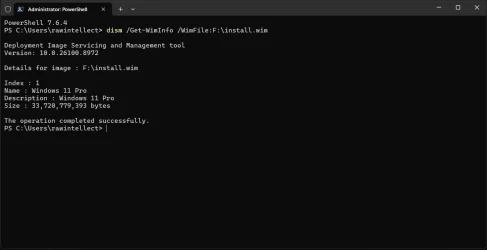
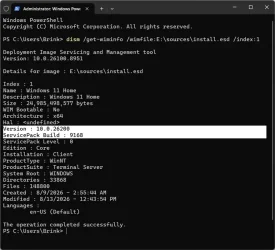
Please run this command:

dism /Get-WimInfo /WimFile:C:\Users\My user name\Desktop\W11\sources\install.esd

This will give you the following output:

1786589032987.webp
In the image above windows 11 pro is index 1 because it's the only thing on the ISO I made from UUP. If the index number is different on your ISO you need to enter that number to replace 6 in your original command. If the index number doesn't match what is actually on the ISO the command will fail.

You can also try to run /startcomponentcleanup before you run:

DISM /Online /Cleanup-Image /RestoreHealth /Source:ESD:C:\Users\My user name\Desktop\W11\sources\install.esd:6 /LimitAccess command
 
Last edited:

My Computer My Computer

At a glance

Windows 11 25H2AMD 9950X3d264GB Corsair vengeance DDR5 (6000 MHz) CL30AMD 9070XT
OS
Windows 11 25H2
Computer type
PC/Desktop
Manufacturer/Model
N/A
CPU
AMD 9950X3d2
Motherboard
Asus x870E Extreme
Memory
64GB Corsair vengeance DDR5 (6000 MHz) CL30
Graphics Card(s)
AMD 9070XT
Sound Card
Realtek
Monitor(s) Displays
N/A
Screen Resolution
1440p
PSU
Thermaltake 1200w
Case
Asus View 71 TG RGB
Cooling
Custom Cooling loop With an Alphacool 13339 VPP Apex Pump and EK Quantum surface radiator
Internet Speed
Xfinity 2300 mbps
Antivirus
Norton
I am having this issue with the 26200.9168 update.
On 1 of the 3 Win 11 computers I have access to.

"The latest Windows 11 update 26200.9168 has been reported to cause issues where taskbar icons may display incorrect names and launch the wrong applications. Microsoft is aware of these problems and is working on a resolution."

The above comment about this issue is from a google search.

Any one else have this issue?
 

My Computer My Computer

At a glance

Win11 Pro 24H2 Build LatestAMD RYZEN 9 5950X 16 CORE PROCESSOR 3325 MHZ64 GB DDR4NVIDIA GeFORCE GTX 1660 SUPER
OS
Win11 Pro 24H2 Build Latest
Computer type
PC/Desktop
Manufacturer/Model
ASUS
CPU
AMD RYZEN 9 5950X 16 CORE PROCESSOR 3325 MHZ
Motherboard
ROG Crosshair VIII Formula
Memory
64 GB DDR4
Graphics Card(s)
NVIDIA GeFORCE GTX 1660 SUPER
Sound Card
STRIX RAID DLX
Monitor(s) Displays
Kogan 32 inch.
Screen Resolution
1920 x 1080
Hard Drives
1000 GB SSD system drive.
7 mechanical hard drives.
4 External Storage Drives attached
PSU
CORSAIR 850
Case
EVOLV X
Cooling
Liquid Cooling.
Keyboard
Wired
Mouse
Wireless
Internet Speed
100MBDown/40 MB Up
Browser
Floorp-Latest
Antivirus
Bitdefender
Two reboots, sfc is clean, had to run restorehealth. Please wait screen is still around, now taking slightly longer to get to sign-in than it did before the update. Prior to the update, it was about one and a half rotations, while tonight it was two full rotations. It's still short and I've stopped caring that it's even there since all my efforts to kill it have ultimately been in vain.

And I have a Microsoft Defender Core Service that was not there prior to the update as well that I am unable to stop or disable. I don't even use Defender, Microsoft. Stop putting in stuff I don't need.
 

My Computer My Computer

At a glance

Windows 11 24H2Intel i3-12100F8 GB NeoForza Mars, currentlyNVIDIA GeForce GTX 1650
OS
Windows 11 24H2
Computer type
PC/Desktop
Manufacturer/Model
ibuypower
CPU
Intel i3-12100F
Motherboard
AsRock B660M-C
Memory
8 GB NeoForza Mars, currently
Graphics Card(s)
NVIDIA GeForce GTX 1650
Installed the update yesterday without issues, DISM took 1 hour to complete on my older system 2 and 30 minutes on my new system 1, no issues. SFC completed fast, also no errors. Looks like Copilot has improved in the Edge Sidebar, no longer see the narrative, chatting and fluff after asking a simple question or draft reply, but still no spell checker.
 

My Computers My Computers

  • At a glance

    Windows 11 Home 25H2 build: 26200.9168Intel(R) Core(TM) Ultra 7 258V, 2200 Mhz, 8 C...32 GB LPDDR5X (soldered)Intel(R) Arc(TM) 140V GPU (16GB)
    OS
    Windows 11 Home 25H2 build: 26200.9168
    Computer type
    Laptop
    Manufacturer/Model
    Acer Swift Edge SFE14-51T
    CPU
    Intel(R) Core(TM) Ultra 7 258V, 2200 Mhz, 8 Cores
    Motherboard
    NB.JG411.004 mainboard, manufactured by Compal.
    Memory
    32 GB LPDDR5X (soldered)
    Graphics Card(s)
    Intel(R) Arc(TM) 140V GPU (16GB)
    Sound Card
    RealTek + Intel Smart Sound
    Monitor(s) Displays
    14" OLED matte Touch
    Screen Resolution
    2880 x1800 x120Hz
    Hard Drives
    KINGSTON OM8PGP41024Q-AA, NVMe Gen4, 1TB
    PSU
    65W USB-C charger
    Case
    Magnesium aluminum alloy body
    Cooling
    1 fan
    Keyboard
    US with Backlight
    Mouse
    Precision Trackpad
    Internet Speed
    25 Mb/s 5G
    Browser
    Edge
    Antivirus
    Windows Defender
    Other Info
    BIOS Version/Date: IInsyde Corp. V1.06, 3/16/2026, Windows Hello IR camera with Facial recognition. Secure Boot 2026 KEK key installed
  • At a glance

    Windows 11 Home 25H2 build: 26200.9168Intel 12th Gen. i7 12700H, 14 cores, 2.3 GHz ...8GB LPDDR4 on board + 8GB LPDDR4 3200 MHz in ...Intel Iris Xe supports up to 4096 x 2304 @ 120Hz
    Operating System
    Windows 11 Home 25H2 build: 26200.9168
    Computer type
    Laptop
    Manufacturer/Model
    Asus Vivobook K3502Z S15 15" OLED
    CPU
    Intel 12th Gen. i7 12700H, 14 cores, 2.3 GHz (24M Cache, up to 4.7 GHz, 6P+8E cores)
    Motherboard
    Alder Lake-H, 1700-4700 MHz clock rate
    Memory
    8GB LPDDR4 on board + 8GB LPDDR4 3200 MHz in Dual Channel.
    Graphics card(s)
    Intel Iris Xe supports up to 4096 x 2304 @ 120Hz
    Sound Card
    Harman Kardon - DTS
    Monitor(s) Displays
    OLED 15.6inch 2.8K (2880 x 1620)
    Screen Resolution
    16:9 aspect ratio 0.2ms response time 120Hz refresh rate, 550nits
    Hard Drives
    512GB M.2 NVMe Gen4 PCIe 4.0 SSD, Micron_2450_MTFDKBA512TFK
    PSU
    90-Watt USB charger (Thunderbolt4)
    Case
    Metal lid, plastic case
    Cooling
    1 fan
    Keyboard
    With adjustable backlight
    Mouse
    Precision Trackpad
    Internet Speed
    ISP provides 15 mb/s WIFI LTE (4G), laptop WIFI 6 adapter.
    Browser
    Edge
    Antivirus
    Windows Defender
    Other Info
    BIOS American Megatrends International, LLC. 10.1.2.312, 13/03/2024. Network adapter: Intel Wi-Fi 6E AX211 160 MHz, Secure Boot 2026 KEK key installed
The dism /Online /Cleanup-Image /RestoreHealth still fails. I only updated one machine so far. If I update the others, I probably won't even bother running that dism command on the others.
Restart (reboot), you may get the black screen with a prompt "Installing updates....." let it complete till you see the Windows desktop. Also check you Internet link quality, DISM Online is very sensitive and hangs easily on slow/bad links. It may take up to 1 hour to complete DISM, run it in the command prompt with Administrative privilege, after a failed run check Task Manager for any Command or DISM processes still running, end these and run DISM again. Personally I don't recommend reclaiming or purging Windows update files, redundant or not this "routine" has given me a headache in 25H2.
 

My Computers My Computers

  • At a glance

    Windows 11 Home 25H2 build: 26200.9168Intel(R) Core(TM) Ultra 7 258V, 2200 Mhz, 8 C...32 GB LPDDR5X (soldered)Intel(R) Arc(TM) 140V GPU (16GB)
    OS
    Windows 11 Home 25H2 build: 26200.9168
    Computer type
    Laptop
    Manufacturer/Model
    Acer Swift Edge SFE14-51T
    CPU
    Intel(R) Core(TM) Ultra 7 258V, 2200 Mhz, 8 Cores
    Motherboard
    NB.JG411.004 mainboard, manufactured by Compal.
    Memory
    32 GB LPDDR5X (soldered)
    Graphics Card(s)
    Intel(R) Arc(TM) 140V GPU (16GB)
    Sound Card
    RealTek + Intel Smart Sound
    Monitor(s) Displays
    14" OLED matte Touch
    Screen Resolution
    2880 x1800 x120Hz
    Hard Drives
    KINGSTON OM8PGP41024Q-AA, NVMe Gen4, 1TB
    PSU
    65W USB-C charger
    Case
    Magnesium aluminum alloy body
    Cooling
    1 fan
    Keyboard
    US with Backlight
    Mouse
    Precision Trackpad
    Internet Speed
    25 Mb/s 5G
    Browser
    Edge
    Antivirus
    Windows Defender
    Other Info
    BIOS Version/Date: IInsyde Corp. V1.06, 3/16/2026, Windows Hello IR camera with Facial recognition. Secure Boot 2026 KEK key installed
  • At a glance

    Windows 11 Home 25H2 build: 26200.9168Intel 12th Gen. i7 12700H, 14 cores, 2.3 GHz ...8GB LPDDR4 on board + 8GB LPDDR4 3200 MHz in ...Intel Iris Xe supports up to 4096 x 2304 @ 120Hz
    Operating System
    Windows 11 Home 25H2 build: 26200.9168
    Computer type
    Laptop
    Manufacturer/Model
    Asus Vivobook K3502Z S15 15" OLED
    CPU
    Intel 12th Gen. i7 12700H, 14 cores, 2.3 GHz (24M Cache, up to 4.7 GHz, 6P+8E cores)
    Motherboard
    Alder Lake-H, 1700-4700 MHz clock rate
    Memory
    8GB LPDDR4 on board + 8GB LPDDR4 3200 MHz in Dual Channel.
    Graphics card(s)
    Intel Iris Xe supports up to 4096 x 2304 @ 120Hz
    Sound Card
    Harman Kardon - DTS
    Monitor(s) Displays
    OLED 15.6inch 2.8K (2880 x 1620)
    Screen Resolution
    16:9 aspect ratio 0.2ms response time 120Hz refresh rate, 550nits
    Hard Drives
    512GB M.2 NVMe Gen4 PCIe 4.0 SSD, Micron_2450_MTFDKBA512TFK
    PSU
    90-Watt USB charger (Thunderbolt4)
    Case
    Metal lid, plastic case
    Cooling
    1 fan
    Keyboard
    With adjustable backlight
    Mouse
    Precision Trackpad
    Internet Speed
    ISP provides 15 mb/s WIFI LTE (4G), laptop WIFI 6 adapter.
    Browser
    Edge
    Antivirus
    Windows Defender
    Other Info
    BIOS American Megatrends International, LLC. 10.1.2.312, 13/03/2024. Network adapter: Intel Wi-Fi 6E AX211 160 MHz, Secure Boot 2026 KEK key installed
Ok there's waaaay to much bla bla bla on running SFC and DISM, let Windows take care of itself.
It will do all that stuff automatically if the system is on and you're not using it for a while when it runs it's maintenance.

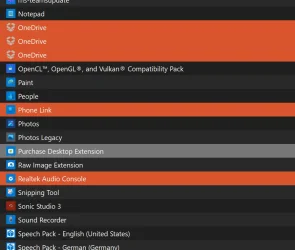
Now to what is really more important: After this update, they got rid of the OneDrive Photos app that was "accidentally" forced upon us:
1786634274616.webp
 

My Computers My Computers

  • At a glance

    Win10 Pro, Win10 Pro N, Win10 Home, Windows 8...Intel Core i9 9900K32 GB Quad Kit, G.Skill Trident Z RGB Series ...ASUS GeForce RTX 3090 ROG Strix O24G, 24576 M...
    OS
    Win10 Pro, Win10 Pro N, Win10 Home, Windows 8.1 Pro, Ubuntu
    Computer type
    PC/Desktop
    Manufacturer/Model
    ۞ΞЖ†ԘΜΞ۞
    CPU
    Intel Core i9 9900K
    Motherboard
    ASUS ROG Maximus X Hero
    Memory
    32 GB Quad Kit, G.Skill Trident Z RGB Series schwarz, DDR4-3866, 18-19-19-39-2T
    Graphics Card(s)
    ASUS GeForce RTX 3090 ROG Strix O24G, 24576 MB GDDR6X
    Sound Card
    (1) HD Webcam C270 (2) NVIDIA High Definition Audio (3) Realtek High Definition Audio
    Monitor(s) Displays
    BenQ BL2711U(4K) and a hp 27vx(1080p)
    Hard Drives
    C: Samsung 960 EVO NVMe M.2 SSD
    E: & O: Libraries & OneDrive-> Samsung 850 EVO 1TB
    D: Hyper-V VM's -> Samsung PM951 Client M.2 512Gb SSD
    G: System Images -> Samsung 860 Pro 2TB
    PSU
    Corsair HX1000i High Performance ATX Power Supply 80+ Platinum
    Case
    Phanteks Enthoo Pro TG
    Cooling
    Thermaltake Floe Riing RGB TT Premium-Edition 360mm and 2x120 Phantek& Halo front, and 1x140 Phanteks
    Keyboard
    Trust GTX THURA
    Mouse
    Trust GTX 148
    Internet Speed
    25+/5+ (+usually faster)
    Browser
    Edge; Chrome;
    Antivirus
    Windows Defender of course & Malwarebytes Anti-Exploit as an added layer between browser & OS
    Other Info
    Router: FRITZ!Box 7590 AX V2
    Sound system: SHARP HT-SBW460 Dolby Atmos Soundbar
    Webcam: Logitech BRIO ULTRA HD PRO WEBCAM 4K webcam with HDR
  • At a glance

    Windoes 10 HomeIntel Ii 6700K32GB DDR4 Corsair Vengeance Blue 3000MHzZOTAC GAMING GeForce RTX 1080 Ti AMP Extreme ...
    Operating System
    Windoes 10 Home
    Computer type
    PC/Desktop
    Manufacturer/Model
    Hyrican
    CPU
    Intel Ii 6700K
    Motherboard
    MSI Z170A PC MATE
    Memory
    32GB DDR4 Corsair Vengeance Blue 3000MHz
    Graphics card(s)
    ZOTAC GAMING GeForce RTX 1080 Ti AMP Extreme Core
    Sound Card
    Connected via HDMI from graics card to home theater system
    Monitor(s) Displays
    Samsung 50" Crystal UHD 4K TU7179 (2020)
    Screen Resolution
    4K
    Hard Drives
    two 256GB San Disk SSD Plus
    PSU
    Corsair 650W CX650M (80+ Bronze)
    Case
    Inwin 303
    Cooling
    Arctic Freezer i11 for CPU and 3 Corsair fans on top ans 3 on the bottom
    Keyboard
    Old generic from Lenovo
    Mouse
    Old generic from Lenovo
    Internet Speed
    25/5
    Browser
    Edge, Chrome
    Antivirus
    Windows Security(Defender)
FYI I have reinstalled the new W11 ISO version with the update option without loosing app, data and configurations - it worked
 

My Computer My Computer

At a glance

windows 11
OS
windows 11

Latest Support Threads

Back
Top Bottom