Insider KB5124038 Windows 11 Insider Experimental (26H2) build 26340.9212 - Aug. 17


 Windows Insider Blog:

Update 17 August 2026: Moving Windows Recovery enhancement originally announced for Beta build 26220.9202 into this Experimental build.


Changes and improvements gradually being rolled out

[File Explorer]​

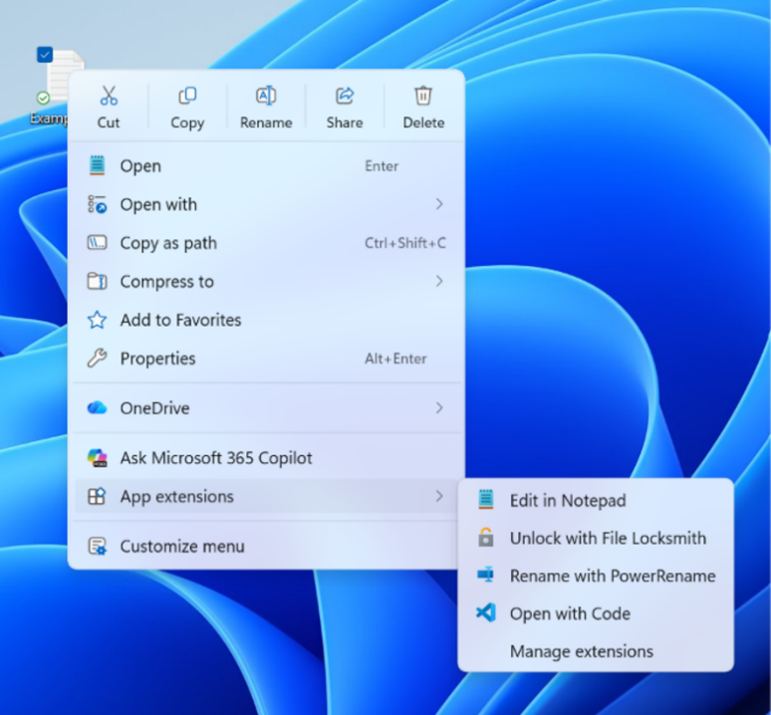
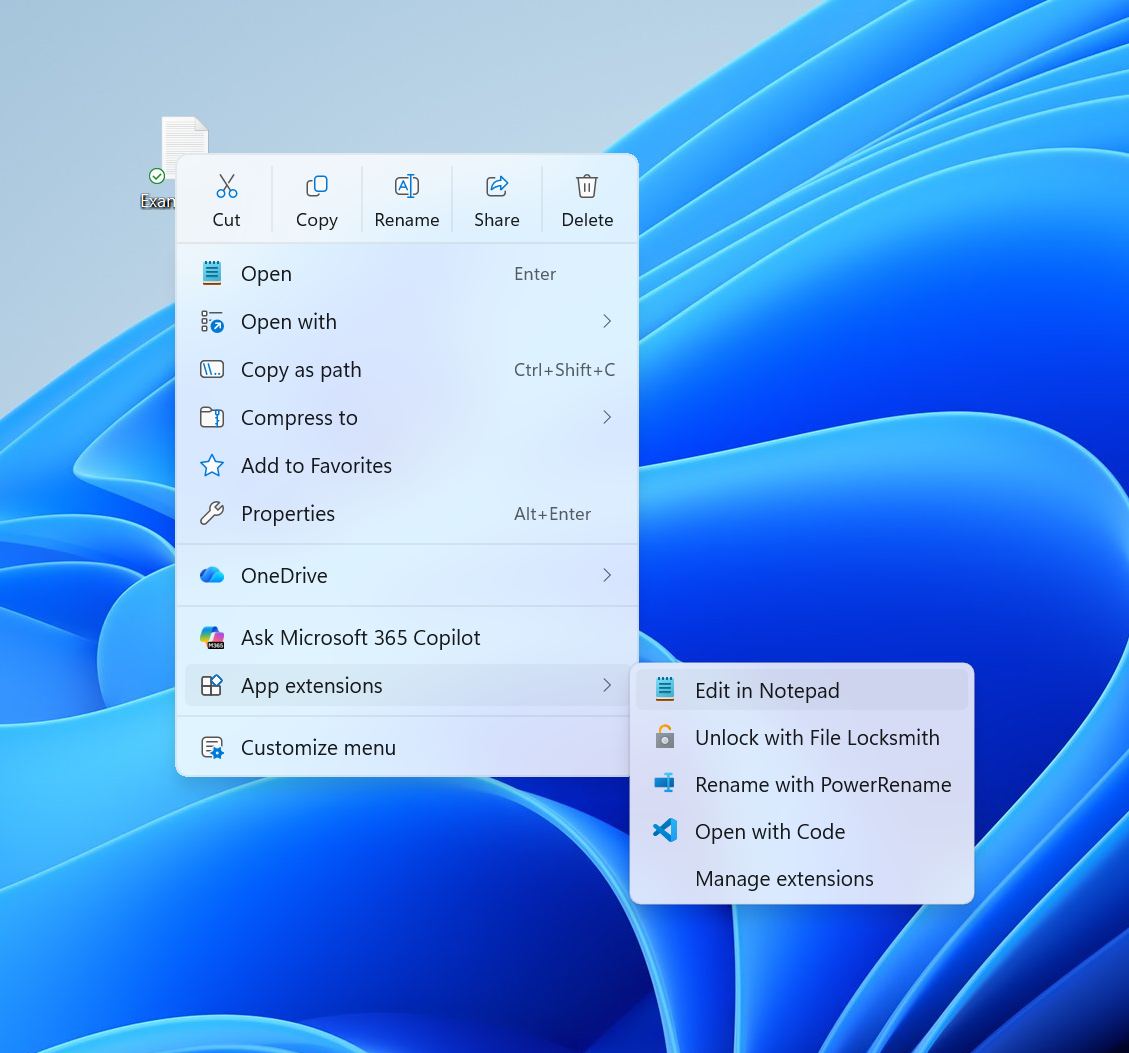
  • Introducing the new, redesigned context menu in File Explorer
    • We're beginning to roll out an updated context menu experience in File Explorer, designed to feel faster, cleaner, and easier to tailor to the way you work. The new design reduces top-level clutter, keeps commonly used actions easy to access, and adds a new Settings experience that gives you more control over what appears in the menu. As we continue refining this experience with Insider feedback, our goal is to make right-click feel more responsive, predictable, and personal.


      Screenshot of new context menu.
      Screenshot of new context menu
  • Previewing images in File Explorer
    • Fixed an issue from the previous flight where previews in File Explorer showed an unexpected thick band across the middle.
Feedback: Share your thoughts in Feedback Hub (WIN + F) under Files, Folders, and Online Storage > File Explorer.

[Camera Roll Backup]​

  • New entry points on the Settings > Home and Accounts pages help you set up Camera Roll Backup and automatically back up photos and videos from your mobile device to OneDrive.

    Screenshot of a UI showing the Phone photo back-up setting in Cloud storage with the status Not backed up.

    UI showing the Phone photo back-up setting in Cloud storage with the status "Not backed up" and link to begin backup process

[Windows Management Instrumentation Command-line (WMIC) removal]​

  • Windows Management Instrumentation Command-line (WMIC) has been removed in this release. This change is part of the ongoing deprecation and removal of WMIC from Windows.
  • For more information about this change, see Windows Management Instrumentation Command-line (WMIC) removal from Windows.

[Emoji]​

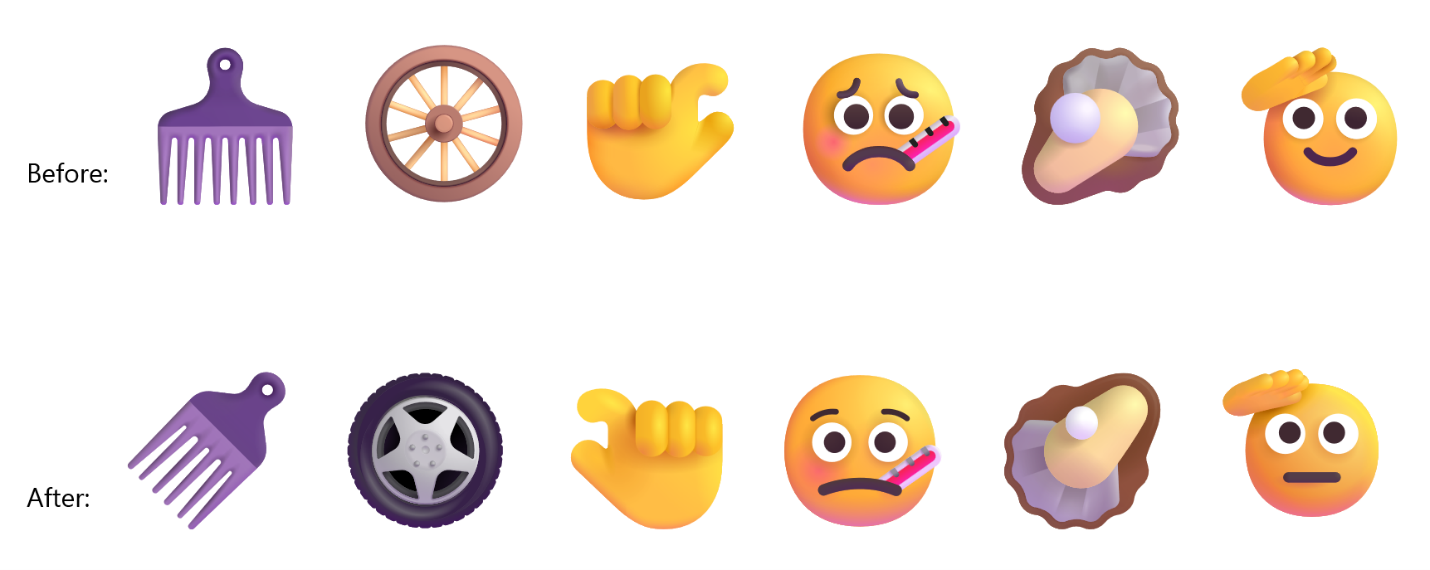
  • We're adding support for Emoji 17.0. This includes new emoji such as distorted face, fight cloud, and hairy creature. To try the new emoji, press the Windows key plus Period (.) to open the emoji panel and insert them from there.


    Screenshot of new emoji added.
  • As part of this effort, we've also made some slight adjustments to the design of some of our current emoji to improve consistency across platforms. This includes the saluting face, face with peeking eye, goose, lotus, and kissing cat emoji.

    Screenshot of emoji adjusted.

[Get Started app]​

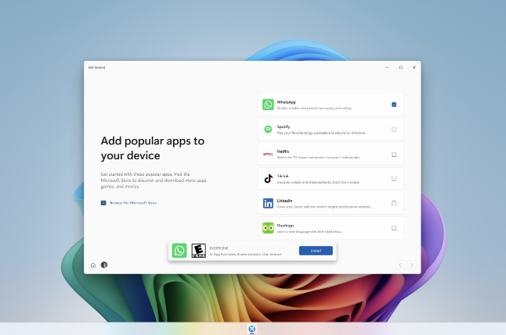
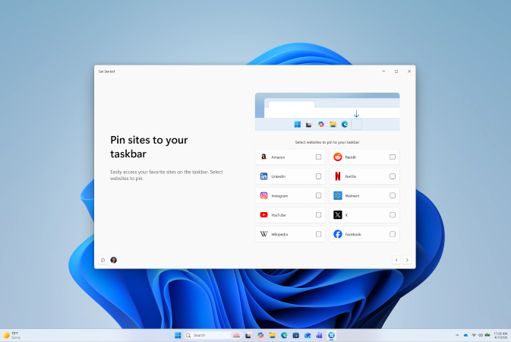
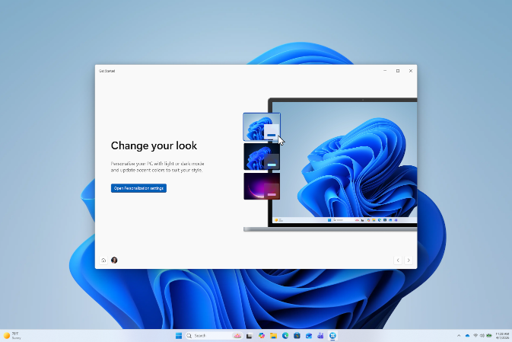
  • The Get Started app is updated with new pages. The pages help personalize your device and discover new features. Pages might depend on your device. Close the flow at any time, or revisit it by opening Get Started. The new pages include the app install page, the site pinning page, and the personalized theme page.

    Screenshot of App install page in Get Started.
    App install page in Get Started

    Screenshot of Site pinning page in Get Started.
    Site pinning page in Get Started

    Screenshot of Theme page in Get Started.
    Theme page in Get Started

[Magnifier]​

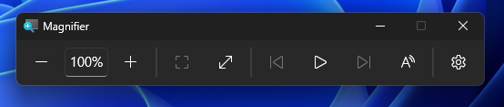
  • We're giving Magnifier's toolbar a modernized visual refresh.
  • Updated icons. We've updated Magnifier's toolbar icons to align with Windows 11 visual design, giving the tool a cleaner, more modernized feel.
  • Refined spacing and padding. We've adjusted the padding and spacing across the toolbar for a more polished, consistent layout.
  • What's not changing: The way Magnifier works. Your views, zoom controls, keyboard shortcuts, and Read Aloud all behave exactly as they did in earlier versions.

    Screenshot of UI showing updated icons and more polished, consistent layout.
    UI showing updated icons and more polished, consistent layout.

[Drag Tray]​

  • Thank you to Insiders who have provided feedback about the Drag Tray experience. Based on feedback, we're removing the experience in this build. We're continuing to explore improvements in this area and look forward to sharing more about a future replacement experience in a later update.

[Input]​

  • Fixed an issue where some third-party keyboard input methods, including certain Chinese IMEs, might not display their status window correctly when typing in File Explorer and other parts of Windows.
  • Improved reliability of typing with the Japanese IME by reducing potential hangs and deadlocks.

[Start menu]​

  • We're adjusting the rollout population for the personalized Start menu, so some Insiders might see the features temporarily disappear. If you don't see the feature in this build, you can re-enable it through feature flags.

[Run]​

  • For Insiders using the modern Run dialog:
    • Improved first launch reliability.
    • Adjusted verbosity for screen reader users.

[Personalization]​

  • We're starting to roll out a variety of improvements to desktop background experiences. These improvements include:
    • Improved reliability of the Personalization > Background page in Settings.
    • Added support for using DIB image files as desktop backgrounds.
    • Improved reliability of desktop slideshow transitions on newly created accounts.
    • Improved the resolution of previews when selecting a desktop background in Personalization > Background.
    • Improved the desktop background preview display in Settings for users with portrait mode monitors.
    • Improved reliability of processing desktop wallpaper changes when they happen in quick succession.
    • Added support for using slideshow wallpapers with multiple desktops so that it won't automatically switch you back to Picture.

[Windows Recovery]​

  • New enhancements to networking in WinRE
    • We're adding a new WinRE networking capability that allows the Windows Recovery Environment to automatically reuse eligible Wi-Fi profiles already saved in the main Windows OS, including supported certificate-based Wi-Fi networks. Previously, WinRE could automatically connect only to wired unauthenticated Ethernet or Wi-Fi networks that were separately preconfigured for WinRE, while users had to manually connect to other WPA2/3 networks by entering a password. With this update, WinRE can use saved Wi-Fi profile information when a recovery workflow requires connectivity, helping devices get online automatically during scenarios such as quick machine recovery or cloud rebuild without requiring users or IT admins to separately preconfigure Wi-Fi credentials in WinRE. By default, this capability is enabled. However, IT admins can disable this functionality if desired.
    • To test this feature in your environment, see Test networking in WinRE.

[Settings]​

  • Fixed an issue causing Settings to crash in the previous flight when interacting with items on the Date & Time page.

[Other]​

  • Fixed an xtajit64.dll crash, which was leading to issues with certain apps for Insiders on Arm64 PCs in the latest flights.

Reminders for Windows Insiders in the Experimental channel

  • Updates are based on Windows 11, version 26H2 via an enablement package (Build 26340.9212).
  • Many features are rolled out using Controlled Feature Rollout technology, starting with a subset of Insiders and ramping up over time. We monitor feedback to see how they land before pushing them out to everyone in this channel.
  • The desktop watermark shown at the lower right corner of the desktop is normal for Windows Insider pre-release builds.
  • Features and experiences included in these builds might never get released as we try out different concepts and get feedback. Features might change over time, be removed, or replaced and never get released beyond Windows Insiders. Some of these features and experiences could show up in future Windows releases when they're ready.
  • Some features in active development we preview with Windows Insiders might not be fully localized, and localization will happen over time as features are finalized. As you see issues with localization in your language, report those issues to us via Feedback Hub.
  • Check out Flight Hub for a complete look at what build is in which Insider channel.

 Source:


Check Windows Updates


UUP Dump:

64-bit ISO download:

ARM64 ISO download:

 
Last edited:
So 26300.XXXX finished ?
 

My Computer My Computer

At a glance

26200.8037i5-11400F32GBGeforce GT-1030
OS
26200.8037
Computer type
PC/Desktop
CPU
i5-11400F
Motherboard
Gigabyte
Memory
32GB
Graphics Card(s)
Geforce GT-1030
Keyboard
Logitech K400
Mouse
Logitech M720
Internet Speed
600 Mb
Browser
Edge
Hi folks
Love the facility with the phone link - using VLC from the phone app to browse network the option also to play even video files as audio on the computer is great !!!! -- also DVD iso files stored on internal memory play video with menus on the computer perfectly.

I like this new build -- Ms done something RIGHT for once. !!!!

Screenshot 2026-08-18 135818.webp

NOTE -- DO NOT get into having to use an Ms account and pin number - on the previous build of 26H2 it all went BONKERS. !!! This build seems well behaved and works.

I hope Ms don't hose it up soon. !!

Note I also have HYPER-V and WSL enabled too -- seems to not impact performance at all on the laptop I'm using. 13 Gen i7, 8 core, 32GB RAM, decent graphics, internal 512GB NVME hard disk- assume ssd type.

Cheers
jimbo
 
Last edited:

My Computer My Computer

At a glance

Windows XP,11 Linux Fedora Rawhide pre-releas...2 X Intel i7
OS
Windows XP,11 Linux Fedora Rawhide pre-release 46
Computer type
PC/Desktop
CPU
2 X Intel i7
Screen Resolution
4KUHD X 2
Update 17 August 2026: Moving Windows Recovery enhancement originally announced for Beta build 26220.9202 into this Experimental build.
 

My Computers My Computers

  • At a glance

    Windows 11 Pro for WorkstationsIntel i7-8700K 5 GHz64 GB (4x16GB) G.SKILL TridentZ RGB DDR4 3600...ASUS ROG-STRIX-GTX1080TI-O11G-GAMING (11GB GD...
    OS
    Windows 11 Pro for Workstations
    Computer type
    PC/Desktop
    Manufacturer/Model
    Custom self build
    CPU
    Intel i7-8700K 5 GHz
    Motherboard
    ASUS ROG Maximus XI Formula Z390
    Memory
    64 GB (4x16GB) G.SKILL TridentZ RGB DDR4 3600 MHz (F4-3600C18D-32GTZR)
    Graphics Card(s)
    ASUS ROG-STRIX-GTX1080TI-O11G-GAMING (11GB GDDR5X)
    Sound Card
    Integrated Digital Audio (S/PDIF)
    Monitor(s) Displays
    2 x Samsung Odyssey G75 27"
    Screen Resolution
    2560x1440
    Hard Drives
    1TB Samsung 990 PRO M.2,
    4TB Samsung 990 PRO M.2,
    TerraMaster F8 SSD Plus NAS
    PSU
    Seasonic Prime Titanium 850W
    Case
    Thermaltake Core P3 wall mounted
    Cooling
    Corsair Hydro H115i
    Keyboard
    Amazon Basics Wired Full Keyboard MD005
    Mouse
    Logitech MX Master 4
    Internet Speed
    2 Gbps Download and 100 Mbps Upload
    Browser
    Chrome and Edge
    Antivirus
    Microsoft Defender
    Other Info
    Logitech Z625 speaker system,
    Logitech BRIO 4K Pro webcam,
    HP Color LaserJet Pro MFP M477fdn,
    CyberPower CP1500PFCLCD
    Galaxy S23 Plus phone
  • At a glance

    Windows 11 ProSnapdragon X Elite (12 core) 3.42 GHz16 GB LPDDR5x-7467 MHz
    Operating System
    Windows 11 Pro
    Computer type
    Laptop
    Manufacturer/Model
    Surface Laptop 7 Copilot+ PC
    CPU
    Snapdragon X Elite (12 core) 3.42 GHz
    Memory
    16 GB LPDDR5x-7467 MHz
    Monitor(s) Displays
    15" HDR
    Screen Resolution
    2496 x 1664
    Hard Drives
    1 TB SSD
    Internet Speed
    Wi-Fi 7 and Bluetooth 5.4
    Browser
    Chrome and Edge
    Antivirus
    Microsoft Defender
Where is the settings of :
new-contextmenu2.png


That shows here :

It deleted the old context menu.
 

My Computer My Computer

At a glance

26200.8037i5-11400F32GBGeforce GT-1030
OS
26200.8037
Computer type
PC/Desktop
CPU
i5-11400F
Motherboard
Gigabyte
Memory
32GB
Graphics Card(s)
Geforce GT-1030
Keyboard
Logitech K400
Mouse
Logitech M720
Internet Speed
600 Mb
Browser
Edge
Hmm, this one was a bit messy. The update consistently failed until I paused Windows Update service and cleared out C:\Windows\SoftwareDistribution\
Then it successfully installed.

All previous enhancements are still present, including the new Context Menu options.
Feature Flags section in Windows Insider Program is empty.

DISM is broken again in this build with the can't find the "Source" error.
SFC is clean.
 

My Computer My Computer

At a glance

Windows 11 Pro 26H2AMD Ryzen 9 9950X3D 16-Core Processor64GB Corsair DDR5 RAM @ 6000 MT/sASUS TUF Gaming GeForce RTX 4090 OC Edition 2...
OS
Windows 11 Pro 26H2
Computer type
PC/Desktop
Manufacturer/Model
Skytech / Central Computers
CPU
AMD Ryzen 9 9950X3D 16-Core Processor
Motherboard
Gigabyte X870E AORUS PRO ICE
Memory
64GB Corsair DDR5 RAM @ 6000 MT/s
Graphics Card(s)
ASUS TUF Gaming GeForce RTX 4090 OC Edition 24GB GDDR6X
Sound Card
Sound Blaster Audigy Fx V2
Monitor(s) Displays
Sony SDMU27M90 (DP HDR), Acer KA272, ASUS VG328QA1A
Screen Resolution
3840x2160 HDR
Hard Drives
Samsung SSD 990 PRO 4TB, Samsung SSD 860 EVO 1TB, Seagate ST8000DM004-2CX88 8TB
Case
Fractal Meshify 2
Cooling
Arctic Freezer III 360mm
26340, looks like MS are preparing 26300 for general release.
 

My Computer My Computer

At a glance

Windows 11 Pro 25H2 (RP channel)AMD Ryzen 7 9800X3D 8-core64GB Corsair Titanium 6000/CL30MSI Suprim 5080 SOC
OS
Windows 11 Pro 25H2 (RP channel)
Computer type
PC/Desktop
Manufacturer/Model
MSI
CPU
AMD Ryzen 7 9800X3D 8-core
Motherboard
MEG X870E Godlike
Memory
64GB Corsair Titanium 6000/CL30
Graphics Card(s)
MSI Suprim 5080 SOC
Sound Card
Soundblaster AE-9
Monitor(s) Displays
ASUS TUF Gaming VG289Q
Screen Resolution
3840x2160
Hard Drives
Samsung 9100 Pro 4TB (gen 5 x4, system drive/games)
Samsung 990 Pro 2TB
Samsung 980 Pro 2TB
Samsung 870 Evo 4TB
Samsung 870 Evo 2TB
Samsung T9 4TB
PSU
Seasonic PX-2200
Case
Bequiet! Dark Base Pro 901
Cooling
Noctua NH-D15S Chromax black
Keyboard
Logitech G915 X (wired)
Mouse
Logitech G903 with PowerPlay charger
Internet Speed
900Mb/sec
Browser
Microsoft Edge
Antivirus
Windows Defender
If you want to try out the new context menu experience in Experimental build 26340.9212, get vivetool and enable feature ID 60813048.


Hello ! Wath is the prompt to enter to the Windows Terminal (in Vivetoool folder) ?

thx
 

My Computer My Computer

At a glance

Windows 11 Insider Experimental (26H2) ChannelIntel Core i5-13600K32 Go DDR4ASUS Dual GeForce RTX 4060 Ti OC Edition 8GB
OS
Windows 11 Insider Experimental (26H2) Channel
Computer type
PC/Desktop
Manufacturer/Model
Made
CPU
Intel Core i5-13600K
Motherboard
ASUS PRIME B760-PLUS D4
Memory
32 Go DDR4
Graphics Card(s)
ASUS Dual GeForce RTX 4060 Ti OC Edition 8GB
Monitor(s) Displays
ViewSonic 1080p
Screen Resolution
1080p
Hard Drives
2 NVMe + SSD Intern + 1 HHD Interne + 4 HDD extern
Keyboard
Roccat Swamm
Internet Speed
Fibre
Browser
Microsoft Edge
Antivirus
Windows Defender
Hello ! Wath is the prompt to enter to the Windows Terminal (in Vivetoool folder) ?

thx

vivetool /enable /id:60813048

See option 2 below for full details on how to use though. :shawn:


My Computers My Computers

  • At a glance

    Windows 11 Pro for WorkstationsIntel i7-8700K 5 GHz64 GB (4x16GB) G.SKILL TridentZ RGB DDR4 3600...ASUS ROG-STRIX-GTX1080TI-O11G-GAMING (11GB GD...
    OS
    Windows 11 Pro for Workstations
    Computer type
    PC/Desktop
    Manufacturer/Model
    Custom self build
    CPU
    Intel i7-8700K 5 GHz
    Motherboard
    ASUS ROG Maximus XI Formula Z390
    Memory
    64 GB (4x16GB) G.SKILL TridentZ RGB DDR4 3600 MHz (F4-3600C18D-32GTZR)
    Graphics Card(s)
    ASUS ROG-STRIX-GTX1080TI-O11G-GAMING (11GB GDDR5X)
    Sound Card
    Integrated Digital Audio (S/PDIF)
    Monitor(s) Displays
    2 x Samsung Odyssey G75 27"
    Screen Resolution
    2560x1440
    Hard Drives
    1TB Samsung 990 PRO M.2,
    4TB Samsung 990 PRO M.2,
    TerraMaster F8 SSD Plus NAS
    PSU
    Seasonic Prime Titanium 850W
    Case
    Thermaltake Core P3 wall mounted
    Cooling
    Corsair Hydro H115i
    Keyboard
    Amazon Basics Wired Full Keyboard MD005
    Mouse
    Logitech MX Master 4
    Internet Speed
    2 Gbps Download and 100 Mbps Upload
    Browser
    Chrome and Edge
    Antivirus
    Microsoft Defender
    Other Info
    Logitech Z625 speaker system,
    Logitech BRIO 4K Pro webcam,
    HP Color LaserJet Pro MFP M477fdn,
    CyberPower CP1500PFCLCD
    Galaxy S23 Plus phone
  • At a glance

    Windows 11 ProSnapdragon X Elite (12 core) 3.42 GHz16 GB LPDDR5x-7467 MHz
    Operating System
    Windows 11 Pro
    Computer type
    Laptop
    Manufacturer/Model
    Surface Laptop 7 Copilot+ PC
    CPU
    Snapdragon X Elite (12 core) 3.42 GHz
    Memory
    16 GB LPDDR5x-7467 MHz
    Monitor(s) Displays
    15" HDR
    Screen Resolution
    2496 x 1664
    Hard Drives
    1 TB SSD
    Internet Speed
    Wi-Fi 7 and Bluetooth 5.4
    Browser
    Chrome and Edge
    Antivirus
    Microsoft Defender
New in Windows 11 Experimental build 26340.9212: an option to open apps maximised by default. Already quietly rolling out to Insiders (feature MaximizeWindow, ID 62915050)


Last edited:

My Computers My Computers

  • At a glance

    Windows 11 Pro for WorkstationsIntel i7-8700K 5 GHz64 GB (4x16GB) G.SKILL TridentZ RGB DDR4 3600...ASUS ROG-STRIX-GTX1080TI-O11G-GAMING (11GB GD...
    OS
    Windows 11 Pro for Workstations
    Computer type
    PC/Desktop
    Manufacturer/Model
    Custom self build
    CPU
    Intel i7-8700K 5 GHz
    Motherboard
    ASUS ROG Maximus XI Formula Z390
    Memory
    64 GB (4x16GB) G.SKILL TridentZ RGB DDR4 3600 MHz (F4-3600C18D-32GTZR)
    Graphics Card(s)
    ASUS ROG-STRIX-GTX1080TI-O11G-GAMING (11GB GDDR5X)
    Sound Card
    Integrated Digital Audio (S/PDIF)
    Monitor(s) Displays
    2 x Samsung Odyssey G75 27"
    Screen Resolution
    2560x1440
    Hard Drives
    1TB Samsung 990 PRO M.2,
    4TB Samsung 990 PRO M.2,
    TerraMaster F8 SSD Plus NAS
    PSU
    Seasonic Prime Titanium 850W
    Case
    Thermaltake Core P3 wall mounted
    Cooling
    Corsair Hydro H115i
    Keyboard
    Amazon Basics Wired Full Keyboard MD005
    Mouse
    Logitech MX Master 4
    Internet Speed
    2 Gbps Download and 100 Mbps Upload
    Browser
    Chrome and Edge
    Antivirus
    Microsoft Defender
    Other Info
    Logitech Z625 speaker system,
    Logitech BRIO 4K Pro webcam,
    HP Color LaserJet Pro MFP M477fdn,
    CyberPower CP1500PFCLCD
    Galaxy S23 Plus phone
  • At a glance

    Windows 11 ProSnapdragon X Elite (12 core) 3.42 GHz16 GB LPDDR5x-7467 MHz
    Operating System
    Windows 11 Pro
    Computer type
    Laptop
    Manufacturer/Model
    Surface Laptop 7 Copilot+ PC
    CPU
    Snapdragon X Elite (12 core) 3.42 GHz
    Memory
    16 GB LPDDR5x-7467 MHz
    Monitor(s) Displays
    15" HDR
    Screen Resolution
    2496 x 1664
    Hard Drives
    1 TB SSD
    Internet Speed
    Wi-Fi 7 and Bluetooth 5.4
    Browser
    Chrome and Edge
    Antivirus
    Microsoft Defender
"Camera Roll Backup"
"Get access to new entry points on the Settings Home and Accounts pages help you set up Camera Roll Backup and automatically back up photos and videos from your mobile device to OneDrive."
Feature Flag ID: 62068874

"Improved Context Menu"
"A faster, cleaner context menu that you can customize to fit your workflow and preferences."
Feature Flag ID: 60813048

"Magnifier toolbar refresh"
"Get access to Magnifier's toolbar updated icons and refined spacing and padding."
Feature Flag ID: 63194003


My Computers My Computers

  • At a glance

    Windows 11 Pro for WorkstationsIntel i7-8700K 5 GHz64 GB (4x16GB) G.SKILL TridentZ RGB DDR4 3600...ASUS ROG-STRIX-GTX1080TI-O11G-GAMING (11GB GD...
    OS
    Windows 11 Pro for Workstations
    Computer type
    PC/Desktop
    Manufacturer/Model
    Custom self build
    CPU
    Intel i7-8700K 5 GHz
    Motherboard
    ASUS ROG Maximus XI Formula Z390
    Memory
    64 GB (4x16GB) G.SKILL TridentZ RGB DDR4 3600 MHz (F4-3600C18D-32GTZR)
    Graphics Card(s)
    ASUS ROG-STRIX-GTX1080TI-O11G-GAMING (11GB GDDR5X)
    Sound Card
    Integrated Digital Audio (S/PDIF)
    Monitor(s) Displays
    2 x Samsung Odyssey G75 27"
    Screen Resolution
    2560x1440
    Hard Drives
    1TB Samsung 990 PRO M.2,
    4TB Samsung 990 PRO M.2,
    TerraMaster F8 SSD Plus NAS
    PSU
    Seasonic Prime Titanium 850W
    Case
    Thermaltake Core P3 wall mounted
    Cooling
    Corsair Hydro H115i
    Keyboard
    Amazon Basics Wired Full Keyboard MD005
    Mouse
    Logitech MX Master 4
    Internet Speed
    2 Gbps Download and 100 Mbps Upload
    Browser
    Chrome and Edge
    Antivirus
    Microsoft Defender
    Other Info
    Logitech Z625 speaker system,
    Logitech BRIO 4K Pro webcam,
    HP Color LaserJet Pro MFP M477fdn,
    CyberPower CP1500PFCLCD
    Galaxy S23 Plus phone
  • At a glance

    Windows 11 ProSnapdragon X Elite (12 core) 3.42 GHz16 GB LPDDR5x-7467 MHz
    Operating System
    Windows 11 Pro
    Computer type
    Laptop
    Manufacturer/Model
    Surface Laptop 7 Copilot+ PC
    CPU
    Snapdragon X Elite (12 core) 3.42 GHz
    Memory
    16 GB LPDDR5x-7467 MHz
    Monitor(s) Displays
    15" HDR
    Screen Resolution
    2496 x 1664
    Hard Drives
    1 TB SSD
    Internet Speed
    Wi-Fi 7 and Bluetooth 5.4
    Browser
    Chrome and Edge
    Antivirus
    Microsoft Defender
Time for Microsoft to fix this nonsense.
DISM can be used with target images of older Windows operating systems, but not with target images of operating systems that are more recent than the installed version of DISM.

The DISM utility version on your/my PC is 10.0.26100 (this is the 24H2 codebase). The system image has been updated to experimental build 10.0.26340 (26H2 branch).
This results in a critical gap (mismatch): the older version of the tool is attempting to restore a newer operating system structure.
Solution: Before running RestoreHealth, run:
DISM /Online /Cleanup-Image /AnalyzeComponentStore
And DISM /Online /Cleanup-Image /StartComponentCleanup
 

My Computer My Computer

At a glance

Windows 11 Insider Experimental (26H2)Intel Core i5-1140032Gb (DDR4 SDRAM)Intel(R) UHD Graphics 730
OS
Windows 11 Insider Experimental (26H2)
Computer type
PC/Desktop
Manufacturer/Model
Gigabyte Technology Co., Ltd.
CPU
Intel Core i5-11400
Motherboard
Z590 AORUS PRO AX
Memory
32Gb (DDR4 SDRAM)
Graphics Card(s)
Intel(R) UHD Graphics 730
Sound Card
Realtek USB Audio
Monitor(s) Displays
LG 27US500-W 4K UHD UltraFine™
Screen Resolution
3840x2160
Hard Drives
Samsung SSD 980 PRO 1TB
WDC WD7501AALS
PSU
Montech CENTURY, 650W, 80+ Gold
Case
Cougar Airface ECO RGB
Cooling
ID-COOLING SE-224-XTS BLACK
Keyboard
Microsoft SideWinder X6 Keyboard
Mouse
Microsoft SideWinder Mouse
Internet Speed
Internet speed of 1 Gbit/s
Browser
Vivaldi browser
Antivirus
Windows Defender
DISM can be used with target images of older Windows operating systems, but not with target images of operating systems that are more recent than the installed version of DISM.

The DISM utility version on your/my PC is 10.0.26100 (this is the 24H2 codebase). The system image has been updated to experimental build 10.0.26340 (26H2 branch).
This results in a critical gap (mismatch): the older version of the tool is attempting to restore a newer operating system structure.
Solution: Before running RestoreHealth, run:
DISM /Online /Cleanup-Image /AnalyzeComponentStore
And DISM /Online /Cleanup-Image /StartComponentCleanup
Already done that and did not make any difference. 🤬
 

My Computer My Computer

At a glance

Windows 11 Pro 25H2Intel I9-9900K64GBNVIDIA RTX 2060
OS
Windows 11 Pro 25H2
Computer type
PC/Desktop
Manufacturer/Model
Dell XPS 8930
CPU
Intel I9-9900K
Memory
64GB
Graphics Card(s)
NVIDIA RTX 2060
Sound Card
NVIDIA High Definition Audio
Monitor(s) Displays
4k Samsung
Screen Resolution
3840 x 2160
Hard Drives
512GB NVMe, ADATA SU 800, 2TB HDD
@fg2001gf11F Hmm. That’s exactly the sequence of commands that fixed the DISM error 0x800f0915 for me.
 

My Computer My Computer

At a glance

Windows 11 Insider Experimental (26H2)Intel Core i5-1140032Gb (DDR4 SDRAM)Intel(R) UHD Graphics 730
OS
Windows 11 Insider Experimental (26H2)
Computer type
PC/Desktop
Manufacturer/Model
Gigabyte Technology Co., Ltd.
CPU
Intel Core i5-11400
Motherboard
Z590 AORUS PRO AX
Memory
32Gb (DDR4 SDRAM)
Graphics Card(s)
Intel(R) UHD Graphics 730
Sound Card
Realtek USB Audio
Monitor(s) Displays
LG 27US500-W 4K UHD UltraFine™
Screen Resolution
3840x2160
Hard Drives
Samsung SSD 980 PRO 1TB
WDC WD7501AALS
PSU
Montech CENTURY, 650W, 80+ Gold
Case
Cougar Airface ECO RGB
Cooling
ID-COOLING SE-224-XTS BLACK
Keyboard
Microsoft SideWinder X6 Keyboard
Mouse
Microsoft SideWinder Mouse
Internet Speed
Internet speed of 1 Gbit/s
Browser
Vivaldi browser
Antivirus
Windows Defender
DISM can be used with target images of older Windows operating systems, but not with target images of operating systems that are more recent than the installed version of DISM.

The DISM utility version on your/my PC is 10.0.26100 (this is the 24H2 codebase). The system image has been updated to experimental build 10.0.26340 (26H2 branch).
This results in a critical gap (mismatch): the older version of the tool is attempting to restore a newer operating system structure.
Solution: Before running RestoreHealth, run:
DISM /Online /Cleanup-Image /AnalyzeComponentStore
And DISM /Online /Cleanup-Image /StartComponentCleanup
Thanks for this tip. It fixed my DISM issue.

1. DISM /Online /Cleanup-Image /AnalyzeComponentStore
2. DISM /Online /Cleanup-Image /StartComponentCleanup
3. DISM /Online /Cleanup-Image /RestoreHealth

Deployment Image Servicing and Management tool
Version: 10.0.26100.8951

Image Version: 10.0.26340.9212

[==========================100.0%==========================] The restore operation completed successfully.
The operation completed successfully.
 

My Computer My Computer

At a glance

Windows 11 Pro 26H2AMD Ryzen 9 9950X3D 16-Core Processor64GB Corsair DDR5 RAM @ 6000 MT/sASUS TUF Gaming GeForce RTX 4090 OC Edition 2...
OS
Windows 11 Pro 26H2
Computer type
PC/Desktop
Manufacturer/Model
Skytech / Central Computers
CPU
AMD Ryzen 9 9950X3D 16-Core Processor
Motherboard
Gigabyte X870E AORUS PRO ICE
Memory
64GB Corsair DDR5 RAM @ 6000 MT/s
Graphics Card(s)
ASUS TUF Gaming GeForce RTX 4090 OC Edition 24GB GDDR6X
Sound Card
Sound Blaster Audigy Fx V2
Monitor(s) Displays
Sony SDMU27M90 (DP HDR), Acer KA272, ASUS VG328QA1A
Screen Resolution
3840x2160 HDR
Hard Drives
Samsung SSD 990 PRO 4TB, Samsung SSD 860 EVO 1TB, Seagate ST8000DM004-2CX88 8TB
Case
Fractal Meshify 2
Cooling
Arctic Freezer III 360mm
Thanks for this tip. It fixed my DISM issue.

1. DISM /Online /Cleanup-Image /AnalyzeComponentStore
2. DISM /Online /Cleanup-Image /StartComponentCleanup
3. DISM /Online /Cleanup-Image /RestoreHealth

Deployment Image Servicing and Management tool
Version: 10.0.26100.8951

Image Version: 10.0.26340.9212

[==========================100.0%==========================] The restore operation completed successfully.
The operation completed successfully.
Did you try another "DISM /Online /Cleanup-Image /ScanHealth" after a successful /RestoreHealth?

It will still find repairable, that means the whole exercise was useless. 🤬🤷‍♂️
1787098324894.webp

1787097473277.webp
 
Last edited:

My Computer My Computer

At a glance

Windows 11 Pro 25H2Intel I9-9900K64GBNVIDIA RTX 2060
OS
Windows 11 Pro 25H2
Computer type
PC/Desktop
Manufacturer/Model
Dell XPS 8930
CPU
Intel I9-9900K
Memory
64GB
Graphics Card(s)
NVIDIA RTX 2060
Sound Card
NVIDIA High Definition Audio
Monitor(s) Displays
4k Samsung
Screen Resolution
3840 x 2160
Hard Drives
512GB NVMe, ADATA SU 800, 2TB HDD

My Computer My Computer

At a glance

Windows 11 Pro 26H2AMD Ryzen 9 9950X3D 16-Core Processor64GB Corsair DDR5 RAM @ 6000 MT/sASUS TUF Gaming GeForce RTX 4090 OC Edition 2...
OS
Windows 11 Pro 26H2
Computer type
PC/Desktop
Manufacturer/Model
Skytech / Central Computers
CPU
AMD Ryzen 9 9950X3D 16-Core Processor
Motherboard
Gigabyte X870E AORUS PRO ICE
Memory
64GB Corsair DDR5 RAM @ 6000 MT/s
Graphics Card(s)
ASUS TUF Gaming GeForce RTX 4090 OC Edition 24GB GDDR6X
Sound Card
Sound Blaster Audigy Fx V2
Monitor(s) Displays
Sony SDMU27M90 (DP HDR), Acer KA272, ASUS VG328QA1A
Screen Resolution
3840x2160 HDR
Hard Drives
Samsung SSD 990 PRO 4TB, Samsung SSD 860 EVO 1TB, Seagate ST8000DM004-2CX88 8TB
Case
Fractal Meshify 2
Cooling
Arctic Freezer III 360mm
Last edited:

My Computer My Computer

At a glance

Windows 11 Pro 25H2Intel I9-9900K64GBNVIDIA RTX 2060
OS
Windows 11 Pro 25H2
Computer type
PC/Desktop
Manufacturer/Model
Dell XPS 8930
CPU
Intel I9-9900K
Memory
64GB
Graphics Card(s)
NVIDIA RTX 2060
Sound Card
NVIDIA High Definition Audio
Monitor(s) Displays
4k Samsung
Screen Resolution
3840 x 2160
Hard Drives
512GB NVMe, ADATA SU 800, 2TB HDD
:: Dark Mode Dialogs and Run
ViVeTool.exe /enable /id:58383338,59270880,59203365,48433719

Does this still work?
It works for me on 25H2. If the IDs don't work, you can always disable them
 

My Computer My Computer

At a glance

Windows 119800X3DPatriot 8200MTs DDR5 CL38Galax RTX 4090ST
OS
Windows 11
Computer type
PC/Desktop
Manufacturer/Model
Asus
CPU
9800X3D
Motherboard
Asus X870E ProArt
Memory
Patriot 8200MTs DDR5 CL38
Graphics Card(s)
Galax RTX 4090ST
PSU
Asus Strix 1000W
Case
Lian Li O11 Vision
That is just useless if /SCANHEALTH still fails after that 🤷‍♂️
I'm not too concerned about any underlying issues if both DISM RestoreHealth and SFC complete successfully. I'm not in the habit of digging for errors.
 

My Computer My Computer

At a glance

Windows 11 Pro 26H2AMD Ryzen 9 9950X3D 16-Core Processor64GB Corsair DDR5 RAM @ 6000 MT/sASUS TUF Gaming GeForce RTX 4090 OC Edition 2...
OS
Windows 11 Pro 26H2
Computer type
PC/Desktop
Manufacturer/Model
Skytech / Central Computers
CPU
AMD Ryzen 9 9950X3D 16-Core Processor
Motherboard
Gigabyte X870E AORUS PRO ICE
Memory
64GB Corsair DDR5 RAM @ 6000 MT/s
Graphics Card(s)
ASUS TUF Gaming GeForce RTX 4090 OC Edition 24GB GDDR6X
Sound Card
Sound Blaster Audigy Fx V2
Monitor(s) Displays
Sony SDMU27M90 (DP HDR), Acer KA272, ASUS VG328QA1A
Screen Resolution
3840x2160 HDR
Hard Drives
Samsung SSD 990 PRO 4TB, Samsung SSD 860 EVO 1TB, Seagate ST8000DM004-2CX88 8TB
Case
Fractal Meshify 2
Cooling
Arctic Freezer III 360mm
I thought MS had stopped using CFR for experimental builds?
If that's the case why do the new features need Vivetool to enable them?

The features are either there or not!
 

My Computer My Computer

At a glance

Windows 11 Pro 25H2 (RP channel)AMD Ryzen 7 9800X3D 8-core64GB Corsair Titanium 6000/CL30MSI Suprim 5080 SOC
OS
Windows 11 Pro 25H2 (RP channel)
Computer type
PC/Desktop
Manufacturer/Model
MSI
CPU
AMD Ryzen 7 9800X3D 8-core
Motherboard
MEG X870E Godlike
Memory
64GB Corsair Titanium 6000/CL30
Graphics Card(s)
MSI Suprim 5080 SOC
Sound Card
Soundblaster AE-9
Monitor(s) Displays
ASUS TUF Gaming VG289Q
Screen Resolution
3840x2160
Hard Drives
Samsung 9100 Pro 4TB (gen 5 x4, system drive/games)
Samsung 990 Pro 2TB
Samsung 980 Pro 2TB
Samsung 870 Evo 4TB
Samsung 870 Evo 2TB
Samsung T9 4TB
PSU
Seasonic PX-2200
Case
Bequiet! Dark Base Pro 901
Cooling
Noctua NH-D15S Chromax black
Keyboard
Logitech G915 X (wired)
Mouse
Logitech G903 with PowerPlay charger
Internet Speed
900Mb/sec
Browser
Microsoft Edge
Antivirus
Windows Defender

Latest Support Threads

Back
Top Bottom