Microsoft Support:
Changes and improvements
[Pointer Indicator]
- We're introducing the Pointer Indicator accessibility setting. This feature enables Windows users with low vision to easily locate and use their cursor to increase productivity and efficiency when using a Windows device.
- To enable this experience, go to Settings > Accessibility > Mouse pointer and touch, and enable the Pointer indicator setting. You can also search for the setting by name. When the setting is enabled, you can toggle it on or off with the keyboard shortcut, Windows logo key + Ctrl + Shift + X.

Enable or Disable Mouse Pointer Indicator in Windows 11
This tutorial will show you how to enable or disable the mouse pointer crosshair indicator for your account in Windows 11. Starting with Windows 11 build 26100.4202, Microsoft added a mouse pointer indicator feature that allows low vision users on Windows to now easily locate and use their... www.elevenforum.com

Change Color of Mouse Pointer Indicator in Windows 11
This tutorial will show you how to change the mouse pointer crosshair indicator color for your account in Windows 11. Starting with Windows 11 build 26100.4202, Microsoft added a mouse pointer indicator feature that allows low vision users on Windows to now easily locate and use their cursor...
www.elevenforum.com
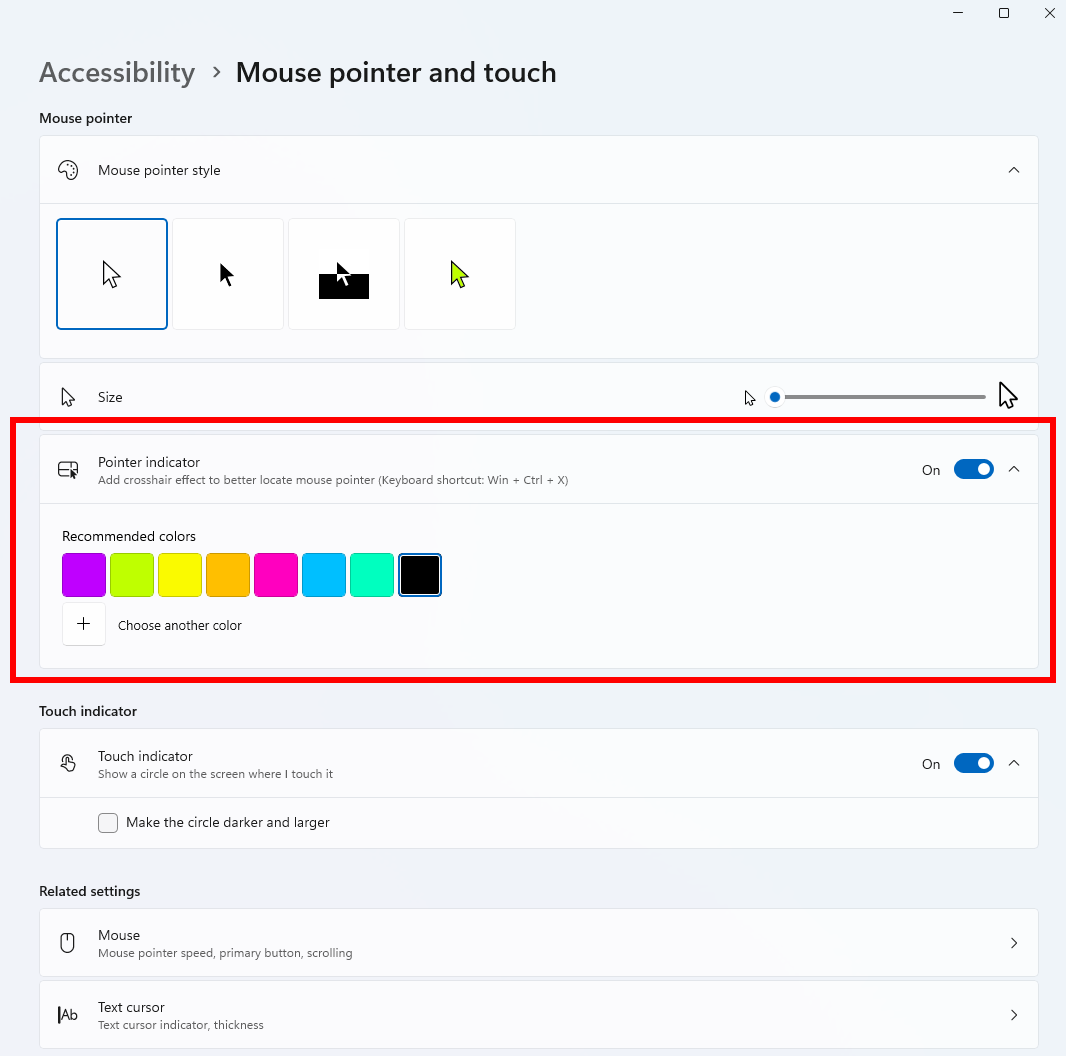
The Pointer indicator and its settings under Mouse pointer and touch.
[Phone Link]
- The phone companion experience in Start already helps you keep up with activity from your mobile device. With today's update, you can see even more at a glance.
- Get more from your latest activities: Hover over a recent message or notification in the Recent section to preview its content directly in Start. There's no need to pick up your phone or open the item to see what's new.
- Whether you're checking a message or deciding if a notification needs attention, these updates make it easier to stay informed and keep your focus.
Enable or Disable Mobile Device Notification Previews on Hover in Start Menu on Windows 11
This tutorial will show you how to enable or disable showing full mobile device (phone) notifications when hovering over them in the Start menu for your account in Windows 11. You can directly access content on your mobile device from the Start menu on your PC. Using this feature, you can view...
www.elevenforum.com

The Phone Link companion experience in Start with a preview of a recent message. - This experience is rolling out to Insiders in the Beta Channel with a minimum Phone Link build of 1.26021.3.0. Go to Phone Link > Settings > Start menu personalization.

[Magnifier]
- A new contrast theme toggle for a lower-glare screen. If bright screens are uncomfortable, many people use color inversion to reduce glare. However, inversion changes everything on screen, including photos, charts, and videos. With this update, we're introducing a new contrast theme toggle in Magnifier.
- Reduce glare with a single toggle. Turn on a contrast theme directly from the Magnifier toolbar for a more comfortable viewing experience.
- Choose the contrast theme that works best for you. The dark theme is applied by default, and you can choose which contrast theme the toggle uses under Settings > Accessibility > Magnifier.
- Photos, videos, and charts keep their original colors. Unlike color inversion, the contrast theme recolors the interface without touching your photos, charts, or videos, so they keep their real colors.
- Color inversion is still here. This isn't a replacement. If you use inversion today, it works exactly as it always has. The contrast theme is a separate, purpose-built option to reduce glare when you want a darker interface without inverting colors.

Turn On or Off a High Contrast Theme in Windows 11
This tutorial will show you how to turn on or off using a high contrast theme for your account in Windows 11. Text with low contrast can be difficult to read for people with low vision. There are web sites that have, for example, poor color combinations such as blue links on black backgrounds...
www.elevenforum.com

Turn On or Off Invert Colors while Magnifier is On in Windows 11
This tutorial will show you how to turn on or off invert screen colors while Magnifier is turned on for your account in Windows 10 and Windows 11. Magnifier makes part or all of your screen bigger so you can see words and images better. Inverted colors may reduce eye strain or make text more...
www.elevenforum.com
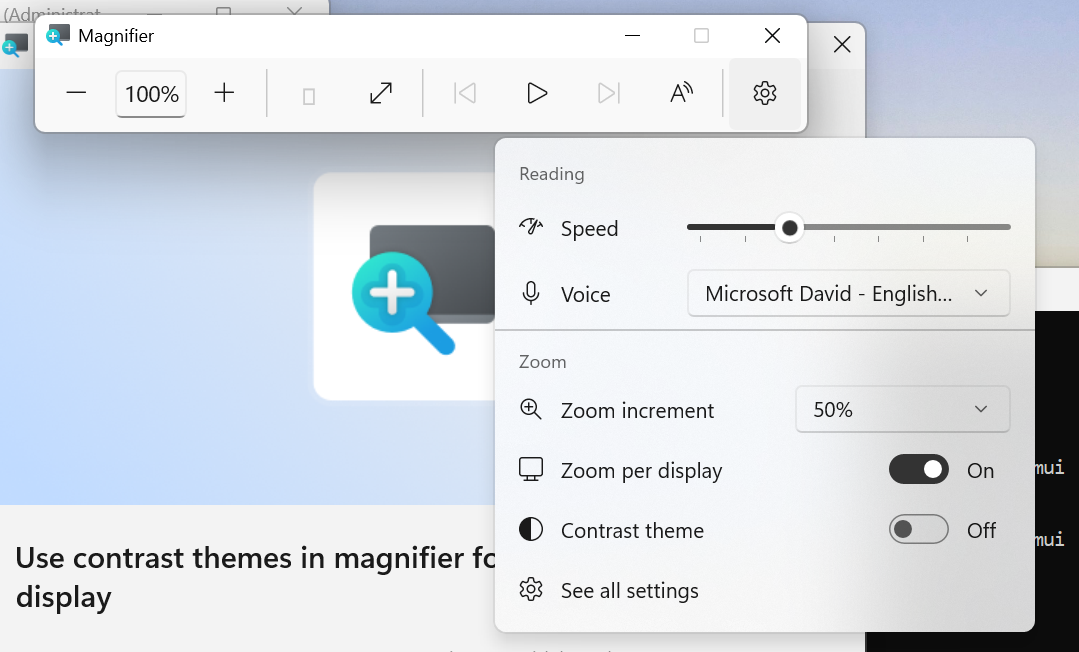
UI showing the new contrast theme toggle in Magnifier. Zoom per display isn't yet available in the Beta Channel.
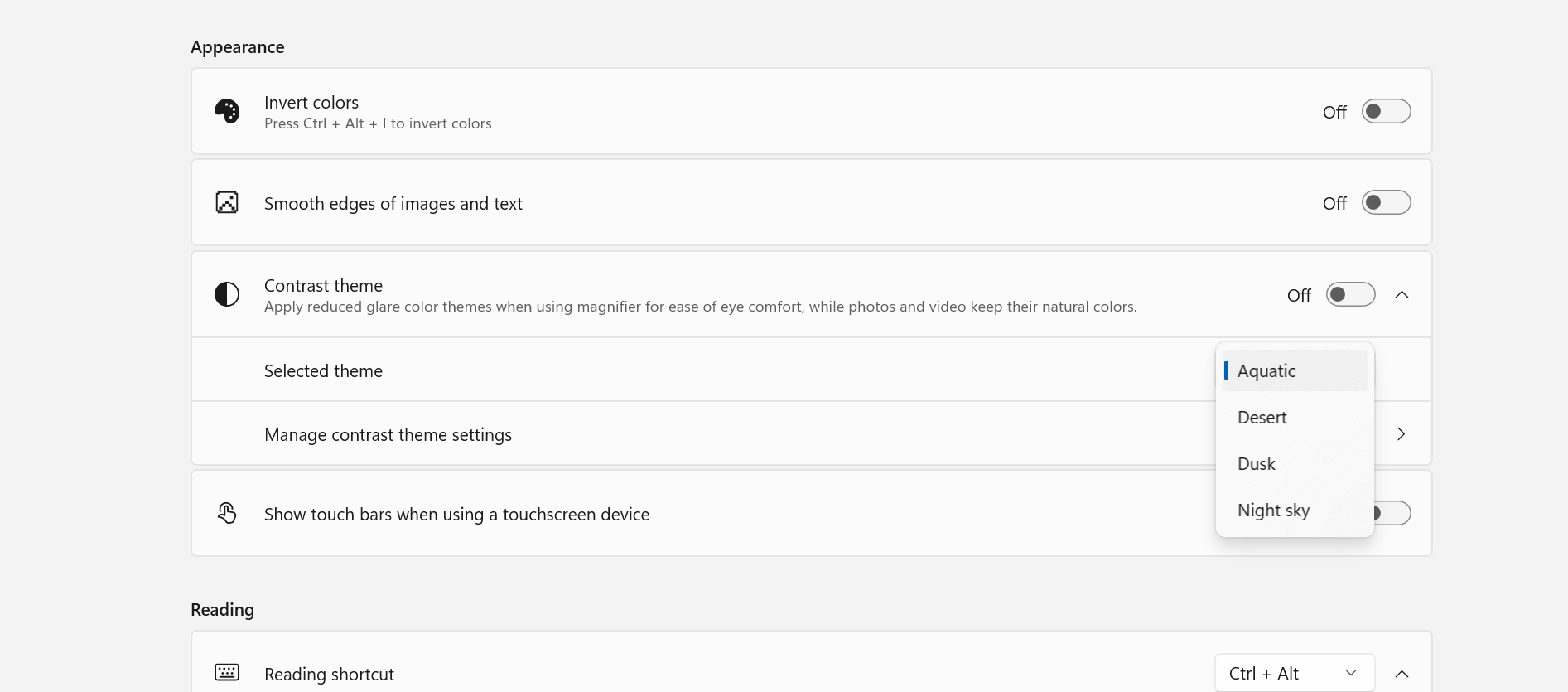
UI showing contrast theme settings for Magnifier.
[File Explorer]
- This update enables dark mode support in the Folder Options dialog in File Explorer.
Audio
- Fixed an issue affecting certain USB Audio Class 1.0 devices, including some multichannel audio headsets, that could prevent the device from working correctly after installing the latest updates.
[Settings]
- Made some small visual refinements to the design of the temporary files section under Settings > System > Storage.
Reminders for Windows Insiders in the Beta Channel
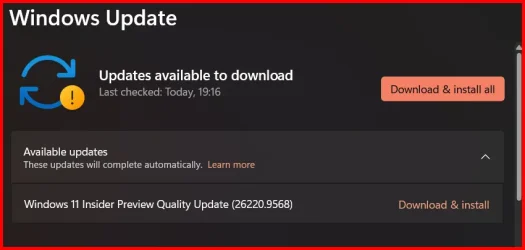
- Updates are based on Windows 11, version 25H2 via an enablement package (Build 26220.9568).
- The desktop watermark shown at the lower right corner of the desktop is normal for Windows Insider pre-release builds.
- Features and experiences included in these builds might never get released as we try out different concepts and get feedback. Features might change over time, be removed, or replaced and never get released beyond Windows Insiders. Some of these features and experiences could show up in future Windows releases when they're ready.
- Some features in active development we preview with Windows Insiders might not be fully localized, and localization will happen over time as features are finalized. As you see issues with localization in your language, report those issues to us via Feedback Hub.
- Check out Flight Hub for a complete look at what build is in which Insider channel.
Source:

Windows 11 Insider Beta Preview Build 26220.9568 - Windows Insider Program
Release notes for Windows 11 Insider Beta Preview Build 26220.9568
learn.microsoft.com

Announcing new builds for 25 September 2026
Hello Windows Insiders, Today, we’re releasing new Windows 11 Insider Preview builds to the Beta and Experimental channels. New builds this week Select your channel below to view its release notes: Beta:
 blogs.windows.com
Check Windows Updates
UUP Dump:
64-bit ISO download:

Select language for Windows 11 Insider Preview Feature Update (26220.9568) amd64
Select language for Windows 11 Insider Preview Feature Update (26220.9568) amd64 on UUP dump. UUP dump lets you download Unified Update Platform files, like Windows Insider updates, directly from Windows Update.
uupdump.net
ARM64 ISO download:
Select language for Windows 11 Insider Preview Feature Update (26220.9568) arm64
Select language for Windows 11 Insider Preview Feature Update (26220.9568) arm64 on UUP dump. UUP dump lets you download Unified Update Platform files, like Windows Insider updates, directly from Windows Update.
uupdump.net

UUP Dump - Download Windows Insider ISO
UUP Dump is the most practical and easy way to get ISO images of any Insider Windows 10 or Windows 11 version, as soon as Microsoft has released a new build. UUP Dump creates a download configuration file according to your choices, downloads necessary files directly from Microsoft servers, and...
www.elevenforum.com
Last edited: