Microsoft Support:
Changes and improvements gradually being rolled out*
- This update includes a small set of general improvements and fixes that improve the overall experience for Insiders running this build on their PCs.
[Windows Search]
- New Windows Search experience with inline actions: We're beginning to roll out a new Windows Search experience built on WinUI 3 that is faster, more efficient, and features a streamlined design that makes results easier to scan. We're also introducing inline actions, allowing you to quickly complete tasks directly. Turn on dark mode or Bluetooth, adjust your screen brightness, mute your device, or arrange windows from Windows Search.
- We're improving how Windows Search understands what you're looking for, including better matching for typos and synonyms. We'll continue fine-tuning these improvements over the coming weeks. For more information detailing the new changes, check out the Windows Insider Blog.
- English is the only supported language for this initial release.
- After upgrading to this build, restart your device before the New Windows Search Experience feature flag is visible.
Microsoft Building a faster, more streamlined Windows 11 Search
Windows Blogs: Hello Windows Insiders, Search is one of the most familiar ways to get around a Windows PC. It is how you may open an app, find a file, change a setting, or simply look for information. As Insiders, you have also been clear about what you expect from it: search should be fast... www.elevenforum.com
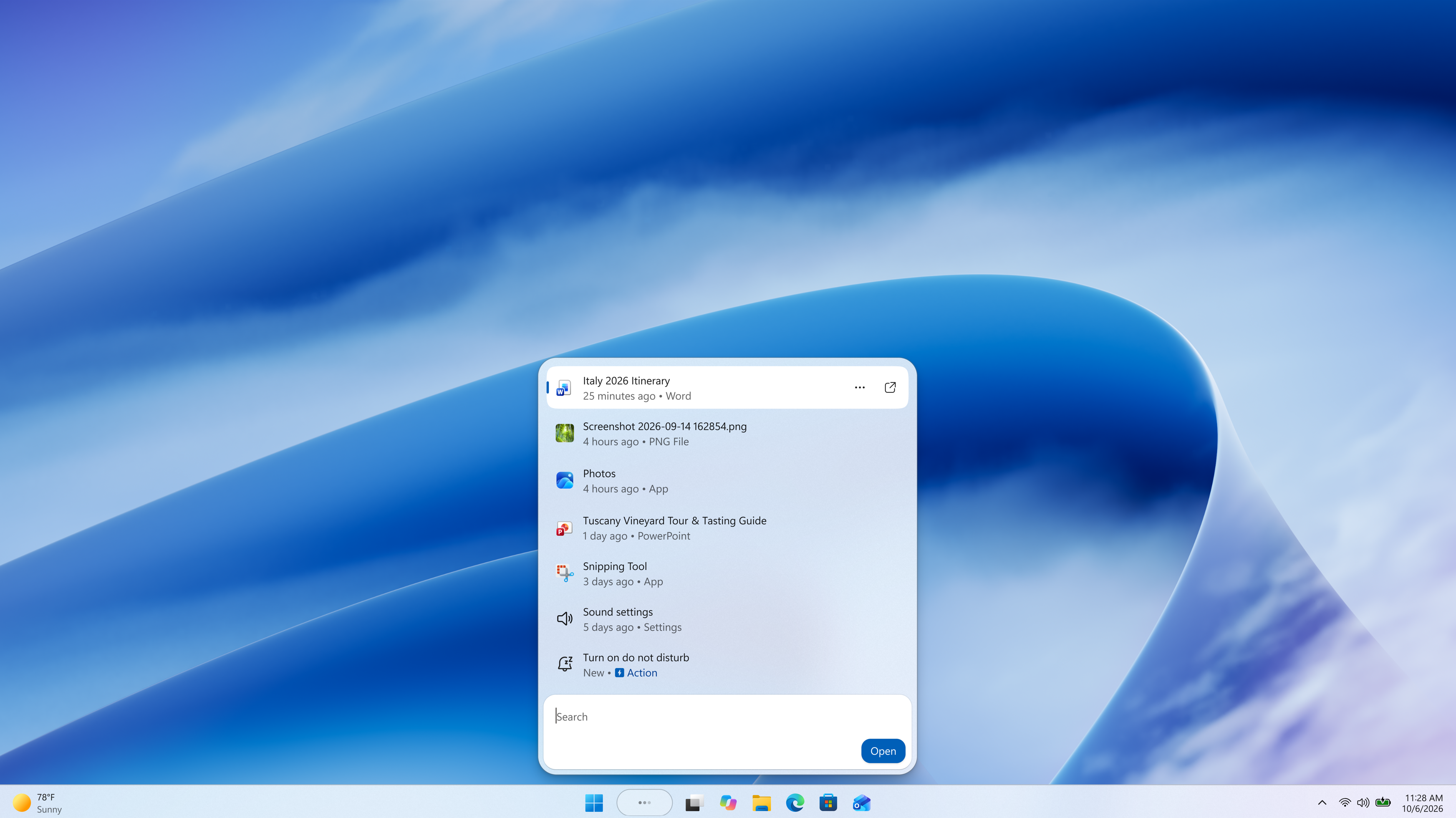
Screenshot of the new Windows Search experience.
[Narrator]
Read and explore math equations with NarratorWe're adding math reading and navigation support in Narrator, bringing clearer and more natural math experiences to users who are blind or have low vision. Math is at the heart of STEM education and learning, and this update helps students and professionals independently read, understand, and explore equations, formulas, and scientific notation with confidence.
With this update, Narrator can read math equations aloud in supported Microsoft 365 apps, including Word and PowerPoint. Instead of announcing every symbol individually, Narrator reads equations in a structured, natural way that reflects how they're meant to be understood. For example, when Narrator reaches a fraction, it reads the numerator and denominator together so you can understand the relationship between them.
You can also explore equations in more detail with a dedicated math navigation mode. Press Narrator key + Alt + N to turn on math navigation, then use the arrow keys to move through different parts of the equation, such as fractions, exponents, and roots. This mode lets you move through an equation one part at a time instead of hearing the full expression all at once. Press Esc to exit math navigation mode.
Math reading is available as soon as you install this build, with no additional download or setup required. To try it, turn on Narrator by pressing Windows key + Ctrl + Enter, then open a supported document that contains mathematical equations and use your standard Narrator reading commands. You can also personalize the experience in Math reading settings in Narrator settings, including speech style and math navigation preferences.
We're continuing to refine this experience and plan to expand it to more scenarios over time. We're beginning to roll this out to Windows Insiders, so it might not be available to everyone right away.

Enable or Disable Math Reading for Narrator in Windows 11
This tutorial will show you how to turn on or off math reading in Narrator for your account in Windows 11. Narrator is a screen reader included with Windows 11 that describes what's on your screen. Narrator lets you use your PC without a mouse to complete common tasks if you’re blind or have...
www.elevenforum.com

The Narrator Math reading settings page in Windows Settings.
Math reading and navigation support
- Building on the math reading and navigation support introduced for Narrator in Build 26340.9354, we're expanding the experience with additional language and browser support. Narrator math reading now supports a total of six languages: English (United States), English (United Kingdom), Traditional Chinese, Finnish, German, and Spanish. You can choose your preferred language under Math reading settings in Narrator settings.

Change Narrator Math Reading Language in Windows 11
This tutorial will show you how to change the language used for reading mathematical content by Narrator math reading for your account in Windows 11. Narrator is a screen reader included with Windows 11 that describes what's on your screen. Narrator lets you use your PC without a mouse to...
www.elevenforum.com
- Math reading is also now available for supported web content in Microsoft Edge Stable version 153.0.4234.32 and later and Chrome Stable version 153.0.8010.18 and later, making it easier to read and explore equations across more of the places where students and professionals work.
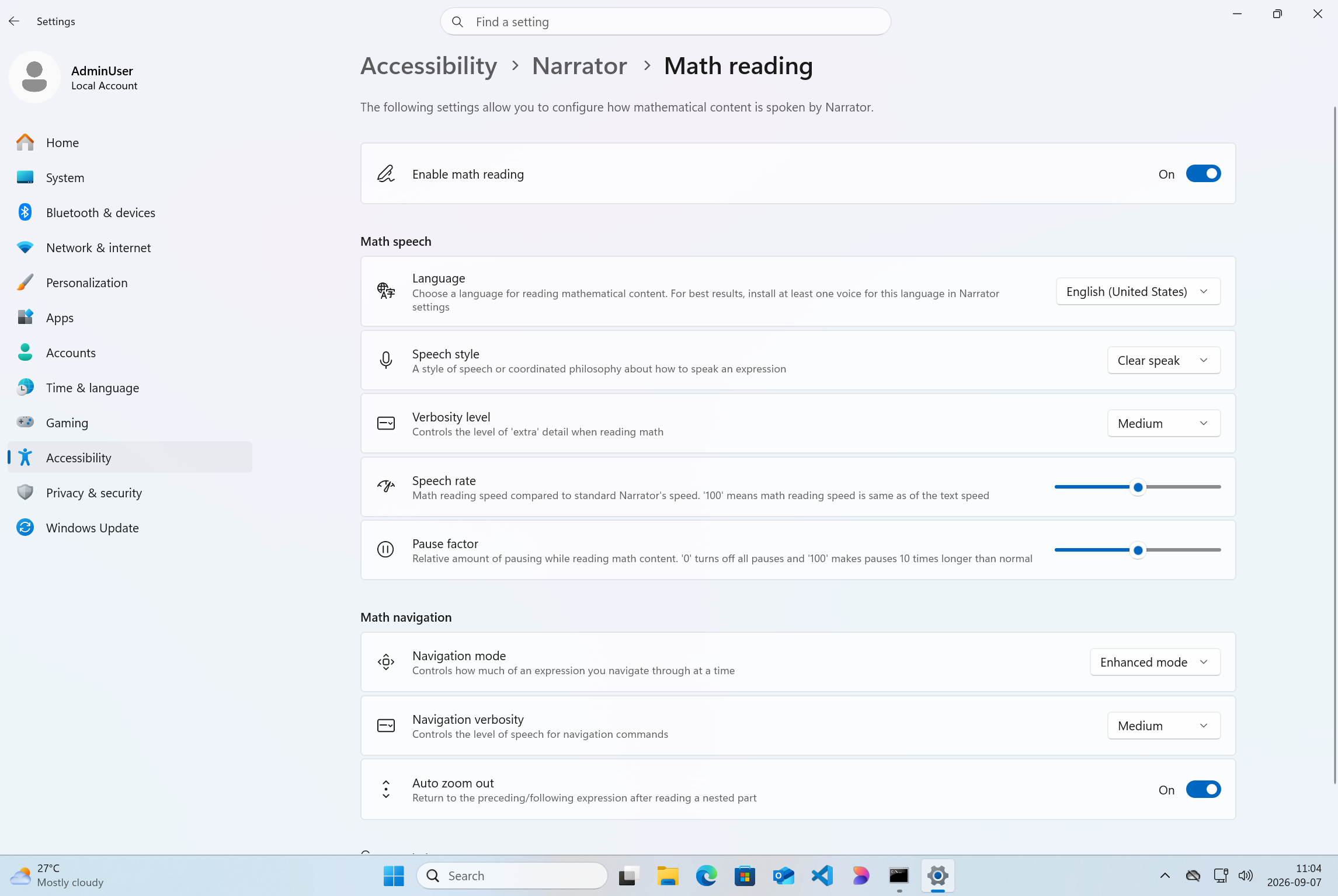
The Narrator Math reading settings page in Windows Settings.
[Taskbar]
- Improved underlying state persistence of taskbar settings related to multiple monitors across monitor connections and disconnections.
Reminder for Windows Insiders in the Experimental (26H1) channel
- These builds can be unstable and might be released with limited documentation.
- Many features in the Experimental (26H1) channel are rolled out using Controlled Feature Rollout technology, starting with a subset of Insiders and ramping up over time as we monitor feedback to see how they land before pushing them out to everyone in this channel.
- The desktop watermark shown at the lower right corner of the desktop is normal for Windows Insider pre-release builds.
- Some features in active development we preview with Windows Insiders might not be fully localized, and localization will happen over time as features are finalized. As you see issues with localization in your language, report those issues to us via Feedback Hub.
- Check out Flight Hub for a complete look at what build is in which Insider channel.
Source:

Windows 11 Insider Experimental (26H1) Preview Build 28120.3181 - Windows Insider Program
Release notes for Windows 11 Insider Experimental (26H1) Preview Build 28120.3181
learn.microsoft.com

Announcing new builds for 7 October 2026
Hello Windows Insiders, Today, we’re releasing new Windows 11 Insider Preview builds to the Beta and Experimental channels! Coming straight off the back of our Windows + Surface event, we have some exciting new features entering the Windows Inside
 blogs.windows.com
Check Windows Updates
UUP Dump:
64-bit ISO download:

Select language for Windows 11 Insider Preview Feature Update (28120.3181) amd64
Select language for Windows 11 Insider Preview Feature Update (28120.3181) amd64 on UUP dump. UUP dump lets you download Unified Update Platform files, like Windows Insider updates, directly from Windows Update.
uupdump.net
ARM64 ISO download:
Select language for Windows 11 Insider Preview Feature Update (28120.3181) arm64
Select language for Windows 11 Insider Preview Feature Update (28120.3181) arm64 on UUP dump. UUP dump lets you download Unified Update Platform files, like Windows Insider updates, directly from Windows Update.
uupdump.net

UUP Dump - Download Windows Insider ISO
UUP Dump is the most practical and easy way to get ISO images of any Insider Windows 10 or Windows 11 version, as soon as Microsoft has released a new build. UUP Dump creates a download configuration file according to your choices, downloads necessary files directly from Microsoft servers, and...
www.elevenforum.com
Last edited: