Microsoft Support:
This non-security out-of-band (OOB) update for Windows 11, versions 24H2, 25H2, and 26H2 (KB5134133) is cumulative. It includes updates from previous releases, along with additional non-security improvements.
Who should install this update
This out-of-band (OOB) update is intended for devices that do not receive current certificate trust list (CTL) updates, including updates to the list of untrusted certificates. Examples include devices in disconnected environments, devices that cannot access Microsoft’s certificate-update service and devices where automatic CTL updates are disabled.Improvements
This update includes fixes and improvements from the following previously released update:The following summary outlines key quality improvements addressed by this update. The bold text within the brackets indicates the item or area of the change.
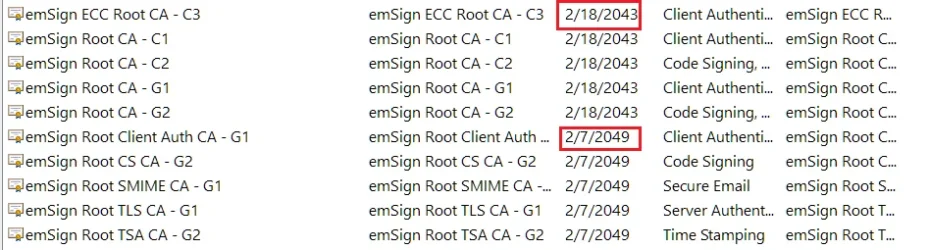
- [Certificates] This update includes an updated trusted root certificate payload in the Windows cumulative update for devices that cannot access Microsoft’s certificate-update service and devices where automatic certificate trust list (CTL) updates are disabled. To learn more, see Certificates and trust in Windows.
Components updates
AI componentsThis release updates the following AI components to version 1.2608.951.0: Image Search, Content Extraction, Semantic Analysis, and Settings Model. To learn more, see Release information for AI components.
Servicing stack update
Includes KB5127647 (Build 26100.9703), which improves the reliability of the Windows update installation process. To learn more about SSUs, see Servicing stack updates.
Known issues in this update
Symptoms
After installing this update, some devices might be unable to turn on Smart App Control in the Windows Security app if it has been turned off. On affected devices, the option to turn on Smart App Control might be grayed out.
Devices where Smart App Control is already turned on are not affected and remain protected.
Resolution
Important: This section contains information about modifying the registry. Before you modify the registry, back it up and make sure that you know how to restore it if a problem occurs. For more information, see How to back up and restore the registry in Windows.
Option #1: Modify the registry
You can modify the registry to restore the ability to turn on Smart App Control by following these steps:
IT administrators can instead choose to mitigate this issue for enterprise-managed devices managed by IT departments by installing and configuring the special Group Policies listed below.
Group Policy downloads with Group Policy name:
The special Group Policies can be found in Computer Configuration > Administrative Templates > {Group Policy name} > Windows 11, version 24H2, 25H2. After installing the Group Policies, configure the value for both settings to Enabled and restart your device(s) to apply the Group Policy settings.
Next steps: Microsoft is working on a resolution and will provide an update in an upcoming release.
After installing this update, some devices might be unable to turn on Smart App Control in the Windows Security app if it has been turned off. On affected devices, the option to turn on Smart App Control might be grayed out.
Devices where Smart App Control is already turned on are not affected and remain protected.
Resolution
Important: This section contains information about modifying the registry. Before you modify the registry, back it up and make sure that you know how to restore it if a problem occurs. For more information, see How to back up and restore the registry in Windows.
Option #1: Modify the registry
You can modify the registry to restore the ability to turn on Smart App Control by following these steps:
- Open a Command Prompt window by typing cmd in the Search box.
- Select Run as administrator.
- At the command prompt, enter the following commands. Then restart the device.
reg add "HKLM\SYSTEM\CurrentControlSet\Policies\Microsoft\FeatureManagement\Overrides" /v 2883193997 /t REG_DWORD /d 1 /f
reg add "HKLM\SYSTEM\CurrentControlSet\Policies\Microsoft\FeatureManagement\Overrides" /v 2850574478 /t REG_DWORD /d 1 /f
IT administrators can instead choose to mitigate this issue for enterprise-managed devices managed by IT departments by installing and configuring the special Group Policies listed below.
Group Policy downloads with Group Policy name:
- Download #1 for Windows 11, versions 24H2, 25H2, and 26H2 — KB5074105 261015_19222 Feature Preview
- Download #2 for Windows 11, versions 24H2, 25H2, and 26H2 — KB5074105 261015_19221 Feature Preview
The special Group Policies can be found in Computer Configuration > Administrative Templates > {Group Policy name} > Windows 11, version 24H2, 25H2. After installing the Group Policies, configure the value for both settings to Enabled and restart your device(s) to apply the Group Policy settings.
Next steps: Microsoft is working on a resolution and will provide an update in an upcoming release.
Symptoms
After installing the September 2026 non-security preview update KB5124010, or later updates, non-admin users might be unable to establish Remote Desktop connections to remote devices that have Administrator protection enabled. Attempts to connect might fail with error 0xC000000D and display the message, “The token that was passed to the function is invalid.” This issue primarily affects enterprise-managed remote devices used as Remote Desktop hosts with Administrator protection enabled, regardless of how the feature was enabled.
Note: If your organization uses Windows security baselines, published through the Microsoft Security Compliance Toolkit, Administrator protection is enabled by default in Windows 11, version 24H2, 25H2, and 26H2 security baselines, unless your organization has configured the policy differently.
Resolution
IT administrators can mitigate this issue on devices affected by the Remote Desktop connection failure by using their existing policy management method to temporarily turn off Administrator protection. Reset the User Account Control Type Of Admin Approval Mode policy in Microsoft Intune or Group Policy. For more information, see Administrator protection on Windows 11.
Next steps: Microsoft is working to address this issue in a future Windows update and will provide more information when it is available.
After installing the September 2026 non-security preview update KB5124010, or later updates, non-admin users might be unable to establish Remote Desktop connections to remote devices that have Administrator protection enabled. Attempts to connect might fail with error 0xC000000D and display the message, “The token that was passed to the function is invalid.” This issue primarily affects enterprise-managed remote devices used as Remote Desktop hosts with Administrator protection enabled, regardless of how the feature was enabled.
Note: If your organization uses Windows security baselines, published through the Microsoft Security Compliance Toolkit, Administrator protection is enabled by default in Windows 11, version 24H2, 25H2, and 26H2 security baselines, unless your organization has configured the policy differently.
Resolution
IT administrators can mitigate this issue on devices affected by the Remote Desktop connection failure by using their existing policy management method to temporarily turn off Administrator protection. Reset the User Account Control Type Of Admin Approval Mode policy in Microsoft Intune or Group Policy. For more information, see Administrator protection on Windows 11.
Next steps: Microsoft is working to address this issue in a future Windows update and will provide more information when it is available.
Symptoms
After installing the September 8, 2026, Windows security update (KB5124012), some USB Audio Class 1.0 devices might fail to start or produce audio. Affected devices might experience one or more of the following symptoms:
This issue is limited to USB Audio Class 1.0 devices.
Resolution
This issue is partially resolved in the out-of-band (OOB) update released on September 14, 2026, (KB5129195). This OOB update resolves the symptoms experienced on devices using 8-channel or 3D audio modes. Microsoft is working to address the other symptoms and will provide more information when it is available.
IT administrators who need an immediate workaround for the symptoms not addressed yet by the OOB update should contact Microsoft Support for Business for assistance.
After installing the September 8, 2026, Windows security update (KB5124012), some USB Audio Class 1.0 devices might fail to start or produce audio. Affected devices might experience one or more of the following symptoms:
- The device displays an error in Device Manager: "This device cannot start (Code 10).”
- No audio output.
- Volume controls are unresponsive or remain at zero.
- Sound settings are unresponsive or unavailable.
This issue is limited to USB Audio Class 1.0 devices.
Resolution
This issue is partially resolved in the out-of-band (OOB) update released on September 14, 2026, (KB5129195). This OOB update resolves the symptoms experienced on devices using 8-channel or 3D audio modes. Microsoft is working to address the other symptoms and will provide more information when it is available.
IT administrators who need an immediate workaround for the symptoms not addressed yet by the OOB update should contact Microsoft Support for Business for assistance.
How to get this update
Before you install this update
- For Windows Update: For Windows 11, version 24H2 and Windows 11, version 25H2, you must have the Windows update released on or after June 10, 2025 (such as KB5060842) installed before installing this update.
- For Windows Server Update Services (WSUS) deployment or when installing the standalone package from Microsoft Update Catalog: For Windows 11, version 24H2 and Windows 11, version 25H2, you must have the Windows update released on or after June 10, 2025 (such as KB5060842) installed before installing this update.
- For Servicing Stack Update (SSU): You must have the latest SSU installed to install this update.
Deployment
If you deploy dynamic updates such as this update to an existing Windows image, ensure the boot.stl file is included as part of the installation media. Failure to include the file might prevent devices from successfully starting from the installation media and can result in error code 0xc0430001.Note: The boot.stl file is used during Secure Boot validation and must match the Windows version and architecture of the image you are updating.
To ensure the boot.stl file is included as part of the installation media, do one of the following:
- Use the Update WinPE script to update an existing Windows image. (Recommended)
- Manually copy the boot.stl file from the device Windows\Boot\EFI folder to the corresponding folder on your installation media before deploying the update.
Install this update
To install this update, use one of the following Windows and Microsoft release channels.Available | Next Step |
|---|---|

| This update is available from the Microsoft Update Catalog. |

| To install this update, download the standalone package(s) for this update from the Microsoft Update Catalog. This update contains MSU files that require installation in a specific order. Follow the Arm64 installation instructions or x64 installation instructions, as appropriate. If you install additional Dynamic Update packages, use versions from the same release month as this update. If a Safe OS Dynamic Update or Setup Dynamic Update is not available for the same release month, use the most recently released version. Note This latest cumulative update includes updates for AI components. AI components are applicable only to Copilot+ PCs and will not install on other Windows client PCs or Windows Server. |
File information
A list of the files that are included in this update are provided in a CSV (Comma delimited) (*.csv) file. The file can be opened in a text editor such as Notepad or in Microsoft Excel.Note The English (United States) version of this software update might contain files for additional languages.

Source:
October 26, 2026—KB5134133 (OS Builds 26300.9725, 26200.9725 and 26100.9725) Out-of-band | Microsoft Support
October 26, 2026—KB5134133 (OS Builds 26300.9725, 26200.9725 and 26100.9725) Out-of-band
 support.microsoft.com
Check Windows Updates
UUP Dump:
64-bit ISO download:

Select language for Windows 11, version 24H2 (26100.9725) amd64
Select language for Windows 11, version 24H2 (26100.9725) amd64 on UUP dump. UUP dump lets you download Unified Update Platform files, like Windows Insider updates, directly from Windows Update.
uupdump.net
Select language for Windows 11, version 25H2 (26200.9725) arm64
Select language for Windows 11, version 25H2 (26200.9725) arm64 on UUP dump. UUP dump lets you download Unified Update Platform files, like Windows Insider updates, directly from Windows Update.
uupdump.net
Select language for Windows 11, version 26H2 (26300.9725) amd64
Select language for Windows 11, version 26H2 (26300.9725) amd64 on UUP dump. UUP dump lets you download Unified Update Platform files, like Windows Insider updates, directly from Windows Update.
uupdump.net
ARM64 ISO download:
Select language for Windows 11, version 24H2 (26100.9725) arm64
Select language for Windows 11, version 24H2 (26100.9725) arm64 on UUP dump. UUP dump lets you download Unified Update Platform files, like Windows Insider updates, directly from Windows Update.
uupdump.net
Select language for Windows 11, version 25H2 (26200.9725) arm64
Select language for Windows 11, version 25H2 (26200.9725) arm64 on UUP dump. UUP dump lets you download Unified Update Platform files, like Windows Insider updates, directly from Windows Update.
uupdump.net
Select language for Windows 11, version 26H2 (26300.9725) arm64
Select language for Windows 11, version 26H2 (26300.9725) arm64 on UUP dump. UUP dump lets you download Unified Update Platform files, like Windows Insider updates, directly from Windows Update.
uupdump.net

UUP Dump - Download Windows Insider ISO
UUP Dump is the most practical and easy way to get ISO images of any Insider Windows 10 or Windows 11 version, as soon as Microsoft has released a new build. UUP Dump creates a download configuration file according to your choices, downloads necessary files directly from Microsoft servers, and...
 www.elevenforum.com
Last edited: