Keyboard not working after Driver Updates - Lenovo ThinkPad T16


twiggs462

Member
Local time
6:55 PM
Posts
16
OS
Windows 11 Pro
Just bought a new Lenovo thinkpad t16. I cloned my drive from a thinkpad e15 with clonezilla.

Worked perfect! I went through windows updates just to get things working right. New bios updates, etc.

After a few reboots of updates I found when I got the the login screen of windows 11 the keyboard would not work.

I used the onscreen keyboard to gain access.

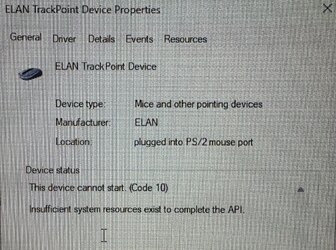
Device manager is showing after Intel - HIDClass - 2.2.1.386 and ELAN Mouse - 31.21.25.1 were installed the keyboard devices under that device type are all showing the hazard yellow sign.

Even my usb wireless external Logitech keyboard doesn't work (the mouse however does)

I tried removing these and reinstalling the drivers, rebooting, running the SFC and DISM commands I found online.

Nothing. What can I do? This is all brand new.
 
Windows Build/Version
Windows 11 Pro

My Computer My Computer

At a glance

Windows 11 ProAMD Ryzen AI 9 HX 370 w/ Radeon 890M32GBRTX 4070
OS
Windows 11 Pro
Computer type
Laptop
Manufacturer/Model
ASUS Zephyrus G16
CPU
AMD Ryzen AI 9 HX 370 w/ Radeon 890M
Memory
32GB
Graphics Card(s)
RTX 4070
Hard Drives
2TB Micron SSD for OS
2TB SK Hynix P41 for Storage
Internet Speed
1GB Fiber
Browser
Firefox
Screenshot 2023-01-19 at 7.47.14 PM.jpg
 

My Computer My Computer

At a glance

Windows 11 ProAMD Ryzen AI 9 HX 370 w/ Radeon 890M32GBRTX 4070
OS
Windows 11 Pro
Computer type
Laptop
Manufacturer/Model
ASUS Zephyrus G16
CPU
AMD Ryzen AI 9 HX 370 w/ Radeon 890M
Memory
32GB
Graphics Card(s)
RTX 4070
Hard Drives
2TB Micron SSD for OS
2TB SK Hynix P41 for Storage
Internet Speed
1GB Fiber
Browser
Firefox
Screenshot 2023-01-19 at 7.59.46 PM.jpg
 

My Computer My Computer

At a glance

Windows 11 ProAMD Ryzen AI 9 HX 370 w/ Radeon 890M32GBRTX 4070
OS
Windows 11 Pro
Computer type
Laptop
Manufacturer/Model
ASUS Zephyrus G16
CPU
AMD Ryzen AI 9 HX 370 w/ Radeon 890M
Memory
32GB
Graphics Card(s)
RTX 4070
Hard Drives
2TB Micron SSD for OS
2TB SK Hynix P41 for Storage
Internet Speed
1GB Fiber
Browser
Firefox
Screenshot 2023-01-19 at 8.00.22 PM.jpg
 

My Computer My Computer

At a glance

Windows 11 ProAMD Ryzen AI 9 HX 370 w/ Radeon 890M32GBRTX 4070
OS
Windows 11 Pro
Computer type
Laptop
Manufacturer/Model
ASUS Zephyrus G16
CPU
AMD Ryzen AI 9 HX 370 w/ Radeon 890M
Memory
32GB
Graphics Card(s)
RTX 4070
Hard Drives
2TB Micron SSD for OS
2TB SK Hynix P41 for Storage
Internet Speed
1GB Fiber
Browser
Firefox
Welcome to the forum. Here's what I would try.
1. First go to windows update and pause updates.

2. Then attempt to roll back the drivers for the troublesome devices. Device Manager>Right click on device and select rollback drive (if the option is available)Restart if you are successful in rolling back driver.

3. If that doesn't work, in device manager, uninstall the troublesome devices, using Option #3 in this tutorial. Uninstall Driver in Windows 11 Tutorial

4. Always get your drivers from the manufacturer if possible. You should have an app called Lenovo ThinkVantage. Use it to update your drivers as well as finding missing drivers. Restart.
NEVER let windows update update your bios. Do it manually or through ThinkVantage.

5. While updates are paused disable driver updates by using this tutorial. Since you have Pro I would use the group policy method, but the regedit method also works. If anyone reading this has Home they would use use the regedit method. Enable or Disable Include Drivers with Windows Updates in Windows 11 Tutorial

6. Un-pause Windows update

7. If still no luck, attempt a system restore.

8. Still not working, bite the bullet and clean install.

Others may disagree with me but I think your problem actually began when you cloned the e15 to the T16. At first boot, Windows installed generic drivers for your devices and they worked, but remnants of the old e15 drivers also still existed both in driverstore and in the registry. Looking at the Lenovo site, though the drivers for the 2 devices are similar, they are NOT the same. When WU updated the drivers it read the wrong remnants in the registry and everything ended all messed up.

A word to the wise, SOMETIMES moving an installation from one machine to another will work, but it's not a clean installation as a ton of junk is left behind. To correctly move an installation from one machine to a different machine with different specs, use backup software that can restore a system image to dissimilar hardware. It prevents you from having things like this bite you in the butt later.
 
Last edited:

My Computers My Computers

  • At a glance

    Windows 11 Pro 25H2 26200.8655i9-10900 10 core 20 threads32 gbnone-Intel UHD Graphics 630
    OS
    Windows 11 Pro 25H2 26200.8655
    Computer type
    PC/Desktop
    Manufacturer/Model
    Dell Optiplex 7080
    CPU
    i9-10900 10 core 20 threads
    Motherboard
    DELL 0J37VM
    Memory
    32 gb
    Graphics Card(s)
    none-Intel UHD Graphics 630
    Sound Card
    Integrated Realtek
    Monitor(s) Displays
    Benq 27
    Screen Resolution
    2560x1440
    Hard Drives
    2x1tb Solidigm m.2 nvme /External drives 512gb Samsung m.2 sata+2tb Kingston m2.nvme
    PSU
    500w
    Case
    MT
    Cooling
    Dell Premium
    Keyboard
    Logitech wired
    Mouse
    Logitech wireless
    Internet Speed
    so slow I'm too embarrassed to tell
    Browser
    #1 Edge #2 Firefox
    Antivirus
    Defender+MWB Premium
  • At a glance

    Windows 11 Pro 24H2 26200.8457AMD Ryzen 7 6800U32 gbintegrated
    Operating System
    Windows 11 Pro 24H2 26200.8457
    Computer type
    PC/Desktop
    Manufacturer/Model
    Beelink Mini PC SER5
    CPU
    AMD Ryzen 7 6800U
    Memory
    32 gb
    Graphics card(s)
    integrated
    Sound Card
    integrated
    Monitor(s) Displays
    Benq 27
    Screen Resolution
    2560x1440
    Hard Drives
    1TB Crucial nvme
    Keyboard
    Logitech wired
    Mouse
    Logitech wireless
    Internet Speed
    still too embarrassed to tell
    Browser
    Firefox
    Antivirus
    Defender
    Other Info
    System 3 is non compliant Dell 9020 i7-4770/24gb ram Win11 PRO 26200.8457
Thanks for the reply glasskuter. So my main reason for doing this is because this laptop is on a domain, has all kinds of custom settings for a co-worker. Doing it from scratch takes a while.

I'll do it, but do you know what the best migration software might be to move the user data and settings?

The OS and the drivers are the easy part.
 

My Computer My Computer

At a glance

Windows 11 ProAMD Ryzen AI 9 HX 370 w/ Radeon 890M32GBRTX 4070
OS
Windows 11 Pro
Computer type
Laptop
Manufacturer/Model
ASUS Zephyrus G16
CPU
AMD Ryzen AI 9 HX 370 w/ Radeon 890M
Memory
32GB
Graphics Card(s)
RTX 4070
Hard Drives
2TB Micron SSD for OS
2TB SK Hynix P41 for Storage
Internet Speed
1GB Fiber
Browser
Firefox
You can also do a Repair Install which allows you to keep all your apps and files.


Also, there's no need to take a photo and upload it to your computer to upload here.
Windows 11 comes with a handy app called Snipping Tool. It allows you to capture any part of your screen and copy/paste it directly to the forum.
You'll find it in the "S" section of your All Apps list and from there you can pin it to your Start menu or taskbar.

1674192770694.png
 

My Computers My Computers

  • At a glance

    Win 11 Pro 25H2 26200.8655Intel® Core™ i7-14700KG.SKILL Ripjaws S5 Series 64GB (2 x 32GB) DDR5ASUS GeForce RTX 4070 Super 12GB
    OS
    Win 11 Pro 25H2 26200.8655
    Computer type
    PC/Desktop
    Manufacturer/Model
    Self Built
    CPU
    Intel® Core™ i7-14700K
    Motherboard
    ASUS TUF Z690-PLUS WIFI BIOS 4505 11/29/25
    Memory
    G.SKILL Ripjaws S5 Series 64GB (2 x 32GB) DDR5
    Graphics Card(s)
    ASUS GeForce RTX 4070 Super 12GB
    Sound Card
    Sound Blaster AE-5 Plus
    Monitor(s) Displays
    ASUS TUF Gaming 27" 2K HDR Gaming
    Screen Resolution
    2560 x 1440
    Hard Drives
    Samsung 990 Pro 1TB NVMe (Win 11 25H2)
    SK hynix P41 500GB NVMe 25H2 DEV/Games
    SK hynix P41 2TB NVMe (x3)
    Crucial P3 Plus 4TB
    PSU
    Corsair RM850x Shift
    Case
    Antec Dark Phantom DP502 FLUX
    Cooling
    Corsair Nautilus 360 RS AIO
    Keyboard
    Logitech MK 320
    Mouse
    Razer Basilisk V3
    Internet Speed
    750Mbs
    Browser
    Firefox
    Antivirus
    Winows Security
    Other Info
    MR 8.1 Home
  • At a glance

    Win 11 Pro 25H2 26200.8655Intel Core i7-11700F64 GB DDR4MSI GeForce RTX 3060 Ventus 2X 12GB
    Operating System
    Win 11 Pro 25H2 26200.8655
    Computer type
    PC/Desktop
    Manufacturer/Model
    Self Built
    CPU
    Intel Core i7-11700F
    Motherboard
    Asus TUF Gaming Z590 Plus WiFi (BIOS 2803)
    Memory
    64 GB DDR4
    Graphics card(s)
    MSI GeForce RTX 3060 Ventus 2X 12GB
    Sound Card
    SoundBlaster Audigy Fx V2
    Monitor(s) Displays
    Samsung F27T350
    Screen Resolution
    1920x1080
    Hard Drives
    Samsung 980 Pro 1TB
    Samsung 970 EVO Plus 2TB
    Samsung 870 EVO 500GB SSD
    PSU
    Corsair HX750
    Case
    Cougar MX330-G Window
    Cooling
    Thermalright Frozen Edge 240 Black AIO
    Internet Speed
    350Mbps
    Browser
    Firefox
    Antivirus
    Windows Security
  • System Three
    Win 11 Pro 25H2 26200.8655
    ASUS PRIME Z370-P II BIOS 3004 7/12/21
    Intel Core i7-8700 CPU @ 3.20GHz
    32GB DDR4 RAM (4x8)
    iGPU Intel UHD Graphics 630
    Mid-Tower Desktop
There may be something I don't know about, I'm not familiar of any way to blanket move only software and user data. Some softwares have options that can backup your settings for that particular software. The only way I know of to keep everything intact is restoring an image.

I also do not know of any FREE backup solution that restores to dissimilar hardware. I use Macrium Workstation Redeploy so it's the only one I am familiar with, but it is very expensive.
Macrium Reflect 8 Home will also do it. It costs $69.95 and the process is the same.

This article lists other less expensive options that is supposed to do do what you want. The price of each piece of software is listed at the bottom of each's description. I am not personally familiar with any of them except Macrium. You can research them.

I know re-installing is a pain, but if you have only one system you are deploying, you may want to go through the tedious process of reinstalling and setting up custom settings in everything rather than purchasing software.

I disagree that a repair install will help you. It will not remove the bad/corrupted drivers.

EDIT: I just thought of something.You might use option #4 in the above tutorial to uninstall the corrupted driver using the command prompt method.
 
Last edited:

My Computers My Computers

  • At a glance

    Windows 11 Pro 25H2 26200.8655i9-10900 10 core 20 threads32 gbnone-Intel UHD Graphics 630
    OS
    Windows 11 Pro 25H2 26200.8655
    Computer type
    PC/Desktop
    Manufacturer/Model
    Dell Optiplex 7080
    CPU
    i9-10900 10 core 20 threads
    Motherboard
    DELL 0J37VM
    Memory
    32 gb
    Graphics Card(s)
    none-Intel UHD Graphics 630
    Sound Card
    Integrated Realtek
    Monitor(s) Displays
    Benq 27
    Screen Resolution
    2560x1440
    Hard Drives
    2x1tb Solidigm m.2 nvme /External drives 512gb Samsung m.2 sata+2tb Kingston m2.nvme
    PSU
    500w
    Case
    MT
    Cooling
    Dell Premium
    Keyboard
    Logitech wired
    Mouse
    Logitech wireless
    Internet Speed
    so slow I'm too embarrassed to tell
    Browser
    #1 Edge #2 Firefox
    Antivirus
    Defender+MWB Premium
  • At a glance

    Windows 11 Pro 24H2 26200.8457AMD Ryzen 7 6800U32 gbintegrated
    Operating System
    Windows 11 Pro 24H2 26200.8457
    Computer type
    PC/Desktop
    Manufacturer/Model
    Beelink Mini PC SER5
    CPU
    AMD Ryzen 7 6800U
    Memory
    32 gb
    Graphics card(s)
    integrated
    Sound Card
    integrated
    Monitor(s) Displays
    Benq 27
    Screen Resolution
    2560x1440
    Hard Drives
    1TB Crucial nvme
    Keyboard
    Logitech wired
    Mouse
    Logitech wireless
    Internet Speed
    still too embarrassed to tell
    Browser
    Firefox
    Antivirus
    Defender
    Other Info
    System 3 is non compliant Dell 9020 i7-4770/24gb ram Win11 PRO 26200.8457
I disagree that a repair install will help you. It will not remove the bad/corrupted drivers.

I stand corrected, I thought it would.
 

My Computers My Computers

  • At a glance

    Win 11 Pro 25H2 26200.8655Intel® Core™ i7-14700KG.SKILL Ripjaws S5 Series 64GB (2 x 32GB) DDR5ASUS GeForce RTX 4070 Super 12GB
    OS
    Win 11 Pro 25H2 26200.8655
    Computer type
    PC/Desktop
    Manufacturer/Model
    Self Built
    CPU
    Intel® Core™ i7-14700K
    Motherboard
    ASUS TUF Z690-PLUS WIFI BIOS 4505 11/29/25
    Memory
    G.SKILL Ripjaws S5 Series 64GB (2 x 32GB) DDR5
    Graphics Card(s)
    ASUS GeForce RTX 4070 Super 12GB
    Sound Card
    Sound Blaster AE-5 Plus
    Monitor(s) Displays
    ASUS TUF Gaming 27" 2K HDR Gaming
    Screen Resolution
    2560 x 1440
    Hard Drives
    Samsung 990 Pro 1TB NVMe (Win 11 25H2)
    SK hynix P41 500GB NVMe 25H2 DEV/Games
    SK hynix P41 2TB NVMe (x3)
    Crucial P3 Plus 4TB
    PSU
    Corsair RM850x Shift
    Case
    Antec Dark Phantom DP502 FLUX
    Cooling
    Corsair Nautilus 360 RS AIO
    Keyboard
    Logitech MK 320
    Mouse
    Razer Basilisk V3
    Internet Speed
    750Mbs
    Browser
    Firefox
    Antivirus
    Winows Security
    Other Info
    MR 8.1 Home
  • At a glance

    Win 11 Pro 25H2 26200.8655Intel Core i7-11700F64 GB DDR4MSI GeForce RTX 3060 Ventus 2X 12GB
    Operating System
    Win 11 Pro 25H2 26200.8655
    Computer type
    PC/Desktop
    Manufacturer/Model
    Self Built
    CPU
    Intel Core i7-11700F
    Motherboard
    Asus TUF Gaming Z590 Plus WiFi (BIOS 2803)
    Memory
    64 GB DDR4
    Graphics card(s)
    MSI GeForce RTX 3060 Ventus 2X 12GB
    Sound Card
    SoundBlaster Audigy Fx V2
    Monitor(s) Displays
    Samsung F27T350
    Screen Resolution
    1920x1080
    Hard Drives
    Samsung 980 Pro 1TB
    Samsung 970 EVO Plus 2TB
    Samsung 870 EVO 500GB SSD
    PSU
    Corsair HX750
    Case
    Cougar MX330-G Window
    Cooling
    Thermalright Frozen Edge 240 Black AIO
    Internet Speed
    350Mbps
    Browser
    Firefox
    Antivirus
    Windows Security
  • System Three
    Win 11 Pro 25H2 26200.8655
    ASUS PRIME Z370-P II BIOS 3004 7/12/21
    Intel Core i7-8700 CPU @ 3.20GHz
    32GB DDR4 RAM (4x8)
    iGPU Intel UHD Graphics 630
    Mid-Tower Desktop
I thought it would
The reason I do not think it would is because it was the drivers from windows update that broke him. With an inplace upgrade, the only way a driver will be replaced is if the driver needs to be updated but that won’t happen if the in-place upgrade is the same version (same driver will be used)
If I am incorrect in this, someone please correct me.
 

My Computers My Computers

  • At a glance

    Windows 11 Pro 25H2 26200.8655i9-10900 10 core 20 threads32 gbnone-Intel UHD Graphics 630
    OS
    Windows 11 Pro 25H2 26200.8655
    Computer type
    PC/Desktop
    Manufacturer/Model
    Dell Optiplex 7080
    CPU
    i9-10900 10 core 20 threads
    Motherboard
    DELL 0J37VM
    Memory
    32 gb
    Graphics Card(s)
    none-Intel UHD Graphics 630
    Sound Card
    Integrated Realtek
    Monitor(s) Displays
    Benq 27
    Screen Resolution
    2560x1440
    Hard Drives
    2x1tb Solidigm m.2 nvme /External drives 512gb Samsung m.2 sata+2tb Kingston m2.nvme
    PSU
    500w
    Case
    MT
    Cooling
    Dell Premium
    Keyboard
    Logitech wired
    Mouse
    Logitech wireless
    Internet Speed
    so slow I'm too embarrassed to tell
    Browser
    #1 Edge #2 Firefox
    Antivirus
    Defender+MWB Premium
  • At a glance

    Windows 11 Pro 24H2 26200.8457AMD Ryzen 7 6800U32 gbintegrated
    Operating System
    Windows 11 Pro 24H2 26200.8457
    Computer type
    PC/Desktop
    Manufacturer/Model
    Beelink Mini PC SER5
    CPU
    AMD Ryzen 7 6800U
    Memory
    32 gb
    Graphics card(s)
    integrated
    Sound Card
    integrated
    Monitor(s) Displays
    Benq 27
    Screen Resolution
    2560x1440
    Hard Drives
    1TB Crucial nvme
    Keyboard
    Logitech wired
    Mouse
    Logitech wireless
    Internet Speed
    still too embarrassed to tell
    Browser
    Firefox
    Antivirus
    Defender
    Other Info
    System 3 is non compliant Dell 9020 i7-4770/24gb ram Win11 PRO 26200.8457
Welcome to the forum. Here's what I would try.
1. First go to windows update and pause updates.

2. Then attempt to roll back the drivers for the troublesome devices. Device Manager>Right click on device and select rollback drive (if the option is available)Restart if you are successful in rolling back driver.

3. If that doesn't work, in device manager, uninstall the troublesome devices, using Option #3 in this tutorial. Uninstall Driver in Windows 11 Tutorial

4. Always get your drivers from the manufacturer if possible. You should have an app called Lenovo ThinkVantage. Use it to update your drivers as well as finding missing drivers. Restart.
NEVER let windows update update your bios. Do it manually or through ThinkVantage.

5. While updates are paused disable driver updates by using this tutorial. Since you have Pro I would use the group policy method, but the regedit method also works. If anyone reading this has Home they would use use the regedit method. Enable or Disable Include Drivers with Windows Updates in Windows 11 Tutorial

6. Un-pause Windows update

7. If still no luck, attempt a system restore.

8. Still not working, bite the bullet and clean install.

Others may disagree with me but I think your problem actually began when you cloned the e15 to the T16. At first boot, Windows installed generic drivers for your devices and they worked, but remnants of the old e15 drivers also still existed both in driverstore and in the registry. Looking at the Lenovo site, though the drivers for the 2 devices are similar, they are NOT the same. When WU updated the drivers it read the wrong remnants in the registry and everything ended all messed up.

A word to the wise, SOMETIMES moving an installation from one machine to another will work, but it's not a clean installation as a ton of junk is left behind. To correctly move an installation from one machine to a different machine with different specs, use backup software that can restore a system image to dissimilar hardware. It prevents you from having things like this bite you in the butt later.
Ha ecuou tried using Control Panel on a 15inch screen?
Like all built in Windows apps the text font is about two points high and they don't respond to any form of zoom settings and so are basically unuseable on any screen under 24 inches. I am using a Google phone to write this. It's not possible to access this forum using my win 11 computer.
Says my username is wrong and my email address is incorrect and in use by a n other.
Log in using my android phone no problem
 

My Computer My Computer

At a glance

Windows 11no idea4no idea
OS
Windows 11
Computer type
Laptop
Manufacturer/Model
Lenovo 14 inch
CPU
no idea
Motherboard
standard
Memory
4
Graphics Card(s)
no idea
Sound Card
standard
Monitor(s) Displays
built in 14 inch
Screen Resolution
no idea
Hard Drives
solid state but small
PSU
outside on a cable
Cooling
fan
Keyboard
English
Mouse
none - just a touch pad
Internet Speed
30meg
Browser
all
Antivirus
Norton 360
Other Info
its a straight off the shelf cheap laptop by lenovo

Latest Support Threads

Back
Top Bottom