killing stubborn processes


cokedude

Active member
Member
Local time
11:42 PM
Posts
60
OS
10 and 11
Sometimes I have a very stubborn process that I can not kill with task manager, taskkill, or wmic. This usually happens to chrome or firefox. The best guide I have found has been this. Does anyone have any other ideas for killing stubborn processes?


1. Try to kill with task manager.
Does not work.

2. Try to kill with taskkill. taskkill does point out there is an issue with a parent process. So also try to close that.
Does not work.

Code:
C:\>taskkill /f /t /PID 10296
ERROR: The process with PID 10296 (child process of PID 11824) could not be terminated.
Reason: Access is denied.

C:\>taskkill /IM firefox.exe /f /t
ERROR: The process with PID 10296 (child process of PID 11824) could not be terminated.
Reason: Access is denied.

C:\>taskkill /f /t /PID 10296
ERROR: The process with PID 10296 (child process of PID 11824) could not be terminated.
Reason: Access is denied.

C:\>taskkill /f /t /PID 11824
ERROR: The process "11824" not found.

3. Try to kill with wmic.
Does not work.

Code:
C:\>wmic process where name='firefox.exe' delete
Deleting instance \\GHOST\ROOT\CIMV2:Win32_Process.Handle="10296"
ERROR:
Description = Access denied

One other interesting thing I found while google searching is this. It gives you the ability to look at all your columns in wmic.

Code:
wmic process where name="firefox.exe" get /format:htable > c:process.htm

Does anyone else have any suggestions?
 

My Computer My Computer

At a glance

10 and 11
OS
10 and 11
Computer type
Laptop
@cokedude

Maybe I don't understand the question.
Just "close" Firefox.

You understand that Firefox needs to run all those other instances?
 

My Computers My Computers

  • At a glance

    Win 11 Home ♦♦♦26200.8655 ♦♦♦♦♦♦♦25H2AMD Ryzen 7 3700XG.Skill (F4-3200C14D-16GTZKW)EVGA RTX 2070 (08G-P4-2171-KR)
    OS
    Win 11 Home ♦♦♦26200.8655 ♦♦♦♦♦♦♦25H2
    Computer type
    PC/Desktop
    Manufacturer/Model
    Built by Ghot® [May 2020]
    CPU
    AMD Ryzen 7 3700X
    Motherboard
    Asus Pro WS X570-ACE (BIOS 5302)
    Memory
    G.Skill (F4-3200C14D-16GTZKW)
    Graphics Card(s)
    EVGA RTX 2070 (08G-P4-2171-KR)
    Sound Card
    Realtek ALC1220P / ALC S1220A
    Monitor(s) Displays
    Dell U3011 30"
    Screen Resolution
    2560 x 1600
    Hard Drives
    2x Samsung 860 EVO 500GB,
    WD 4TB Black FZBX - SATA III,
    WD 8TB Black FZBX - SATA III,
    DRW-24B1ST CD/DVD Burner
    PSU
    PC Power & Cooling 750W Quad EPS12V
    Case
    Cooler Master ATCS 840 Tower
    Cooling
    CM Hyper 212 EVO (push/pull)
    Keyboard
    Ducky DK9008 Shine II Blue LED
    Mouse
    Logitech Optical M-100
    Internet Speed
    300/300
    Browser
    Firefox (latest)
    Antivirus
    Bitdefender Total Security
    Other Info
    Speakers: Klipsch Pro Media 2.1
  • At a glance

    Windows XP Pro 32bit w/SP3AMD Athlon 64 X2 5000+ (OC'd @ 3.2Ghz)TWIN2X2048-6400C4DHX (2 x 1GB, DDR2 800)EVGA 256-P2-N758-TR GeForce 8600GT SSC
    Operating System
    Windows XP Pro 32bit w/SP3
    Computer type
    PC/Desktop
    Manufacturer/Model
    Built by Ghot® (not in use)
    CPU
    AMD Athlon 64 X2 5000+ (OC'd @ 3.2Ghz)
    Motherboard
    ASUS M2N32-SLI Deluxe Wireless Edition
    Memory
    TWIN2X2048-6400C4DHX (2 x 1GB, DDR2 800)
    Graphics card(s)
    EVGA 256-P2-N758-TR GeForce 8600GT SSC
    Sound Card
    Onboard
    Monitor(s) Displays
    ViewSonic G90FB Black 19" Professional (CRT)
    Screen Resolution
    up to 2048 x 1536
    Hard Drives
    WD 36GB 10,000rpm Raptor SATA
    Seagate 80GB 7200rpm SATA
    Lite-On LTR-52246S CD/RW
    Lite-On LH-18A1P CD/DVD Burner
    PSU
    PC Power & Cooling Silencer 750 Quad EPS12V
    Case
    Generic Beige case, 80mm fans
    Cooling
    ZALMAN 9500A 92mm CPU Cooler
    Keyboard
    Logitech Classic Keybooard 200
    Mouse
    Logitech Optical M-BT96a
    Internet Speed
    300/300
    Browser
    Firefox 3.x ??
    Antivirus
    Symantec (Norton)
    Other Info
    Still assembled, still runs. Haven't turned it on for 15 years?
@cokedude

Maybe I don't understand the question.
Just "close" Firefox.

You understand that Firefox needs to run all those other instances?

I have attempted to close it. It is not closing properly. Sometimes programs do not close properly. That is the case.
 

My Computer My Computer

At a glance

10 and 11
OS
10 and 11
Computer type
Laptop
I have attempted to close it. It is not closing properly. Sometimes programs do not close properly. That is the case.


Maybe start by opening a Terminal as Admin and running sfc /scannow
...and then running Dism /Online /Cleanup-Image /RestoreHealth


It sounds like there may be some other issues involved.
If the ONLY program that's hard to close is Firefox, then you may have a FF problem.
If there are other programs that also don't close easily, then you probably have a larger issue.
 

My Computers My Computers

  • At a glance

    Win 11 Home ♦♦♦26200.8655 ♦♦♦♦♦♦♦25H2AMD Ryzen 7 3700XG.Skill (F4-3200C14D-16GTZKW)EVGA RTX 2070 (08G-P4-2171-KR)
    OS
    Win 11 Home ♦♦♦26200.8655 ♦♦♦♦♦♦♦25H2
    Computer type
    PC/Desktop
    Manufacturer/Model
    Built by Ghot® [May 2020]
    CPU
    AMD Ryzen 7 3700X
    Motherboard
    Asus Pro WS X570-ACE (BIOS 5302)
    Memory
    G.Skill (F4-3200C14D-16GTZKW)
    Graphics Card(s)
    EVGA RTX 2070 (08G-P4-2171-KR)
    Sound Card
    Realtek ALC1220P / ALC S1220A
    Monitor(s) Displays
    Dell U3011 30"
    Screen Resolution
    2560 x 1600
    Hard Drives
    2x Samsung 860 EVO 500GB,
    WD 4TB Black FZBX - SATA III,
    WD 8TB Black FZBX - SATA III,
    DRW-24B1ST CD/DVD Burner
    PSU
    PC Power & Cooling 750W Quad EPS12V
    Case
    Cooler Master ATCS 840 Tower
    Cooling
    CM Hyper 212 EVO (push/pull)
    Keyboard
    Ducky DK9008 Shine II Blue LED
    Mouse
    Logitech Optical M-100
    Internet Speed
    300/300
    Browser
    Firefox (latest)
    Antivirus
    Bitdefender Total Security
    Other Info
    Speakers: Klipsch Pro Media 2.1
  • At a glance

    Windows XP Pro 32bit w/SP3AMD Athlon 64 X2 5000+ (OC'd @ 3.2Ghz)TWIN2X2048-6400C4DHX (2 x 1GB, DDR2 800)EVGA 256-P2-N758-TR GeForce 8600GT SSC
    Operating System
    Windows XP Pro 32bit w/SP3
    Computer type
    PC/Desktop
    Manufacturer/Model
    Built by Ghot® (not in use)
    CPU
    AMD Athlon 64 X2 5000+ (OC'd @ 3.2Ghz)
    Motherboard
    ASUS M2N32-SLI Deluxe Wireless Edition
    Memory
    TWIN2X2048-6400C4DHX (2 x 1GB, DDR2 800)
    Graphics card(s)
    EVGA 256-P2-N758-TR GeForce 8600GT SSC
    Sound Card
    Onboard
    Monitor(s) Displays
    ViewSonic G90FB Black 19" Professional (CRT)
    Screen Resolution
    up to 2048 x 1536
    Hard Drives
    WD 36GB 10,000rpm Raptor SATA
    Seagate 80GB 7200rpm SATA
    Lite-On LTR-52246S CD/RW
    Lite-On LH-18A1P CD/DVD Burner
    PSU
    PC Power & Cooling Silencer 750 Quad EPS12V
    Case
    Generic Beige case, 80mm fans
    Cooling
    ZALMAN 9500A 92mm CPU Cooler
    Keyboard
    Logitech Classic Keybooard 200
    Mouse
    Logitech Optical M-BT96a
    Internet Speed
    300/300
    Browser
    Firefox 3.x ??
    Antivirus
    Symantec (Norton)
    Other Info
    Still assembled, still runs. Haven't turned it on for 15 years?
Did you try taskkill /IM firefox.exe /T /F
Or whatever the application exe
Not /f /t


My Computers My Computers

  • At a glance

    Windows 11 Pro 25H2 Build 26200.8655Intel(R) Core(TM) i7-4770K CPU @ 3.50GHz32.0 GB of I forget and the box is in storage.Gigabyte nVidia GeForce GTX 1660 Super OC 6GB
    OS
    Windows 11 Pro 25H2 Build 26200.8655
    Computer type
    PC/Desktop
    Manufacturer/Model
    Sin-built 2013
    CPU
    Intel(R) Core(TM) i7-4770K CPU @ 3.50GHz
    Motherboard
    ASUS ROG Maximus VI Formula
    Memory
    32.0 GB of I forget and the box is in storage.
    Graphics Card(s)
    Gigabyte nVidia GeForce GTX 1660 Super OC 6GB
    Sound Card
    ROG SupremeFX Formula 8-Channel High Definition Audio
    Monitor(s) Displays
    5 x LG 25MS500-B - 1 x 24MK430H-B - 1 x Wacom Pro 22" Touch Screen Tablet
    Screen Resolution
    All over the place
    Hard Drives
    Too many to list.
    OS on Samsung 1TB 870 QVO SATA
    PSU
    Silverstone 1500
    Case
    NZXT Phantom 820 Full-Tower Case
    Cooling
    Noctua NH-D15 Elite Class Dual Tower CPU Cooler / 6 x EziDIY 120mm / 2 x Corsair 140mm somethings / 1 x 140mm Thermaltake something / 2 x 200mm Corsair.
    Keyboard
    Corsair K95 / Logitech diNovo Edge Wireless
    Mouse
    Logitech: G402 / G502 / Mx Masters / Mx Air Cordless
    Internet Speed
    2000/500Mbps
    Browser
    All sorts
    Antivirus
    Kaspersky Premium
    Other Info
    ㅤㅤㅤㅤㅤㅤㅤㅤㅤㅤㅤㅤㅤㅤㅤㅤㅤㅤㅤㅤㅤㅤㅤㅤㅤㅤㅤㅤㅤㅤㅤㅤㅤㅤㅤㅤㅤㅤㅤㅤ⠀⠀⠀⠀⠀⠀⠀⠀⠀⠀
    TP-Link BE9300 WiFi 7 Bluetooth 5.4 (Archer TBE550E)
    TP-Link TX201 V1 2.5GB Lan

    Grandstream HT812 - VoIP
    ASUS DSL-AX82U - Mesh
    ASUS RT-AC68U - Mesh
    ASUS RT-BE88U Router

    Brother MFC-L2880DW Printer

    I’m on a horse.
  • At a glance

    Windows 11 Pro 25H2 Build 26200.8655 (Wifes)Intel Core 12th Gen i5-1240P Processor (1.7 -...16GB LPDDR5 RAMIntel Iris Xe Graphics Processor
    Operating System
    Windows 11 Pro 25H2 Build 26200.8655 (Wifes)
    Computer type
    Laptop
    Manufacturer/Model
    LENOVO Yoga 7 14IRL8 - 7i EVO OLED 14" Touchscreen i5 12 Core 16GB/512GB
    CPU
    Intel Core 12th Gen i5-1240P Processor (1.7 - 4.4GHz)
    Memory
    16GB LPDDR5 RAM
    Graphics card(s)
    Intel Iris Xe Graphics Processor
    Sound Card
    Optimized with Dolby Atmos®
    Screen Resolution
    QHD 2880 x 1800 OLED
    Hard Drives
    M.2 512GB
    Antivirus
    Defender / Malwarebytes
    Other Info
    …still on a horse.
  • Yoga 7 2-in-1 14IML9 - Type 83DJ (Wifes)

    Processor: Intel® Core™ Ultra 7 155H Processor(Core™ Ultra 7 155H)
    Memory: 32GB LPD5X-7467
    Hard Drive: 1 TB SSD PCIe
    Wireless Network: 1x Wi-Fi 6E 2x2 AX; Bluetooth® 5.1 or above
    Ports: 1 x HDMI 2.1 TMDS; 1 x Novo Button; 1 x Combo Audio Jack
    2 x USB-C (USB 4.0)
    1 x USB-A 3.2 Gen 1
    Camera: 1080P FHD IR Hybrid with Dual Microphone and Privacy Shutter
    Graphics: Intel® Arc™ Graphics
    Monitor: 14" 2.8K
Grab Process Hacker:


My Computer My Computer

At a glance

Windows 11 Pro 24H2i7 Ultra16GBIntel
OS
Windows 11 Pro 24H2
Computer type
Laptop
Manufacturer/Model
LG
CPU
i7 Ultra
Memory
16GB
Graphics Card(s)
Intel
Sound Card
Intel Realtek
Monitor(s) Displays
Laptop 17" & TB4 Dell 27" QHD Ultrasharp w/integral TB4 hub
Screen Resolution
2560x1600
Hard Drives
1TB SSD, 5 external WDs
Mouse
Logitech Master MX 3S
Browser
Vivaldi
Antivirus
Kaspersky Premium Suite
If you're trying to stop Firefox from running in the background, try this:

1750432160365.webp
 

My Computer My Computer

At a glance

Windows 11
OS
Windows 11
Computer type
PC/Desktop
Manufacturer/Model
Custom Built
I have attempted to close it. It is not closing properly. Sometimes programs do not close properly. That is the case.

What is "not closing properly" supposed to mean? Provide a detailed description.
 

My Computer My Computer

At a glance

Windows 11 ProIntel(R) Core(TM) i7-5930K CPU @ 3.50GHzNVIDIA GeForce GTX 970
OS
Windows 11 Pro
Computer type
PC/Desktop
CPU
Intel(R) Core(TM) i7-5930K CPU @ 3.50GHz
Motherboard
EVGA X99 Micro
Graphics Card(s)
NVIDIA GeForce GTX 970

Attachments

  • capture_06202025_205555.webp
    capture_06202025_205555.webp
    95 KB · Views: 1

My Computer My Computer

At a glance

Home26H2CanAMD Ryzen 5 8600G (07/24)2x32GB Kingston FURY DDR5 5600 MHz CL36 @5200...ASROCK Radeon RX 6600 Challenger D 8G @48FPS ...
OS
Home26H2Can
Computer type
PC/Desktop
CPU
AMD Ryzen 5 8600G (07/24)
Motherboard
ASROCK B650M-HDV/M.2 (07/24) BIOS 4.21 AGESA ComboAM5 1.3.0.1 (04/26)
Memory
2x32GB Kingston FURY DDR5 5600 MHz CL36 @5200 CL36 (07/24)
Graphics Card(s)
ASROCK Radeon RX 6600 Challenger D 8G @48FPS (08/24)
Sound Card
Creative Sound BlasterX AE-5 Plus (05/24)
Monitor(s) Displays
24" Philips 24M1N3200ZS/00 (05/24)
Screen Resolution
1920×1080@165Hz via DP1.4
Hard Drives
Kingston KC3000 NVMe 2TB (05/24)
ADATA XPG GAMMIX S11 Pro 512GB (07/19)
PSU
Seasonic Core GM 550 Gold (04/24)
Case
Fractal Design Define 7 Mini with 3x Noctua NF-P14s/12@555rpm (04/24)
Cooling
Noctua NH-U12S with Noctua NF-P12 (04/24)
Keyboard
HP Pavilion Wired Keyboard 300 (07/24) + Rabalux 76017 Parker (01/24)
Mouse
Logitech M330 Silent Plus (01/26)
Internet Speed
500/100 Mbps via RouterOS (05/21) & TCP Optimizer
Browser
Edge, Brave for YouTube, LibreWolf for FB
Antivirus
NextDNS blocking 1/3 Traffic
Other Info
Phone: Motorola Moto G86 (02/26)
Backup: Hasleo Backup Suite (PreOS)
Headphones: Sennheiser RS170 (09/10)
Chair: Huzaro Force 4.4 Grey Mesh (05/24)
Notifier: Xiaomi Mi Band 9 Milanese (10/24)
FlexCore USB-C 3.2 Gen 1 (M) to LAN (F) (08/25)
If you're trying to stop Firefox from running in the background
That option is not in Firefox.
Must be a real old result as it is not called options anymore it is now called settings.
 

My Computer My Computer

At a glance

Windows 11 Pro
OS
Windows 11 Pro
Firefox has a built-in Process Manager. Press Shift+Esc to open it. It has an "Actions" column on the far right.

I wrote a simple command that can be run directly on the command line (not within a batch script, but you can modify it to make it work in a batch script) in an elevated command window. This command uses the WMIC tool and PsExec (from Sysinternals PsTools) to get SYSTEM privileges before it attempts to kill the parent process of Firefox—albeit that doesn't necessarily always help either. You'd have to make sure that the command can find the file PsExec.exe or else it definitely won't work. Also, I am assuming that you aren't running multiple instances of Firefox concurrently. (AFAIK no one here except only me ever does that anyway in the first place so, you should be good. lol) Here is the command:

@cmd /v:on /q /c "(for /f "usebackq" %B in (`for /f %A in ^('wmic process where name^^^="firefox.exe" get parentprocessid ^^^| more +1 ^^^| findstr /r /v "^^$" ^^^| sort /l C /uniq'^) do @wmic process where name^="firefox.exe" get processid ^| findstr %A`) do @set a=%B)&@psexec /s taskkill /f /pid !a!"
 

My Computers My Computers

  • At a glance

    11 Homei7 13650HX16GB DDR5GeForce RTX 4060 Mobile
    OS
    11 Home
    Computer type
    Laptop
    Manufacturer/Model
    Asus TUF Gaming F16 (2024)
    CPU
    i7 13650HX
    Memory
    16GB DDR5
    Graphics Card(s)
    GeForce RTX 4060 Mobile
    Sound Card
    Eastern Electric MiniMax DAC Supreme; Emotiva UMC-200; Astell & Kern AK240
    Monitor(s) Displays
    Sony Bravia XR-55X90J
    Screen Resolution
    3840×2160
    Hard Drives
    512GB SSD internal
    37TB external
    PSU
    Li-ion
    Cooling
    2× Arc Flow Fans, 4× exhaust vents, 5× heatpipes
    Keyboard
    Logitech K800
    Mouse
    Logitech G402
    Internet Speed
    30Mbit/s up, 500Mbit/s down
    Browser
    FF
    Antivirus
    What's an antivirus?
  • At a glance

    11 Homei5 1135G716GB DDR4Intel Iris Xe
    Operating System
    11 Home
    Computer type
    Laptop
    Manufacturer/Model
    Medion S15450
    CPU
    i5 1135G7
    Memory
    16GB DDR4
    Graphics card(s)
    Intel Iris Xe
    Sound Card
    Eastern Electric MiniMax DAC Supreme; Emotiva UMC-200; Astell & Kern AK240
    Monitor(s) Displays
    Sony Bravia XR-55X90J
    Screen Resolution
    3840×2160
    Hard Drives
    2TB SSD internal
    37TB external
    PSU
    Li-ion
    Keyboard
    Logitech K800
    Mouse
    Logitech G402
    Internet Speed
    30Mbit/s up, 500Mbit/s down
    Browser
    FF
Maybe start by opening a Terminal as Admin and running sfc /scannow
...and then running Dism /Online /Cleanup-Image /RestoreHealth


It sounds like there may be some other issues involved.
If the ONLY program that's hard to close is Firefox, then you may have a FF problem.
If there are other programs that also don't close easily, then you probably have a larger issue.

I tried that. Thank you.
 

My Computer My Computer

At a glance

10 and 11
OS
10 and 11
Computer type
Laptop
Did you try taskkill /IM firefox.exe /T /F
Or whatever the application exe
Not /f /t


I did that method with `taskkill` that you showed above and the other method with `taskkill` where I used the PID and neither method worked.
 

My Computer My Computer

At a glance

10 and 11
OS
10 and 11
Computer type
Laptop
Grab Process Hacker:


Can you explain what to do with Process Hacker? I tried everything I could find with google and nothing seemed to help.
 

My Computer My Computer

At a glance

10 and 11
OS
10 and 11
Computer type
Laptop

My Computer My Computer

At a glance

10 and 11
OS
10 and 11
Computer type
Laptop
What is "not closing properly" supposed to mean? Provide a detailed description.

Using the x button in the top right corner that all programs have. clicking File, then clicking exit. Using the task manager. Using the command taskkill. taskkill /PID 16012 /F or taskkill /IM firefox.exe /T /F.
 

My Computer My Computer

At a glance

10 and 11
OS
10 and 11
Computer type
Laptop
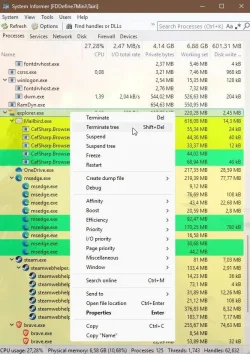
Process Hacker was replaced by System Informer

You can see the parent process and restart it or terminate the whole tree.

Can you explain how to use that? What does Canary Builds mean on the download page? I will try to use this next time it happens.
 

My Computer My Computer

At a glance

10 and 11
OS
10 and 11
Computer type
Laptop
Firefox has a built-in Process Manager. Press Shift+Esc to open it. It has an "Actions" column on the far right.

I wrote a simple command that can be run directly on the command line (not within a batch script, but you can modify it to make it work in a batch script) in an elevated command window. This command uses the WMIC tool and PsExec (from Sysinternals PsTools) to get SYSTEM privileges before it attempts to kill the parent process of Firefox—albeit that doesn't necessarily always help either. You'd have to make sure that the command can find the file PsExec.exe or else it definitely won't work. Also, I am assuming that you aren't running multiple instances of Firefox concurrently. (AFAIK no one here except only me ever does that anyway in the first place so, you should be good. lol) Here is the command:

@cmd /v:on /q /c "(for /f "usebackq" %B in (`for /f %A in ^('wmic process where name^^^="firefox.exe" get parentprocessid ^^^| more +1 ^^^| findstr /r /v "^^$" ^^^| sort /l C /uniq'^) do @wmic process where name^="firefox.exe" get processid ^| findstr %A`) do @set a=%B)&@psexec /s taskkill /f /pid !a!"

I do not see the actions column.

Where do I need to put PsExec.exe? I do sometimes run Firefox concurrently :).


<a href="PiXhost - Free Image Hosting"><img src="https://t1.pixhost.to/thumbs/7091/620293544_firefox_process_explorer.jpg" alt="firefox_process_explorer.jpg" border="0"/></a>
 

My Computer My Computer

At a glance

10 and 11
OS
10 and 11
Computer type
Laptop
I do not see the actions column.
It's the narrow column on the far right. Its column header has a small cogwheel symbol.
Where do I need to put PsExec.exe?
  • Place it In a folder e.g. C:\PsTools
  • In the command, substitute PsExec.exe with the correct filepath e.g. C:\PsTools\PsExec.exe
I do sometimes run Firefox concurrently :).
With regular Firefox, any attempt to run a separate, additional, new instance of Firefox will typically give an error, "Another instance of Firefox is already running". You'd have to use the Portable edition of Firefox and configure it specifically for this purpose. I am not aware of any other way to achieve this so, I somehow doubt that it is what you are referring to. (Each time when I bring up this particular subject anywhere on the forum, no one replies to it or else it just gets misinterpreted again.)
 
Last edited:

My Computers My Computers

  • At a glance

    11 Homei7 13650HX16GB DDR5GeForce RTX 4060 Mobile
    OS
    11 Home
    Computer type
    Laptop
    Manufacturer/Model
    Asus TUF Gaming F16 (2024)
    CPU
    i7 13650HX
    Memory
    16GB DDR5
    Graphics Card(s)
    GeForce RTX 4060 Mobile
    Sound Card
    Eastern Electric MiniMax DAC Supreme; Emotiva UMC-200; Astell & Kern AK240
    Monitor(s) Displays
    Sony Bravia XR-55X90J
    Screen Resolution
    3840×2160
    Hard Drives
    512GB SSD internal
    37TB external
    PSU
    Li-ion
    Cooling
    2× Arc Flow Fans, 4× exhaust vents, 5× heatpipes
    Keyboard
    Logitech K800
    Mouse
    Logitech G402
    Internet Speed
    30Mbit/s up, 500Mbit/s down
    Browser
    FF
    Antivirus
    What's an antivirus?
  • At a glance

    11 Homei5 1135G716GB DDR4Intel Iris Xe
    Operating System
    11 Home
    Computer type
    Laptop
    Manufacturer/Model
    Medion S15450
    CPU
    i5 1135G7
    Memory
    16GB DDR4
    Graphics card(s)
    Intel Iris Xe
    Sound Card
    Eastern Electric MiniMax DAC Supreme; Emotiva UMC-200; Astell & Kern AK240
    Monitor(s) Displays
    Sony Bravia XR-55X90J
    Screen Resolution
    3840×2160
    Hard Drives
    2TB SSD internal
    37TB external
    PSU
    Li-ion
    Keyboard
    Logitech K800
    Mouse
    Logitech G402
    Internet Speed
    30Mbit/s up, 500Mbit/s down
    Browser
    FF
Back
Top Bottom