
Hello,
I have a language problem with Windows 11 on my new Lenovo laptop.
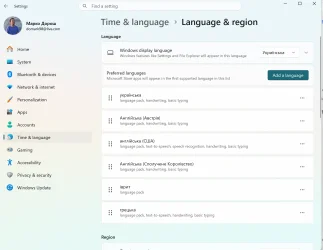
I set Ukrainian as the Windows display language, but Windows remains partly in English. Some Settings menus and system elements are in Ukrainian, while others remain in English. I would like the entire Windows interface to be Ukrainian.
My region is correctly set to Austria, where I currently live and where I bought the laptop. This should not be a problem, as my old laptop is also set to Austria but has the Windows interface 100% in Ukrainian.
I have already tried the following:
Could someone please help me identify what is causing certain parts of Windows 11 to remain in English and how I can make the entire interface Ukrainian?
I would especially appreciate suggestions beyond the standard “set Ukrainian as the display language” step, as I have already tried that and the other troubleshooting steps above.
Thank you!
I have a language problem with Windows 11 on my new Lenovo laptop.
I set Ukrainian as the Windows display language, but Windows remains partly in English. Some Settings menus and system elements are in Ukrainian, while others remain in English. I would like the entire Windows interface to be Ukrainian.
My region is correctly set to Austria, where I currently live and where I bought the laptop. This should not be a problem, as my old laptop is also set to Austria but has the Windows interface 100% in Ukrainian.
I have already tried the following:
- Settings → Time & language → Language & region:
- set Ukrainian as the Windows display language;
- checked that Ukrainian is installed;
- moved Ukrainian to the appropriate position in the preferred languages list;
- checked the regional format and related language settings.
- I signed out of Windows and restarted the laptop several times after changing the language settings.
- I removed/re-added the Ukrainian language settings and language pack and applied Ukrainian as the display language again.
- I checked the Windows language settings using PowerShell and tried changing the Windows language/locale settings through PowerShell commands.
- I ran Windows system repair checks, including DISM /Online /Cleanup-Image /RestoreHealth. The process stopped at around 64% and did not appear to complete even after waiting approximately 10–15 minutes.
- I also restarted Windows Explorer and cleared/rebuilt relevant Windows caches, but this did not change the language of the affected system elements.
- I have restarted the laptop multiple times throughout the process, but the English parts of Windows remain unchanged.
Could someone please help me identify what is causing certain parts of Windows 11 to remain in English and how I can make the entire interface Ukrainian?
I would especially appreciate suggestions beyond the standard “set Ukrainian as the display language” step, as I have already tried that and the other troubleshooting steps above.
Thank you!
- Windows Build/Version
- Windows 11, 64 bit
Attachments
My Computer
At a glance
Windows 11, 64 bit
- OS
- Windows 11, 64 bit
- Computer type
- Laptop
- Manufacturer/Model
- Lenovo E14, Gen 7






