[Laptop] Automatically lower the screen brightness when it's on battery?


Shamalow

Well-known member
Member
Local time
3:35 PM
Posts
43
Location
France
OS
Windows 11 Pro 23H2
Hi

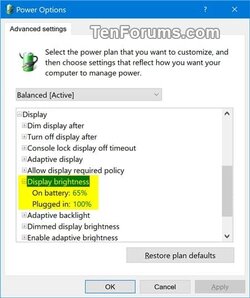
Since Windows 10 1809+, Windows has decided to remove this setting in the power mode of a laptop.
We have to turn down the brightness manually on battery, which is stupid. :unsure:

On Windows 11, has anyone found a way to automatically lower the screen brightness when it's on battery?

Thanks.
Display_brightness.jpg
 

My Computer My Computer

At a glance

Windows 11 Pro 23H2Intel 12700H32 GoRTX 3060
OS
Windows 11 Pro 23H2
Computer type
Laptop
Manufacturer/Model
ASUS TUF Gaming F17 (2022) - FX707ZM
CPU
Intel 12700H
Motherboard
Asus FX707ZM
Memory
32 Go
Graphics Card(s)
RTX 3060
Sound Card
C-MEDIA
Monitor(s) Displays
Integrated screen
Screen Resolution
1920x1080
Hard Drives
Intel NVME & WD Green NVME
Mouse
ROG Gladius III
Browser
Edge
Antivirus
Windows Defender
Run this batchfile as an administrator to, for the Power Scheme that is the currently active one, set the Display Brightness On Battery to 60%:
Batch:
for /f "tokens=4" %%v in ('powercfg GetActiveScheme') do (set a=%%v)
powercfg SetDcValueIndex %a% SUB_VIDEO VIDEONORMALLEVEL 60 && powercfg s %a%
 

My Computers My Computers

  • At a glance

    11 Homei7 13650HX16GB DDR5GeForce RTX 4060 Mobile
    OS
    11 Home
    Computer type
    Laptop
    Manufacturer/Model
    Asus TUF Gaming F16 (2024)
    CPU
    i7 13650HX
    Memory
    16GB DDR5
    Graphics Card(s)
    GeForce RTX 4060 Mobile
    Sound Card
    Eastern Electric MiniMax DAC Supreme; Emotiva UMC-200; Astell & Kern AK240
    Monitor(s) Displays
    Sony Bravia XR-55X90J
    Screen Resolution
    3840×2160
    Hard Drives
    512GB SSD internal
    37TB external
    PSU
    Li-ion
    Cooling
    2× Arc Flow Fans, 4× exhaust vents, 5× heatpipes
    Keyboard
    Logitech K800
    Mouse
    Logitech G402
    Internet Speed
    30Mbit/s up, 500Mbit/s down
    Browser
    FF
    Antivirus
    What's an antivirus?
  • At a glance

    11 Homei5 1135G716GB DDR4Intel Iris Xe
    Operating System
    11 Home
    Computer type
    Laptop
    Manufacturer/Model
    Medion S15450
    CPU
    i5 1135G7
    Memory
    16GB DDR4
    Graphics card(s)
    Intel Iris Xe
    Sound Card
    Eastern Electric MiniMax DAC Supreme; Emotiva UMC-200; Astell & Kern AK240
    Monitor(s) Displays
    Sony Bravia XR-55X90J
    Screen Resolution
    3840×2160
    Hard Drives
    2TB SSD internal
    37TB external
    PSU
    Li-ion
    Keyboard
    Logitech K800
    Mouse
    Logitech G402
    Internet Speed
    30Mbit/s up, 500Mbit/s down
    Browser
    FF
Thanks,

I tried your batch script, but unfortunately the screen brightness stays at the same level when I unplug.
 

My Computer My Computer

At a glance

Windows 11 Pro 23H2Intel 12700H32 GoRTX 3060
OS
Windows 11 Pro 23H2
Computer type
Laptop
Manufacturer/Model
ASUS TUF Gaming F17 (2022) - FX707ZM
CPU
Intel 12700H
Motherboard
Asus FX707ZM
Memory
32 Go
Graphics Card(s)
RTX 3060
Sound Card
C-MEDIA
Monitor(s) Displays
Integrated screen
Screen Resolution
1920x1080
Hard Drives
Intel NVME & WD Green NVME
Mouse
ROG Gladius III
Browser
Edge
Antivirus
Windows Defender
Hi

Since Windows 10 1809+, Windows has decided to remove this setting in the power mode of a laptop.
We have to turn down the brightness manually on battery, which is stupid. :unsure:

On Windows 11, has anyone found a way to automatically lower the screen brightness when it's on battery?

Thanks.

View attachment 76572
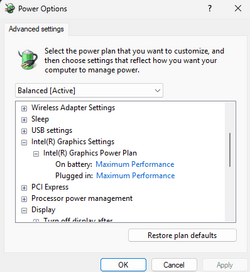
I believe you have an integrated Intel UHD card on your system.
Please look under Intel.

Screenshot 2023-11-04 153353.png
 

My Computers My Computers

  • At a glance

    All Branches but ReleaseAMD Ryzen 7 7735HS 3200-4500 Mhz 8 cores x 232 GB DDR5Radeon Graphic / NVIDIA GeForce RTX 4060 8 GB...
    OS
    All Branches but Release
    Computer type
    Laptop
    Manufacturer/Model
    Acer Nitro ANV15-51
    CPU
    AMD Ryzen 7 7735HS 3200-4500 Mhz 8 cores x 2
    Motherboard
    Sportage_RBH
    Memory
    32 GB DDR5
    Graphics Card(s)
    Radeon Graphic / NVIDIA GeForce RTX 4060 8 GB GDDR6
    Sound Card
    AMD/Realtek(R) Audio
    Monitor(s) Displays
    Integrated Monitor (15.3"vis)
    Screen Resolution
    FHD 1920X1080 16:9 144Hz
    Hard Drives
    KINGSTON OM8SEP4512Q-AA 1TB
    Western Digital 256GB
    PSU
    19V DC 6.32 A 120 W
    Cooling
    Dual Fans
    Mouse
    MS Bluetooth
    Internet Speed
    Fiber 1GB Cox -us & 1GB Orange-fr
    Browser
    Edge Canary- Firefox Nightly-Chrome Dev-Chrome Dev
    Antivirus
    Windows Defender
  • At a glance

    Windows 11 BetaAMD A9-94208 GB of DDR4AMD Radeon R5
    Operating System
    Windows 11 Beta
    Computer type
    Laptop
    Manufacturer/Model
    Asus X751BP
    CPU
    AMD A9-9420
    Memory
    8 GB of DDR4
    Graphics card(s)
    AMD Radeon R5
    Screen Resolution
    1600x900
    Hard Drives
    Seagate 1 TB
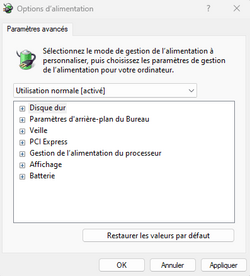
yes I have an INTEL iris igpu, but I don't have any settings available in the power plan.

01.png
 

My Computer My Computer

At a glance

Windows 11 Pro 23H2Intel 12700H32 GoRTX 3060
OS
Windows 11 Pro 23H2
Computer type
Laptop
Manufacturer/Model
ASUS TUF Gaming F17 (2022) - FX707ZM
CPU
Intel 12700H
Motherboard
Asus FX707ZM
Memory
32 Go
Graphics Card(s)
RTX 3060
Sound Card
C-MEDIA
Monitor(s) Displays
Integrated screen
Screen Resolution
1920x1080
Hard Drives
Intel NVME & WD Green NVME
Mouse
ROG Gladius III
Browser
Edge
Antivirus
Windows Defender
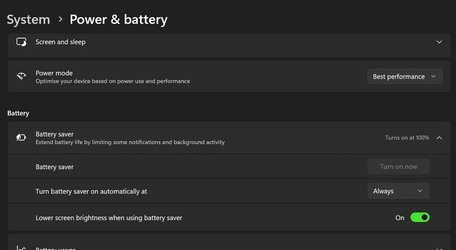
In settings I turn on battery saver at 100% (always) with 'Lower screen brightness when using battery saver' turned on.

1699109710522.png
 

My Computers My Computers

  • At a glance

    Win 11 ProAMD Ryzen™ 7 7730U24GB Dual-Channel DDR4 @ 1596MHz (22-22-22-52)512MB ATI AMD Radeon Graphics (ASUStek Comput...
    OS
    Win 11 Pro
    Computer type
    Laptop
    Manufacturer/Model
    ASUS Vivobook
    CPU
    AMD Ryzen™ 7 7730U
    Motherboard
    M1605YA
    Memory
    24GB Dual-Channel DDR4 @ 1596MHz (22-22-22-52)
    Graphics Card(s)
    512MB ATI AMD Radeon Graphics (ASUStek Computer Inc)
    Monitor(s) Displays
    Generic PnP Monitor (1920x1200@60Hz) - P1 PLUS (1920x1080@59Hz)
    Screen Resolution
    1920 X 1200
    Hard Drives
    953GB Western Digital WD
    PSU
    45 Watts
    Mouse
    Lenovo Bluetooth.
    Internet Speed
    500 Mbps
    Browser
    Edge
    Antivirus
    Defender
  • At a glance

    Windows 11AMD Ryzen 7 5800H / 3.2 GHz32 GB DDR4 SDRAM 3200 MHzNVIDIA GeForce RTX 3060 6 GB GDDR6 SDRAM
    Operating System
    Windows 11
    Computer type
    Laptop
    Manufacturer/Model
    ACER NITRO
    CPU
    AMD Ryzen 7 5800H / 3.2 GHz
    Motherboard
    CZ Scala_CAS (FP6)
    Memory
    32 GB DDR4 SDRAM 3200 MHz
    Graphics card(s)
    NVIDIA GeForce RTX 3060 6 GB GDDR6 SDRAM
    Sound Card
    Realtek Audio. NVIDIA High Definition Audio
    Monitor(s) Displays
    15.6" LED backlight 1920 x 1080 (Full HD) 144 Hz
    Screen Resolution
    1920 x 1080 (Full HD)
    Hard Drives
    Samsung 970 Evo Plus 2TB NVMe M.2
    PSU
    180 Watt, 19.5 V
    Mouse
    Lenovo Bluetooth
    Internet Speed
    500 Mbps
    Browser
    Edge
    Antivirus
    Defender
Yes I tested this setting which reduces the brightness to only 70%. 😢
 

My Computer My Computer

At a glance

Windows 11 Pro 23H2Intel 12700H32 GoRTX 3060
OS
Windows 11 Pro 23H2
Computer type
Laptop
Manufacturer/Model
ASUS TUF Gaming F17 (2022) - FX707ZM
CPU
Intel 12700H
Motherboard
Asus FX707ZM
Memory
32 Go
Graphics Card(s)
RTX 3060
Sound Card
C-MEDIA
Monitor(s) Displays
Integrated screen
Screen Resolution
1920x1080
Hard Drives
Intel NVME & WD Green NVME
Mouse
ROG Gladius III
Browser
Edge
Antivirus
Windows Defender

Latest Support Threads

Back
Top Bottom