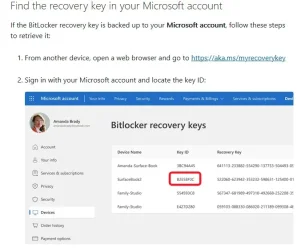
That's cute. Here's the reality I myself live in.
My Microsoft account, my only one, the one I'm signed into OneDrive with:
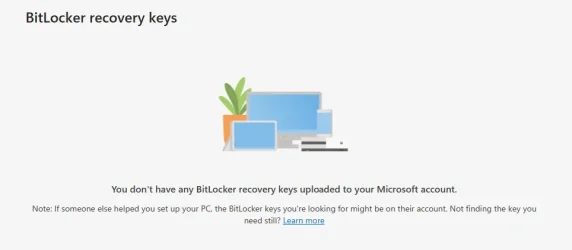
I've never had to remove a BitLocker key from my Microsoft account, either, not even a single solitary one in the 12 years I've been using BitLocker. That's because I don't choose to save them there when I encrypt a volume.
Below is a partial screenshot of my Bitlocker backup folder on my PC, which I sync with my Apricorn Aegis Secure Keys, which is where I save keys when encrypting a volume. Note the dates, 2014-2026, and the number of items, 129. I've been doing this a long time for many drives. I Bitlocker all my system and data drives along with the two sets of bare drives I use with a dock for backups. I've redacted things like PC names and GUIDs in the filenames, because while there's no harm in sharing them, I prefer not to.
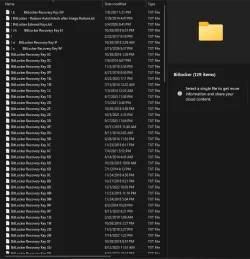
People who actually understand this stuff might wonder what "BitLocker - Restore AutoUnlock after Image Restore.txt" is for. It contains somewhat cumbersome recovery instructions for restoring auto-unlock on data drives after restoring a system volume and re-encrypting it, a process that invalidates the data drive auto-unlock info. Note also the July 2014 date, which is not long after my May 2014 migration from TrueCrypt I mentioned earlier. I discovered later that this isn't necessary if I boot into Image For Windows TBWinRE environment and restore to an unlocked system volume; the unlocking can be done before rebooting to perform the restore or from within TBWinRE after rebooting with manage-bde. This makes BitLocker in WinRE encrypt the data on the fly, as it's being restored, and it doesn't mess up the auto-unlocking of data drives. I keep the instructions around just in case I mess up or can't restore this way for some reason.
Oh, and "! BitLocker External Keys.txt"? It contains a list of PCs, protection methods, and filenames for the .bek files associated with their encrypted system volumes.



 So i do not remember that.