WindowsXP/7/8/8.1/10/11,Linux,Android,FreeBSD...Intel® Core™ i7-8750H 8th Gen 2.2Ghz up to 4....64GB using 2x32GB CL16 Mushkin redLine modulesIntel UHD 630 & NVIDIA GeForce GTX 1050 Ti wi...
@Almighty1 I believe your right... People are posting on other websites with the same issue that @Stigg has - moving up to Google chrome 129/130 - someone else smarter than me! is going to try to figure out how. we tried.
My Computer
At a glance
Windows 11 25H2 (OS Build 26200.9168)Processor: 11th Gen Intel(R) Core(TM) i5-1135...12GBIntel R Iris R XE Graphics family
OS
Windows 11 25H2 (OS Build 26200.9168)
Computer type
Laptop
Manufacturer/Model
Dell
CPU
Processor: 11th Gen Intel(R) Core(TM) i5-1135G7 @ 2.40G
Motherboard
64-bit operating system Dell 0XMF7W
Memory
12GB
Graphics Card(s)
Intel R Iris R XE Graphics family
Sound Card
Cirrus Speakers High Definition Audio
Monitor(s) Displays
Generic PnP monitor
Screen Resolution
1920 x 1080
Hard Drives
NVMe 670p SSDPEKNU512GZ NVMe I NTEL 512GB
Case
cheap
Mouse
Logitech wireless mouse
Internet Speed
16 Mps download
Browser
Google Chrome
Antivirus
Security: Microsoft Defender & Malwarebytes Premium (with browser guard)
@Almighty1 this looks possible? Go to chrome://flags/ and look for "Default Browser Prompt Refresh" and set that to Disabled. I believe that will turn that off.
My Computer
At a glance
Windows 11 25H2 (OS Build 26200.9168)Processor: 11th Gen Intel(R) Core(TM) i5-1135...12GBIntel R Iris R XE Graphics family
OS
Windows 11 25H2 (OS Build 26200.9168)
Computer type
Laptop
Manufacturer/Model
Dell
CPU
Processor: 11th Gen Intel(R) Core(TM) i5-1135G7 @ 2.40G
Motherboard
64-bit operating system Dell 0XMF7W
Memory
12GB
Graphics Card(s)
Intel R Iris R XE Graphics family
Sound Card
Cirrus Speakers High Definition Audio
Monitor(s) Displays
Generic PnP monitor
Screen Resolution
1920 x 1080
Hard Drives
NVMe 670p SSDPEKNU512GZ NVMe I NTEL 512GB
Case
cheap
Mouse
Logitech wireless mouse
Internet Speed
16 Mps download
Browser
Google Chrome
Antivirus
Security: Microsoft Defender & Malwarebytes Premium (with browser guard)
@Almighty1 this looks possible? Go to chrome://flags/ and look for "Default Browser Prompt Refresh" and set that to Disabled. I believe that will turn that off.
Windows 11 ProIntel Core i9-10900XCorsair 64 GB (4 x 16 GB) CMW64GX4M4C3000C15 ...GIGABYTE GeForce GTX 1660 Super Mini ITX 6 GB OC
OS
Windows 11 Pro
Computer type
PC/Desktop
Manufacturer/Model
Stigg's Build
CPU
Intel Core i9-10900X
Motherboard
GIGABYTE X299X DESIGNARE 10G
Memory
Corsair 64 GB (4 x 16 GB) CMW64GX4M4C3000C15 Vengeance RGB Pro 3000Mhz DDR4
Graphics Card(s)
GIGABYTE GeForce GTX 1660 Super Mini ITX 6 GB OC
Sound Card
Realtek ALC1220
Monitor(s) Displays
Samsung 27" FHD LED FreeSync Gaming Monitor (LS27F350FHEXXY)
Screen Resolution
1920 x 1080
Hard Drives
Samsung 970 Pro Series 1TB M.2 2280 NVMe SSD
Western Digital Red Pro WD8003FFBX-68B9AN0 8 TB, 7200 RPM, SATA-III
Western Digital Red Pro WD8003FFBX-68B9AN0 8 TB, 7200 RPM, SATA-III
PSU
Corsair HX1200 1200W 80 Plus Platinum
Case
Fractal Design Define 7 Black Solid Case
Cooling
Noctua NH-D15 Chromax Black
Keyboard
Razer Ornata V2
Mouse
Razer DeathAdder Essential
Internet Speed
FTTN 100Mbps / 40Mbps
Browser
Mozilla Firefox
Antivirus
N/A
Other Info
Logitech BRIO 4k Ultra HD USB-C Webcam
At a glance
Windows 10 ProCore i7-8750HSK Hynix 32 GB (2 x 16 GB) HMA82GS6CJR8N-VK 1...NVIDIA GeForce GTX 1070
Operating System
Windows 10 Pro
Computer type
Laptop
Manufacturer/Model
ASUS ROG Zephyrus M GM501GS
CPU
Core i7-8750H
Motherboard
Zephyrus M GM501GS
Memory
SK Hynix 32 GB (2 x 16 GB) HMA82GS6CJR8N-VK 16 GB DDR4-2666 DDR4 SDRAM
@Almighty1 this looks possible? Go to chrome://flags/ and look for "Default Browser Prompt Refresh" and set that to Disabled. I believe that will turn that off.
That is the same flag I was referring to earlier. Seems like it still worked until about a month ago per the comments.
My Computer
At a glance
WindowsXP/7/8/8.1/10/11,Linux,Android,FreeBSD...Intel® Core™ i7-8750H 8th Gen 2.2Ghz up to 4....64GB using 2x32GB CL16 Mushkin redLine modulesIntel UHD 630 & NVIDIA GeForce GTX 1050 Ti wi...
@Almighty1 I can't find a way? MS says download Chrome, & more options to stop the issue stigg has will appear? Some users are using Ublock. Finding ways to stop it. MS says google has a right to put ads up? No luck with google support or the community website. I'm stuck at my research on it maybe the next chrome version? There sure are enough people with the same Complaint as Stigg.
My Computer
At a glance
Windows 11 25H2 (OS Build 26200.9168)Processor: 11th Gen Intel(R) Core(TM) i5-1135...12GBIntel R Iris R XE Graphics family
OS
Windows 11 25H2 (OS Build 26200.9168)
Computer type
Laptop
Manufacturer/Model
Dell
CPU
Processor: 11th Gen Intel(R) Core(TM) i5-1135G7 @ 2.40G
Motherboard
64-bit operating system Dell 0XMF7W
Memory
12GB
Graphics Card(s)
Intel R Iris R XE Graphics family
Sound Card
Cirrus Speakers High Definition Audio
Monitor(s) Displays
Generic PnP monitor
Screen Resolution
1920 x 1080
Hard Drives
NVMe 670p SSDPEKNU512GZ NVMe I NTEL 512GB
Case
cheap
Mouse
Logitech wireless mouse
Internet Speed
16 Mps download
Browser
Google Chrome
Antivirus
Security: Microsoft Defender & Malwarebytes Premium (with browser guard)
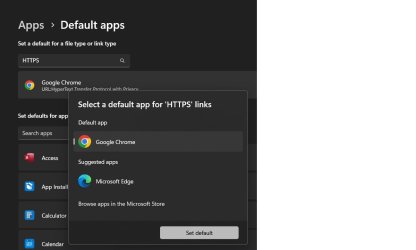
I see the latest Chrome release screws up the Chrome shortcut icons. I fixed this by setting the default browser for HTTPS files to Edge then back to Chrome.
My Computer
At a glance
Windows 11 ProCore i7-13700K64 GB Kingston Fury Beast DDR5Gigabyte GeForce RTX 2060 Super Gaming OC 8G
@Steve C I only found 1 possible workaround, Rt. click on Start\ Open Settings\ go to Personalization\ Themes\ on the Rt. side\ go to "Desktop Icon Settings" another small box should open (see Pic) , it worked on the youtube I found. If you want to give it a shot? [ I have Version 130.0.6723.70 (Official Build) (64-bit) ] and no issue here with my icons. let us know if it works. regards EDIT: PS: found another Youtube on what maybe your issue: https://www.google.com/search?q=the...te=ive&vld=cid:ac20581a,vid:nEWUT9iVnak,st:24
Attachments
icons.jpg
25.4 KB
· Views: 1
Last edited:
My Computer
At a glance
Windows 11 25H2 (OS Build 26200.9168)Processor: 11th Gen Intel(R) Core(TM) i5-1135...12GBIntel R Iris R XE Graphics family
OS
Windows 11 25H2 (OS Build 26200.9168)
Computer type
Laptop
Manufacturer/Model
Dell
CPU
Processor: 11th Gen Intel(R) Core(TM) i5-1135G7 @ 2.40G
Motherboard
64-bit operating system Dell 0XMF7W
Memory
12GB
Graphics Card(s)
Intel R Iris R XE Graphics family
Sound Card
Cirrus Speakers High Definition Audio
Monitor(s) Displays
Generic PnP monitor
Screen Resolution
1920 x 1080
Hard Drives
NVMe 670p SSDPEKNU512GZ NVMe I NTEL 512GB
Case
cheap
Mouse
Logitech wireless mouse
Internet Speed
16 Mps download
Browser
Google Chrome
Antivirus
Security: Microsoft Defender & Malwarebytes Premium (with browser guard)




 maybe the next chrome version? There sure are enough people with the same Complaint as Stigg.