JavaScript is disabled. For a better experience, please enable JavaScript in your browser before proceeding.
You are using an out of date browser. It may not display this or other websites correctly.
You should upgrade or use an
alternative browser .
Left Nav Pane: Wrong Separatation Lines, and Can't Remove Quick Access "Libraries" Entry...
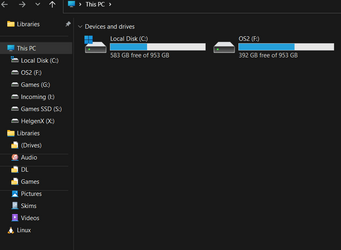
Sorry for the long subject name, but this just started after yesterday's update I received.
As you can see here, these are wrong separation lines, just started after latest update. Also, I can't get that damned quick access area off no matter what I do. If I try to remove Libraries from here, too, it just won't remove, so it's stuck here. I do not use Quick Access and want this area removed.
Any advice? Thanks.
1666737839577.png
121.1 KB
· Views: 9
1666737891482.png
10.2 KB
· Views: 9
Well-known member
Pro User
VIP
This is what I have on my Win11 Notebook:
Right-clicking on the line between OneDrive and Desktop gives me this:
One more thing, this is with the new Tabbed File Explorer.
Win11 Pro RTM Version 24H2 Build 26100.4202 Intel Core i5 11th Gen. 2.40GHz 12GB Win11 Pro RTM Version 24H2 Build 26100.4202 Laptop Dell Vostro 3400 Intel Core i5 11th Gen. 2.40GHz 12GB 256GB SSD NVMe M.2
Win11 Pro RTM Version 24H2 Build 26100.4202 Intel Core i5 10th Gen. 2.90GHz 16GB Onboard, no VGA, using a DisplayPort-to-VGA a... Win11 Pro RTM Version 24H2 Build 26100.4202 PC/Desktop Dell Vostro 5890 Intel Core i5 10th Gen. 2.90GHz 16GB Onboard, no VGA, using a DisplayPort-to-VGA adapter 24" Dell 512GB SSD NVMe, 4TB Seagate HDD Firefox, Edge Windows Defender/Microsoft Security
New member
Thread Starter
Thanks, but that doesn't tell me how to remove the lines. I did manage to get rid of Libraries.
New member
Thread Starter
At the moment the only solution that Microsoft gives is to give the option to show all folders, but you may not like the resulting view.
I did, and I hid some default access through registry entries, which in this forum explain how to do it.
In this way, when you display the libraries, the stripes do not appear.
Windows 11 PC/Desktop i7 920 Asus P6T Deluxe v2 18GB 1920*1080