Solved Left - right Headphone Check


Andrew_SH_from_Essex_UK

Well-known member
VIP
Local time
8:32 PM
Posts
81
Location
near Maldon, Essex, UK
OS
Windows 11
Is there a facility to do this with Windows 11 without using the internet.

I know this is a very simple issue for which there are other solutions - nonetheles I am interested to know and if it is possible to learn how to do it.

Thank you if you can assist.
 

Attachments
  • 2023-05-28.png
    2023-05-28.png
    8.6 KB · Views: 1

My Computers My Computers

  • At a glance

    Windows 11
    OS
    Windows 11
    Computer type
    PC/Desktop
    Manufacturer/Model
    Lenovo
    Other Info
    Device name DESKTOP-91AVJSJ
    Processor Intel(R) Core(TM) i5-9400 CPU @ 2.90GHz 2.90 GHz
    Installed RAM 8.00 GB (7.90 GB usable)
    Device ID D1C9D8EB-95E8-4256-B431-9613F5E28A00
    Product ID 00330-52571-93699-AAOEM
    System type 64-bit operating system, x64-based processor
    Pen and touch No pen or touch input is available for this display
  • At a glance

    Windows 11 Surface 2 go home model
    Operating System
    Windows 11 Surface 2 go home model
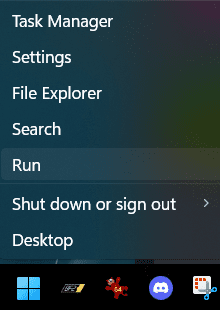
Right-click your start menu and select Run.

1685260668928.png

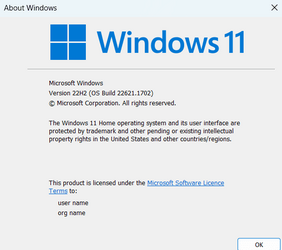
In the Run box enter mmsys.cpl , select OK.

1685260482809.png

In the playback tab, select your headphones then select Configure.

1685259948656.png

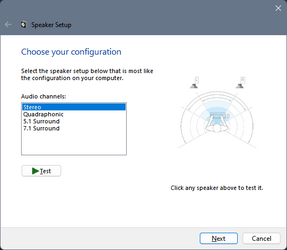
In the Speaker Setup popup, select Test.

1685259968218.png
 

Attachments

  • 1685260638235.png
    1685260638235.png
    40.1 KB · Views: 1
Last edited:

My Computers My Computers

  • At a glance

    Win 11 Pro 25H2 26200.8655Intel® Core™ i7-14700KG.SKILL Ripjaws S5 Series 64GB (2 x 32GB) DDR5ASUS GeForce RTX 4070 Super 12GB
    OS
    Win 11 Pro 25H2 26200.8655
    Computer type
    PC/Desktop
    Manufacturer/Model
    Self Built
    CPU
    Intel® Core™ i7-14700K
    Motherboard
    ASUS TUF Z690-PLUS WIFI BIOS 4505 11/29/25
    Memory
    G.SKILL Ripjaws S5 Series 64GB (2 x 32GB) DDR5
    Graphics Card(s)
    ASUS GeForce RTX 4070 Super 12GB
    Sound Card
    Sound Blaster AE-5 Plus
    Monitor(s) Displays
    ASUS TUF Gaming 27" 2K HDR Gaming
    Screen Resolution
    2560 x 1440
    Hard Drives
    Samsung 990 Pro 1TB NVMe (Win 11 25H2)
    SK hynix P41 500GB NVMe 25H2 DEV/Games
    SK hynix P41 2TB NVMe (x3)
    Crucial P3 Plus 4TB
    PSU
    Corsair RM850x Shift
    Case
    Antec Dark Phantom DP502 FLUX
    Cooling
    Corsair Nautilus 360 RS AIO
    Keyboard
    Logitech MK 320
    Mouse
    Razer Basilisk V3
    Internet Speed
    750Mbs
    Browser
    Firefox
    Antivirus
    Winows Security
    Other Info
    MR 8.1 Home
  • At a glance

    Win 11 Pro 25H2 26200.8655Intel Core i7-11700F64 GB DDR4MSI GeForce RTX 3060 Ventus 2X 12GB
    Operating System
    Win 11 Pro 25H2 26200.8655
    Computer type
    PC/Desktop
    Manufacturer/Model
    Self Built
    CPU
    Intel Core i7-11700F
    Motherboard
    Asus TUF Gaming Z590 Plus WiFi (BIOS 2803)
    Memory
    64 GB DDR4
    Graphics card(s)
    MSI GeForce RTX 3060 Ventus 2X 12GB
    Sound Card
    SoundBlaster Audigy Fx V2
    Monitor(s) Displays
    Samsung F27T350
    Screen Resolution
    1920x1080
    Hard Drives
    Samsung 980 Pro 1TB
    Samsung 970 EVO Plus 2TB
    Samsung 870 EVO 500GB SSD
    PSU
    Corsair HX750
    Case
    Cougar MX330-G Window
    Cooling
    Thermalright Frozen Edge 240 Black AIO
    Internet Speed
    350Mbps
    Browser
    Firefox
    Antivirus
    Windows Security
  • System Three
    Win 11 Pro 25H2 26200.8655
    ASUS PRIME Z370-P II BIOS 3004 7/12/21
    Intel Core i7-8700 CPU @ 3.20GHz
    32GB DDR4 RAM (4x8)
    iGPU Intel UHD Graphics 630
    Mid-Tower Desktop
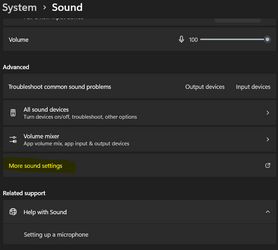
An alternate way to do it is System>Sound>More Sound Settings

1685260993361.png
 

My Computers My Computers

  • At a glance

    Win 11 Pro 25H2 26200.8655Intel® Core™ i7-14700KG.SKILL Ripjaws S5 Series 64GB (2 x 32GB) DDR5ASUS GeForce RTX 4070 Super 12GB
    OS
    Win 11 Pro 25H2 26200.8655
    Computer type
    PC/Desktop
    Manufacturer/Model
    Self Built
    CPU
    Intel® Core™ i7-14700K
    Motherboard
    ASUS TUF Z690-PLUS WIFI BIOS 4505 11/29/25
    Memory
    G.SKILL Ripjaws S5 Series 64GB (2 x 32GB) DDR5
    Graphics Card(s)
    ASUS GeForce RTX 4070 Super 12GB
    Sound Card
    Sound Blaster AE-5 Plus
    Monitor(s) Displays
    ASUS TUF Gaming 27" 2K HDR Gaming
    Screen Resolution
    2560 x 1440
    Hard Drives
    Samsung 990 Pro 1TB NVMe (Win 11 25H2)
    SK hynix P41 500GB NVMe 25H2 DEV/Games
    SK hynix P41 2TB NVMe (x3)
    Crucial P3 Plus 4TB
    PSU
    Corsair RM850x Shift
    Case
    Antec Dark Phantom DP502 FLUX
    Cooling
    Corsair Nautilus 360 RS AIO
    Keyboard
    Logitech MK 320
    Mouse
    Razer Basilisk V3
    Internet Speed
    750Mbs
    Browser
    Firefox
    Antivirus
    Winows Security
    Other Info
    MR 8.1 Home
  • At a glance

    Win 11 Pro 25H2 26200.8655Intel Core i7-11700F64 GB DDR4MSI GeForce RTX 3060 Ventus 2X 12GB
    Operating System
    Win 11 Pro 25H2 26200.8655
    Computer type
    PC/Desktop
    Manufacturer/Model
    Self Built
    CPU
    Intel Core i7-11700F
    Motherboard
    Asus TUF Gaming Z590 Plus WiFi (BIOS 2803)
    Memory
    64 GB DDR4
    Graphics card(s)
    MSI GeForce RTX 3060 Ventus 2X 12GB
    Sound Card
    SoundBlaster Audigy Fx V2
    Monitor(s) Displays
    Samsung F27T350
    Screen Resolution
    1920x1080
    Hard Drives
    Samsung 980 Pro 1TB
    Samsung 970 EVO Plus 2TB
    Samsung 870 EVO 500GB SSD
    PSU
    Corsair HX750
    Case
    Cougar MX330-G Window
    Cooling
    Thermalright Frozen Edge 240 Black AIO
    Internet Speed
    350Mbps
    Browser
    Firefox
    Antivirus
    Windows Security
  • System Three
    Win 11 Pro 25H2 26200.8655
    ASUS PRIME Z370-P II BIOS 3004 7/12/21
    Intel Core i7-8700 CPU @ 3.20GHz
    32GB DDR4 RAM (4x8)
    iGPU Intel UHD Graphics 630
    Mid-Tower Desktop
I have answered my own question by interpreting information available via the Windows Help App and related questions others have asked and had answers.
Go to SETTINGS - SYSTEM - SOUND


Scroll to - Advanced
CLICK on All Sound Devices
Beneath - Output Devices - CLICK on Headphones.

The left and right chanel are shown by turning up or down one or the other one can match which ear/headphone they are affecting.
 

Attachments

  • 05-23-2023-Scan of Sound System Settings left right headphones-Screenshot 2023-05-28 090257.png
    05-23-2023-Scan of Sound System Settings left right headphones-Screenshot 2023-05-28 090257.png
    24.7 KB · Views: 1

My Computers My Computers

  • At a glance

    Windows 11
    OS
    Windows 11
    Computer type
    PC/Desktop
    Manufacturer/Model
    Lenovo
    Other Info
    Device name DESKTOP-91AVJSJ
    Processor Intel(R) Core(TM) i5-9400 CPU @ 2.90GHz 2.90 GHz
    Installed RAM 8.00 GB (7.90 GB usable)
    Device ID D1C9D8EB-95E8-4256-B431-9613F5E28A00
    Product ID 00330-52571-93699-AAOEM
    System type 64-bit operating system, x64-based processor
    Pen and touch No pen or touch input is available for this display
  • At a glance

    Windows 11 Surface 2 go home model
    Operating System
    Windows 11 Surface 2 go home model
Oh gosh - I now see whilst have been typing that others have explained how it can be done - thank you all.
 

My Computers My Computers

  • At a glance

    Windows 11
    OS
    Windows 11
    Computer type
    PC/Desktop
    Manufacturer/Model
    Lenovo
    Other Info
    Device name DESKTOP-91AVJSJ
    Processor Intel(R) Core(TM) i5-9400 CPU @ 2.90GHz 2.90 GHz
    Installed RAM 8.00 GB (7.90 GB usable)
    Device ID D1C9D8EB-95E8-4256-B431-9613F5E28A00
    Product ID 00330-52571-93699-AAOEM
    System type 64-bit operating system, x64-based processor
    Pen and touch No pen or touch input is available for this display
  • At a glance

    Windows 11 Surface 2 go home model
    Operating System
    Windows 11 Surface 2 go home model
Right-click your start menu and select Run.

View attachment 61129

In the Run box enter mmsys.cpl , select OK.

View attachment 61127

In the playback tab, select your headphones then select Configure.

View attachment 61124

In the Speaker Setup popup, select Test.

View attachment 61125
Thank you Scott -so that is three different ways - it is a little surprising Microsft do not do a straightforward explanation - I have just bought a set of earphones with absolutely no markings on them at all - I know such tests are available via the internet but I guess Microsoft cannot provide everything!
 

My Computers My Computers

  • At a glance

    Windows 11
    OS
    Windows 11
    Computer type
    PC/Desktop
    Manufacturer/Model
    Lenovo
    Other Info
    Device name DESKTOP-91AVJSJ
    Processor Intel(R) Core(TM) i5-9400 CPU @ 2.90GHz 2.90 GHz
    Installed RAM 8.00 GB (7.90 GB usable)
    Device ID D1C9D8EB-95E8-4256-B431-9613F5E28A00
    Product ID 00330-52571-93699-AAOEM
    System type 64-bit operating system, x64-based processor
    Pen and touch No pen or touch input is available for this display
  • At a glance

    Windows 11 Surface 2 go home model
    Operating System
    Windows 11 Surface 2 go home model
Thank you Scott -so that is three different ways - it is a little surprising Microsft do not do a straightforward explanation - I have just bought a set of earphones with absolutely no markings on them at all - I know such tests are available via the internet but I guess Microsoft cannot provide everything!

You're very welcome, and good job figuring it out. I've been using the classic sound control panel for as long as I can remember.
 

My Computers My Computers

  • At a glance

    Win 11 Pro 25H2 26200.8655Intel® Core™ i7-14700KG.SKILL Ripjaws S5 Series 64GB (2 x 32GB) DDR5ASUS GeForce RTX 4070 Super 12GB
    OS
    Win 11 Pro 25H2 26200.8655
    Computer type
    PC/Desktop
    Manufacturer/Model
    Self Built
    CPU
    Intel® Core™ i7-14700K
    Motherboard
    ASUS TUF Z690-PLUS WIFI BIOS 4505 11/29/25
    Memory
    G.SKILL Ripjaws S5 Series 64GB (2 x 32GB) DDR5
    Graphics Card(s)
    ASUS GeForce RTX 4070 Super 12GB
    Sound Card
    Sound Blaster AE-5 Plus
    Monitor(s) Displays
    ASUS TUF Gaming 27" 2K HDR Gaming
    Screen Resolution
    2560 x 1440
    Hard Drives
    Samsung 990 Pro 1TB NVMe (Win 11 25H2)
    SK hynix P41 500GB NVMe 25H2 DEV/Games
    SK hynix P41 2TB NVMe (x3)
    Crucial P3 Plus 4TB
    PSU
    Corsair RM850x Shift
    Case
    Antec Dark Phantom DP502 FLUX
    Cooling
    Corsair Nautilus 360 RS AIO
    Keyboard
    Logitech MK 320
    Mouse
    Razer Basilisk V3
    Internet Speed
    750Mbs
    Browser
    Firefox
    Antivirus
    Winows Security
    Other Info
    MR 8.1 Home
  • At a glance

    Win 11 Pro 25H2 26200.8655Intel Core i7-11700F64 GB DDR4MSI GeForce RTX 3060 Ventus 2X 12GB
    Operating System
    Win 11 Pro 25H2 26200.8655
    Computer type
    PC/Desktop
    Manufacturer/Model
    Self Built
    CPU
    Intel Core i7-11700F
    Motherboard
    Asus TUF Gaming Z590 Plus WiFi (BIOS 2803)
    Memory
    64 GB DDR4
    Graphics card(s)
    MSI GeForce RTX 3060 Ventus 2X 12GB
    Sound Card
    SoundBlaster Audigy Fx V2
    Monitor(s) Displays
    Samsung F27T350
    Screen Resolution
    1920x1080
    Hard Drives
    Samsung 980 Pro 1TB
    Samsung 970 EVO Plus 2TB
    Samsung 870 EVO 500GB SSD
    PSU
    Corsair HX750
    Case
    Cougar MX330-G Window
    Cooling
    Thermalright Frozen Edge 240 Black AIO
    Internet Speed
    350Mbps
    Browser
    Firefox
    Antivirus
    Windows Security
  • System Three
    Win 11 Pro 25H2 26200.8655
    ASUS PRIME Z370-P II BIOS 3004 7/12/21
    Intel Core i7-8700 CPU @ 3.20GHz
    32GB DDR4 RAM (4x8)
    iGPU Intel UHD Graphics 630
    Mid-Tower Desktop

Latest Support Threads

Back
Top Bottom