Diaboyos
New member
- Local time
- 4:06 AM
- Posts
- 1
- OS
- Windows 11
I asked this on the Microsoft forums and they couldn't help me so I'm trying here.
This post is specifically about links within Windows written to only open using Edge. Links like Get Help or More Info in the Settings or when you try to open the weather widget. Any link within Windows itself that is written to only open using Edge, regardless of your default browser settings.
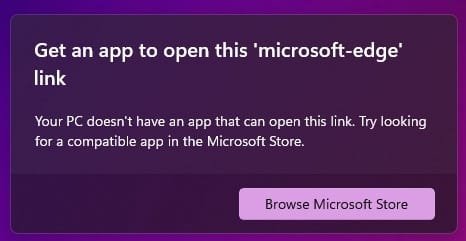
When I attempt to open any of these Edge-only links a message pops up telling me that I don't have an app that can open the link (see attached photo) and to go to the Microsoft store and download Edge. The problem is I already have Edge and it works for all links except these Edge-only links built into Windows. I can browse with Edge without any problems even though it's not my default browser. I've even uninstalled all other browsers so only Edge was on the machine and it still does not work.
I've tried running DISM and SFC and both showed no problems.
I've reset the default apps but that didn't help.
I ran PowerShell as admin and ran the following commands:
Set-ExecutionPolicy Unrestricted
Get-AppXPackage -AllUsers | Foreach {Add-AppxPackage -DisableDevelopmentMode -Register "$ ($_. InstallLocation) AppXManifest.xml"}
Set-ExecutionPolicy restricted
These were all suggestions from Microsoft but none of them helped. When I ran PowerShell and ran the commands Microsoft said to run I got a lot of red text (see attached photo).
I've also tried creating a new user account to see if it was an account issue. Edge-only links do not work on the new account either.
This only began after a Windows reset. Before that, Edge-only links worked without issue.
Is there any way I can fix this?
This post is specifically about links within Windows written to only open using Edge. Links like Get Help or More Info in the Settings or when you try to open the weather widget. Any link within Windows itself that is written to only open using Edge, regardless of your default browser settings.
When I attempt to open any of these Edge-only links a message pops up telling me that I don't have an app that can open the link (see attached photo) and to go to the Microsoft store and download Edge. The problem is I already have Edge and it works for all links except these Edge-only links built into Windows. I can browse with Edge without any problems even though it's not my default browser. I've even uninstalled all other browsers so only Edge was on the machine and it still does not work.
I've tried running DISM and SFC and both showed no problems.
I've reset the default apps but that didn't help.
I ran PowerShell as admin and ran the following commands:
Set-ExecutionPolicy Unrestricted
Get-AppXPackage -AllUsers | Foreach {Add-AppxPackage -DisableDevelopmentMode -Register "$ ($_. InstallLocation) AppXManifest.xml"}
Set-ExecutionPolicy restricted
These were all suggestions from Microsoft but none of them helped. When I ran PowerShell and ran the commands Microsoft said to run I got a lot of red text (see attached photo).
I've also tried creating a new user account to see if it was an account issue. Edge-only links do not work on the new account either.
This only began after a Windows reset. Before that, Edge-only links worked without issue.
Is there any way I can fix this?
- Windows Build/Version
- OS Build 22631.4317
Attachments

My Computer
At a glance
Windows 11
- OS
- Windows 11