JimCricket
New member
- Local time
- 4:52 PM
- Posts
- 1
- OS
- Windows 11
I'm new to Windows 11, but old to Windows. I'm sure this question has been asked in different ways. But it helps me to ask it according to my needs.
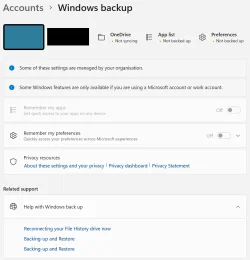
I just don't understand what One Drive is doing, especially when I have it disabled.
I am sole owner/user of a brand new Lenovo laptop that I just received on Thursday 9/17. Since then I've done two factory resets and spent countless hours trying to set it up and understand what it's doing. I disabled One Drive within hours of owning the computer, and right after I did that Firefox stopped working and a Pictures folder I thought was local (and wasn't) disappeared. Other things too, but I'll skip all that.
Right now One Drive is diabled.
I see in my folders I have what is called <my name> - Personal. That sounds like a local folder to me. But when on the properties, I see c:\users\googl (using the first five letters of a gmail address that I use to log into the required Microsoft account). THe Pictures folder is c:\users\googl\Pictures. I'm not even clear why it is calling the folder "<my name> - Personal" other than <my first name, last name> is an administrator.
I don't need One Drive, but if it disabled then what is that path it has left?
I've been reading up on how to make the whole computer local but there is conflicting information as to whether or not that is still even possible.
I just don't understand what One Drive is doing, especially when I have it disabled.
I am sole owner/user of a brand new Lenovo laptop that I just received on Thursday 9/17. Since then I've done two factory resets and spent countless hours trying to set it up and understand what it's doing. I disabled One Drive within hours of owning the computer, and right after I did that Firefox stopped working and a Pictures folder I thought was local (and wasn't) disappeared. Other things too, but I'll skip all that.
Right now One Drive is diabled.
I see in my folders I have what is called <my name> - Personal. That sounds like a local folder to me. But when on the properties, I see c:\users\googl (using the first five letters of a gmail address that I use to log into the required Microsoft account). THe Pictures folder is c:\users\googl\Pictures. I'm not even clear why it is calling the folder "<my name> - Personal" other than <my first name, last name> is an administrator.
I don't need One Drive, but if it disabled then what is that path it has left?
I've been reading up on how to make the whole computer local but there is conflicting information as to whether or not that is still even possible.
- Windows Build/Version
- 25H2
My Computer
At a glance
Windows 11
- OS
- Windows 11