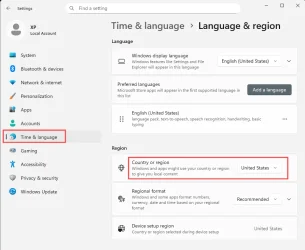
This must be a "feature" of Windows 11 or I don't know. It never happened in 10. Anyway.
I have international english ISO as a base for my unattended install. In the answer file, I set
<SystemLocale>en-GB</SystemLocale>
<UserLocale>cs-CZ</UserLocale>
Which, up until now on both Win 7 and 10 resulted in the interface being in english (not like there is any other option by default with this image) and regional settings like time and date and whatever in such format we use in Czech republic.
Fast forward to Windows 11.
I installed it in a VM, right clicked on a .cmd file, and in the context menu, among entries in english, was "upravit v poznámkovém bloku" instead of "edit with notepad" or something.
Can anyone explain what on earth is the bloody system doing and how do I fix it? Because this cannot be intentional.
I have international english ISO as a base for my unattended install. In the answer file, I set
<SystemLocale>en-GB</SystemLocale>
<UserLocale>cs-CZ</UserLocale>
Which, up until now on both Win 7 and 10 resulted in the interface being in english (not like there is any other option by default with this image) and regional settings like time and date and whatever in such format we use in Czech republic.
Fast forward to Windows 11.
I installed it in a VM, right clicked on a .cmd file, and in the context menu, among entries in english, was "upravit v poznámkovém bloku" instead of "edit with notepad" or something.
Can anyone explain what on earth is the bloody system doing and how do I fix it? Because this cannot be intentional.
My Computer
At a glance
Windows 11
- OS
- Windows 11