

Sky88blue
Member
- Local time
- 12:00 AM
- Posts
- 8
- OS
- Windows 11 Pro
Hi,
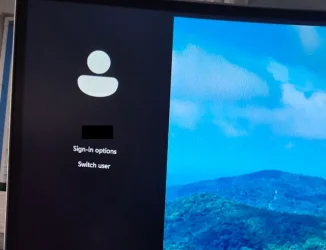
I use a password picture to login to Windows. On the left side where it shows the username and 'Sign-in options' it has a band of colour (see attached). On my Windows 10 installation, the colour seemed to be the same as what is set in my personalisation settings. When I upgraded to Win 11 the other day, it is now showing as black and the personalisation colours don't affect it.
Does anyone know how to change this?
I use a password picture to login to Windows. On the left side where it shows the username and 'Sign-in options' it has a band of colour (see attached). On my Windows 10 installation, the colour seemed to be the same as what is set in my personalisation settings. When I upgraded to Win 11 the other day, it is now showing as black and the personalisation colours don't affect it.
Does anyone know how to change this?
- Windows Build/Version
- 24H2/26100.4652
Attachments
My Computer
At a glance
Windows 11 Pro
- OS
- Windows 11 Pro
- Computer type
- Laptop
- Manufacturer/Model
- HP






