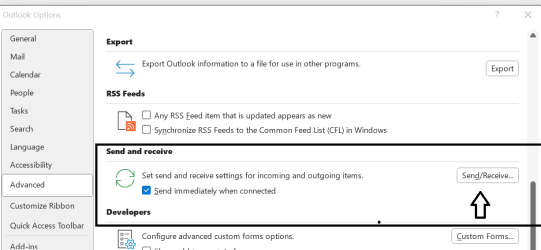
I am using Outlook on my computer and it is the version supplied for as part of the Office 365 suite.
I have noticed over the past few days that mail sent to me can take up to an hour to appear on Outlook yet is available almost instantly on Webmail. I have looked at all the settings I can think of but can't find anything that will account for that.
The fact that WebMail receives mail quickly excludes an ISP issue. My internet connection is quick (72 Gbps). All other apps are working fine. Avast is happy.
(A timed test has just arrived - took 40 minutes to arrive).
I have found various things I can try but they all imply a problem with my PC which seems unlikely as everything else is working as well and as fast as normal.
I'd welcome comments before embarking on time consuming PC checks.
Edit - Just tried sending myself an email making use of a different address. Mail to that one (POP) automatically forwards mail to the troublesome on (IMAP/SMTP). The email arrived at both addresses almost instantly.
You might take a look at time interval that's set for automatic send/receive in file>options>advanced. Outlook is almost instant. Gmail takes a little longer. I have an old pop account from my isp. I have to manually sync that sucker every single time I want to send or receive mail.
Edit - Just tried sending myself an email making use of a different address. Mail to that one (POP) automatically forwards mail to the troublesome on (IMAP/SMTP). The email arrived at both addresses almost instantly.
Not SMTP mate, remember? SMTP is the Outgoing for both POP & IMAP
These two emails IMAP & POP3 They aren’t the same email address are they? One POP3 one IMAP? ( I am not sure if you ever deleted the one you didn’t want to use?)
Not at all. Webmail works on the net, between the web interface which is usually on the mail server and the mail server itself, not between outlook on your PC and the mail server. The webmail interface is on the server your mail goes to, so it will be relatively instant. Where as what you see on your PC needs to be downloaded via your internet connection from the ISP to the PC.
Check the following:
Open Outlook
Go to File > Account Settings > Account Settings
In the email accounts box, click on the IMAP email address and check what it says in the "Root Folder Path"
If nothing, type INBOX (all caps) like in the image, click Next then click Done.
Close and open Outlook again, test the result for me.
5 x LG 25MS500-B - 1 x 24MK430H-B - 1 x Wacom Pro 22" Touch Screen Tablet
Screen Resolution
All over the place
Hard Drives
Too many to list.
OS on Samsung 1TB 870 QVO SATA
PSU
Silverstone 1500
Case
NZXT Phantom 820 Full-Tower Case
Cooling
Noctua NH-D15 Elite Class Dual Tower CPU Cooler / 6 x EziDIY 120mm / 2 x Corsair 140mm somethings / 1 x 140mm Thermaltake something / 2 x 200mm Corsair.
If it already says INBOX, I would wait another day (or two) before making any drastic changes. Just be sure it isn't an issue with your ISP or the Server company that hosts your site/email. (or are they one in the same? I can't remember)
The internet connection that Your-Name-Here supplies you is kind of separate to the server they host your stuff on.
It might even pay to explain to Your-Name-Here that this is just a recent issue, they can check it out for you.
EDIT:
Re the interval your mail is checked. That's a separate issue. If your email is set to be checked every 5 minutes, yet if you can click on send/receive and it's taking 40min, that's a separate issue to the time mail is set to be checked by Outlook.
5 x LG 25MS500-B - 1 x 24MK430H-B - 1 x Wacom Pro 22" Touch Screen Tablet
Screen Resolution
All over the place
Hard Drives
Too many to list.
OS on Samsung 1TB 870 QVO SATA
PSU
Silverstone 1500
Case
NZXT Phantom 820 Full-Tower Case
Cooling
Noctua NH-D15 Elite Class Dual Tower CPU Cooler / 6 x EziDIY 120mm / 2 x Corsair 140mm somethings / 1 x 140mm Thermaltake something / 2 x 200mm Corsair.
Your name here is a hosting company that hosts your site and mail server, I don’t believe it’s an ISP, is it? Do they supply your internet connection also?
If you believe your internet connection is OK, that’s good.
It’s YNH you probably need to speak to as they have your mail server, Ian.
There are folder sync settings we could run through but I’d rather not until you’ve cleared it up with YNH
5 x LG 25MS500-B - 1 x 24MK430H-B - 1 x Wacom Pro 22" Touch Screen Tablet
Screen Resolution
All over the place
Hard Drives
Too many to list.
OS on Samsung 1TB 870 QVO SATA
PSU
Silverstone 1500
Case
NZXT Phantom 820 Full-Tower Case
Cooling
Noctua NH-D15 Elite Class Dual Tower CPU Cooler / 6 x EziDIY 120mm / 2 x Corsair 140mm somethings / 1 x 140mm Thermaltake something / 2 x 200mm Corsair.
Thank you all for your suggestions. Some I had tried but TBH not at my best at the moment - Two nights of lousy sleep and my various aches and pains are also playing up. I blame my birthday a couple of days ago! Didn't really want to be a year older but got no choice in the matter.
I was going to look at the suggestions above but first checked o see what there was on WebMail which has been working OK. Found this Your mailbox Pending Emails Sync Failure.
#####.org.uk Mail-Server Blocked 5 incoming messages.
As of Jun 05, 2022 6:28 AM (UTC), you have 5 incoming pending messages
Click below to View, Release or Delete pending e-mail messages. Mail account:
(My email address)
Thanks,
Mail System Administrator
This notification was sent to i#####@###.org.uk; Don't want occasional updates about subscription preferences and friendly suggestions?
Getting round to following above advice now that I feel better!
Re IMAP and POP - At my age I am allowed to be a slow learner and to forget things.
The POP & IMAP are different addresses, and different domains - I manage two.
Did that - Root folder path was empty. Problem solved - thank you. Not as fast as WebMail but perfectly reasonable - maybe 5 - 10 seconds.
And to cover other points raised -
Server and ISP are different - the former YNH, the latter BT
And my speed is 72 - 74 Gbps. Fibre cables are being laid all around the village at present (and causing mayhem with road closures). part of "leveling up" - a lot of west Cumbria is getting option of fibre to home. Not sure if my group of houses is but I don;t see much point with only two of us in my house and neither of us needing a fast internet connection.
5 x LG 25MS500-B - 1 x 24MK430H-B - 1 x Wacom Pro 22" Touch Screen Tablet
Screen Resolution
All over the place
Hard Drives
Too many to list.
OS on Samsung 1TB 870 QVO SATA
PSU
Silverstone 1500
Case
NZXT Phantom 820 Full-Tower Case
Cooling
Noctua NH-D15 Elite Class Dual Tower CPU Cooler / 6 x EziDIY 120mm / 2 x Corsair 140mm somethings / 1 x 140mm Thermaltake something / 2 x 200mm Corsair.
It won’t ever be as fast as webmail. Webmail doesn’t have to travel anywhere, the webmail interface is just a window that is on the same server as your email sits in. It would be like passing a small file from your documents folder to your download folder on the same drive.
Outlook on your PC needs to be told to check for mail & send a request, communicate with the server, fetch the mail, download it to your Outlook/PC
5 x LG 25MS500-B - 1 x 24MK430H-B - 1 x Wacom Pro 22" Touch Screen Tablet
Screen Resolution
All over the place
Hard Drives
Too many to list.
OS on Samsung 1TB 870 QVO SATA
PSU
Silverstone 1500
Case
NZXT Phantom 820 Full-Tower Case
Cooling
Noctua NH-D15 Elite Class Dual Tower CPU Cooler / 6 x EziDIY 120mm / 2 x Corsair 140mm somethings / 1 x 140mm Thermaltake something / 2 x 200mm Corsair.
5 x LG 25MS500-B - 1 x 24MK430H-B - 1 x Wacom Pro 22" Touch Screen Tablet
Screen Resolution
All over the place
Hard Drives
Too many to list.
OS on Samsung 1TB 870 QVO SATA
PSU
Silverstone 1500
Case
NZXT Phantom 820 Full-Tower Case
Cooling
Noctua NH-D15 Elite Class Dual Tower CPU Cooler / 6 x EziDIY 120mm / 2 x Corsair 140mm somethings / 1 x 140mm Thermaltake something / 2 x 200mm Corsair.