Solved Looking for alternative to stock windows file explorer (labels,tags,color coding etc.)


MilkyWindow

Member
Local time
6:22 PM
Posts
75
OS
W11 24H2 26100.712
Hello.
I am looking for replacement or addon for stock windows 11 file explorer.
If someone knows some good replacemets then thanks in advance for sharing.

Mandatory features:
- colour coding or taggin individual files and folders for later sorting (similar to MAC OS)

Features I am looking for that are very important:
- nothing automated like auto sorting to some magic "all stuff" or "all videos" folder
- nothing from ms store ( so simple exe/msi installer or even portable is ok)
- minimal to no risk of losing files.

Not mandatory but very welcome.
- working well with current TeraCopy
- having a panel that lets me drag-drop files or folders that I can sort manually and the files are there only visually so nothing is actually moved its just "sorted for later to copy"
- all columns of default W11 file explorer like file type-date created-attributes etc...
- showing size of folders
- preview of files like image files or video files.
- preferably with no dependecies other than VC redists to install. (I dont want to install any Pythons or "Cobras" or other "Anacondas")
- easy intuitive installation
- features from my mandatory/importand list but applicable to external drives
- stable (ofcourse)

For now I tested
GitHub - spacedriveapp/spacedrive: Spacedrive is an open source cross-platform file explorer, powered by a virtual distributed filesystem written in Rust. - wanted to check it out but cannot install it at all...probably could be it if would let itself install in first place
Files • Home - no go - destroyed some of my test data
Dual-pane file manager for Mac, Windows and Linux - fman - quite nice to have and easy arrows and keyboard file operations but no tagging feature.
Color labels function - File Explorer · Issue #22367 · microsoft/PowerToys - wanted to test it because here it says it has something like that but from what I understand its a set of tools not a simple file explorer
XYplorer - File Manager for Windows - well not my thing no features I m looking for.
OneCommander - Modern files manager for Windows 11 and Windows 10 - same as above

So basically most important thing for me is tagging labelling or any easy sorting visual solution thats safe for files.
 

My Computer

System One

  • OS
    W11 24H2 26100.712
    Other Info
    Updates are disease.
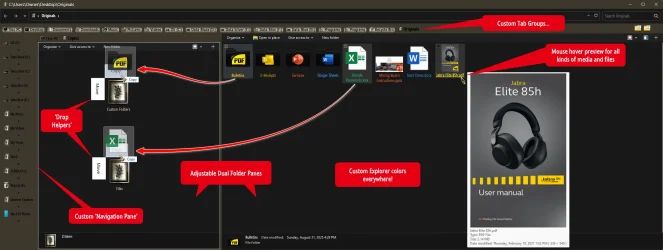
QTTabBar has a lot of what you're looking for.
Search it on YouTube first, to get a better idea of what it's all about. It's pretty complex!
 

My Computers

System One System Two

  • OS
    Windows 11 Pro
    Computer type
    PC/Desktop
    Manufacturer/Model
    ASUS ROG Strix
  • Operating System
    Windows 11 Pro
    Computer type
    Laptop
    Manufacturer/Model
    ASUS VivoBook
QTTabBar has a lot of what you're looking for.
Search it on YouTube first, to get a better idea of what it's all about. It's pretty complex!
appreciate the suggestion. Im not really looking for anything complex. just stuff to organize and move my messy files and folder which I have a tons. soo something visually helping to help the task. I liked that in fman the siple keyboard navigation and shortcuts to basic tasks like copy paste cut rename etc. My real physical stuff I have mostly organized by visuals of colours and labels it makes it super easy to find stuff but im struggling with something like that on windows environment to find....pretty simple stuff that will make QOL on Windows.
 

My Computer

System One

  • OS
    W11 24H2 26100.712
    Other Info
    Updates are disease.

My Computers

System One System Two

  • OS
    Windows 11 Pro
    Computer type
    PC/Desktop
    Manufacturer/Model
    ASUS ROG Strix
  • Operating System
    Windows 11 Pro
    Computer type
    Laptop
    Manufacturer/Model
    ASUS VivoBook
Does it need much fiddling with settings to achieve this?
Not at all, but you need a bit of patience to set QTTabBar initially.
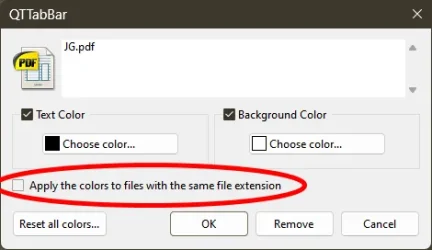
Are colours of files here assigned by filetype exclusively or it was manually made?
Both, by file type or one by one, if you choose...

10459.webp

Folders you have to do manually one by one.
 

My Computers

System One System Two

  • OS
    Windows 11 Pro
    Computer type
    PC/Desktop
    Manufacturer/Model
    ASUS ROG Strix
  • Operating System
    Windows 11 Pro
    Computer type
    Laptop
    Manufacturer/Model
    ASUS VivoBook

My Computer

System One

  • OS
    W11 24H2 26100.712
    Other Info
    Updates are disease.
A couple words of caution, though...,

1. QTTabBar doesn't work worth a darn with the native Windows 11 Explorer SDK..., as you can see by my screenshot in Post #4, I'm using Explorer in Windows 7 Mode with the aid of StartAllBack!

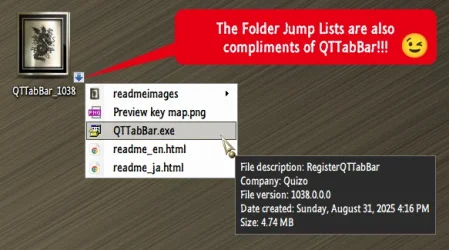
2. I'm using an older version (1038) of QTTabBar, which you can get here, (it says 1036 but you get 1038), which is a standalone version that cooperates much nicer with Explorer!
 

My Computers

System One System Two

  • OS
    Windows 11 Pro
    Computer type
    PC/Desktop
    Manufacturer/Model
    ASUS ROG Strix
  • Operating System
    Windows 11 Pro
    Computer type
    Laptop
    Manufacturer/Model
    ASUS VivoBook

My Computers

System One System Two

  • OS
    Windows 11 Pro
    Computer type
    PC/Desktop
    Manufacturer/Model
    ASUS ROG Strix
  • Operating System
    Windows 11 Pro
    Computer type
    Laptop
    Manufacturer/Model
    ASUS VivoBook
... compatible with Explorer patcher and dark theme?
Not sure about Explorer Patcher as I've never used it...,
dark elements are applied to some degree with version 1038 and the help of StartAllBack...,
a more fully compatible version is the 2048 beta 2, but it has a ton of glitches, in my experience anyway, and, it's not standalone.
The 1038 version you can virtually turn on and off at will.
 

My Computers

System One System Two

  • OS
    Windows 11 Pro
    Computer type
    PC/Desktop
    Manufacturer/Model
    ASUS ROG Strix
  • Operating System
    Windows 11 Pro
    Computer type
    Laptop
    Manufacturer/Model
    ASUS VivoBook
Not sure about Explorer Patcher as I've never used it...,
dark elements are applied to some degree with version 1038 and the help of StartAllBack...,
a more fully compatible version is the 2048 beta 2, but it has a ton of glitches, in my experience anyway, and, it's not standalone.
The 1038 version you can virtually turn on and off at will.
Can I ask for settings file to import like to have result like on from post #4? That "Drop helpers" view especialy?
 

My Computer

System One

  • OS
    W11 24H2 26100.712
    Other Info
    Updates are disease.
Here's an overall view of Explorer in W7 mode with QT and all it's Options...

10461.webp
 

My Computers

System One System Two

  • OS
    Windows 11 Pro
    Computer type
    PC/Desktop
    Manufacturer/Model
    ASUS ROG Strix
  • Operating System
    Windows 11 Pro
    Computer type
    Laptop
    Manufacturer/Model
    ASUS VivoBook
Can I ask for settings file to import like to have result like on from post #4? That "Drop helpers" view especialy?
It won't work, many of .xml pointers are OS specific.
It's pretty easy to setup yourself, though, you just need to take your time...,
Here's the QT Manual
 

My Computers

System One System Two

  • OS
    Windows 11 Pro
    Computer type
    PC/Desktop
    Manufacturer/Model
    ASUS ROG Strix
  • Operating System
    Windows 11 Pro
    Computer type
    Laptop
    Manufacturer/Model
    ASUS VivoBook
I think I have found alternative.
Tested for a while and besides crashing occasionally seems like the free version is to my liking. For now should be enough. it has tagging stuff and nice graphical presentation plus supposedly doesnt do anything to files themselves like internally messing stuff.
 

My Computer

System One

  • OS
    W11 24H2 26100.712
    Other Info
    Updates are disease.
  • Like
Reactions: OAT
Hi there

@MilkyWindow

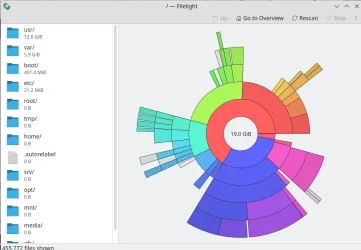
If you can load up any "Live Linux" distro and just run filelight then this is a really great easy app to analyse files etc -- it supports NTFS Windows files too

just move mouse to a box and details shown plus lots of other options
The overview looks like this :

Screenshot_20250902_222532.webp


Cheers
jimbo
 

My Computer

System One

  • OS
    Windows XP,11 Linux Fedora Rawhide pre-release 45
    Computer type
    PC/Desktop
    CPU
    2 X Intel i7
    Screen Resolution
    4KUHD X 2
The best file managers like Dolphin and Nemo are Linux only. A pity no one has ported them to Windows.
 

My Computers

System One System Two

  • OS
    Windows 11 Education For 25H2
    Computer type
    Laptop
    Manufacturer/Model
    HP ZBook G2
    CPU
    Intel® Core i7 5500u
    Motherboard
    HP
    Memory
    8 GB
    Graphics Card(s)
    Intel HD Family Graphics 5500 AMD Firepro 4150M
    Sound Card
    Realtek High Audio
    Hard Drives
    1 TB SSD
    Mouse
    HP USB Mouse
    Antivirus
    Windows Defender
  • Operating System
    Windows 11 Pro For Workstations 25H2
    Computer type
    Laptop
    Manufacturer/Model
    HP Zbook G4
    CPU
    Xeon 1535m v6
    Motherboard
    HP
    Memory
    32 GB
    Graphics card(s)
    AMD Quadro Pro 4100
    Sound Card
    Bang and Olufson Audio
    Hard Drives
    1TB SSD
    Mouse
    HP USB Mouse
    Antivirus
    Windows Defender
The best file managers like Dolphin and Nemo are Linux only. A pity no one has ported them to Windows.
I agree about Dolphin but that's not very helpful to a Windows 11 user.
 

My Computers

System One System Two

  • OS
    All Branches but Release
    Computer type
    Laptop
    Manufacturer/Model
    Acer Nitro ANV15-51
    CPU
    AMD Ryzen 7 7735HS 3200-4500 Mhz 8 cores x 2
    Motherboard
    Sportage_RBH
    Memory
    32 GB DDR5
    Graphics Card(s)
    Radeon Graphic / NVIDIA GeForce RTX 4060 8 GB GDDR6
    Sound Card
    AMD/Realtek(R) Audio
    Monitor(s) Displays
    Integrated Monitor (15.3"vis)
    Screen Resolution
    FHD 1920X1080 16:9 144Hz
    Hard Drives
    KINGSTON OM8SEP4512Q-AA 1TB
    Western Digital 256GB
    PSU
    19V DC 6.32 A 120 W
    Cooling
    Dual Fans
    Mouse
    MS Bluetooth
    Internet Speed
    Fiber 1GB Cox -us & 1GB Orange-fr
    Browser
    Edge Canary- Firefox Nightly-Chrome Dev-Chrome Dev
    Antivirus
    Windows Defender
  • Operating System
    Windows 11 Beta
    Computer type
    Laptop
    Manufacturer/Model
    Asus X751BP
    CPU
    AMD A9-9420
    Memory
    8 GB of DDR4
    Graphics card(s)
    AMD Radeon R5
    Screen Resolution
    1600x900
    Hard Drives
    Seagate 1 TB

Latest Support Threads

Back
Top Bottom