Cannot add optional features in latest "Experimental build"


jimbo45

Well-known member
Pro User
VIP
Local time
3:08 PM
Posts
5,780
Location
Hafnarfjörður IS
OS
Windows XP,11 Linux Fedora Rawhide pre-release 45
Hi folks
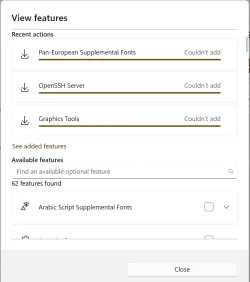
problem with adding "Optional features" in latest experimental build
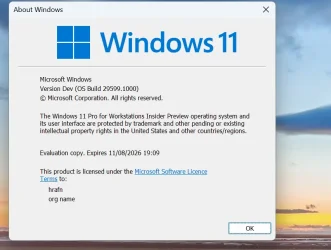
Screenshot 2026-06-04 154045.webp


Optional features

Screenshot 2026-06-04 154359.webp


Cheers
jimbo
 

My Computer

System One

  • OS
    Windows XP,11 Linux Fedora Rawhide pre-release 45
    Computer type
    PC/Desktop
    CPU
    2 X Intel i7
    Screen Resolution
    4KUHD X 2
You can add Windows 11 optional features using the Deployment Image Servicing and Management (DISM) tool via an elevated Command Prompt or PowerShell. This allows you to install or enable features and capabilities efficiently without relying on the GUI.


Find the exact feature name: Before installing, ensure you have the exact name of the feature you want. You can view all available features by running the following command:

Code:
DISM /Online /Get-Features /Format:Table


Enable the specific feature: Use the /Enable-Feature command, replacing FeatureName with the exact name from the list:

Code:
DISM /Online /Enable-Feature /FeatureName:NameOfFeature /All


Note: Add the /All flag if you want to enable all parent features and dependencies automatically).
 

My Computer

System One

  • OS
    Windows 11
    Computer type
    PC/Desktop
    Manufacturer/Model
    HP Pavilion
    CPU
    AMD Ryzen 7 5700G
    Motherboard
    Erica6
    Memory
    Micron Technology DDR4-3200 16GB
    Graphics Card(s)
    NVIDIA GeForce RTX 3060
    Sound Card
    Realtek ALC671
    Monitor(s) Displays
    Samsung SyncMaster U28E590
    Screen Resolution
    3840 x 2160
    Hard Drives
    SAMSUNG MZVLQ1T0HALB-000H1

Latest Support Threads

Back
Top Bottom