Cannot add optional features in latest "Experimental build"


jimbo45

Well-known member
Pro User
VIP
Local time
1:09 AM
Posts
5,981
Location
Hafnarfjörður IS
OS
Windows XP,11 Linux Fedora Rawhide pre-release 46
Hi folks
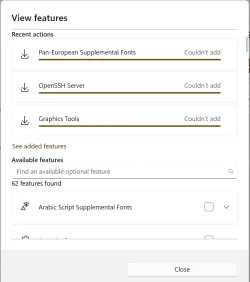
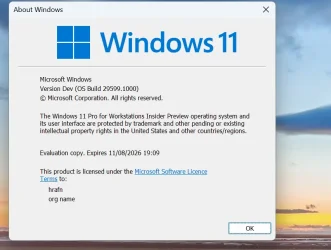
problem with adding "Optional features" in latest experimental build
Screenshot 2026-06-04 154045.webp


Optional features

Screenshot 2026-06-04 154359.webp


Cheers
jimbo
 

My Computer My Computer

At a glance

Windows XP,11 Linux Fedora Rawhide pre-releas...2 X Intel i7
OS
Windows XP,11 Linux Fedora Rawhide pre-release 46
Computer type
PC/Desktop
CPU
2 X Intel i7
Screen Resolution
4KUHD X 2
You can add Windows 11 optional features using the Deployment Image Servicing and Management (DISM) tool via an elevated Command Prompt or PowerShell. This allows you to install or enable features and capabilities efficiently without relying on the GUI.


Find the exact feature name: Before installing, ensure you have the exact name of the feature you want. You can view all available features by running the following command:

Code:
DISM /Online /Get-Features /Format:Table


Enable the specific feature: Use the /Enable-Feature command, replacing FeatureName with the exact name from the list:

Code:
DISM /Online /Enable-Feature /FeatureName:NameOfFeature /All


Note: Add the /All flag if you want to enable all parent features and dependencies automatically).
 

My Computer My Computer

At a glance

Windows 11AMD Ryzen 7 5700GMicron Technology DDR4-3200 16GBNVIDIA GeForce RTX 3060
OS
Windows 11
Computer type
PC/Desktop
Manufacturer/Model
HP Pavilion
CPU
AMD Ryzen 7 5700G
Motherboard
Erica6
Memory
Micron Technology DDR4-3200 16GB
Graphics Card(s)
NVIDIA GeForce RTX 3060
Sound Card
Realtek ALC671
Monitor(s) Displays
Samsung SyncMaster U28E590
Screen Resolution
3840 x 2160
Hard Drives
SAMSUNG MZVLQ1T0HALB-000H1
You can add Windows 11 optional features using the Deployment Image Servicing and Management (DISM) tool via an elevated Command Prompt or PowerShell. This allows you to install or enable features and capabilities efficiently without relying on the GUI.


Find the exact feature name: Before installing, ensure you have the exact name of the feature you want. You can view all available features by running the following command:

Code:
DISM /Online /Get-Features /Format:Table


Enable the specific feature: Use the /Enable-Feature command, replacing FeatureName with the exact name from the list:

Code:
DISM /Online /Enable-Feature /FeatureName:NameOfFeature /All


Note: Add the /All flag if you want to enable all parent features and dependencies automatically).
All these Get arounds might be OK but WHY if I usually use the GUI which has worked "Since Pontius was a Pilot" i.e for years suddenly be not working any more !!!

Cheers
jimbo
 

My Computer My Computer

At a glance

Windows XP,11 Linux Fedora Rawhide pre-releas...2 X Intel i7
OS
Windows XP,11 Linux Fedora Rawhide pre-release 46
Computer type
PC/Desktop
CPU
2 X Intel i7
Screen Resolution
4KUHD X 2
All these Get arounds might be OK but WHY if I usually use the GUI which has worked "Since Pontius was a Pilot" i.e for years suddenly be not working any more !!!

Cheers
jimbo
Stop using experimental software then!
 

My Computers My Computers

  • At a glance

    All Branches but StableAMD Ryzen 7 7735HS 3200-4500 Mhz 8 cores x 232 GB DDR5Radeon Graphic / NVIDIA GeForce RTX 4060 8 GB...
    OS
    All Branches but Stable
    Computer type
    Laptop
    Manufacturer/Model
    Acer Nitro ANV15-51
    CPU
    AMD Ryzen 7 7735HS 3200-4500 Mhz 8 cores x 2
    Motherboard
    Sportage_RBH
    Memory
    32 GB DDR5
    Graphics Card(s)
    Radeon Graphic / NVIDIA GeForce RTX 4060 8 GB GDDR6
    Sound Card
    AMD/Realtek(R) Audio
    Monitor(s) Displays
    Integrated Monitor (15.3"vis)
    Screen Resolution
    FHD 1920X1080 16:9 144Hz
    Hard Drives
    KINGSTON OM8SEP4512Q-AA 1TB
    Western Digital 256GB
    PSU
    19V DC 6.32 A 120 W
    Cooling
    Dual Fans
    Mouse
    MS Bluetooth
    Internet Speed
    Fiber 1GB Cox -us & 1GB Orange-fr
    Browser
    Edge Canary- Firefox Nightly-Chrome Dev-Chrome Dev
    Antivirus
    Windows Defender
  • At a glance

    Windows 11 BetaAMD A9-94208 GB of DDR4AMD Radeon R5
    Operating System
    Windows 11 Beta
    Computer type
    Laptop
    Manufacturer/Model
    Asus X751BP
    CPU
    AMD A9-9420
    Memory
    8 GB of DDR4
    Graphics card(s)
    AMD Radeon R5
    Screen Resolution
    1600x900
    Hard Drives
    Seagate 1 TB

Latest Support Threads

Back
Top Bottom