Why does my 7900xtx use less power in some games?


GetTheClicker

Well-known member
Member
Local time
5:31 PM
Posts
77
OS
Windows 11
Untitled.webp

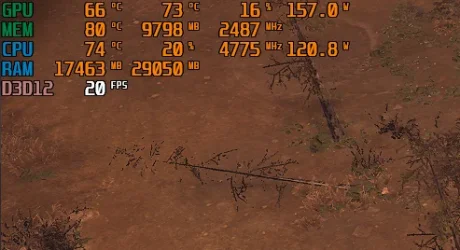
In Tempest Rising, which I understand is more of a CPU based game, it uses hardly any of my GPU once you build up a small army and doesn't recover unless in the pause menu.

In other games such as Once Human or 007 First light it will play normally but randomly drop to these same low usage stats as seen in the picture but only for a few seconds up to a few minutes which will tank my FPS.

Atomic Heart is the worst one. It will play smoothly but every minute it will lose a little FPS and the power will also lower down as well. After 20 mins I've gone from 144fps to 14. Only way to get that FPS back is the restart the game entirely.

DDU'd and new drivers from the official AMD site.
Games are set to High Priority.
I even did the Registry tweaks.
 

My Computer

System One

  • OS
    Windows 11
    Computer type
    PC/Desktop
    Manufacturer/Model
    Aorus
    CPU
    AMD 5950X
    Motherboard
    Aorus X570S Master
    Memory
    64gigs DDR4 4000mhz Neo TridentZ
    Graphics Card(s)
    Radeon 7900XTX
    Monitor(s) Displays
    Dual 42" Insignia 1080p 55" TCL 6 series
    Screen Resolution
    3200x1800 / 3840x2160
    Hard Drives
    1 500gb NvMe Operating System Drive
    3x 2TB NvMe
    1 2tb SSD
    1 500gb SSD
    PSU
    Lian Li Edge Serie - 1000W
    Cooling
    ARCTIC Liquid Freezer II 360
    Browser
    Chrome
View attachment 173379

In Tempest Rising, which I understand is more of a CPU based game, it uses hardly any of my GPU once you build up a small army and doesn't recover unless in the pause menu.

In other games such as Once Human or 007 First light it will play normally but randomly drop to these same low usage stats as seen in the picture but only for a few seconds up to a few minutes which will tank my FPS.

Atomic Heart is the worst one. It will play smoothly but every minute it will lose a little FPS and the power will also lower down as well. After 20 mins I've gone from 144fps to 14. Only way to get that FPS back is the restart the game entirely.

DDU'd and new drivers from the official AMD site.
Games are set to High Priority.
I even did the Registry tweaks.
Are you asking why some games utilize the GPU differently than others? That question could take days to answer. In a nutshell, how a game is coded determines how it will utilize the GPU. Different game assets such as graphics, and physics will utilize the GPU differently.
 

My Computer

System One

  • OS
    Windows 11 25H2
    Computer type
    PC/Desktop
    Manufacturer/Model
    EVGA home brew
    CPU
    Broadwell-e 6850K 4.5ghz @1.36v
    Motherboard
    EVGA X99 FTW K
    Memory
    32GB Corsair LPM 3600 C16
    Graphics Card(s)
    EVGA RTX 3080Ti FTW
    Sound Card
    Asus Centurion true 7.1 headset. (5 speakers in each earpeice)
    Monitor(s) Displays
    LG C4 55"
    Screen Resolution
    4K 144hz
    Hard Drives
    Various models of SSDs ~10TB No HDDs installed.
    PSU
    be quiet! BN516 Straight Power 12-1000w 80 Plus Platinum
    Case
    Corsair 780T modified to dual 200mm intake fans
    Cooling
    Corsair H110i
    Keyboard
    Corsair K95 Platinum
    Mouse
    Corsair M65 RGB Elite
    Internet Speed
    50Mbs
@GetTheClicker


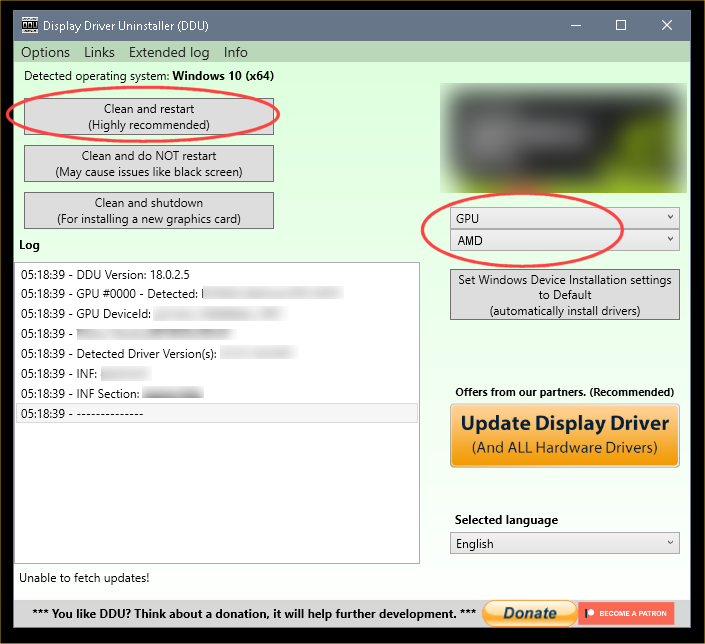
The two most important items in the following are to disable drivers included in Windows updates, and to disconnect and reconnect the internet as mentioned...


 DDU Instructions - AMD


1. First, do Option #2, step #3 and onward, here...
2. This will block MS from including drivers in Windows Updates.
3. They'll still be listed in the Optional Updates, if you ever need them.


1. Get this program, here: Display Driver Uninstaller (DDU) | Wagnardsoft ...get the latest version, and save it to your desktop.
2. Get your vid card driver here, use the Manual Search: http://support.amd.com/en-us/download ...save this to your desktop.
Unhook the internet completely.
3. Reboot into Safe Mode and run DDU (Display Driver Uninstaller) choose the "Highly Recommend Option", and just do what it tells you.
4. After it's done, reboot to normal mode, then just double click the AMD driver to install. If it want's to reboot, let it.
Rehook the internet.

ZeG5oTO.png


Many times, Microsoft will install drivers over top of the driver(s) you have installed.
A lot of the time, this will cause driver corruption.


If all else fails... (which it does sometimes), you can also block driver updates to a specific piece of hardware, by using that hardware's ID...


I had to use this tutorial to stop MS (or Nvidia), from updating my vid card driver, without my permission.
[Still waiting to see if this actually worked. It's been a month so far.]


Now if I could just get MS to start using DDU, when they wanted to install a vid card driver without permission, then we probably wouldn't have these problems. :D
 
Last edited:

My Computers

System One System Two

  • OS
    Win 11 Home ♦♦♦26200.8457 ♦♦♦♦♦♦♦25H2
    Computer type
    PC/Desktop
    Manufacturer/Model
    Built by Ghot® [May 2020]
    CPU
    AMD Ryzen 7 3700X
    Motherboard
    Asus Pro WS X570-ACE (BIOS 5302)
    Memory
    G.Skill (F4-3200C14D-16GTZKW)
    Graphics Card(s)
    EVGA RTX 2070 (08G-P4-2171-KR)
    Sound Card
    Realtek ALC1220P / ALC S1220A
    Monitor(s) Displays
    Dell U3011 30"
    Screen Resolution
    2560 x 1600
    Hard Drives
    2x Samsung 860 EVO 500GB,
    WD 4TB Black FZBX - SATA III,
    WD 8TB Black FZBX - SATA III,
    DRW-24B1ST CD/DVD Burner
    PSU
    PC Power & Cooling 750W Quad EPS12V
    Case
    Cooler Master ATCS 840 Tower
    Cooling
    CM Hyper 212 EVO (push/pull)
    Keyboard
    Ducky DK9008 Shine II Blue LED
    Mouse
    Logitech Optical M-100
    Internet Speed
    300/300
    Browser
    Firefox (latest)
    Antivirus
    Bitdefender Total Security
    Other Info
    Speakers: Klipsch Pro Media 2.1
  • Operating System
    Windows XP Pro 32bit w/SP3
    Computer type
    PC/Desktop
    Manufacturer/Model
    Built by Ghot® (not in use)
    CPU
    AMD Athlon 64 X2 5000+ (OC'd @ 3.2Ghz)
    Motherboard
    ASUS M2N32-SLI Deluxe Wireless Edition
    Memory
    TWIN2X2048-6400C4DHX (2 x 1GB, DDR2 800)
    Graphics card(s)
    EVGA 256-P2-N758-TR GeForce 8600GT SSC
    Sound Card
    Onboard
    Monitor(s) Displays
    ViewSonic G90FB Black 19" Professional (CRT)
    Screen Resolution
    up to 2048 x 1536
    Hard Drives
    WD 36GB 10,000rpm Raptor SATA
    Seagate 80GB 7200rpm SATA
    Lite-On LTR-52246S CD/RW
    Lite-On LH-18A1P CD/DVD Burner
    PSU
    PC Power & Cooling Silencer 750 Quad EPS12V
    Case
    Generic Beige case, 80mm fans
    Cooling
    ZALMAN 9500A 92mm CPU Cooler
    Keyboard
    Logitech Classic Keybooard 200
    Mouse
    Logitech Optical M-BT96a
    Internet Speed
    300/300
    Browser
    Firefox 3.x ??
    Antivirus
    Symantec (Norton)
    Other Info
    Still assembled, still runs. Haven't turned it on for 15 years?
Are you asking why some games utilize the GPU differently than others? That question could take days to answer. In a nutshell, how a game is coded determines how it will utilize the GPU. Different game assets such as graphics, and physics will utilize the GPU differently.
No I'm asking why does my GPU look like it's slowing down from time to time. Some games it will trip and get back up. Other games it takes a nap. I am not even playing but for a couple hours a day. I don't think it's about optimization, it seems like Windows or maybe a feature is telling the GPU to hold back. It has a 1000watt LianLi PSU which is brand new.


Yes I did DDU in safemode and did a full cleaning. That did away with an error I had caused by stacked up drivers so I mean that is a win.
 

My Computer

System One

  • OS
    Windows 11
    Computer type
    PC/Desktop
    Manufacturer/Model
    Aorus
    CPU
    AMD 5950X
    Motherboard
    Aorus X570S Master
    Memory
    64gigs DDR4 4000mhz Neo TridentZ
    Graphics Card(s)
    Radeon 7900XTX
    Monitor(s) Displays
    Dual 42" Insignia 1080p 55" TCL 6 series
    Screen Resolution
    3200x1800 / 3840x2160
    Hard Drives
    1 500gb NvMe Operating System Drive
    3x 2TB NvMe
    1 2tb SSD
    1 500gb SSD
    PSU
    Lian Li Edge Serie - 1000W
    Cooling
    ARCTIC Liquid Freezer II 360
    Browser
    Chrome
7900 XTX can generate a massive amount of heat and if it hits the temperature threshold it will thermal throttle until it cools back down to within thermal specs.

Run something like HWInfo or GPU-Z and monitor the GPU temps.
 

My Computer

System One

  • OS
    Windows 11 Pro
No I'm asking why does my GPU look like it's slowing down from time to time. Some games it will trip and get back up. Other games it takes a nap. I am not even playing but for a couple hours a day. I don't think it's about optimization, it seems like Windows or maybe a feature is telling the GPU to hold back. It has a 1000watt LianLi PSU which is brand new.
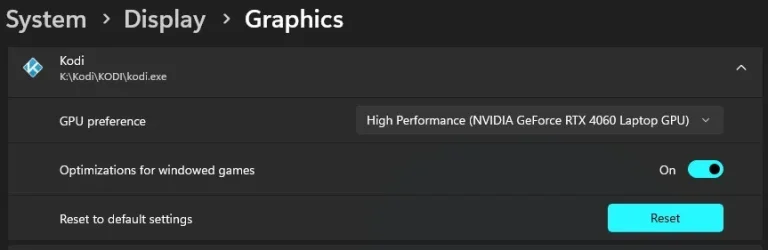
There is an option that makes you choose which GPU is used per app/games.
Double check to see which GPU is chosen in System/Display/Graphics/ for each game.

start.webp
 

My Computers

System One System Two

  • OS
    All Branches but Release
    Computer type
    Laptop
    Manufacturer/Model
    Acer Nitro ANV15-51
    CPU
    AMD Ryzen 7 7735HS 3200-4500 Mhz 8 cores x 2
    Motherboard
    Sportage_RBH
    Memory
    32 GB DDR5
    Graphics Card(s)
    Radeon Graphic / NVIDIA GeForce RTX 4060 8 GB GDDR6
    Sound Card
    AMD/Realtek(R) Audio
    Monitor(s) Displays
    Integrated Monitor (15.3"vis)
    Screen Resolution
    FHD 1920X1080 16:9 144Hz
    Hard Drives
    KINGSTON OM8SEP4512Q-AA 1TB
    Western Digital 256GB
    PSU
    19V DC 6.32 A 120 W
    Cooling
    Dual Fans
    Mouse
    MS Bluetooth
    Internet Speed
    Fiber 1GB Cox -us & 1GB Orange-fr
    Browser
    Edge Canary- Firefox Nightly-Chrome Dev-Chrome Dev
    Antivirus
    Windows Defender
  • Operating System
    Windows 11 Beta
    Computer type
    Laptop
    Manufacturer/Model
    Asus X751BP
    CPU
    AMD A9-9420
    Memory
    8 GB of DDR4
    Graphics card(s)
    AMD Radeon R5
    Screen Resolution
    1600x900
    Hard Drives
    Seagate 1 TB
7900 XTX can generate a massive amount of heat and if it hits the temperature threshold it will thermal throttle until it cools back down to within thermal specs.

Run something like HWInfo or GPU-Z and monitor the GPU temps.
It's not a temp issue. I never let my hotspot go above 99c. The max temp for hotspot is 110-112c. I use MSI Afterburner and Gigabyte Control Center.

There is an option that makes you choose which GPU is used per app/games.
Double check to see which GPU is chosen in System/Display/Graphics/ for each game.

View attachment 173393

Did all that. Made no difference.
 

My Computer

System One

  • OS
    Windows 11
    Computer type
    PC/Desktop
    Manufacturer/Model
    Aorus
    CPU
    AMD 5950X
    Motherboard
    Aorus X570S Master
    Memory
    64gigs DDR4 4000mhz Neo TridentZ
    Graphics Card(s)
    Radeon 7900XTX
    Monitor(s) Displays
    Dual 42" Insignia 1080p 55" TCL 6 series
    Screen Resolution
    3200x1800 / 3840x2160
    Hard Drives
    1 500gb NvMe Operating System Drive
    3x 2TB NvMe
    1 2tb SSD
    1 500gb SSD
    PSU
    Lian Li Edge Serie - 1000W
    Cooling
    ARCTIC Liquid Freezer II 360
    Browser
    Chrome
Did all that. Made no difference.


Keep in mind, that it could also be the games themselves.
If you haven't already... check those game's forums. See if it's a known issue.

There may be patches for those exact problems?
 

My Computers

System One System Two

  • OS
    Win 11 Home ♦♦♦26200.8457 ♦♦♦♦♦♦♦25H2
    Computer type
    PC/Desktop
    Manufacturer/Model
    Built by Ghot® [May 2020]
    CPU
    AMD Ryzen 7 3700X
    Motherboard
    Asus Pro WS X570-ACE (BIOS 5302)
    Memory
    G.Skill (F4-3200C14D-16GTZKW)
    Graphics Card(s)
    EVGA RTX 2070 (08G-P4-2171-KR)
    Sound Card
    Realtek ALC1220P / ALC S1220A
    Monitor(s) Displays
    Dell U3011 30"
    Screen Resolution
    2560 x 1600
    Hard Drives
    2x Samsung 860 EVO 500GB,
    WD 4TB Black FZBX - SATA III,
    WD 8TB Black FZBX - SATA III,
    DRW-24B1ST CD/DVD Burner
    PSU
    PC Power & Cooling 750W Quad EPS12V
    Case
    Cooler Master ATCS 840 Tower
    Cooling
    CM Hyper 212 EVO (push/pull)
    Keyboard
    Ducky DK9008 Shine II Blue LED
    Mouse
    Logitech Optical M-100
    Internet Speed
    300/300
    Browser
    Firefox (latest)
    Antivirus
    Bitdefender Total Security
    Other Info
    Speakers: Klipsch Pro Media 2.1
  • Operating System
    Windows XP Pro 32bit w/SP3
    Computer type
    PC/Desktop
    Manufacturer/Model
    Built by Ghot® (not in use)
    CPU
    AMD Athlon 64 X2 5000+ (OC'd @ 3.2Ghz)
    Motherboard
    ASUS M2N32-SLI Deluxe Wireless Edition
    Memory
    TWIN2X2048-6400C4DHX (2 x 1GB, DDR2 800)
    Graphics card(s)
    EVGA 256-P2-N758-TR GeForce 8600GT SSC
    Sound Card
    Onboard
    Monitor(s) Displays
    ViewSonic G90FB Black 19" Professional (CRT)
    Screen Resolution
    up to 2048 x 1536
    Hard Drives
    WD 36GB 10,000rpm Raptor SATA
    Seagate 80GB 7200rpm SATA
    Lite-On LTR-52246S CD/RW
    Lite-On LH-18A1P CD/DVD Burner
    PSU
    PC Power & Cooling Silencer 750 Quad EPS12V
    Case
    Generic Beige case, 80mm fans
    Cooling
    ZALMAN 9500A 92mm CPU Cooler
    Keyboard
    Logitech Classic Keybooard 200
    Mouse
    Logitech Optical M-BT96a
    Internet Speed
    300/300
    Browser
    Firefox 3.x ??
    Antivirus
    Symantec (Norton)
    Other Info
    Still assembled, still runs. Haven't turned it on for 15 years?
Hi @GetTheClicker

First, I'm a RX 7900 XTX user myself, my GPU is listed below and I've in over 3 years never had my 7900 XTX exhibit the behaviour you're describing. So, have these behaviours you're with your GPU, just started recently or is it a long-term issue?

Just wondering if the issue is hardware related and not a driver issue.
 

My Computers

System One System Two

  • OS
    Windows 11 Pro 25H2
    Computer type
    PC/Desktop
    Manufacturer/Model
    Homebuilt
    CPU
    Intel Core i9 13900K
    Motherboard
    Asus ProArt Z790 Creator WiFi - Bios 3107
    Memory
    Corsair Dominator Platinum 64gb 5600MT/s DDR5 Dual Channel
    Graphics Card(s)
    Sapphire NITRO+ AMD Radeon RX 7900 XTX Vapor-X 24GB
    Sound Card
    External DAC: Cambridge Audio DACMagic200M - Headphone Amp: Topping L50
    Monitor(s) Displays
    Panasonic MX950 Mini LED 55" TV 120hz
    Screen Resolution
    3840 x 2160 120hz
    Hard Drives
    Samsung 980 Pro 2TB (OS)
    Samsung 980 Pro 1TB (Files)
    Lexar NZ790 4TB
    LaCie d2 Professional 6TB external - USB 3.1
    Seagate Expansion 16TB external - USB 3.2
    Seagate One Touch 18TB external HD - USB 3.0
    PSU
    Corsair RM1200x Shift
    Case
    Corsair RGB Smart Case 5000x (white)
    Cooling
    Corsair iCue H150i Elite Capellix XT
    Keyboard
    Incase Ergonomic USB (Microsoft clone)
    Mouse
    Logitech MX Master 3S
    Internet Speed
    Fibre 900/500 Mbps
    Browser
    Microsoft Edge Chromium
    Antivirus
    Bitdefender Total Security
    Other Info
    AMD Radeon Software & Drivers 26.1.1
    Hasleo Backup Suite
    Dashlane password manager
    Kensington Verimark fingerprint reader
    Logitech Brio 4K webcam
    Orico 10-port powered USB 3.0 hub
  • Operating System
    Windows 11 Pro 25H2
    Computer type
    Laptop
    Manufacturer/Model
    Asus Vivobook X1605VA
    CPU
    Intel® Core™ i9-13900H
    Motherboard
    Asus X1605VA bios 309
    Memory
    32GB DDR4-3200 Dual channel
    Graphics card(s)
    *Intel Iris Xᵉ Graphics G7
    Sound Card
    Realtek | Intel SST Bluetooth & USB
    Monitor(s) Displays
    16.0-inch, WUXGA 16:10 aspect ratio, IPS-level Panel
    Screen Resolution
    1920 x 1200 60hz
    Hard Drives
    512GB M.2 NVMe™ PCIe® 3.0 SSD
    Mouse
    Logitech MX Ergo Trackball
    Antivirus
    Bitdefender Total Security
    Other Info
    720p Webcam
    WiFi & USB to ethernet
  • Like
Reactions: OAT
Keep in mind, that it could also be the games themselves.
If you haven't already... check those game's forums. See if it's a known issue.

There may be patches for those exact problems?
Seems like almost any game I play has its own issues. Some slowly put the GPU to sleep, some it's a little nap, and others it's not too noticeable like Forza Horizon 5.
Hi @GetTheClicker

First, I'm a RX 7900 XTX user myself, my GPU is listed below and I've in over 3 years never had my 7900 XTX exhibit the behaviour you're describing. So, have these behaviours you're with your GPU, just started recently or is it a long-term issue?

Just wondering if the issue is hardware related and not a driver issue.
It has gone on for a while, I just started to notice it more because I'm playing more types of games now that I'm on vacation from work. It's a reference model from Gigabyte. About 5 years old.

I dust the computer regularly with the Inland Compressed Air 3.0. I've never taken the card apart mainly because I spent $1800 back then and have no other GPU or display device if something goes wrong.

I keep up to date with the drivers using DDU every 5 updates. I've noticed if I update 6 times without DDU I get GPU related crashes and BSOD's.

It's paired with a 5950x on an Aorus X570S Master mobo. SAM is enabled along with XMP running all 4 16 gig sticks of ram at 4000mhz. I could not afford the 5800x3d let alone find one to upgrade to that wasn't almost $900. There doesn't seem to be a bottleneck. It feels like a power saving option somewhere. I have looked everywhere, tweaked all the settings, disabled ULPS within MSI Afterburner, followed the Registry Edit tutorial seen here...
I did NOT download the Boost Pack, seems sketchy but if anyone can verify it does what it claims I'd like to give that a try.
 

My Computer

System One

  • OS
    Windows 11
    Computer type
    PC/Desktop
    Manufacturer/Model
    Aorus
    CPU
    AMD 5950X
    Motherboard
    Aorus X570S Master
    Memory
    64gigs DDR4 4000mhz Neo TridentZ
    Graphics Card(s)
    Radeon 7900XTX
    Monitor(s) Displays
    Dual 42" Insignia 1080p 55" TCL 6 series
    Screen Resolution
    3200x1800 / 3840x2160
    Hard Drives
    1 500gb NvMe Operating System Drive
    3x 2TB NvMe
    1 2tb SSD
    1 500gb SSD
    PSU
    Lian Li Edge Serie - 1000W
    Cooling
    ARCTIC Liquid Freezer II 360
    Browser
    Chrome
Almost entirely due to the way the Game is written without going into a vast array of complicated programming.

You have some control with the game's Graphics settings. That means an understanding what each item does, is the effect actually visible, etc. No good wasting GPU/CPU on something that cannot be seen.

I'm asking why does my GPU look like it's slowing down from time to time. Some games it will trip and get back up. Other games it takes a nap. I am not even playing but for a couple hours a day. I don't think it's about optimization, it seems like Windows or maybe a feature is telling the GPU to hold back. It has a 1000watt LianLi PSU which is brand new.
That is far too simplistic view, particularly with modern CPUs, memory management and so forth.

It's not a temp issue. I never let my hotspot go above 99c. The max temp for hotspot is 110-112c. I use MSI Afterburner and Gigabyte Control Center.
Again a simplistic assumption.


There is an option that makes you choose which GPU is used per app/games.
Double check to see which GPU is chosen in System/Display/Graphics/ for each game.
That is only applicable to Optimus type of Laptops with iGPU and dGPU MUX switching etc, not Desktops.
 

My Computer

System One

  • OS
    Windows 11
Nvidia coulda.webp
 

My Computers

System One System Two

  • OS
    Win 11 Home ♦♦♦26200.8457 ♦♦♦♦♦♦♦25H2
    Computer type
    PC/Desktop
    Manufacturer/Model
    Built by Ghot® [May 2020]
    CPU
    AMD Ryzen 7 3700X
    Motherboard
    Asus Pro WS X570-ACE (BIOS 5302)
    Memory
    G.Skill (F4-3200C14D-16GTZKW)
    Graphics Card(s)
    EVGA RTX 2070 (08G-P4-2171-KR)
    Sound Card
    Realtek ALC1220P / ALC S1220A
    Monitor(s) Displays
    Dell U3011 30"
    Screen Resolution
    2560 x 1600
    Hard Drives
    2x Samsung 860 EVO 500GB,
    WD 4TB Black FZBX - SATA III,
    WD 8TB Black FZBX - SATA III,
    DRW-24B1ST CD/DVD Burner
    PSU
    PC Power & Cooling 750W Quad EPS12V
    Case
    Cooler Master ATCS 840 Tower
    Cooling
    CM Hyper 212 EVO (push/pull)
    Keyboard
    Ducky DK9008 Shine II Blue LED
    Mouse
    Logitech Optical M-100
    Internet Speed
    300/300
    Browser
    Firefox (latest)
    Antivirus
    Bitdefender Total Security
    Other Info
    Speakers: Klipsch Pro Media 2.1
  • Operating System
    Windows XP Pro 32bit w/SP3
    Computer type
    PC/Desktop
    Manufacturer/Model
    Built by Ghot® (not in use)
    CPU
    AMD Athlon 64 X2 5000+ (OC'd @ 3.2Ghz)
    Motherboard
    ASUS M2N32-SLI Deluxe Wireless Edition
    Memory
    TWIN2X2048-6400C4DHX (2 x 1GB, DDR2 800)
    Graphics card(s)
    EVGA 256-P2-N758-TR GeForce 8600GT SSC
    Sound Card
    Onboard
    Monitor(s) Displays
    ViewSonic G90FB Black 19" Professional (CRT)
    Screen Resolution
    up to 2048 x 1536
    Hard Drives
    WD 36GB 10,000rpm Raptor SATA
    Seagate 80GB 7200rpm SATA
    Lite-On LTR-52246S CD/RW
    Lite-On LH-18A1P CD/DVD Burner
    PSU
    PC Power & Cooling Silencer 750 Quad EPS12V
    Case
    Generic Beige case, 80mm fans
    Cooling
    ZALMAN 9500A 92mm CPU Cooler
    Keyboard
    Logitech Classic Keybooard 200
    Mouse
    Logitech Optical M-BT96a
    Internet Speed
    300/300
    Browser
    Firefox 3.x ??
    Antivirus
    Symantec (Norton)
    Other Info
    Still assembled, still runs. Haven't turned it on for 15 years?
Almost entirely due to the way the Game is written without going into a vast array of complicated programming.

You have some control with the game's Graphics settings. That means an understanding what each item does, is the effect actually visible, etc. No good wasting GPU/CPU on something that cannot be seen.


That is far too simplistic view, particularly with modern CPUs, memory management and so forth.


Again a simplistic assumption.


That is only applicable to Optimus type of Laptops with iGPU and dGPU MUX switching etc, not Desktops.
Unless I assume you have the iGPU (onboard) enabled in the BIOS along with the discrete GPU. But, even then, the discrete GPU should be used by default because it is much faster. So I don't think it's such a setting the culprit. I would make sure that I set maximum performance in graphics settings and prevent sleeping when idle. I would also select maximum performance over best quality to boost graphics as much as possible. Besides in a very fast action game you wouldn't notice the difference between best quality and standard quality.
 

My Computers

System One System Two

  • OS
    Windows 11 Pro 23H2 (5699), 25H2 (8457)
    Computer type
    Laptop
    Manufacturer/Model
    Acer Extensa 5630EZ
    CPU
    Mobile DualCore Intel Core 2 Duo T7250, 2000 MHz
    Motherboard
    Acer Extensa 5630
    Memory
    4GB
    Graphics Card(s)
    Mobile Intel(R) GMA 4500M (Mobile 4 series)
    Sound Card
    Realtek ALC268 @ Intel 82801IB ICH9 - High Definition Audio Controller
    Monitor(s) Displays
    1
    Screen Resolution
    1280x800
    Hard Drives
    Samsung SSD 850 EVO 250GB SATA Device (250 GB, SATA-III)
    Internet Speed
    VDSL 50 Mbps
    Browser
    MICROSOFT EDGE
    Antivirus
    WINDOWS DEFENDER
    Other Info
    Legacy MBR installation, no TPM, no Secure Boot, no WDDM 2.0 graphics drivers, no SSE4.2, cannot get more unsupported ;) This is only my test laptop. I had installed Windows 11 here before upgrading my main PC. For my main PC I use everyday see my 2nd system specs.
  • Operating System
    Windows 11 Pro v25H2 (build 26200.8457)
    Computer type
    PC/Desktop
    Manufacturer/Model
    Custom-built PC
    CPU
    Intel Core-i7 3770 3.40GHz s1155 (3rd generation)
    Motherboard
    Asus P8H61 s1155 ATX
    Memory
    2x Kingston Hyper-X Blu 8GB DDR3-1600
    Graphics card(s)
    GIGABYTE GeForce RTX 3050 WINDFORCE OC V2 6GB (GV-N3050WF2OCV2-6GD)
    Sound Card
    Realtek HD audio (ALC887)
    Monitor(s) Displays
    Sony Bravia KDL-19L4000 19" LCD TV via VGA
    Screen Resolution
    1440x900 32-bit 60Hz
    Hard Drives
    WD Blue SA510 2.5 1000GB SSD as system disk, Western Digital Caviar Purple 4TB SATA III (WD40PURZ) as second
    PSU
    Thermaltake Litepower RGB 550W Full Wired
    Case
    SUPERCASE MIDI-TOWER
    Cooling
    Deepcool Gamma Archer CPU cooler, 1x 8cm fan at the back
    Keyboard
    Mitsumi 101-key PS/2
    Mouse
    Sunnyline OptiEye PS/2
    Internet Speed
    100Mbps
    Browser
    Microsoft Edge, Mozilla Firefox
    Antivirus
    Microsoft Windows Defender
    Other Info
    Legacy BIOS (MBR) installation, no TPM, no Secure Boot, WDDM 3.0 graphics drivers, WEI score 7.4

My Computers

System One System Two

  • OS
    Windows 11 Pro 23H2 (5699), 25H2 (8457)
    Computer type
    Laptop
    Manufacturer/Model
    Acer Extensa 5630EZ
    CPU
    Mobile DualCore Intel Core 2 Duo T7250, 2000 MHz
    Motherboard
    Acer Extensa 5630
    Memory
    4GB
    Graphics Card(s)
    Mobile Intel(R) GMA 4500M (Mobile 4 series)
    Sound Card
    Realtek ALC268 @ Intel 82801IB ICH9 - High Definition Audio Controller
    Monitor(s) Displays
    1
    Screen Resolution
    1280x800
    Hard Drives
    Samsung SSD 850 EVO 250GB SATA Device (250 GB, SATA-III)
    Internet Speed
    VDSL 50 Mbps
    Browser
    MICROSOFT EDGE
    Antivirus
    WINDOWS DEFENDER
    Other Info
    Legacy MBR installation, no TPM, no Secure Boot, no WDDM 2.0 graphics drivers, no SSE4.2, cannot get more unsupported ;) This is only my test laptop. I had installed Windows 11 here before upgrading my main PC. For my main PC I use everyday see my 2nd system specs.
  • Operating System
    Windows 11 Pro v25H2 (build 26200.8457)
    Computer type
    PC/Desktop
    Manufacturer/Model
    Custom-built PC
    CPU
    Intel Core-i7 3770 3.40GHz s1155 (3rd generation)
    Motherboard
    Asus P8H61 s1155 ATX
    Memory
    2x Kingston Hyper-X Blu 8GB DDR3-1600
    Graphics card(s)
    GIGABYTE GeForce RTX 3050 WINDFORCE OC V2 6GB (GV-N3050WF2OCV2-6GD)
    Sound Card
    Realtek HD audio (ALC887)
    Monitor(s) Displays
    Sony Bravia KDL-19L4000 19" LCD TV via VGA
    Screen Resolution
    1440x900 32-bit 60Hz
    Hard Drives
    WD Blue SA510 2.5 1000GB SSD as system disk, Western Digital Caviar Purple 4TB SATA III (WD40PURZ) as second
    PSU
    Thermaltake Litepower RGB 550W Full Wired
    Case
    SUPERCASE MIDI-TOWER
    Cooling
    Deepcool Gamma Archer CPU cooler, 1x 8cm fan at the back
    Keyboard
    Mitsumi 101-key PS/2
    Mouse
    Sunnyline OptiEye PS/2
    Internet Speed
    100Mbps
    Browser
    Microsoft Edge, Mozilla Firefox
    Antivirus
    Microsoft Windows Defender
    Other Info
    Legacy BIOS (MBR) installation, no TPM, no Secure Boot, WDDM 3.0 graphics drivers, WEI score 7.4
That's true. We might have paid a little more for an nVidia card but we get better performance than same range AMD card.


I think Nvidia is just better at making drivers.
 

My Computers

System One System Two

  • OS
    Win 11 Home ♦♦♦26200.8457 ♦♦♦♦♦♦♦25H2
    Computer type
    PC/Desktop
    Manufacturer/Model
    Built by Ghot® [May 2020]
    CPU
    AMD Ryzen 7 3700X
    Motherboard
    Asus Pro WS X570-ACE (BIOS 5302)
    Memory
    G.Skill (F4-3200C14D-16GTZKW)
    Graphics Card(s)
    EVGA RTX 2070 (08G-P4-2171-KR)
    Sound Card
    Realtek ALC1220P / ALC S1220A
    Monitor(s) Displays
    Dell U3011 30"
    Screen Resolution
    2560 x 1600
    Hard Drives
    2x Samsung 860 EVO 500GB,
    WD 4TB Black FZBX - SATA III,
    WD 8TB Black FZBX - SATA III,
    DRW-24B1ST CD/DVD Burner
    PSU
    PC Power & Cooling 750W Quad EPS12V
    Case
    Cooler Master ATCS 840 Tower
    Cooling
    CM Hyper 212 EVO (push/pull)
    Keyboard
    Ducky DK9008 Shine II Blue LED
    Mouse
    Logitech Optical M-100
    Internet Speed
    300/300
    Browser
    Firefox (latest)
    Antivirus
    Bitdefender Total Security
    Other Info
    Speakers: Klipsch Pro Media 2.1
  • Operating System
    Windows XP Pro 32bit w/SP3
    Computer type
    PC/Desktop
    Manufacturer/Model
    Built by Ghot® (not in use)
    CPU
    AMD Athlon 64 X2 5000+ (OC'd @ 3.2Ghz)
    Motherboard
    ASUS M2N32-SLI Deluxe Wireless Edition
    Memory
    TWIN2X2048-6400C4DHX (2 x 1GB, DDR2 800)
    Graphics card(s)
    EVGA 256-P2-N758-TR GeForce 8600GT SSC
    Sound Card
    Onboard
    Monitor(s) Displays
    ViewSonic G90FB Black 19" Professional (CRT)
    Screen Resolution
    up to 2048 x 1536
    Hard Drives
    WD 36GB 10,000rpm Raptor SATA
    Seagate 80GB 7200rpm SATA
    Lite-On LTR-52246S CD/RW
    Lite-On LH-18A1P CD/DVD Burner
    PSU
    PC Power & Cooling Silencer 750 Quad EPS12V
    Case
    Generic Beige case, 80mm fans
    Cooling
    ZALMAN 9500A 92mm CPU Cooler
    Keyboard
    Logitech Classic Keybooard 200
    Mouse
    Logitech Optical M-BT96a
    Internet Speed
    300/300
    Browser
    Firefox 3.x ??
    Antivirus
    Symantec (Norton)
    Other Info
    Still assembled, still runs. Haven't turned it on for 15 years?
Back
Top Bottom