- Local time
- 8:47 PM
- Posts
- 45
- OS
- windows 11 64 bit
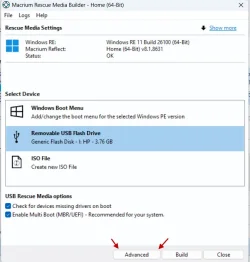
How do i use the Macrium bootable usb on a laptop running Windows Home that has its drives encrypted. This is a Lenovo laptop that came with Windows Home pre-installed and the drives oem encrypted (may not be BitLocker because that is a proprietary feature included with Windows Pro not Hiome).
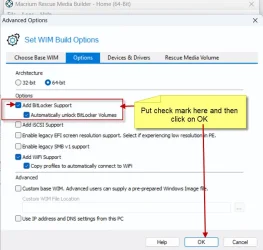
Including BitLocker when making the rescue disk does not help.
(i am aware about turning off encryption and turning it bckj on after the imaging - but that is too tedious)
Any other ways or workarounds or solution
Including BitLocker when making the rescue disk does not help.
(i am aware about turning off encryption and turning it bckj on after the imaging - but that is too tedious)
Any other ways or workarounds or solution
- Windows Build/Version
- 11 25H2
My Computer
At a glance
windows 11 64 bitintel i5 8th geeneration16GB
- OS
- windows 11 64 bit
- Computer type
- Laptop
- Manufacturer/Model
- HP x360 cd
- CPU
- intel i5 8th geeneration
- Memory
- 16GB
- Screen Resolution
- 1920
- Hard Drives
- one 500 GB SSD plus 1 TB hdd (2.5 inches)
- Keyboard
- inbuilt
- Mouse
- inbuilt trackpad
- Internet Speed
- 500 Mbps
- Browser
- Edge chromium
- Antivirus
- Defender

 "When you first sign in or set up a device with a Microsoft account, or work or school account, Device Encryption is turned on and a