Macrium bootable usb on encrypted drive


perfection

Well-known member
Member
Local time
9:11 PM
Posts
45
OS
windows 11 64 bit
How do i use the Macrium bootable usb on a laptop running Windows Home that has its drives encrypted. This is a Lenovo laptop that came with Windows Home pre-installed and the drives oem encrypted (may not be BitLocker because that is a proprietary feature included with Windows Pro not Hiome).

Including BitLocker when making the rescue disk does not help.

(i am aware about turning off encryption and turning it bckj on after the imaging - but that is too tedious)

Any other ways or workarounds or solution
 
Windows Build/Version
11 25H2

My Computer My Computer

At a glance

windows 11 64 bitintel i5 8th geeneration16GB
OS
windows 11 64 bit
Computer type
Laptop
Manufacturer/Model
HP x360 cd
CPU
intel i5 8th geeneration
Memory
16GB
Screen Resolution
1920
Hard Drives
one 500 GB SSD plus 1 TB hdd (2.5 inches)
Keyboard
inbuilt
Mouse
inbuilt trackpad
Internet Speed
500 Mbps
Browser
Edge chromium
Antivirus
Defender
Hi @perfection

Your drive is not OEM encrypted. It is rather Microsoft encrypted :-) "When you first sign in or set up a device with a Microsoft account, or work or school account, Device Encryption is turned on and a recovery key is attached to that account." Device Encryption in Windows - Microsoft Support
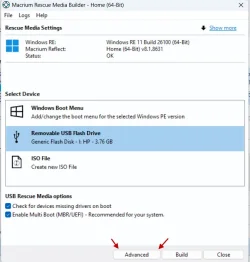
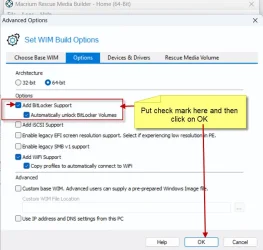
When creating the Macrium bootable USB click on "Advanced" in the first window and then put a check mark in "Add Bitlocker Support" and click on "OK"
as shown in the screenshots below. When done, MR will automatically unlock the bitlocker volumes during backup.

26-10-2025 09-50-56.webp


26-10-2025 11-27-20.webp

Note:

From the horse's mouth:


Last edited:

My Computers My Computers

  • At a glance

    Windows 11 Pro Version:25H2 OS Build: 26200.916812th Gen Intel core i5-1235U(Alder16*2 (32 GB) DDR 4-3200(1600MHz) Crucial Tech...Intel Iris Xe Graphics (Internal)
    OS
    Windows 11 Pro Version:25H2 OS Build: 26200.9168
    Computer type
    PC/Desktop
    Manufacturer/Model
    Beelink Mini PC Model: SEi12
    CPU
    12th Gen Intel core i5-1235U(Alder
    Motherboard
    SEi (manufactured by AZW)
    Memory
    16*2 (32 GB) DDR 4-3200(1600MHz) Crucial Technology
    Graphics Card(s)
    Intel Iris Xe Graphics (Internal)
    Sound Card
    Internal
    Monitor(s) Displays
    BenQ GW2283
    Screen Resolution
    1920*1080
    Hard Drives
    500GB NVME (Kingston SNV2S500G)
    1TB (Crucial CT1000BX500SSD1)
    PSU
    Power Brick 19V-6.32A , 120.08W
    Keyboard
    Dell KB3322Wi (Wireless)
    Mouse
    Dell WM118t (Wireless)
    Internet Speed
    4G/5G
    Browser
    MS Edge, Chrome
    Antivirus
    Malwarebytes Premium - Subscription
  • At a glance

    Windows 11 Home Version 25H2 Build 26200.9168Intel Core i3 8145UIntel Optane 16GB module + DDR 4 16GB (Optane...Intel UHD Graphics 620
    Operating System
    Windows 11 Home Version 25H2 Build 26200.9168
    Computer type
    PC/Desktop
    Manufacturer/Model
    Dell Inspiron 3280 AIO 22"
    CPU
    Intel Core i3 8145U
    Motherboard
    Dell inc. 027W48
    Memory
    Intel Optane 16GB module + DDR 4 16GB (Optane disabled.)
    Graphics card(s)
    Intel UHD Graphics 620
    Sound Card
    Internal
    Monitor(s) Displays
    Dell Monitor 22"
    Screen Resolution
    1920x1080
    Hard Drives
    Crucial CT1000BX500SSD1 ; 1000,2 GB
    PSU
    Power Brick
    Case
    All-in one
    Keyboard
    Dell Wireless KM636
    Mouse
    Dell Wireless KM 636
    Internet Speed
    4G
    Browser
    Edge, Chrome
    Antivirus
    Malwarebytes
    Other Info
    Upgraded from Windows 10 Home to Windows 11 Home on 28 Oct 2023
Back
Top Bottom