

- Local time
- 3:52 PM
- Posts
- 8,864
- OS
- Windows 11 Pro + Win11 Canary VM.
Some of you are probably way of "Synthetic Fulls" that get created by a schedule and retention rules if you click option.
How it works (if you select synthetic option), is if you say to keep 4 incs, and you produce a 5th one, first one automatically get merged with full image.
I tend not to use schedules though - creating incs as I need them.
I discovered today that you can manually create a syntheti full.
To do this, you use a stand-alone feature in Macrium Reflect that lets you consolidate differentals or incrementals to its parent full image creating a "synthetic" full.
You just run consolidate.exe from c:\program files\macrium (I have created a desktop shortcut), and select full image and (for incs) last one in chain you wish to consolidate.
In a simple example, I have a full and three incrementals.

In this example, I run the consolidate.exe file and I select to integrate Full + 1st two incrementals, but not the third.

and you end up with this.
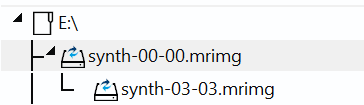
The interesting thing is the 3rd incremental does not become orphaned (or else scheduled synthetic fulls would not work).
So I ran consolidate again to see if that got merged as I expected, and it did.

Quite how useful this feature is is debatable - it saves space and if the fulls are large, it can save time.
Downside is whether it is reliable (of course we expect Reflect to be reliable) i.e. are you putting all your eggs in one basket?
How it works (if you select synthetic option), is if you say to keep 4 incs, and you produce a 5th one, first one automatically get merged with full image.
I tend not to use schedules though - creating incs as I need them.
I discovered today that you can manually create a syntheti full.
To do this, you use a stand-alone feature in Macrium Reflect that lets you consolidate differentals or incrementals to its parent full image creating a "synthetic" full.
You just run consolidate.exe from c:\program files\macrium (I have created a desktop shortcut), and select full image and (for incs) last one in chain you wish to consolidate.
In a simple example, I have a full and three incrementals.
In this example, I run the consolidate.exe file and I select to integrate Full + 1st two incrementals, but not the third.
and you end up with this.
The interesting thing is the 3rd incremental does not become orphaned (or else scheduled synthetic fulls would not work).
So I ran consolidate again to see if that got merged as I expected, and it did.
Quite how useful this feature is is debatable - it saves space and if the fulls are large, it can save time.
Downside is whether it is reliable (of course we expect Reflect to be reliable) i.e. are you putting all your eggs in one basket?
Attachments

Last edited:
My Computer
At a glance
Windows 11 Pro + Win11 Canary VM.I9 13th gen i9-13900H 2.60 GHZ16 GB solderedIntegrated Intel Iris XE
- OS
- Windows 11 Pro + Win11 Canary VM.
- Computer type
- Laptop
- Manufacturer/Model
- ASUS Zenbook 14
- CPU
- I9 13th gen i9-13900H 2.60 GHZ
- Motherboard
- Yep, Laptop has one.
- Memory
- 16 GB soldered
- Graphics Card(s)
- Integrated Intel Iris XE
- Sound Card
- Realtek built in
- Monitor(s) Displays
- laptop OLED screen
- Screen Resolution
- 2880x1800 touchscreen
- Hard Drives
- 1 TB NVME SSD (only weakness is only one slot)
- PSU
- Internal + 65W thunderbolt USB4 charger
- Case
- Yep, got one
- Cooling
- Stella Artois (UK pint cans - 568 ml) - extra cost.
- Keyboard
- Built in UK keybd
- Mouse
- Bluetooth , wireless dongled, wired
- Internet Speed
- 900 mbs (ethernet), wifi 6 typical 350-450 mb/s both up and down
- Browser
- Edge
- Antivirus
- Defender
- Other Info
- TPM 2.0, 2xUSB4 thunderbolt, 1xUsb3 (usb a), 1xUsb-c, hdmi out, 3.5 mm audio out/in combo, ASUS backlit trackpad (inc. switchable number pad)
Macrium Reflect Home V8
Office 365 Family (6 users each 1TB onedrive space)
Hyper-V (a vm runs almost as fast as my older laptop)






