Solved Macrium reflect 8 free and Start issues.


FDretired

Well-known member
Member
VIP
Local time
10:19 AM
Posts
244
OS
windows 11 ,Ubuntu Cinnamon - for tinkering only
After installing or updating windows 11 25H2 I always install Macrium.

Soon after this Start stops working. It closes in a split second.

After deleting Macrium reflect 8 the issue disappears.

After trial and error I decided to install Macrium 7 free . The start issue does not recur.

Macrium 7 free functions well.
 

My Computer My Computer

At a glance

windows 11 ,Ubuntu Cinnamon - for tinkering onlyIntel i51140016 GB0
OS
windows 11 ,Ubuntu Cinnamon - for tinkering only
Computer type
PC/Desktop
Manufacturer/Model
No Name - Assembled by a Compute shop in a Strip Mall.
CPU
Intel i511400
Motherboard
ASUS PRIME B560-PLUS motherboard
Memory
16 GB
Graphics Card(s)
0
Sound Card
0
Monitor(s) Displays
25 in BenQ
Screen Resolution
1920 x 1080
Hard Drives
9 SSDs 4 Nvme, 2 in M.2 slot and 2 in PCIE with adapter + 5 Sata. DVD drive
PSU
600w
Case
Antec- VSK4000E-U3 Mid Tower
Internet Speed
Bell pure fibre optic. 3 GB package. 6E Wireless adapter 1.5GB/ 1.0 GB best result
Browser
Firefox, Microsoft Edge
Antivirus
Defender
Hi, this was reported here, seemingly with respect to particular versions:

I guess when you say 'Start' that you are referring to Windows' own start menu, and not a 3rd party start menu. Is that correct?

Are you using the free edition? That thread suggests a workaround in posts #12, #20

My start menu is fine:
MR v 8.1.8853
Win 11 26200.8246

To which builds of these are you referring?
 

My Computer My Computer

At a glance

Windows 11 Proi7-8650U16GBIntel UHD 620
OS
Windows 11 Pro
Computer type
Laptop
Manufacturer/Model
Lenovo t480s
CPU
i7-8650U
Memory
16GB
Graphics Card(s)
Intel UHD 620
Screen Resolution
1920x1080
Hard Drives
C SN810 SDCPNRY-512G-1006
Browser
Edge, Firefox
Antivirus
Defender
Hi, this was reported here, seemingly with respect to particular versions:

I guess when you say 'Start' that you are referring to Windows' own start menu, and not a 3rd party start menu. Is that correct?

Are you using the free edition? That thread suggests a workaround in posts #12, #20

My start menu is fine:
MR v 8.1.8853
Win 11 26200.8246

To which builds of these are you referring?
I was referring to the last MR free version 8.0.7783 (8.1.8853 is paid version)

Win 11 25H2 26200.8117

Windows Start on Taskbar
 

My Computer My Computer

At a glance

windows 11 ,Ubuntu Cinnamon - for tinkering onlyIntel i51140016 GB0
OS
windows 11 ,Ubuntu Cinnamon - for tinkering only
Computer type
PC/Desktop
Manufacturer/Model
No Name - Assembled by a Compute shop in a Strip Mall.
CPU
Intel i511400
Motherboard
ASUS PRIME B560-PLUS motherboard
Memory
16 GB
Graphics Card(s)
0
Sound Card
0
Monitor(s) Displays
25 in BenQ
Screen Resolution
1920 x 1080
Hard Drives
9 SSDs 4 Nvme, 2 in M.2 slot and 2 in PCIE with adapter + 5 Sata. DVD drive
PSU
600w
Case
Antec- VSK4000E-U3 Mid Tower
Internet Speed
Bell pure fibre optic. 3 GB package. 6E Wireless adapter 1.5GB/ 1.0 GB best result
Browser
Firefox, Microsoft Edge
Antivirus
Defender
Copied Link # 2 -> #20 above

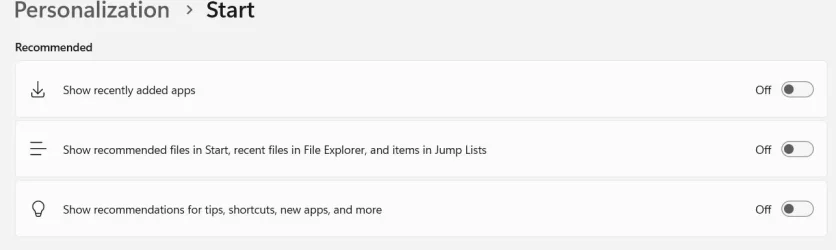
"Clearing the recent files cache from windows explorer also clears this file from the startmenu cache, and allows the startmenu to work again. Ofcourse until I mount a mrimg file again and that file shows up in the recent files list. To permanently solve it, you should either allow less pins to be shown in the startmenu's recommended/recent section or disable that option completely in Settings -> personalization -> start ."

I went to Settings -> personalization -> start and disabled all 3 recommendations. I then reinstalled Macrium 8 free. No issues with Start
 

Attachments

  • Screen Shot 04-27-26 at 01.58 PM.webp
    Screen Shot 04-27-26 at 01.58 PM.webp
    16.8 KB · Views: 2

My Computer My Computer

At a glance

windows 11 ,Ubuntu Cinnamon - for tinkering onlyIntel i51140016 GB0
OS
windows 11 ,Ubuntu Cinnamon - for tinkering only
Computer type
PC/Desktop
Manufacturer/Model
No Name - Assembled by a Compute shop in a Strip Mall.
CPU
Intel i511400
Motherboard
ASUS PRIME B560-PLUS motherboard
Memory
16 GB
Graphics Card(s)
0
Sound Card
0
Monitor(s) Displays
25 in BenQ
Screen Resolution
1920 x 1080
Hard Drives
9 SSDs 4 Nvme, 2 in M.2 slot and 2 in PCIE with adapter + 5 Sata. DVD drive
PSU
600w
Case
Antec- VSK4000E-U3 Mid Tower
Internet Speed
Bell pure fibre optic. 3 GB package. 6E Wireless adapter 1.5GB/ 1.0 GB best result
Browser
Firefox, Microsoft Edge
Antivirus
Defender
And thank you for your reply. I guess that solved your problem.
 

My Computer My Computer

At a glance

Windows 11 Proi7-8650U16GBIntel UHD 620
OS
Windows 11 Pro
Computer type
Laptop
Manufacturer/Model
Lenovo t480s
CPU
i7-8650U
Memory
16GB
Graphics Card(s)
Intel UHD 620
Screen Resolution
1920x1080
Hard Drives
C SN810 SDCPNRY-512G-1006
Browser
Edge, Firefox
Antivirus
Defender
And thank you for your reply. I guess that solved your problem.
Thank you.

You solved my problem that bugged me for weeks.
 

My Computer My Computer

At a glance

windows 11 ,Ubuntu Cinnamon - for tinkering onlyIntel i51140016 GB0
OS
windows 11 ,Ubuntu Cinnamon - for tinkering only
Computer type
PC/Desktop
Manufacturer/Model
No Name - Assembled by a Compute shop in a Strip Mall.
CPU
Intel i511400
Motherboard
ASUS PRIME B560-PLUS motherboard
Memory
16 GB
Graphics Card(s)
0
Sound Card
0
Monitor(s) Displays
25 in BenQ
Screen Resolution
1920 x 1080
Hard Drives
9 SSDs 4 Nvme, 2 in M.2 slot and 2 in PCIE with adapter + 5 Sata. DVD drive
PSU
600w
Case
Antec- VSK4000E-U3 Mid Tower
Internet Speed
Bell pure fibre optic. 3 GB package. 6E Wireless adapter 1.5GB/ 1.0 GB best result
Browser
Firefox, Microsoft Edge
Antivirus
Defender
Back
Top Bottom