Solved Macrium reflect 8 free and Start issues.


FDretired

Well-known member
Member
VIP
Local time
4:54 PM
Posts
237
OS
windows 11 ,Ubuntu Cinnamon - for tinkering only
After installing or updating windows 11 25H2 I always install Macrium.

Soon after this Start stops working. It closes in a split second.

After deleting Macrium reflect 8 the issue disappears.

After trial and error I decided to install Macrium 7 free . The start issue does not recur.

Macrium 7 free functions well.
 

My Computer

System One

  • OS
    windows 11 ,Ubuntu Cinnamon - for tinkering only
    Computer type
    PC/Desktop
    Manufacturer/Model
    No Name - Assembled by a Compute shop in a Strip Mall.
    CPU
    Intel i511400
    Motherboard
    ASUS PRIME B560-PLUS motherboard
    Memory
    16 GB
    Graphics Card(s)
    0
    Sound Card
    0
    Monitor(s) Displays
    25 in BenQ
    Screen Resolution
    1920 x 1080
    Hard Drives
    9 SSDs 4 Nvme, 2 in M.2 slot and 2 in PCIE with adapter + 5 Sata. DVD drive
    PSU
    600w
    Case
    Antec- VSK4000E-U3 Mid Tower
    Internet Speed
    Bell pure fibre optic. 3 GB package. 6E Wireless adapter 750/500
    Browser
    Firefox, Microsoft Edge
    Antivirus
    Defender
Hi, this was reported here, seemingly with respect to particular versions:

I guess when you say 'Start' that you are referring to Windows' own start menu, and not a 3rd party start menu. Is that correct?

Are you using the free edition? That thread suggests a workaround in posts #12, #20

My start menu is fine:
MR v 8.1.8853
Win 11 26200.8246

To which builds of these are you referring?
 

My Computer

System One

  • OS
    Windows 11 Pro
    Computer type
    Laptop
    Manufacturer/Model
    Lenovo t480s
    CPU
    i7-8650U
    Memory
    16GB
    Graphics Card(s)
    Intel UHD 620
    Screen Resolution
    1920x1080
    Hard Drives
    C SN810 SDCPNRY-512G-1006
    Browser
    Edge, Firefox
    Antivirus
    Defender
Hi, this was reported here, seemingly with respect to particular versions:

I guess when you say 'Start' that you are referring to Windows' own start menu, and not a 3rd party start menu. Is that correct?

Are you using the free edition? That thread suggests a workaround in posts #12, #20

My start menu is fine:
MR v 8.1.8853
Win 11 26200.8246

To which builds of these are you referring?
I was referring to the last MR free version 8.0.7783 (8.1.8853 is paid version)

Win 11 25H2 26200.8117

Windows Start on Taskbar
 

My Computer

System One

  • OS
    windows 11 ,Ubuntu Cinnamon - for tinkering only
    Computer type
    PC/Desktop
    Manufacturer/Model
    No Name - Assembled by a Compute shop in a Strip Mall.
    CPU
    Intel i511400
    Motherboard
    ASUS PRIME B560-PLUS motherboard
    Memory
    16 GB
    Graphics Card(s)
    0
    Sound Card
    0
    Monitor(s) Displays
    25 in BenQ
    Screen Resolution
    1920 x 1080
    Hard Drives
    9 SSDs 4 Nvme, 2 in M.2 slot and 2 in PCIE with adapter + 5 Sata. DVD drive
    PSU
    600w
    Case
    Antec- VSK4000E-U3 Mid Tower
    Internet Speed
    Bell pure fibre optic. 3 GB package. 6E Wireless adapter 750/500
    Browser
    Firefox, Microsoft Edge
    Antivirus
    Defender
Copied Link # 2 -> #20 above

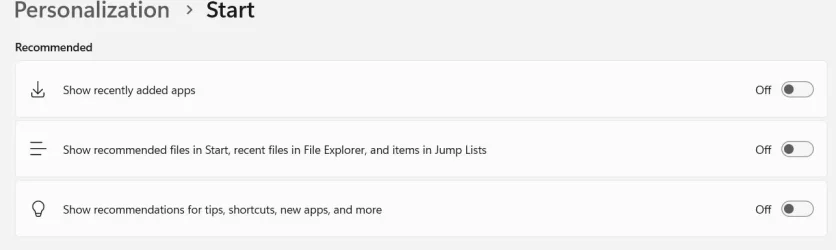
"Clearing the recent files cache from windows explorer also clears this file from the startmenu cache, and allows the startmenu to work again. Ofcourse until I mount a mrimg file again and that file shows up in the recent files list. To permanently solve it, you should either allow less pins to be shown in the startmenu's recommended/recent section or disable that option completely in Settings -> personalization -> start ."

I went to Settings -> personalization -> start and disabled all 3 recommendations. I then reinstalled Macrium 8 free. No issues with Start
 

Attachments

  • Screen Shot 04-27-26 at 01.58 PM.webp
    Screen Shot 04-27-26 at 01.58 PM.webp
    16.8 KB · Views: 2

My Computer

System One

  • OS
    windows 11 ,Ubuntu Cinnamon - for tinkering only
    Computer type
    PC/Desktop
    Manufacturer/Model
    No Name - Assembled by a Compute shop in a Strip Mall.
    CPU
    Intel i511400
    Motherboard
    ASUS PRIME B560-PLUS motherboard
    Memory
    16 GB
    Graphics Card(s)
    0
    Sound Card
    0
    Monitor(s) Displays
    25 in BenQ
    Screen Resolution
    1920 x 1080
    Hard Drives
    9 SSDs 4 Nvme, 2 in M.2 slot and 2 in PCIE with adapter + 5 Sata. DVD drive
    PSU
    600w
    Case
    Antec- VSK4000E-U3 Mid Tower
    Internet Speed
    Bell pure fibre optic. 3 GB package. 6E Wireless adapter 750/500
    Browser
    Firefox, Microsoft Edge
    Antivirus
    Defender
And thank you for your reply. I guess that solved your problem.
 

My Computer

System One

  • OS
    Windows 11 Pro
    Computer type
    Laptop
    Manufacturer/Model
    Lenovo t480s
    CPU
    i7-8650U
    Memory
    16GB
    Graphics Card(s)
    Intel UHD 620
    Screen Resolution
    1920x1080
    Hard Drives
    C SN810 SDCPNRY-512G-1006
    Browser
    Edge, Firefox
    Antivirus
    Defender
And thank you for your reply. I guess that solved your problem.
Thank you.

You solved my problem that bugged me for weeks.
 

My Computer

System One

  • OS
    windows 11 ,Ubuntu Cinnamon - for tinkering only
    Computer type
    PC/Desktop
    Manufacturer/Model
    No Name - Assembled by a Compute shop in a Strip Mall.
    CPU
    Intel i511400
    Motherboard
    ASUS PRIME B560-PLUS motherboard
    Memory
    16 GB
    Graphics Card(s)
    0
    Sound Card
    0
    Monitor(s) Displays
    25 in BenQ
    Screen Resolution
    1920 x 1080
    Hard Drives
    9 SSDs 4 Nvme, 2 in M.2 slot and 2 in PCIE with adapter + 5 Sata. DVD drive
    PSU
    600w
    Case
    Antec- VSK4000E-U3 Mid Tower
    Internet Speed
    Bell pure fibre optic. 3 GB package. 6E Wireless adapter 750/500
    Browser
    Firefox, Microsoft Edge
    Antivirus
    Defender
Back
Top Bottom