Macrium Reflect "Index load failed" - no other processes interfering


yeahyeah

Active member
Local time
2:12 PM
Posts
10
OS
Windows 11
I have used the free version of Reflect for months on the Dell XPS 8950 computer I bought last fall. C drive = 512GB NVMe, D drive = 2 TB HDD. I back up to 2 different WD Black P10 5TB USB drives. No schedule -- I just do a full backup of C: & D: to one of the WD Blacks, followed by 5 or 6 Differential backups to the same USB drive, then switch to the other WD Black & repeat. Backups have occasionally failed with a "Index load failed" error. But I've always been able to try another time or two & it would work. No problem, since I always have the "verify" switch on. That way I know the backups have been written & checked.

The problem has gotten worse. Every full backup attempt bombs out with the "Index load failed" error, and the same with most differential backups. I installed the Trial version of MR to get the most up to date. Same thing. I've already followed the advice given to use ResMon to make sure no other processes are interfering with Reflect. None are.

Even now that I have the trial version Macrium won't give me any support. I've never asked for any support before, but they say I've been a "customer" for several months already, since I was running the free version, so my Trial version doesn't include any support (and if it did, it'd only be to help me get it installed correctly).

I've run Dell's diagnostics but nothing shows up -- including the memory troubleshooter. I suspect that some hardware is failing (memory?), but can't figure out how to gather enough info to give Dell before my 1-yr warranty runs out. (I might be wrong, but I suspect they'll say MR is the problem since nothing else is showing any errors, and Dell's own tests don't show any problems.)

I got HWiNFO64 to test hardware with, but if it could help, I can't tell. I just get lost as soon as I open it up.
 
Windows Build/Version
Win 11 Pro, 22H2 (OS Build 22621.2134)

My Computer My Computer

At a glance

Windows 11I732 GB
OS
Windows 11
Computer type
PC/Desktop
Manufacturer/Model
Dell/8950
CPU
I7
Memory
32 GB

My Computer My Computer

At a glance

Windows 10
OS
Windows 10
1 Try turning off verify to see if MR is the cause

2 Start Windows in safe mode and then run MR - this will eliminate many possible conflicts.
 

My Computers My Computers

  • At a glance

    Windows 11 Pro 25H2 26200.8655AMD Ryzen 7 5825U with Radeon Graphics16GB
    OS
    Windows 11 Pro 25H2 26200.8655
    Computer type
    Laptop
    Manufacturer/Model
    Acemagic LX15PRO
    CPU
    AMD Ryzen 7 5825U with Radeon Graphics
    Memory
    16GB
    Screen Resolution
    1920 x 1080
    Hard Drives
    SSD 2TB
    Internet Speed
    30 Mbps
    Browser
    Brave
    Antivirus
    Webroot Secure Anywhere
    Other Info
    System 3

    Acer Swift SF114-34 laptop
    OS Windows 11 Pro 26200.8524
    CPU Pentium Silver N6000
    RAM 4GB
    SSD Samsung 970 EVO Plus SSD 2TB (an upgrade)
  • At a glance

    Windows 11 Pro 23H2 22631.2506Atom N450 1.66GHz2GB
    Operating System
    Windows 11 Pro 23H2 22631.2506
    Computer type
    Laptop
    Manufacturer/Model
    HP Mini 210-1090NR PC (bought in late 2009!)
    CPU
    Atom N450 1.66GHz
    Memory
    2GB
    Browser
    Brave
    Antivirus
    Webroot

My Computer My Computer

At a glance

Windows 11I732 GB
OS
Windows 11
Computer type
PC/Desktop
Manufacturer/Model
Dell/8950
CPU
I7
Memory
32 GB
I've spent days working on this, trying to locate the source.

  • The backup drives: I'm alternating between two Western Digital P10 5 TB external USB drives. I updated WD's "Dashboard" software and had it do Extended Diagnostics on one of the drives. That ran for 16 hours. Nothing.
  • USB slots and cables. Each USB drive came with its own short cable. I've always kept the original cable with its drive. I tried different USB slots on the PC. Ruled this out.
  • The computer: It's a Dell XPS 8950, less than a year old, so I've run Dell's diagnostics (especially the advanced version of RAM diagnostics, multiple times). Dell also has diagnostics you can run only by interrupting the bootup process, before Windows has loaded. Did that. Also ran Windows's diagnostics that run during the bootup process. Nothing.
  • Large files: The problem has gradually gotten worse with the increasing size of the backups, so I created a big-ass archive file using 7-zip, then used XCOPY to copy it to the drive and verify. A 550 GB file copied and verified without a hitch on both USB drives. That was one archive. I decided to try copying the unarchived files and folders, just to stress the situation in a little different way. I learned that you can't use XCOPY to copy files & folders from an internal HDD because my file names and paths exceed XCOPY's limit of 250-something characters. I considered learning how to use Robocopy, but it seemed like too much trouble for any info the exercise would yield. Yet I clearly had more problems with data corruption with copying larger files than with smaller ones.
  • Dell: I called Dell Support, paid $99 (refunded if they don't solve the problem). The tech spent 45 minutes looking at the PC, concluded that it's something Macrium should be addressing, not Dell, and refunded my $99.
  • Macrium: As I said earlier, the ticket I opened with them once I installed the 30-day trial version of Reflect wasn't helpful. The tech saw that I had been using Reflect Free, and at first said they don't support that. I pointed out that I have the Trial version installed, & then they said essentially "Well, but you were a customer as soon as you started using Free." So in other words, even though I had no support with the free version, whatever support I would've gotten by installing the Trial version has already run out. Oh, and by the way, the only thing they'd be willing to help me with is installation issues. Instead, they directed me to tenforums (or in my case, eleven). With Macrium changing their licensing model, I seriously doubt that they'll be willing to pay their support team enough to provide adequate service in the future. Right now I'm not too happy with Macrium, and I'm still quite open to using another established company's backup software (maybe Seagate's DiscWizard, which is an Acronis product. At least it doesn't come with a 5 year limit (vs. Western Digital's Acronis-made freebie).
So what worked? Well first I learned some helpful info:
  1. Western Digital's Dashboard software offers to tell Windows to TRIM (defrag) your USB drive. But I discovered that it wasn't getting "TRIMmed" at all! Dashboard was misleading me. Windows will defrag a disc if it's formatted with NTFS, but it won't defrag a disc that's formatted with exFAT.
  2. Also, NTFS offers better performance if you're willing to *ALWAYS* use "Safely Remove Hardware" and wait for it to complete before unplugging the USB cable to your drive.
  3. Better performance + defragging? Sure, I'll do that! The only drawback is I can't also use these drives on a non-Windows machine. No problem!
So I reformatted one of the USB drives to NTFS (NOT a quick format -- a 16 hour long, full format). Then I used Reflect to do a full image of both C: and D: using medium compression, with verification on. That backup file was 729 GB, and it succeeded. Not only that, but it took significantly less time than previous full backups!

Conclusion: exFAT appears to have caused the problem. As my backup files got larger, it appears to have introduced more data corruption into the copy process.
 

My Computer My Computer

At a glance

Windows 11I732 GB
OS
Windows 11
Computer type
PC/Desktop
Manufacturer/Model
Dell/8950
CPU
I7
Memory
32 GB
Update: same problem even after reformatting the USB drives to NTFS. I've stopped trying to back up C: and D: both at the same time. Now I back them up seperately. C: passes the verification test most of the time. But D: fails more often than it succeeds. Today so far it failed the first time at 20%. The second time it failed at 10%. Now it's running for the 3rd time.

I was considering buying a license for Macrium Reflect while they have their Black Friday sale, but I don't see the justification. It just doesn't work on this rig, and they don't *really* support their software (see my earlier post).

I'll try running Windows in safe mode next. If that doesn't do it, then the only suggestion I've read that I haven't implemented is switch out RAM modules. Nice suggestion ... if you happen to have an extra $400 or so of RAM just lying around. I'm sure as hell not going to buy it *hoping* that it solves the problem.

Back to the drawing board.
 

My Computer My Computer

At a glance

Windows 11I732 GB
OS
Windows 11
Computer type
PC/Desktop
Manufacturer/Model
Dell/8950
CPU
I7
Memory
32 GB
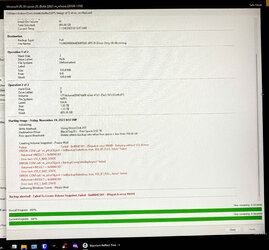
I restarted the PC in "Safe Mode with Networking" then tried backing up the D: drive with Reflect. That's a 685.48 GB backup -- the same one that failed during the verification stage 3 times yesterday. Reflect aborts the backup as soon as it gets to "Creating Volume Snapshot". Here are the three errors:
ERROR: COM call "m_pVssObject->SetBackupState(true, true, VSS_BT_FULL, false)" failed.
ERROR: COM call "m_pVssObject->BackupComplete(&pAsync)" failed.
ERROR: COM call "m_pVssObject->SetBackupState(true, true, VSS_BT_FULL, false)" failed.

Full details:2023_11-24_Reflect bombs in Safe Mode_share.JPG
 

My Computer My Computer

At a glance

Windows 11I732 GB
OS
Windows 11
Computer type
PC/Desktop
Manufacturer/Model
Dell/8950
CPU
I7
Memory
32 GB
Never run MR in Safe Mode. If you run from the Recovery stick, VSS is not needed.
I believe that the USB is the culprit.
512 GB for a C-Drive means just one partition (C:) on that disk? Not a good idea!
hyperfil is switched off?
If you don't have too many data on (C:) create a backup-folder on your D-Drive and run the test.
If there is enough space on the (C:)-Drive create a backup-folder and test the backup from D ==> C with some testfiles.
If that works without problem:
Take a 3,5" HDD with a SATA-Adapter and connect it to the machine.
Once more. Never run MR in Safe Mode.
 

My Computer My Computer

At a glance

Windows 10Intel 6700HQ24AMD FirePro 5170M
OS
Windows 10
Computer type
Laptop
Manufacturer/Model
HP ZBook
CPU
Intel 6700HQ
Motherboard
HP
Memory
24
Graphics Card(s)
AMD FirePro 5170M
Hard Drives
Samsung SSD 860 Pro
Keyboard
yes
Mouse
yes
Other Info
19045.3803
some Red Hat workhorses
Solution: The WD Black P10 5TB USB drive was faulty. Replaced it and everything runs fine.
 

My Computer My Computer

At a glance

Windows 11I732 GB
OS
Windows 11
Computer type
PC/Desktop
Manufacturer/Model
Dell/8950
CPU
I7
Memory
32 GB
Solution: The WD Black P10 5TB USB drive was faulty. Replaced it and everything runs fine.
You have the patience of a saint, it's been a year now that you've been suffering. Glad you found the cause now.
 

My Computers My Computers

  • At a glance

    Windows 11 HomeAMD Athlon Silver 3050U8GBRadeon Graphics
    OS
    Windows 11 Home
    Computer type
    Laptop
    Manufacturer/Model
    Acer Aspire 3 A315-23-R9VY
    CPU
    AMD Athlon Silver 3050U
    Memory
    8GB
    Graphics Card(s)
    Radeon Graphics
    Monitor(s) Displays
    laptop screen
    Screen Resolution
    1366x768 native resolution, up to 2560x1440 with Radeon Virtual Super Resolution
    Hard Drives
    1TB Samsung EVO 870 SSD (from April 2026: 250GB EVO 850)
    Internet Speed
    150 Mbps
    Browser
    Edge, Firefox
    Antivirus
    Defender
    Other Info
    fully 'Windows 11 ready' laptop. Windows 10 C: partition migrated from my old unsupported 'main machine' then upgraded to 11. A test migration ran Insider builds for 2 months. When 11 was released on 5th October 2021 it was re-imaged back to 10 and was offered the upgrade in Windows Update on 20th October. Windows Update offered the 22H2 Feature Update on 20th September 2022. It got the 23H2 Feature Update on 4th November 2023 through Windows Update, 24H2 on 3rd October 2024 through Windows Update by setting the Target Release Version for 24H2, and 25H2 on 30th September 2025 through Windows Update by setting the Target Release Version for 25H2.

    UPDATE - 11 April 2026: due to mechanical deterioration this PC has been retired from active duty. The OS with all software and files has been migrated to my System Seven in 'Other systems' to carry on as my general purpose 'main machine'.
  • At a glance

    Windows 11 ProIntel® Core™ i5-520M8GB(integrated graphics) Intel HD Graphics
    Operating System
    Windows 11 Pro
    Computer type
    Laptop
    Manufacturer/Model
    Dell Latitude E4310
    CPU
    Intel® Core™ i5-520M
    Motherboard
    0T6M8G
    Memory
    8GB
    Graphics card(s)
    (integrated graphics) Intel HD Graphics
    Screen Resolution
    1366x768
    Hard Drives
    500GB Crucial MX500 SSD
    Browser
    Firefox, Edge
    Antivirus
    Defender
    Other Info
    unsupported machine: Legacy bios, MBR, TPM 1.2, upgraded from W10 to W11 using W10/W11 hybrid install media workaround.

    In-place upgrade to 22H2 using ISO and a workaround.
    Feature Update to 23H2 by manually installing the Enablement Package.
    In-place upgrade to 24H2 using hybrid 23H2/24H2 install media.
    Upgraded to 25H2 by Enablement Package.

    Also running Insider Dev, and Canary builds and Windows 10 as native boot .vhdx.
  • My SYSTEM THREE is a Dell Latitude 5410, i7-10610U, 32GB RAM, 512GB NVMe ssd, supported device running Windows 11 Pro.

    My SYSTEM FOUR is a 2-in-1 convertible Lenovo Yoga 11e 20DA, Celeron N2930, 8GB RAM, 256GB ssd. Unsupported device: currently running Win10 Pro, plus Win11 Pro RTM and Insider Dev, Beta, and RP 24H2 as native boot vhdx.

    My SYSTEM FIVE is a Dell Latitude 3190 2-in-1, Pentium Silver N5030, 8GB RAM, 1TB NVMe ssd, supported device running Windows 11 Pro, plus Insider Beta, Dev, and Canary builds (and a few others) as a native boot .vhdx.

    My SYSTEM SIX is a Dell Latitude 5550, Core Ultra 7 165H, 64GB RAM, 1TB NVMe SSD, supported device, Windows 11 Pro 24H2, Hyper-V host machine. Updated to 25H2 on 30th September 2025.

    My SYSTEM SEVEN is a Lenovo Thinkpad T580, Intel Core i7-8650U, 16GB RAM, 512GB NVMe SSD + 2nd 512GB NVMe SSD, a supported device for Windows 11. This is my current general purpose 'main machine'. The installed Windows 11 Home from my System One has been migrated to this machine.
Back
Top Bottom