
Solved Macrium Reflect Version 7 problem


rigsby

Active member
Member
Local time
9:21 AM
Posts
76
OS
Windows 11 Pro
I have been using a paid for version of Macrium Reflect 7 for years on a Windows 10 machine. Yesterday, I moved the license over to my new Windows 11 machine and I also imported the backup definition file which I had set to trigger automatically, as a differential type, every night and then shut down the machine when finished.

I then did an initial backup manually yesterday which worked OK, but this morning I discovered that the overnight scheduled backup failed. The log entry says "Backup Aborted! - Error reading Image file"

I thought there might be an issue with the imported Windows 10 definition file, so I have created a new one. After the initial manual backup completed again just now, I thought I would try a dummy run of the schedule which I set to start a few minutes ago. The backup triggered OK, but nothing else happened. I opened up Macrium, checked the log and again I see this " Backup Aborted! - Error reading Image file" error.

The backup type has always been set to Differential. The initial backup image is fully readable in Restore mode.

My support with Macrium has long expired. Does anyone have any idea what the problem might be? Is Version 7 maybe not fully compatible with Windows 11?
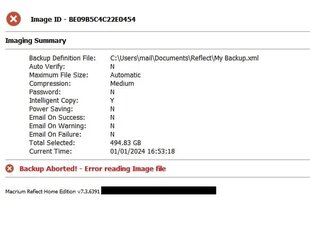
MR1.jpg
 
Windows Build/Version
22H2
Last edited by a moderator:

My Computer My Computer

At a glance

Windows 11 Pro
OS
Windows 11 Pro
Computer type
PC/Desktop
Manufacturer/Model
MinisForum
Unsure myself...I moved to v8 a long time ago. What I can find is it seems v7 will work on Win11, at least the earlier versions of 11. And FYI if you don't find an answer here you can register with the Macrium user forums and get other user inputs/help.
 

My Computer My Computer

At a glance

Win 7/10/11
OS
Win 7/10/11
Computer type
PC/Desktop
Other Info
I'm a computer enthusiast so have quite a few systems that I run. More like an advanced hobby.
"Error reading Image file" suggests that an area of disk that the Image file has been written to is damaged, thus unreadable to Reflect and it bails out.
 

My Computer My Computer

At a glance

Win11 Proi3-10100F.Crucial 2x16GB @2666Mhz.1060 6GB.
OS
Win11 Pro
Computer type
PC/Desktop
Manufacturer/Model
Self built.
CPU
i3-10100F.
Motherboard
ASRock ITX.
Memory
Crucial 2x16GB @2666Mhz.
Graphics Card(s)
1060 6GB.
Sound Card
Onboard.
Monitor(s) Displays
1-3x Dell IPS 24"
Screen Resolution
1200p.
Hard Drives
1TB M2.
PSU
Lian Li 750w Gold SFX.
Case
El Cheapo white ITX with a handle on top!
Cooling
Air.
Keyboard
TKL mech.
Mouse
Small Razer.
Internet Speed
Not much, ~16/2.
Browser
Pale Moon, currently AVX build, plus others.
Antivirus
ESET Multi-Device Security Pack.
"Error reading Image file" suggests that an area of disk that the Image file has been written to is damaged, thus unreadable to Reflect and it bails out.
Thanks. Yes, I was thinking something similar. I am now in the process of moving the backup file to different media and will try again from there.
 

My Computer My Computer

At a glance

Windows 11 Pro
OS
Windows 11 Pro
Computer type
PC/Desktop
Manufacturer/Model
MinisForum
moving the backup file to different media
Which would lead to the same error, if that's where the damaged area/sector is...

Perhaps checking the disk (not CHKDSK, it can't repair and might remove any chance of it) first to confirm, or 'fix' the problem?
 

My Computer My Computer

At a glance

Win11 Proi3-10100F.Crucial 2x16GB @2666Mhz.1060 6GB.
OS
Win11 Pro
Computer type
PC/Desktop
Manufacturer/Model
Self built.
CPU
i3-10100F.
Motherboard
ASRock ITX.
Memory
Crucial 2x16GB @2666Mhz.
Graphics Card(s)
1060 6GB.
Sound Card
Onboard.
Monitor(s) Displays
1-3x Dell IPS 24"
Screen Resolution
1200p.
Hard Drives
1TB M2.
PSU
Lian Li 750w Gold SFX.
Case
El Cheapo white ITX with a handle on top!
Cooling
Air.
Keyboard
TKL mech.
Mouse
Small Razer.
Internet Speed
Not much, ~16/2.
Browser
Pale Moon, currently AVX build, plus others.
Antivirus
ESET Multi-Device Security Pack.
Do a check disk on the destination drive.

Right click on the disk
Properties->Tools->check
 

My Computer My Computer

At a glance

windows 11 ,Ubuntu Cinnamon - for tinkering onlyIntel i51140016 GB0
OS
windows 11 ,Ubuntu Cinnamon - for tinkering only
Computer type
PC/Desktop
Manufacturer/Model
No Name - Assembled by a Compute shop in a Strip Mall.
CPU
Intel i511400
Motherboard
ASUS PRIME B560-PLUS motherboard
Memory
16 GB
Graphics Card(s)
0
Sound Card
0
Monitor(s) Displays
25 in BenQ
Screen Resolution
1920 x 1080
Hard Drives
9 SSDs 4 Nvme, 2 in M.2 slot and 2 in PCIE with adapter + 5 Sata. DVD drive
PSU
600w
Case
Antec- VSK4000E-U3 Mid Tower
Internet Speed
Bell pure fibre optic. 3 GB package. 6E Wireless adapter 750/500
Browser
Firefox, Microsoft Edge
Antivirus
Defender
If the Image itself is reading an error from within Macrium you can "verify" the image for integrity and also an option to attempt to repair. Although I am using v8 Home.
 

My Computer My Computer

At a glance

Win 7/10/11
OS
Win 7/10/11
Computer type
PC/Desktop
Other Info
I'm a computer enthusiast so have quite a few systems that I run. More like an advanced hobby.
@satrow @BamaInArk @FDretired

I've run a chkdsk on the drive (a 1tb USB key) and kit suggests no errors, but it also says Access Denied. Should I have formatted it as NTFS instead of the default exFAT?

CheckDisk1.jpg
 

My Computer My Computer

At a glance

Windows 11 Pro
OS
Windows 11 Pro
Computer type
PC/Desktop
Manufacturer/Model
MinisForum
E: probably isn't the drive with the read failing, it's the drive being written to?
 

My Computer My Computer

At a glance

Win11 Proi3-10100F.Crucial 2x16GB @2666Mhz.1060 6GB.
OS
Win11 Pro
Computer type
PC/Desktop
Manufacturer/Model
Self built.
CPU
i3-10100F.
Motherboard
ASRock ITX.
Memory
Crucial 2x16GB @2666Mhz.
Graphics Card(s)
1060 6GB.
Sound Card
Onboard.
Monitor(s) Displays
1-3x Dell IPS 24"
Screen Resolution
1200p.
Hard Drives
1TB M2.
PSU
Lian Li 750w Gold SFX.
Case
El Cheapo white ITX with a handle on top!
Cooling
Air.
Keyboard
TKL mech.
Mouse
Small Razer.
Internet Speed
Not much, ~16/2.
Browser
Pale Moon, currently AVX build, plus others.
Antivirus
ESET Multi-Device Security Pack.
E: probably isn't the drive with the read failing, it's the drive being written to?
Yes E: is the drive being written to. However, I've just done another small backup to a different drive (formatted as exFAT) and then tried the schedule and it has worked fine. So maybe it's some kind of issue with the USB key in E:
 

My Computer My Computer

At a glance

Windows 11 Pro
OS
Windows 11 Pro
Computer type
PC/Desktop
Manufacturer/Model
MinisForum
So maybe it's some kind of issue with the USB key in E:
Yes, perhaps the read failing refers to the Verification?
 

My Computer My Computer

At a glance

Win11 Proi3-10100F.Crucial 2x16GB @2666Mhz.1060 6GB.
OS
Win11 Pro
Computer type
PC/Desktop
Manufacturer/Model
Self built.
CPU
i3-10100F.
Motherboard
ASRock ITX.
Memory
Crucial 2x16GB @2666Mhz.
Graphics Card(s)
1060 6GB.
Sound Card
Onboard.
Monitor(s) Displays
1-3x Dell IPS 24"
Screen Resolution
1200p.
Hard Drives
1TB M2.
PSU
Lian Li 750w Gold SFX.
Case
El Cheapo white ITX with a handle on top!
Cooling
Air.
Keyboard
TKL mech.
Mouse
Small Razer.
Internet Speed
Not much, ~16/2.
Browser
Pale Moon, currently AVX build, plus others.
Antivirus
ESET Multi-Device Security Pack.
Thanks all. I'm now making a full image backup using the new media. If that works OK on the schedule, I'll close this thread as solved.
 

My Computer My Computer

At a glance

Windows 11 Pro
OS
Windows 11 Pro
Computer type
PC/Desktop
Manufacturer/Model
MinisForum
All OK now. It was obviously a dodgy USB key :rolleyes: . Thanks all for your time & trouble.
 

My Computer My Computer

At a glance

Windows 11 Pro
OS
Windows 11 Pro
Computer type
PC/Desktop
Manufacturer/Model
MinisForum

Latest Support Threads

Back
Top Bottom




