Make taskbar icons behave like quick access


trashbag

Member
Local time
11:06 PM
Posts
3
OS
Windows 11 Pro
Hi!

I've looked around a bit and tried some third-party software but can't find a solution to this.

I have 13-14 applications pinned to the taskbar. I've sorted them somewhat after how often I use them. But after some time (weeks, months) and depending on my behaviour I sometimes end up with starting application 3, 5, 8, 11 (from left to right in the taskbar). When clicking between the apps I then sometimes accidently open another app located between the ones I'm using at that time and an application which I don't want to start launches. You can say that I have a "digitally fat finger" 😅

So I'm looking for a setting or a third-party software where you can make the taskbar act a bit like quick access does inside the file explorer. Either choosing to sort by recently used taskbar icons from left to right or choosing to sort by frequently used taskbar icons from left to right.

I hope you understand my question. Do you know if I can find this inside any software or change anywhere inside Windows/regedit?
 
Windows Build/Version
Windows 11 Pro Version 22H2 (OS Build 22621.3007)

My Computer My Computer

At a glance

Windows 11 Pro12th Gen Intel(R) Core(TM) i5-12450H16GBNVIDIA GeForce RTX 4050 Laptop GPU
OS
Windows 11 Pro
Computer type
Laptop
Manufacturer/Model
MSI
CPU
12th Gen Intel(R) Core(TM) i5-12450H
Motherboard
MS-16R8
Memory
16GB
Graphics Card(s)
NVIDIA GeForce RTX 4050 Laptop GPU
Monitor(s) Displays
No external screen
Screen Resolution
1920 x 1080
Hard Drives
512GB SSD
Browser
Brave & Firefox
If you would use either Explorer Patcher (Free) or StartAllBack (Shareware, pay a very small amount after one month trying) to tweak the taskbar, you could use the good old Quick Launch. With which you can choose in which order they appear and they always stay on the same place on the taskbar.

Like this:

001631.jpg

If you might want to use the QuickLauch, you can find here how to do that (after you enabled the taskbar of StartAllBack or ExplorerPatcher):


BTW. The extra distance between the start button and the first symbol in the quick launch is there because I made my own start button version with extra space beside it.
 

My Computer My Computer

At a glance

Windows 11 Pro 25H2AMD Ryzen 7 5700GKingston FURY Beast 2x16GB DIMM DDR4 2666 CL16MSI GeForce GT 730 2GB LP V1
OS
Windows 11 Pro 25H2
Computer type
PC/Desktop
Manufacturer/Model
Build by vendor to my specs
CPU
AMD Ryzen 7 5700G
Motherboard
MSI PRO B550M-P Gen3
Memory
Kingston FURY Beast 2x16GB DIMM DDR4 2666 CL16
Graphics Card(s)
MSI GeForce GT 730 2GB LP V1
Sound Card
Creative Sound Blaster Audigy FX
Monitor(s) Displays
Samsung S24E450F 24"
Screen Resolution
1920 x 1080
Hard Drives
1. SSD Crucial P5 Plus 500GB PCIe M.2
2. SSD-SATA Crucial MX500-2TB
PSU
Corsair CV650W
Case
Cooler Master Silencio S400
Cooling
Cooler Master Hyper H412R with Be Quiet Pure Wings 2 PWM BL038 fan
Keyboard
Cherry Stream (wired, scissor keys)
Mouse
Asus WT465 (wireless)
Internet Speed
70 Mbps down / 80 Mbps up
Browser
Firefox 130.0
Antivirus
F-Secure (Internetprovider version)
Other Info
Router: FRITZBox 7490
Oracle VirtualBox 7 for testing software on Win 10 or 11
Thanks, but...

"and they always stay on the same place on the taskbar."

That's kind of what I don't want. I want to find a way where the icons switch positions depending on how often I use them.

I tried Explorer Patcher and then quick launch. I tried to sort the icons in different ways in the quick launch folder itself (%UserProfile%\AppData\Roaming\Microsoft\Internet Explorer\Quick Launch) but when then using quick launch from the taskbar the shortcuts stayed sorted by name even if I sorted them by last used in the folder.
 

My Computer My Computer

At a glance

Windows 11 Pro12th Gen Intel(R) Core(TM) i5-12450H16GBNVIDIA GeForce RTX 4050 Laptop GPU
OS
Windows 11 Pro
Computer type
Laptop
Manufacturer/Model
MSI
CPU
12th Gen Intel(R) Core(TM) i5-12450H
Motherboard
MS-16R8
Memory
16GB
Graphics Card(s)
NVIDIA GeForce RTX 4050 Laptop GPU
Monitor(s) Displays
No external screen
Screen Resolution
1920 x 1080
Hard Drives
512GB SSD
Browser
Brave & Firefox
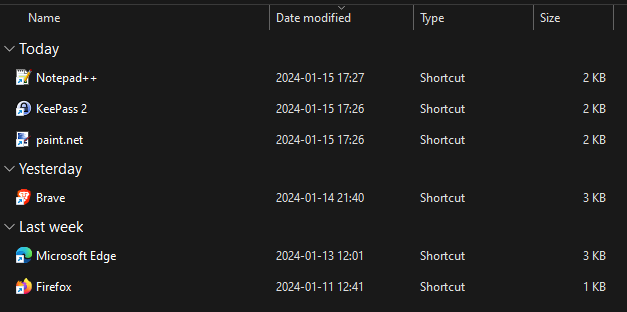
Inside Quick Launch Folder after launching some applications in testing purpose (sorted by recently used)

PD8KrlX.png


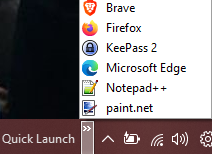
When using Quick Launch from taskbar (still sorted by name)

5lqFTR2.png


My goal is to have the taskbar icons sorted by:
* Most used
or
* Last used
 

My Computer My Computer

At a glance

Windows 11 Pro12th Gen Intel(R) Core(TM) i5-12450H16GBNVIDIA GeForce RTX 4050 Laptop GPU
OS
Windows 11 Pro
Computer type
Laptop
Manufacturer/Model
MSI
CPU
12th Gen Intel(R) Core(TM) i5-12450H
Motherboard
MS-16R8
Memory
16GB
Graphics Card(s)
NVIDIA GeForce RTX 4050 Laptop GPU
Monitor(s) Displays
No external screen
Screen Resolution
1920 x 1080
Hard Drives
512GB SSD
Browser
Brave & Firefox
Last edited:

My Computers My Computers

  • At a glance

    Windows 11 Pro 25H2 26200.8875i9-10900 10 core 20 threads32 gbnone-Intel UHD Graphics 630
    OS
    Windows 11 Pro 25H2 26200.8875
    Computer type
    PC/Desktop
    Manufacturer/Model
    Dell Optiplex 7080
    CPU
    i9-10900 10 core 20 threads
    Motherboard
    DELL 0J37VM
    Memory
    32 gb
    Graphics Card(s)
    none-Intel UHD Graphics 630
    Sound Card
    Integrated Realtek
    Monitor(s) Displays
    Benq 27
    Screen Resolution
    2560x1440
    Hard Drives
    2x1tb Solidigm m.2 nvme /External drives 512gb Samsung m.2 sata+2tb Kingston m2.nvme
    PSU
    500w
    Case
    MT
    Cooling
    Dell Premium
    Keyboard
    Logitech wired
    Mouse
    Logitech wireless
    Internet Speed
    so slow I'm too embarrassed to tell
    Browser
    #1 Edge #2 Firefox
    Antivirus
    Defender+MWB Premium
  • At a glance

    Windows 11 Pro 24H2 26200.8875AMD Ryzen 7 6800U32 gbintegrated
    Operating System
    Windows 11 Pro 24H2 26200.8875
    Computer type
    PC/Desktop
    Manufacturer/Model
    Beelink Mini PC SER5
    CPU
    AMD Ryzen 7 6800U
    Memory
    32 gb
    Graphics card(s)
    integrated
    Sound Card
    integrated
    Monitor(s) Displays
    Benq 27
    Screen Resolution
    2560x1440
    Hard Drives
    1TB Crucial nvme
    Keyboard
    Logitech wired
    Mouse
    Logitech wireless
    Internet Speed
    still too embarrassed to tell
    Browser
    Firefox
    Antivirus
    Defender
    Other Info
    System 3 is non compliant Dell 9020 i7-4770/24gb ram Win11 PRO 26200.8875
My goal is to have the taskbar icons sorted by:
* Most used
or
* Last used
Not gonna happen..., unless you make that determination yourself, rearrange them manually in like manner, and then leave it!

You'll have to use another method or app, to be viewed from some other location.

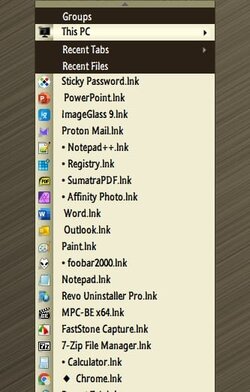
The only application, that I'm familiar with, that will render a list of last used applications, in that order, is QTTabBar...

6115.jpg
 
Last edited:

My Computers My Computers

  • At a glance

    Windows 11 Pro
    OS
    Windows 11 Pro
    Computer type
    PC/Desktop
    Manufacturer/Model
    ASUS ROG Strix
  • At a glance

    Windows 11 Pro
    Operating System
    Windows 11 Pro
    Computer type
    Laptop
    Manufacturer/Model
    ASUS VivoBook
  • ASUS VivoBook 'Lite' ~ Windows 11 Home
Back
Top Bottom