Marcium many 800+mb partitions


x7007

Well-known member
Member
Local time
6:13 AM
Posts
83
OS
Windows 11
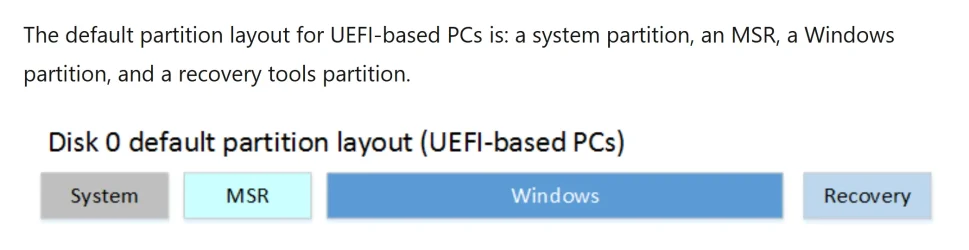
I used more than a couple of times with Marcium and I needed sometimes to have lower space and sometimes more space, so I used the copy partitions. I don't remember or know why it keeps adding more 150mb partitions and I don't know which ones I can remove
I have only 2 real NTFS Partitions C: G: I am sure the first 3 before C: are needed, but I have no idea what about the others.

1781917607426.webp
 

My Computer My Computer

At a glance

Windows 117800x3DKINGSTONE DDR5ZOTAC 4090 AMP EXTREME
OS
Windows 11
Computer type
PC/Desktop
Manufacturer/Model
Intel
CPU
7800x3D
Motherboard
MSI X690E TOMHAWK
Memory
KINGSTONE DDR5
Graphics Card(s)
ZOTAC 4090 AMP EXTREME
Sound Card
Creative SXFI AMP
Monitor(s) Displays
Samsung S90C
Screen Resolution
3840x2160
Hard Drives
Nmve WD850N 1TB
SanDisk SDSSDXPS480G
Samsung SSD 840 PRO Series 256Gb
WDC Enterprise Gold 16TB 512MB
WDC Enterprise Gold 6TB 256MB
PSU
ThermalTake ToughPower 1650
Case
Obsidian Series™ 750D Airflow Edition Full Tower ATX Case
Cooling
Arctic Liquid Freezer II 360
Keyboard
SteelSeries APEX PRO
Mouse
SwitPoint Z2
Internet Speed
5000/500
Browser
CHROME
Antivirus
ESET Internet Security
If you mean that you did a restore and ended up with more partitions, that means you did the restore incorrectly. When doing a restore you can do it one of 2 ways. You should be booting from the Macrium recovery disk and clicking on the "restore" tab.

1. delete all the partitions on the target drive, then from the Macrium restore screen, drag the partitions from the backup image onto the empty target drive (this is what you will have to do to straighten out your duplicated partitions)

2. In the future when you restore an image, do what I do. Drag each partition from the backup image onto its corresponding existing partition on the destination drive. Only delete those partitions if there is a need to do so. (such as if you need to resize them) Doing it this way, your partition scheme and sizing will be exactly the same.
 

My Computers My Computers

  • At a glance

    Windows 11 Pro 25H2 26200.8655i9-10900 10 core 20 threads32 gbnone-Intel UHD Graphics 630
    OS
    Windows 11 Pro 25H2 26200.8655
    Computer type
    PC/Desktop
    Manufacturer/Model
    Dell Optiplex 7080
    CPU
    i9-10900 10 core 20 threads
    Motherboard
    DELL 0J37VM
    Memory
    32 gb
    Graphics Card(s)
    none-Intel UHD Graphics 630
    Sound Card
    Integrated Realtek
    Monitor(s) Displays
    Benq 27
    Screen Resolution
    2560x1440
    Hard Drives
    2x1tb Solidigm m.2 nvme /External drives 512gb Samsung m.2 sata+2tb Kingston m2.nvme
    PSU
    500w
    Case
    MT
    Cooling
    Dell Premium
    Keyboard
    Logitech wired
    Mouse
    Logitech wireless
    Internet Speed
    so slow I'm too embarrassed to tell
    Browser
    #1 Edge #2 Firefox
    Antivirus
    Defender+MWB Premium
  • At a glance

    Windows 11 Pro 24H2 26200.8457AMD Ryzen 7 6800U32 gbintegrated
    Operating System
    Windows 11 Pro 24H2 26200.8457
    Computer type
    PC/Desktop
    Manufacturer/Model
    Beelink Mini PC SER5
    CPU
    AMD Ryzen 7 6800U
    Memory
    32 gb
    Graphics card(s)
    integrated
    Sound Card
    integrated
    Monitor(s) Displays
    Benq 27
    Screen Resolution
    2560x1440
    Hard Drives
    1TB Crucial nvme
    Keyboard
    Logitech wired
    Mouse
    Logitech wireless
    Internet Speed
    still too embarrassed to tell
    Browser
    Firefox
    Antivirus
    Defender
    Other Info
    System 3 is non compliant Dell 9020 i7-4770/24gb ram Win11 PRO 26200.8457
If you mean that you did a restore and ended up with more partitions, that means you did the restore incorrectly. When doing a restore you can do it one of 2 ways. You should be booting from the Macrium recovery disk and clicking on the "restore" tab.

1. delete all the partitions on the target drive, then from the Macrium restore screen, drag the partitions from the backup image onto the empty target drive (this is what you will have to do to straighten out your duplicated partitions)

2. In the future when you restore an image, do what I do. Drag each partition from the backup image onto its corresponding existing partition on the destination drive. Only delete those partitions if there is a need to do so. (such as if you need to resize them) Doing it this way, your partition scheme and sizing will be exactly the same.

Just a couple of additional notes.

For #1, there may be more partitions than were backed up for which you don't want to delete.

For #2, you can just click on the copy partitions button during restore and not have to drag and drop each one

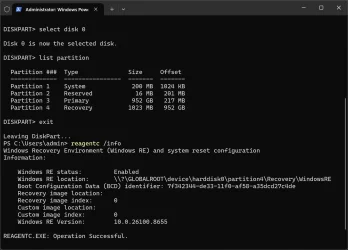
I think this might be a Windows issue in that it is creating multiple recovery partitions. You should back up the recovery partition as well. Odd that they get consecutively smaller as you go right. I thought it would be the other way round.
 
Last edited:

My Computers My Computers

  • At a glance

    Windows 11 Pro x64i9 14900K P/E 5.8/4.5 GHz, cache 5.0 GHz96GB (2x48) G.skill Ripjaws 6800 MT/sAsus ROG Strix 4070 Ti OC
    OS
    Windows 11 Pro x64
    Computer type
    PC/Desktop
    Manufacturer/Model
    📷🔈🎧 🪛 DIY Photoshop/Audio/Game/tinker
    CPU
    i9 14900K P/E 5.8/4.5 GHz, cache 5.0 GHz
    Motherboard
    Asus ROG Maximus Z790 Dark Hero
    Memory
    🐏 96GB (2x48) G.skill Ripjaws 6800 MT/s
    Graphics Card(s)
    Asus ROG Strix 4070 Ti OC
    Sound Card
    🔊Bowers & Wilkins 606 S3 speakers; Audiolabs 7000a integrated amp; RSL 10S Mk2 sub; Creative Pebble Pro Minimilist
    Monitor(s) Displays
    🖥️🖥️ Eizo CG2730 ColorEdge, ViewSonic VP2768
    Screen Resolution
    🖥️🖥️ 2560 x 1440p x 2
    Hard Drives
    💾 WDC SN850X 4TB nvme, SN850 1TB nvme, SK-Hynix 2 TB P41 nvme,. Sabrent USB-C DS-SC5B 5-bay docking station: 6TB WDC Black, 6TB Ironwolf Pro; 2x 2TB WDC Black HDD
    PSU
    ⚡️ 850W Seasonic Vertex PX-850 ATX 3.0/PCI-E 5.0
    Case
    Fractal Design North XL Mesh, Black Walnut
    Cooling
    ❄️ EK Nucleus black 360 AIO w/Phanteks T30-120 fans, 2 Noctua NF-A14 Chromax case fan, 1 T30-120 fan cooling memory
    Keyboard
    ⌨️ Keychron Q3 Max TKL with custom GMK Redsuns Red Samuri keycaps, TX Stabs
    Mouse
    🖱️ Logitech G305 wireless gaming
    Internet Speed
    ⬇️ 500 Mb/s ⬆️ 12 Mb/s
    Browser
    🔥🦊 Firefox
    Antivirus
    🦺 Defender, Macrium Reflect X 🏆
    Other Info
    Phangkey Amaterasu V2 Desk Mat
  • At a glance

    Apple M1
    Computer type
    Laptop
    Manufacturer/Model
    💻 Apple 13" Macbook Pro 2020 (m1)
    CPU
    Apple M1
    Screen Resolution
    2560x1600
    Browser
    Firefox

Latest Support Threads

Back
Top Bottom