JavaScript is disabled. For a better experience, please enable JavaScript in your browser before proceeding.
You are using an out of date browser. It may not display this or other websites correctly.
You should upgrade or use an
alternative browser .
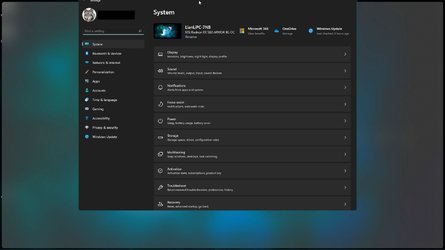
Maximizing "Settings" -> Doesn't fill all the way to the top of the screen.
Is anyone else seeing this with "Settings"? When I maximize it, there's a blank bar at the very top where you can see whatever is behind the Settings window.
In my attachment, you can see some of the items on my desktop.
Well-known member
Guru
VIP
I have no such a problem is your Taskbar top of the screen?
Windows 11 AMD Ryzen 7 5700G Micron Technology DDR4-3200 16GB NVIDIA GeForce RTX 3060 Windows 11 PC/Desktop HP Pavilion AMD Ryzen 7 5700G Erica6 Micron Technology DDR4-3200 16GB NVIDIA GeForce RTX 3060 Realtek ALC671 Samsung SyncMaster U28E590 3840 x 2160 SAMSUNG MZVLQ1T0HALB-000H1
Active member
Thread Starter
My taskbar is at the bottom. I just cropped it out of the screenshot. This is only happening with "Settings".
Well-known member
Guru
VIP
Strange, like i said no problem on my Windows 11 setup.
Windows 11 AMD Ryzen 7 5700G Micron Technology DDR4-3200 16GB NVIDIA GeForce RTX 3060 Windows 11 PC/Desktop HP Pavilion AMD Ryzen 7 5700G Erica6 Micron Technology DDR4-3200 16GB NVIDIA GeForce RTX 3060 Realtek ALC671 Samsung SyncMaster U28E590 3840 x 2160 SAMSUNG MZVLQ1T0HALB-000H1
The First Three Star Guru
Guru
VIP
Mine is fine, I do get that with Steam maximised but only a very tiny gap about a mill
Windows 11 Pro 13th Gen Core i9 13900HX 32GB DDR5 @4800MHz 2x16GB Geforce RTX 4090HX 16GB Windows 11 Pro Laptop Alienware M18 R1 13th Gen Core i9 13900HX 32GB DDR5 @4800MHz 2x16GB Geforce RTX 4090HX 16GB Nvidia HD / Realtek ALC3254 18" QHD+ 25660 X 1600 C: KIOXIA (Toshiba) 2TB KXG80ZNV2T04 NVMe PCIe M.2 SSD Dark Metallic Moon Alienware M Series per-key AlienFX RGB Alienware AW610M Chrome and Firefox Norton Killer E3000 Ethernet Controller
Windows 11 Pro 10th Gen i-9 10900 K 32Gb Dual Channel DDR4 @ 8843MHz Nvidia RTX 2080 Super Windows 11 Pro Laptop Alienware Area 51m R2 10th Gen i-9 10900 K 32Gb Dual Channel DDR4 @ 8843MHz Nvidia RTX 2080 Super Nvidia 1920 x 1080 Hard Drive C: Samsung 2TB SSD PM981a NVMe Alienware 610M Chrome Norton
Microsoft 365 Basic
Pro User
VIP
What happens when you drag Settings to the top of the screen?
capture_11072021_180257.jpg
74.4 KB
· Views: 4
Home2FH2Can AMD Ryzen 5 8600G (07/24) 2x32GB Kingston FURY DDR5 5600 MHz CL36 @5200... ASROCK Radeon RX 6600 Challenger D 8G @48FPS ... Home2FH2Can PC/Desktop AMD Ryzen 5 8600G (07/24) ASROCK B650M-HDV/M.2 (07/24) BIOS 4.43 AGESA ComboAM5 1.3.0.1b Patch A (07/26) 2x32GB Kingston FURY DDR5 5600 MHz CL36 @5200 CL40 (07/24) ASROCK Radeon RX 6600 Challenger D 8G @48FPS (08/24) Creative Sound BlasterX AE-5 Plus (05/24) 24" Philips 24M1N3200ZS/00 (05/24) 1920×1080@165Hz via DP1.4 Kingston KC3000 NVMe 2TB (05/24) Seasonic Core GM 550 Gold (04/24) Fractal Design Define 7 Mini with 3x Noctua NF-P14s/12@555rpm (04/24) Noctua NH-U12S with Noctua NF-P12 (04/24) HP Pavilion Wired Keyboard 300 (07/24) + Rabalux 76017 Parker (01/24) Logitech M330 Silent Plus (07/26) 500/100 Mbps via RouterOS (05/21) & TCP Optimizer Edge, Brave for YouTube, LibreWolf for FB NextDNS blocking 50% Traffic Phone: Motorola Moto G86 (02/26)
Well-known member
Power User
VIP
Not another result of using a Taskbar mod by any chance?
Windows 11 22H2 OS Build 22623.1095 AMD Ryzen 7 3800X 16GB Corsair Vengeance LPX DDR4 @3000Mhz ASUS - GeForce RTX 3070 Ti 8 GB TUF GAMING OC Windows 11 22H2 OS Build 22623.1095 PC/Desktop Self Build AMD Ryzen 7 3800X Asus PRIME B350-PLUS 16GB Corsair Vengeance LPX DDR4 @3000Mhz ASUS - GeForce RTX 3070 Ti 8 GB TUF GAMING OC On Board Realtec Acer KA241 1920 x 1080 @60Hz 240GB PNY CS900 SSD - OS 750 Watt Corsair TX750 Plus Cooler Master 690 III Akasa AK98 5 Case Fans Logitech K270 - wireless Logitech - M185 wireless BT Fibre 75 Mbps Firefox Windows Defender Use hardware KVM to switch monitors on three PCs and software (input director) to use mouse and keyboard on all 4 PCs.
Windows 11 Pro 22H2 build 22621.900 Intel i5 - 10400 16GB of HyperX Fury @ 2133 Mhz EVGA 6GB GTX 1060. Windows 11 Pro 22H2 build 22621.900 PC/Desktop Dell Inspiron 3881 - modified with SFX PSU fitted internally Intel i5 - 10400 Dell 032w55 version A00 16GB of HyperX Fury @ 2133 Mhz EVGA 6GB GTX 1060. Builtin ACER KA241 1920x 1080 @60Hz 256GB SK hynix NVMe Modular 450 Watt Corsair SF450 Platinum ( Mod to replace the Dell 265 Watt PSU) Inspiron Small Desktop Dell stock cooler Dell Dell BT Fibre 75 Mbps Firefox Windows Defender Use hardware KVM to switch monitors on three PCs and software (input director) to use mouse and keyboard on all 4 PCs.
Active member
Thread Starter
Ok problem resolved. It was being caused by ExplorerPatcher. I removed it and Settings properly maximizes now.
The First Three Star Guru
Guru
VIP
I would check your ExplorerPatcher settings, I have been using this for ages and do not have the problem I am using win11 version 22000.282 and ExplorerPatcher version 22000.282.32.7
Windows 11 Pro 13th Gen Core i9 13900HX 32GB DDR5 @4800MHz 2x16GB Geforce RTX 4090HX 16GB Windows 11 Pro Laptop Alienware M18 R1 13th Gen Core i9 13900HX 32GB DDR5 @4800MHz 2x16GB Geforce RTX 4090HX 16GB Nvidia HD / Realtek ALC3254 18" QHD+ 25660 X 1600 C: KIOXIA (Toshiba) 2TB KXG80ZNV2T04 NVMe PCIe M.2 SSD Dark Metallic Moon Alienware M Series per-key AlienFX RGB Alienware AW610M Chrome and Firefox Norton Killer E3000 Ethernet Controller
Windows 11 Pro 10th Gen i-9 10900 K 32Gb Dual Channel DDR4 @ 8843MHz Nvidia RTX 2080 Super Windows 11 Pro Laptop Alienware Area 51m R2 10th Gen i-9 10900 K 32Gb Dual Channel DDR4 @ 8843MHz Nvidia RTX 2080 Super Nvidia 1920 x 1080 Hard Drive C: Samsung 2TB SSD PM981a NVMe Alienware 610M Chrome Norton
The First Three Star Guru
Guru
VIP
@clam1952 well worked out, but as I mentioned in last post I have never had that problem and been using it for ages
Windows 11 Pro 13th Gen Core i9 13900HX 32GB DDR5 @4800MHz 2x16GB Geforce RTX 4090HX 16GB Windows 11 Pro Laptop Alienware M18 R1 13th Gen Core i9 13900HX 32GB DDR5 @4800MHz 2x16GB Geforce RTX 4090HX 16GB Nvidia HD / Realtek ALC3254 18" QHD+ 25660 X 1600 C: KIOXIA (Toshiba) 2TB KXG80ZNV2T04 NVMe PCIe M.2 SSD Dark Metallic Moon Alienware M Series per-key AlienFX RGB Alienware AW610M Chrome and Firefox Norton Killer E3000 Ethernet Controller
Windows 11 Pro 10th Gen i-9 10900 K 32Gb Dual Channel DDR4 @ 8843MHz Nvidia RTX 2080 Super Windows 11 Pro Laptop Alienware Area 51m R2 10th Gen i-9 10900 K 32Gb Dual Channel DDR4 @ 8843MHz Nvidia RTX 2080 Super Nvidia 1920 x 1080 Hard Drive C: Samsung 2TB SSD PM981a NVMe Alienware 610M Chrome Norton
Well-known member
Power User
VIP
@clam1952 well worked out, but as I mentioned in last post I have never had that problem and been using it for ages
Could well be related to particular setting used? Or maybe an older version, was an update yesterday according to github 22000.282.32.7
Windows 11 22H2 OS Build 22623.1095 AMD Ryzen 7 3800X 16GB Corsair Vengeance LPX DDR4 @3000Mhz ASUS - GeForce RTX 3070 Ti 8 GB TUF GAMING OC Windows 11 22H2 OS Build 22623.1095 PC/Desktop Self Build AMD Ryzen 7 3800X Asus PRIME B350-PLUS 16GB Corsair Vengeance LPX DDR4 @3000Mhz ASUS - GeForce RTX 3070 Ti 8 GB TUF GAMING OC On Board Realtec Acer KA241 1920 x 1080 @60Hz 240GB PNY CS900 SSD - OS 750 Watt Corsair TX750 Plus Cooler Master 690 III Akasa AK98 5 Case Fans Logitech K270 - wireless Logitech - M185 wireless BT Fibre 75 Mbps Firefox Windows Defender Use hardware KVM to switch monitors on three PCs and software (input director) to use mouse and keyboard on all 4 PCs.
Windows 11 Pro 22H2 build 22621.900 Intel i5 - 10400 16GB of HyperX Fury @ 2133 Mhz EVGA 6GB GTX 1060. Windows 11 Pro 22H2 build 22621.900 PC/Desktop Dell Inspiron 3881 - modified with SFX PSU fitted internally Intel i5 - 10400 Dell 032w55 version A00 16GB of HyperX Fury @ 2133 Mhz EVGA 6GB GTX 1060. Builtin ACER KA241 1920x 1080 @60Hz 256GB SK hynix NVMe Modular 450 Watt Corsair SF450 Platinum ( Mod to replace the Dell 265 Watt PSU) Inspiron Small Desktop Dell stock cooler Dell Dell BT Fibre 75 Mbps Firefox Windows Defender Use hardware KVM to switch monitors on three PCs and software (input director) to use mouse and keyboard on all 4 PCs.
The First Three Star Guru
Guru
VIP
That's the one I am on, I have one on pre release 22.000.32.5 and an older version before that on the old pc none have them have that problem, it's probably a conflict with
@darien_day 's machine and some other setting
Windows 11 Pro 13th Gen Core i9 13900HX 32GB DDR5 @4800MHz 2x16GB Geforce RTX 4090HX 16GB Windows 11 Pro Laptop Alienware M18 R1 13th Gen Core i9 13900HX 32GB DDR5 @4800MHz 2x16GB Geforce RTX 4090HX 16GB Nvidia HD / Realtek ALC3254 18" QHD+ 25660 X 1600 C: KIOXIA (Toshiba) 2TB KXG80ZNV2T04 NVMe PCIe M.2 SSD Dark Metallic Moon Alienware M Series per-key AlienFX RGB Alienware AW610M Chrome and Firefox Norton Killer E3000 Ethernet Controller
Windows 11 Pro 10th Gen i-9 10900 K 32Gb Dual Channel DDR4 @ 8843MHz Nvidia RTX 2080 Super Windows 11 Pro Laptop Alienware Area 51m R2 10th Gen i-9 10900 K 32Gb Dual Channel DDR4 @ 8843MHz Nvidia RTX 2080 Super Nvidia 1920 x 1080 Hard Drive C: Samsung 2TB SSD PM981a NVMe Alienware 610M Chrome Norton