Windows IT Pro Blog:
Windows is moving toward a more secure authentication model by phasing out New Technology LAN Manager (NTLM) in favor of stronger, Kerberos‑based alternatives. Let’s look at enhanced auditing and upcoming tools to help prepare your organization for disabling NTLM by default.
The evolution of Windows authentication
For more than three decades, NTLM has been part of Windows authentication. It is a legacy authentication protocol that uses challenge-response verification for access to network resources, most often as a fallback when Kerberos is unavailable.NTLM consists of security protocols originally designed to provide authentication, integrity, and confidentiality to users. However, as security threats have evolved, so have our standards to meet modern security expectations. Today, NTLM is susceptible to various attacks, including replay and man-in-the-middle attacks, due to its use of weak cryptography.
Microsoft is committed to helping your organization transition to stronger authentication mechanisms. In this post you’ll find a long-term roadmap to reduce, restrict, and ultimately remove NTLM from Windows.
The importance of moving from deprecation to disabling NTLM
Today, NTLM is classified as deprecated. Deprecated features remain available, but no longer receive updates or enhancements and may be removed in a future release. Despite its deprecated status, NTLM continues to be prevalent in environments where modern protocols, such as Kerberos, are not feasible due to legacy dependencies, network limitations, or ingrained application logic. The ongoing use of NTLM exposes organizations to the following risks:- No server authentication
- Vulnerability to replay, relay, and pass-the-hash attacks
- Weak cryptography
- Limited diagnostic data and auditing visibility (until recently)
A phased approach that meets you where you are
The roadmap below presents a three-phased approach toward this goal.Important: Timelines and feature availability outlined in this post are subject to change as engineering schedules evolve.
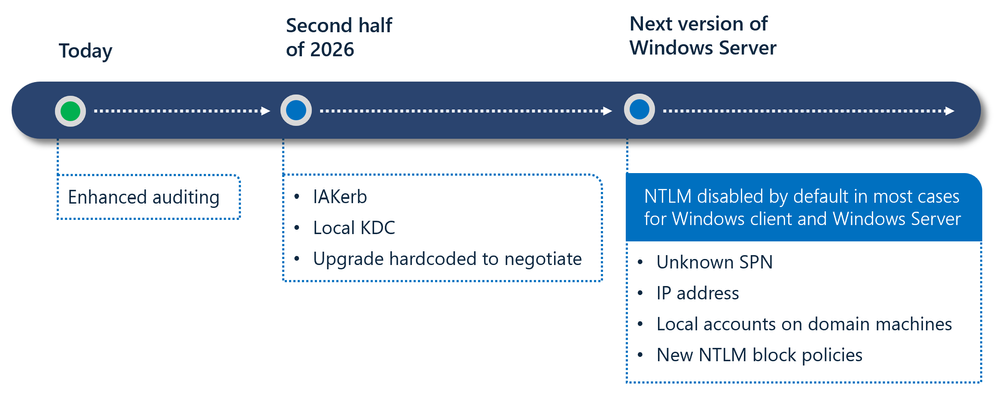
With each phase come new capabilities so that your organization has the tools, visibility, and compatibility support needed before NTLM becomes disabled by default. Let’s take a closer look at each phase.
Phase 1: Building visibility and control
Available now, enhanced NTLM auditing helps your organization understand exactly where and why NTLM is still being used in your environment. This is the foundation of any NTLM migration effort. You can use it today with Windows Server 2025 and Windows 11, versions 24H2 and later. For additional guidance, see Disabling NTLM.Phase 2: Addressing the top NTLM pain points
Here is how we can address some of the biggest blockers you may face when trying to eliminate NTLM:- No line of sight to the domain controller: Features such as IAKerb and local Key Distribution Center (KDC) (pre-release) allow Kerberos authentication to succeed in scenarios where domain controller (DC) connectivity previously forced NTLM fallback.
- Local accounts authentication: Local KDC (pre-release) helps ensure that local account authentication no longer forces NTLM fallback on modern systems.
- Hardcoded NTLM usage: Core Windows components will be upgraded to negotiate Kerberos first, reducing instances on NTLM usage.
Phase 3: NTLM disabled by default
In the next major Windows Server release and associated Windows client releases:- Network NTLM will be disabled by default.
- NTLM usage will require explicit re-enablement through new policy controls.
- Support for handling NTLM only cases will be built-in, reducing application breakage. Examples include accessing targets with unknown SPNs, authentication requests made using IP addresses, local accounts on domain joined machines, and new NTLM blocking policies.
But what does ‘NTLM disabled by default’ really mean?
Disabling NTLM by default does not mean completely removing NTLM from Windows yet. Instead, it means that Windows will be delivered in a secure-by-default state where network NTLM authentication is blocked and no longer used automatically. The OS will prefer modern, more secure Kerberos-based alternatives. At the same time, common legacy scenarios will be addressed through new upcoming capabilities such as Local KDC and IAKerb (pre-release).Note: While Microsoft continues to work toward NTLM-independent Windows, during phase 3, NTLM will remain present in the OS and can be explicitly re-enabled via policy if you still need it. This approach balances meaningful security improvements while maintaining a supported and phased transition as you move away from NTLM.
Our commitment to a secure, compatible transition
Disabling NTLM represents a major evolution in Windows authentication, and a critical step toward a passwordless, phishing resistant future. That is why we are committed to providing clear communication of timelines and expectations, and a phased transition with opt-in/opt-out controls.Our phased roadmap is designed to give every organization clear, predictable steps to prepare for default NTLM disablement in Windows. If your organization is beginning or accelerating its NTLM reduction efforts, now is the right time to engage your identity, security, and application owners to take concrete steps:
- Deploy enhanced NTLM auditing to identify where NTLM is still used.
- Map dependencies across applications and services, and prioritize remediation. This may include reaching out to application developers to update critical applications.
- Migrate and validate that critical workloads succeed with Kerberos. The capabilities that will be released in the second half of 2026 will significantly expand the scenarios where you can use Kerberos successfully.
- Begin testing NTLM-off configurations in non-production environments.
- Enable Kerberos upgrades as they become available through the Windows Insider Program, and then more broadly later this calendar year.
We will continue to publish updated documentation, migration guides, and scenario specific instructions as new capabilities enter flighting or reach general availability later this calendar year. If you discover unique or hard-to-mitigate scenarios where NTLM is still being used, please reach out to [email protected]. These insights help us validate edge cases and ensure our features fully support real-world environments.
Source:

Advancing Windows security: Disabling NTLM by default - Windows IT Pro Blog
Learn how Windows is moving toward an NTLM-independent future with enhanced auditing, Kerberos enhancements, and a phased roadmap.
 techcommunity.microsoft.com