Windows Networking Blog:
In November 2025, we announced the private preview of Windows CLAT, marking a major milestone in helping customers operate successfully on IPv6-only and IPv6‑mostly networks.
Since then, we’ve worked closely with customers across government, enterprise, and the broader internet community to validate the feature, refine the experience, and ensure it’s ready to scale.
If you’re interested in the background on why Windows CLAT exists, how it works, and the standards it’s built on, we encourage you to read the original announcement:
Windows CLAT Enters Private Preview: A Milestone for IPv6 Adoption
Public Preview Now Available
Today, we’re thrilled to announce that Windows CLAT is now available in public preview.The public preview is available starting with Windows Insider Canary build #29599-1000, and will continue to become available in other Windows Insider Channels over the coming weeks. This expands access beyond the private preview cohort and enables a broader set of customers to evaluate Windows CLAT in their environments and provide feedback as we continue toward general availability. For public preview, we also now support Group Policy Object (GPO) to configure Windows CLAT.
Reporting Feedback
We value your feedback! Your feedback is crucial for us as we get to work towards our General Availability release.If you have questions or general feedback on this preview we’d love to hear from you! Feel free to comment in the section below this blog.
Thank You to Our Preview Participants
We’d like to extend a sincere thank you to everyone who participated in the private preview and provided early feedback. Your testing, questions, and real‑world validation were critical in shaping the feature and improving quality, interoperability, and usability.That feedback directly influenced where we are today—and it will continue to guide our work as we move toward general availability. We truly appreciate your partnership in helping make Windows CLAT a better and more reliable solution for the wider IPv6 community.
We’re excited to see Windows CLAT reach a broader audience in public preview and look forward to continued feedback as more customers begin testing.
Getting Started with Windows CLAT
Note: Windows CLAT is currently available in Public Preview and is intended for evaluation and feedback only. It is not supported for production use as bugs may be present. Functionality may also change, including potential breaking changes, before General Availability (GA).Once you’ve installed the appropriate preview build, Windows CLAT can be enabled by opening an administrative command prompt and typing the following:
C:\Users\Administrator>netsh.exe interface clat set global permit=enabled pref64fromdns=enabled pref64fromra=enabledAfterwards, reboot the device:
C:\Users\Administrator>shutdown -r -t 0Note: Each re-configuration of the PREF64 discovery methods currently requires a reboot.
Confirming Windows IPv6 CLAT Functionality
You can confirm that Windows CLAT is working via the following method.Open a command prompt and type:
netsh interface clat show instance interface = [interface-name]You should see a local prefix and IPv6 address, as well as a synthetic IPv4 address listed:
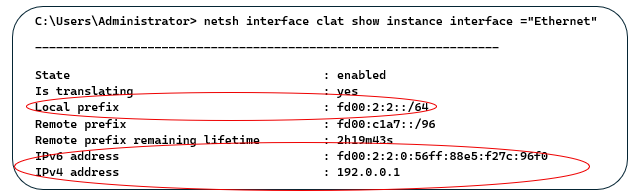
Also, you can use a packet sniffer to run a capture on the system running CLAT or connected network segment and filter for IPv6 traffic. Confirm that traffic is seen using the CLAT IPv6 local address.
Querying State of CLAT & Collecting Logs
To check CLAT global configuration state, type the following in an administrative command prompt:netsh.exe interface clat show globalThe above should output something like the following:
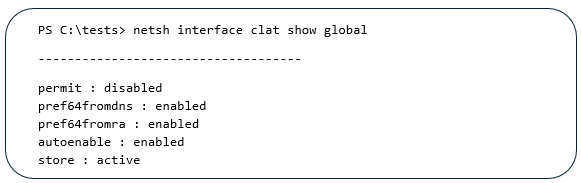
You can use the same show interface instance argument as referenced in the above 'Confirming Windows IPv6 CLAT Functionality' section for additional details regarding both local and remote prefixes.
Disable Windows CLAT
C:\Users\Administrator>netsh.exe interface clat set global permit=disabledGroup Policy Object (GPO)
As indicated earlier, Group Policy Object (GPO) is now supported in the Windows CLAT public preview. A few things to note:- The CLAT configurations for permit, pref64 from DNS, and pref64 from RA are available in the group policy template under Network -> TCPIP Settings -> IPv6 Transition Technologies.
- Any configuration value set through group policy will override the matching configuration value set through "netsh interface clat set global".
- The "netsh interface clat show global" command will by default show the active/effective configuration, which uses each group policy value if it is set and the value set through netsh otherwise. (See screenshot for the command above).
Notes
Prefix Discovery
PREF64 prefix discovery by Route Advertisements (RA) is the default prefix discovery mechanism (RFC 8781). Prefix discovery via DNS “ipv4only.arpa” (RFC 8880) will be used if PREF64 via RA is not available.DHCP Option 108
Windows DHCP client supports DHCP Option 108 and Windows CLAT will attempt configuration discovery if a valid 108 response is received.Known Issues
RFC 1918 Addresses and 464XLAT in Local Address Space
Using the well-known prefix will not work for devices with RFC 1918 addresses when communicating through 464XLAT. For this scenario you must use a network specific prefix (NSP). See RFC 6052: IPv6 Addressing of IPv4/IPv6 Translators | RFC EditorCLAT May Not Seamlessly Work When Roaming Between Wi-Fi Networks
When CLAT is successfully translating on a Wi-Fi network associated with one SSID and then the user switches the computer to use to a different Wi-Fi SSID, the computer running CLAT doesn't update the synthetic IPv6 address and tries to continue using the existing one. The workaround is to disable/reenable Wi-Fi in the Quick Settings panel of the Taskbar, the Wi-Fi adapter in the Control Panel Network Settings, or if applicable, unplug/re-plug the Wi-Fi adapter.Diagnostics and Endpoint Visibility
Tools such as traceroute will not work due to a known problem with endpoint visibility. Ask your PLAT vendor to recommend appropriate diagnostic tools for this purpose.Windows Linux Subsystem (WSL) Support
Windows CLAT does not currently support WSL or applications that run within WSL.RFC 6052 Support
Windows CLAT does not fully support RFC 6052, specifically section 3.1: “The Well-Known Prefix MUST NOT be used to represent non-global IPv4 addresses, such as those defined in [RFC 1918] or listed in Section 3 of [RFC 5735]. Address translators MUST NOT translate packets in which an address is composed of the Well-Known Prefix and a non-global IPv4 address; they MUST drop these packets.”Relevant RFC Support
These RFCs provide a comprehensive overview of the protocols and mechanisms involved in IPv4/IPv6 translation, including those relevant for the operation of CLAT: RFCs 6144, 6146, 6147, 6052, 6877, 7915, 7757, 7050, 8781, 8925. Source:

Announcing Windows CLAT Public Preview | Microsoft Community Hub
Since then, we’ve worked closely with customers across government, enterprise, and the broader internet community to validate the feature, refine the...
 techcommunity.microsoft.com