Microsoft bricks Help features in MS-Office 2019? Seriously?


Levitate11

Well-known member
Power User
VIP
Local time
10:15 PM
Posts
475
OS
Windows 11 Pro 24H2
I rarely use Help, but Office 2019 is still relatively unexplored for me... so when I needed to do something I hadn't before, I clicked on the Help option.

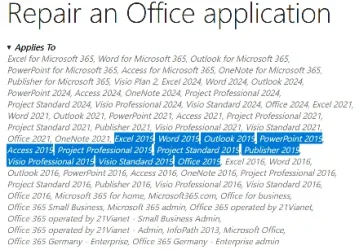
Imagine my surprise when I found that when they ended support in Oct 2025 they actually deleted the on-line Help data. Gone. The only Help you can get is help on how to upgrade to a newer version of Office.

Wow. I've always preferred local Help files, but I can see the advantage to a company putting them on-line in terms of updates for changes, etc. However, I never expected that they'd kill it when they ended support. That's just downright nasty.

I'm not an MS basher by any means, but this certainly doesn't make me like them more.
 

My Computer

System One

  • OS
    Windows 11 Pro 24H2
    Computer type
    Laptop
    Manufacturer/Model
    HP
    CPU
    Intel Ultra 7 155H
    Memory
    16gb
    Graphics Card(s)
    Intel Arc integrated
    Hard Drives
    SSD
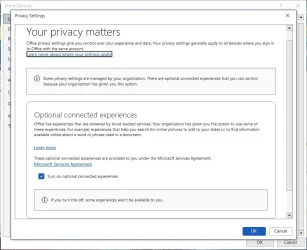
File > Options > General > Privacy Settings

Are these checked?:

Let office download online content

Enable connected experiences
 

My Computer

System One

  • OS
    Windows 11 Pro
I don't see that in Office Pro Plus 2019. I see the same thing in Office Pro Plus 2021.

Office2019PrivacySettings.webp

BTW, I have 2 x Office Pro Plus 2019 and 3 x Office Pro Plus 2021 licenses. Office 2021 support will end in October 2026 so it will have the same problem.

In any case I rarely use Office online support so it won't be missed much. I usually search online for help or use my old Office 2010 books because some things haven't changed in a long time.

Shutting down Office online support for perpetual licenses is apparently on purpose. They must think if they annoy us enough we will give up and subscribe to Microsoft 365. :(
 

My Computers

System One System Two

  • OS
    Windows 11 Pro 25H2 (26200.6901)
    Computer type
    Laptop
    Manufacturer/Model
    ASUS TUF Gaming A15 (2022)
    CPU
    AMD Ryzen 7 6800H with Radeon 680M GPU (486MB RAM)
    Memory
    Crucial DDR5-4800 (2400MHz) 32GB (2 x 16GB)
    Graphics Card(s)
    NVIDIA RTX 3060 Laptop (6GB RAM)
    Sound Card
    n/a
    Monitor(s) Displays
    15.6-inch
    Screen Resolution
    1920x1080 300Hz
    Hard Drives
    2 x Samsung 990 Evo Plus (2TB M.2 NVME SSD)
    PSU
    n/a
    Mouse
    Wireless Mouse M510
    Internet Speed
    2100Mbps/300Mbps
    Browser
    Firefox
    Antivirus
    Malwarebytes
  • Operating System
    Windows 11 Pro 25H2 (26200.8246)
    Computer type
    PC/Desktop
    Manufacturer/Model
    Custom build
    CPU
    AMD Ryzen 7 5700X3D
    Motherboard
    ASUS ROG Strix B550-F Gaming WiFi II
    Memory
    G.SKILL Flare X 32GB (2x16GB) DDR4
    Graphics card(s)
    ASUS ROG-STRIX-RTX3060TI-08G-V2-GAMING (RTX 3060-Ti, 8GB RAM)
    Monitor(s) Displays
    Samsung G50D IPS 27"
    Screen Resolution
    1440p/180Hz
    Hard Drives
    SAMSUNG 990 EVO Plus (2TB] M.2 NVME SSD
    SAMSUNG 990 EVO Plus (4TB) M.2 NVME SSD
    PSU
    Corsair RM750x (750 watts)
    Case
    Cooler Master MasterCase 5
    Cooling
    Scythe Mugen 6
    Keyboard
    Logitech K520 (MK540 keyboard/mouse combo)
    Mouse
    Logitech M310 (MK540 keyboard/mouse combo)
    Internet Speed
    2100 Mbps down / 300 Mbps up
    Browser
    Firefox, Edge, Chrome
    Antivirus
    Malwarebytes (Premium)
    Other Info
    ASUS Blu-ray Burner BW-16D1HT (SATA) || Western Digital Easystore 20TB USB 3.0 external hard drive used with Acronis True Image 2025 backup software || HP OfficeJet Pro 6975 Printer/Scanner
Back
Top Bottom