Microsoft bricks Help features in MS-Office 2019? Seriously?


Levitate11

Well-known member
Power User
VIP
Local time
2:13 AM
Posts
476
OS
Windows 11 Pro 24H2
I rarely use Help, but Office 2019 is still relatively unexplored for me... so when I needed to do something I hadn't before, I clicked on the Help option.

Imagine my surprise when I found that when they ended support in Oct 2025 they actually deleted the on-line Help data. Gone. The only Help you can get is help on how to upgrade to a newer version of Office.

Wow. I've always preferred local Help files, but I can see the advantage to a company putting them on-line in terms of updates for changes, etc. However, I never expected that they'd kill it when they ended support. That's just downright nasty.

I'm not an MS basher by any means, but this certainly doesn't make me like them more.
 

My Computer

System One

  • OS
    Windows 11 Pro 24H2
    Computer type
    Laptop
    Manufacturer/Model
    HP
    CPU
    Intel Ultra 7 155H
    Memory
    16gb
    Graphics Card(s)
    Intel Arc integrated
    Hard Drives
    SSD
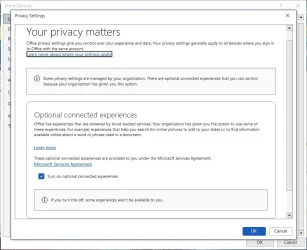
File > Options > General > Privacy Settings

Are these checked?:

Let office download online content

Enable connected experiences
 

My Computer

System One

  • OS
    Windows 11 Pro
I don't see that in Office Pro Plus 2019. I see the same thing in Office Pro Plus 2021.

Office2019PrivacySettings.webp

BTW, I have 2 x Office Pro Plus 2019 and 3 x Office Pro Plus 2021 licenses. Office 2021 support will end in October 2026 so it will have the same problem.

In any case I rarely use Office online support so it won't be missed much. I usually search online for help or use my old Office 2010 books because some things haven't changed in a long time.

Shutting down Office online support for perpetual licenses is apparently on purpose. They must think if they annoy us enough we will give up and subscribe to Microsoft 365. :(
 

My Computers

System One System Two

  • OS
    Windows 11 Pro 25H2 (26200.6901)
    Computer type
    Laptop
    Manufacturer/Model
    ASUS TUF Gaming A15 (2022)
    CPU
    AMD Ryzen 7 6800H with Radeon 680M GPU (486MB RAM)
    Memory
    Crucial DDR5-4800 (2400MHz) 32GB (2 x 16GB)
    Graphics Card(s)
    NVIDIA RTX 3060 Laptop (6GB RAM)
    Sound Card
    n/a
    Monitor(s) Displays
    15.6-inch
    Screen Resolution
    1920x1080 300Hz
    Hard Drives
    2 x Samsung 990 Evo Plus (2TB M.2 NVME SSD)
    PSU
    n/a
    Mouse
    Wireless Mouse M510
    Internet Speed
    2100Mbps/300Mbps
    Browser
    Firefox
    Antivirus
    Malwarebytes
  • Operating System
    Windows 11 Pro 25H2 (26200.8246)
    Computer type
    PC/Desktop
    Manufacturer/Model
    Custom build
    CPU
    AMD Ryzen 7 5700X3D
    Motherboard
    ASUS ROG Strix B550-F Gaming WiFi II
    Memory
    G.SKILL Flare X 32GB (2x16GB) DDR4
    Graphics card(s)
    ASUS ROG-STRIX-RTX3060TI-08G-V2-GAMING (RTX 3060-Ti, 8GB RAM)
    Monitor(s) Displays
    Samsung G50D IPS 27"
    Screen Resolution
    1440p/180Hz
    Hard Drives
    SAMSUNG 990 EVO Plus (2TB] M.2 NVME SSD
    SAMSUNG 990 EVO Plus (4TB) M.2 NVME SSD
    PSU
    Corsair RM750x (750 watts)
    Case
    Cooler Master MasterCase 5
    Cooling
    Scythe Mugen 6
    Keyboard
    Logitech K520 (MK540 keyboard/mouse combo)
    Mouse
    Logitech M310 (MK540 keyboard/mouse combo)
    Internet Speed
    2100 Mbps down / 300 Mbps up
    Browser
    Firefox, Edge, Chrome
    Antivirus
    Malwarebytes (Premium)
    Other Info
    ASUS Blu-ray Burner BW-16D1HT (SATA) || Western Digital Easystore 20TB USB 3.0 external hard drive used with Acronis True Image 2025 backup software || HP OfficeJet Pro 6975 Printer/Scanner
In any case I rarely use Office online support so it won't be missed much. I usually search online for help or use my old Office 2010 books because some things haven't changed in a long time.

I usually just DuckDuckGo the problem and see what turns up. I've gone back as far as Office 2003 doing lookups.

If they make it too draconian then I'll do a full switch to LibreOffice, which is actually getting better and better.

Shutting down Office online support for perpetual licenses is apparently on purpose. They must think if they annoy us enough we will give up and subscribe to Microsoft 365. :(

Well there ya go...
 

My Computers

System One System Two

  • OS
    Windows 11 Pro 25H2 build: (26200.7623)
    Computer type
    Laptop
    Manufacturer/Model
    Microsoft Surface Pro
    Memory
    32GB
  • Operating System
    Microsoft 25H2 Pro
    Computer type
    Laptop
    Manufacturer/Model
    Dell Pro 14 - PC14250
    CPU
    Intel Core Ultra 7
    Memory
    64GB
    Graphics card(s)
    Intel Integrated Graphics
    Hard Drives
    Micron 1TB SSD
I usually just DuckDuckGo the problem and see what turns up. I've gone back as far as Office 2003 doing lookups.

If they make it too draconian then I'll do a full switch to LibreOffice, which is actually getting better and better.


Well there ya go...
The problem as always for all these Office clones is that there's no embedded email client -- for all its "old fashioned look" etc Outlook does what it does easily, simply, no probs with IMAP,POP3,EXCHANGE etc or numbers of accounts allowed. Other paid email clients hare usually a bit fussier, are going increasingly for the dreaded subscription model and if they have any free features are removing pretty well any of the worth while ones.

Thunderbird is "Semi-acceptable" as a freebie but it has quirks and is complicated to set up properly for multiple accounts and different email servers.

The nearest decent outlook clone (free) I've seen but it's a total dog to get working -- but worthwhile in the end is to use KMAIL on any Linux live distro (or VM) with the KDE GUI.

Libre Office or equivalents are fine for all the other things unless you are an "EXCEL" power user. With Copilot Excel is really good these days even with Office 2019 and as for help with office - the DUCKDUCKGO suggestion is a good one.

There's also loads of free publications online on how to use all features of the various releases of Ms office. Apart from EXCEL not much really in the way of new features since Office 2010 - at least not for around 90% of typical Office users. Even with EXCEL you can "replicate" - although far lengthier and complicated some of the newer great features such as better Pivot table handling and "What If" scenarios / calculations.

cheers
jimbo
 

My Computer

System One

  • OS
    Windows XP,11 Linux Fedora Rawhide pre-release 45
    Computer type
    PC/Desktop
    CPU
    2 X Intel i7
    Screen Resolution
    4KUHD X 2
The problem as always for all these Office clones is that there's no embedded email client -- for all its "old fashioned look" etc Outlook does what it does easily, simply, no probs with IMAP,POP3,EXCHANGE etc or numbers of accounts allowed. Other paid email clients hare usually a bit fussier, are going increasingly for the dreaded subscription model and if they have any free features are removing pretty well any of the worth while ones.

I never use Outlook so this isn't a problem. MS should never have a monopoly towards email access, anyway.

Thunderbird is "Semi-acceptable" as a freebie but it has quirks and is complicated to set up properly for multiple accounts and different email servers.

I've been using it for 10 years now. One of the few programs I donate to. It's a lot easier to set up now then it used to be.

The nearest decent outlook clone (free) I've seen but it's a total dog to get working -- but worthwhile in the end is to use KMAIL on any Linux live distro (or VM) with the KDE GUI.

Good to know, thanks!

Libre Office or equivalents are fine for all the other things unless you are an "EXCEL" power user. With Copilot Excel is really good these days even with Office 2019 and as for help with office - the DUCKDUCKGO suggestion is a good one.

DuckDuckGo is really the only solution for me. I'm still using old versions of Office on Windows 10 and those old "Help" links to those old versions of Office have been long dead. I've just accepted that and it goes with the territory.

And no, I'm not paying a subscription and updating everytime an new version of Office comes out. They can take a hike...

These days, the only thing I need is a good Office writer and LibreOffice Writer works just as well for me. Lots of improvements to make it more Office-like without the burden of Microsoft's crap that goes with it. But I sill use old versions of Office whenever I feel like it, though. As long as they still work then I'll still use them.
 
Last edited:

My Computers

System One System Two

  • OS
    Windows 11 Pro 25H2 build: (26200.7623)
    Computer type
    Laptop
    Manufacturer/Model
    Microsoft Surface Pro
    Memory
    32GB
  • Operating System
    Microsoft 25H2 Pro
    Computer type
    Laptop
    Manufacturer/Model
    Dell Pro 14 - PC14250
    CPU
    Intel Core Ultra 7
    Memory
    64GB
    Graphics card(s)
    Intel Integrated Graphics
    Hard Drives
    Micron 1TB SSD
I never use Outlook so this isn't a problem. MS should never have a monopoly towards email access, anyway.


I've been using it for 10 years now. One of the few programs I donate to. It's a lot easier to set up now then it used to be.


Good to know, thanks!


DuckDuckGo is really the only solution for me. I'm still using old versions of Office on Windows 10 and those old "Help" links to those old versions of Office have been long dead. I've just accepted that and it goes with the territory.

And no, I'm not paying a subscription and updating everytime an new version of Office comes out. They can take a hike...

These days, the only thing I need is a good Office writer and LibreOffice Writer works just as well for me. Lots of improvements to make it more Office-like without the burden of Microsoft's crap that goes with it. But I sill use old versions of Office whenever I feel like it, though. As long as they still work then I'll still use them.
Don't forget the Internet Archive to get ISO's of earlier versions of Office etc.

Cheers
jimbo
 

My Computer

System One

  • OS
    Windows XP,11 Linux Fedora Rawhide pre-release 45
    Computer type
    PC/Desktop
    CPU
    2 X Intel i7
    Screen Resolution
    4KUHD X 2
Don't forget the Internet Archive to get ISO's of earlier versions of Office etc.

Any good links you would recommend?
 

My Computers

System One System Two

  • OS
    Windows 11 Pro 25H2 build: (26200.7623)
    Computer type
    Laptop
    Manufacturer/Model
    Microsoft Surface Pro
    Memory
    32GB
  • Operating System
    Microsoft 25H2 Pro
    Computer type
    Laptop
    Manufacturer/Model
    Dell Pro 14 - PC14250
    CPU
    Intel Core Ultra 7
    Memory
    64GB
    Graphics card(s)
    Intel Integrated Graphics
    Hard Drives
    Micron 1TB SSD
If you just need an email client you can download the free Outlook for Windows app from the Microsoft Store.

BTW, what good are links to ISOs of earlier versions of Office? They will run in a reduced mode unless they are activated with a valid key. That is you can open files but you can't edit them.
 

My Computers

System One System Two

  • OS
    Windows 11 Pro 25H2 (26200.6901)
    Computer type
    Laptop
    Manufacturer/Model
    ASUS TUF Gaming A15 (2022)
    CPU
    AMD Ryzen 7 6800H with Radeon 680M GPU (486MB RAM)
    Memory
    Crucial DDR5-4800 (2400MHz) 32GB (2 x 16GB)
    Graphics Card(s)
    NVIDIA RTX 3060 Laptop (6GB RAM)
    Sound Card
    n/a
    Monitor(s) Displays
    15.6-inch
    Screen Resolution
    1920x1080 300Hz
    Hard Drives
    2 x Samsung 990 Evo Plus (2TB M.2 NVME SSD)
    PSU
    n/a
    Mouse
    Wireless Mouse M510
    Internet Speed
    2100Mbps/300Mbps
    Browser
    Firefox
    Antivirus
    Malwarebytes
  • Operating System
    Windows 11 Pro 25H2 (26200.8246)
    Computer type
    PC/Desktop
    Manufacturer/Model
    Custom build
    CPU
    AMD Ryzen 7 5700X3D
    Motherboard
    ASUS ROG Strix B550-F Gaming WiFi II
    Memory
    G.SKILL Flare X 32GB (2x16GB) DDR4
    Graphics card(s)
    ASUS ROG-STRIX-RTX3060TI-08G-V2-GAMING (RTX 3060-Ti, 8GB RAM)
    Monitor(s) Displays
    Samsung G50D IPS 27"
    Screen Resolution
    1440p/180Hz
    Hard Drives
    SAMSUNG 990 EVO Plus (2TB] M.2 NVME SSD
    SAMSUNG 990 EVO Plus (4TB) M.2 NVME SSD
    PSU
    Corsair RM750x (750 watts)
    Case
    Cooler Master MasterCase 5
    Cooling
    Scythe Mugen 6
    Keyboard
    Logitech K520 (MK540 keyboard/mouse combo)
    Mouse
    Logitech M310 (MK540 keyboard/mouse combo)
    Internet Speed
    2100 Mbps down / 300 Mbps up
    Browser
    Firefox, Edge, Chrome
    Antivirus
    Malwarebytes (Premium)
    Other Info
    ASUS Blu-ray Burner BW-16D1HT (SATA) || Western Digital Easystore 20TB USB 3.0 external hard drive used with Acronis True Image 2025 backup software || HP OfficeJet Pro 6975 Printer/Scanner
File > Options > General > Privacy Settings

Are these checked?:

Let office download online content

Enable connected experiences

I don't have the option... my screen looks like what @MisterEd posted.

Would there be a way to backtrack to an ISO and get the content from there? Was HELP ever downloadable to the local machine?
 

My Computer

System One

  • OS
    Windows 11 Pro 24H2
    Computer type
    Laptop
    Manufacturer/Model
    HP
    CPU
    Intel Ultra 7 155H
    Memory
    16gb
    Graphics Card(s)
    Intel Arc integrated
    Hard Drives
    SSD
Thunderbird is "Semi-acceptable" as a freebie but it has quirks and is complicated to set up properly for multiple accounts and different email servers...
Really? I have like 4 accounts setup in Thunderbird... I'm no expert, IT or something knowledgeable at least... What's so complicated about setting up an account? Unless you mean things like making it check all folders for new mail always, which then yes, it needs an advanced toggle lol (Yeah, they need an option for that for normal users like me...)
 

My Computers

System One System Two

  • OS
    Windows 11 Pro 25H2
    Computer type
    PC/Desktop
    Manufacturer/Model
    Built PC
    CPU
    AMD Ryzen 5 5600G @ 3.9/4.4Ghz
    Motherboard
    MSI B550M-PRO-WiFi Ver. 1.4
    Memory
    2 x 16 GB DDR4 Kingston Fury Beast 3200 Mhz
    Graphics Card(s)
    AMD Radeon RX 6600 XT MSI Mech 2X OC Edition 8 GB
    Sound Card
    Realtek High Definition Audio (Integrated)
    Monitor(s) Displays
    Samsung C50Rx 27" LED / HP S2031 20" LCD
    Screen Resolution
    1920 x 1080 px / 1600 x 900 px
    Hard Drives
    WD Blue SN570 NVME M.2 SSD [1 TB] -- External Drives: - WD Scorpion Blue 250 GB 5400 RPM (Data Backup) - Hitachi 500 GB 5400 RPM (Software / ISOs Backup) - Toshiba MQ01ABD100 1 TB 5400 RPM (OS Images) - HGST TravelStar 7K1000 1 TB, 7200 RPM USB 3.0 - ADATA SU800 2TB SSD USB 3.0
    PSU
    Corsair RM750e 750W Fully Modular
    Case
    Naceb Hydra NA-1602
    Cooling
    Naceb Orpheus x 3 (Front) + Naceb Cepheus 1200 RPM Max (Rear) + ThemalRight Assasin X 90 SE (CPU)
    Keyboard
    Logitech MK470 Wireless
    Mouse
    Logitech MK470 Wireless
    Internet Speed
    120 MB Symetrical
    Browser
    Firefox / Brave / Edge
    Antivirus
    Windows Defender
    Other Info
    - VMs: WMware Player - Windows 8.1 Pro x64 / Windows 11 Pro
    - Wacom Intuos Pro Small Tablet PTH-460
  • Operating System
    Windows 11 Pro 25H2
    Computer type
    Laptop
    Manufacturer/Model
    HP Pavilion 15-eh3000la (80M53LA)
    CPU
    AMD Ryzen 7 7730U @ 2.0/4.5 Ghz
    Motherboard
    HP 8BC7
    Memory
    2 x 16 GB Kingston Fury Impact DDR4 3200 Mhz
    Graphics card(s)
    Radeon (tm) Graphics Vega 8 (512 MB)
    Sound Card
    Realtek High Definition Audio (Integrated)
    Monitor(s) Displays
    AU Optronics
    Screen Resolution
    1920 x 1080 px (125% size)
    Hard Drives
    WD Blue SN570 1TB NVME M.2 Drive
    PSU
    45 Watt Charger
    Cooling
    Laptop Cooling Pad
    Keyboard
    Free Wolf Foldable Portable Keyboard
    Mouse
    Free Wolf Wireless Mouse
    Internet Speed
    120 MB Symetrical
    Browser
    Firefox / Brave / Edge
    Antivirus
    Windows Defender
    Other Info
    - 41mWh battery.
    - Wacom Intuos Pro Small Tablet PTH-460
Really? I have like 4 accounts setup in Thunderbird... I'm no expert, IT or something knowledgeable at least... What's so complicated about setting up an account? Unless you mean things like making it check all folders for new mail always, which then yes, it needs an advanced toggle lol (Yeah, they need an option for that for normal users like me...)

Well it used to be a pain in the ass a few years back, having to look up all those individual IMAP, POP3, EXCHANGE numbers for hotmail, outlook, yahoo, gmail etc... and then entering each one of them in manually. - - - Jeez, I remember those days. :nope:

But newer versions now just automate all that so it's a lot simpler. Only need your email address / user name and password now and T-bird just looks them all up for you. Real smooth. Good times.
 

My Computers

System One System Two

  • OS
    Windows 11 Pro 25H2 build: (26200.7623)
    Computer type
    Laptop
    Manufacturer/Model
    Microsoft Surface Pro
    Memory
    32GB
  • Operating System
    Microsoft 25H2 Pro
    Computer type
    Laptop
    Manufacturer/Model
    Dell Pro 14 - PC14250
    CPU
    Intel Core Ultra 7
    Memory
    64GB
    Graphics card(s)
    Intel Integrated Graphics
    Hard Drives
    Micron 1TB SSD
Really? I have like 4 accounts setup in Thunderbird... I'm no expert, IT or something knowledgeable at least... What's so complicated about setting up an account? Unless you mean things like making it check all folders for new mail always, which then yes, it needs an advanced toggle lol (Yeah, they need an option for that for normal users like me...)
You’re 100% correct. I just setup 5 gmail accounts on Thunderbird on a Mac Mini and had absolutely no problems whatsoever. As a matter of fact I set up multiple filters/rules for each account and they worked flawlessly unlike Outlook which never worked right in all the years I was using it.
 

My Computers

System One System Two

  • OS
    Windows 11 Pro
    Computer type
    PC/Desktop
    Manufacturer/Model
    Dell 8940 XPS
    CPU
    10th Gen Intel(R) Core(TM) i7-10700, 2.90GHz
    Motherboard
    Dell 0KV3RP (U3E1)
    Memory
    32GB, 2x16GB, DDR4, 2933Mhz
    Graphics Card(s)
    NVIDIA(R) GeForce(R) RTX 2060 SUPER(TM) 8GB GDDR6
    Sound Card
    Onboard, Realtek Codec, NVIDIA Hi Def Audio, Intel Display Audio
    Monitor(s) Displays
    Dell UltraSharp U3415W
    Screen Resolution
    3440x1440
    Hard Drives
    2TB M.2 PCIe NVMe SSD; 2TB Samsung SSD 860 EVO; 2TB Samsung SSD 860 EVO 2
    PSU
    500 W Dell
    Case
    Night Sky Bezel Chassis
    Cooling
    Dell
    Keyboard
    Logi Wireless
    Mouse
    Logi Wireless
    Internet Speed
    111 Mbps Download, 132 Mbps Upload
    Browser
    Edge, Chrome
    Antivirus
    Windows Defender, MalwareBytes
  • Operating System
    Windows 11 Pro
    Computer type
    PC/Desktop
    Manufacturer/Model
    Falcon Northwest Talon
    CPU
    Intel 13900K Core I9 24 Core LGA 1700
    Motherboard
    Asus ROG Z970 Maximus Hero
    Memory
    32GB (2x16) Kingston Fury Beast 6000MHZ DDR5
    Graphics card(s)
    nVidia 4090 Founders Edition
    Sound Card
    Motherboard
    Monitor(s) Displays
    Alienware 34” Curved OLED
    Screen Resolution
    4K
    Hard Drives
    SSD M.2 Kingston Renegade Fury 4 TB x 2; Western Digital Red Pro 8 TB SATA III
    PSU
    1000W ECGA Platinum Modular ATX
    Case
    Falcon NW Custom
    Cooling
    AIO Falcon NW 280mm Liquid Cooler
    Keyboard
    Logitech Pro Gamer
    Mouse
    Logitech G502
    Internet Speed
    111 Mbps Download, 132 Mbps Upload
    Browser
    Edge, Chrome
    Antivirus
    Windows Defender, MalwareBytes
    Other Info
    Noise Blocker Fans
@Levitate11: On the Microsoft support forum: Offline Help in Office 2019

In the response it stated, "Offline help was there till Office 2013. Starting Office 2016, Offline help has been taken off.".

If true then that means we are out of luck :(
 

My Computers

System One System Two

  • OS
    Windows 11 Pro 25H2 (26200.6901)
    Computer type
    Laptop
    Manufacturer/Model
    ASUS TUF Gaming A15 (2022)
    CPU
    AMD Ryzen 7 6800H with Radeon 680M GPU (486MB RAM)
    Memory
    Crucial DDR5-4800 (2400MHz) 32GB (2 x 16GB)
    Graphics Card(s)
    NVIDIA RTX 3060 Laptop (6GB RAM)
    Sound Card
    n/a
    Monitor(s) Displays
    15.6-inch
    Screen Resolution
    1920x1080 300Hz
    Hard Drives
    2 x Samsung 990 Evo Plus (2TB M.2 NVME SSD)
    PSU
    n/a
    Mouse
    Wireless Mouse M510
    Internet Speed
    2100Mbps/300Mbps
    Browser
    Firefox
    Antivirus
    Malwarebytes
  • Operating System
    Windows 11 Pro 25H2 (26200.8246)
    Computer type
    PC/Desktop
    Manufacturer/Model
    Custom build
    CPU
    AMD Ryzen 7 5700X3D
    Motherboard
    ASUS ROG Strix B550-F Gaming WiFi II
    Memory
    G.SKILL Flare X 32GB (2x16GB) DDR4
    Graphics card(s)
    ASUS ROG-STRIX-RTX3060TI-08G-V2-GAMING (RTX 3060-Ti, 8GB RAM)
    Monitor(s) Displays
    Samsung G50D IPS 27"
    Screen Resolution
    1440p/180Hz
    Hard Drives
    SAMSUNG 990 EVO Plus (2TB] M.2 NVME SSD
    SAMSUNG 990 EVO Plus (4TB) M.2 NVME SSD
    PSU
    Corsair RM750x (750 watts)
    Case
    Cooler Master MasterCase 5
    Cooling
    Scythe Mugen 6
    Keyboard
    Logitech K520 (MK540 keyboard/mouse combo)
    Mouse
    Logitech M310 (MK540 keyboard/mouse combo)
    Internet Speed
    2100 Mbps down / 300 Mbps up
    Browser
    Firefox, Edge, Chrome
    Antivirus
    Malwarebytes (Premium)
    Other Info
    ASUS Blu-ray Burner BW-16D1HT (SATA) || Western Digital Easystore 20TB USB 3.0 external hard drive used with Acronis True Image 2025 backup software || HP OfficeJet Pro 6975 Printer/Scanner
You’re 100% correct. I just setup 5 gmail accounts on Thunderbird on a Mac Mini and had absolutely no problems whatsoever. As a matter of fact I set up multiple filters/rules for each account and they worked flawlessly unlike Outlook which never worked right in all the years I was using it.
The REAL problem is if you have different inbound and outbound mail servers with different user account and password on each. Automated stuff works fine for a lot but doesn't work for different mail servers !!!!!!

For bog standard situations with typical type email addresses then no prob. My post was on when you have those situations where automated setup doesn't work or not applicable. !!!!

Cheers
jimbo
 

My Computer

System One

  • OS
    Windows XP,11 Linux Fedora Rawhide pre-release 45
    Computer type
    PC/Desktop
    CPU
    2 X Intel i7
    Screen Resolution
    4KUHD X 2
In the response it stated, "Offline help was there till Office 2013. Starting Office 2016, Offline help has been taken off.".

If true then that means we are out of luck
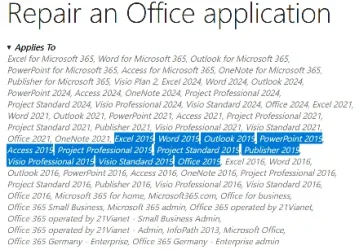
But do note that many current Office online Help pages apply to Office 2019 & even Office 2016 as well as current versions.
Applicability is given in the Applies to section under article titles.
e.g. Repair an Office application - MSSupport
Help article applicability.webp

My understanding is that Office versions since Office 2013 have just added hardly-ever-useful capabilities [without removing old capabilities] so your working assumption can always be that current Office online Help articles are worth consulting for older versions.
https://support.microsoft.com/office


All the best,
Denis
Still an Office Pro 2007 user - it has built-in Help files
 
Last edited:

My Computer

System One

  • OS
    Windows 11 Home x64 Version 25H2 Build 26200.8037
I found out years ago with even earlier versions of Office. All the on-line help is gone, but an Internet search normally turns up what I need.
 

My Computers

System One System Two

  • OS
    Win 11 Pro 25H2, Build 26200.8524
    Computer type
    PC/Desktop
    Manufacturer/Model
    Home Brew
    CPU
    Intel Core i5 14500
    Motherboard
    Gigabyte B760M G P WIFI
    Memory
    64GB DDR4
    Graphics Card(s)
    GeForce RTX 4060
    Sound Card
    Chipset Realtek
    Monitor(s) Displays
    LG 45" Ultragear, Acer 24" 1080p
    Screen Resolution
    5120x1440, 1920x1080
    Hard Drives
    Crucial P310 2TB 2280 PCIe Gen4 3D NAND NVMe M.2 SSD (O/S)
    Silicon Power 2TB US75 NVMe PCIe Gen4 M.2 2280 SSD (backup)
    Crucial BX500 2TB 3D NAND (2nd backup)
    Seagate 4TB Ironwolf, rotating HDD archive files
    External off-line backup Drives: 2 NVMe 4TB drives in external enclosures
    PSU
    Thermaltake Toughpower GF3 750W
    Case
    LIAN LI LANCOOL 216 E-ATX PC Case
    Cooling
    Lots of fans!
    Keyboard
    Microsoft Comfort Curve 2000
    Mouse
    Logitech G305
    Internet Speed
    Verizon FiOS 1GB
    Browser
    Firefox
    Antivirus
    Malware Bytes & Windows Defender Security
  • Operating System
    Win 11 Pro 25H2, Build 26200.8524
    Computer type
    PC/Desktop
    Manufacturer/Model
    Home Brew
    CPU
    Intel Core i5 14400
    Motherboard
    Gigabyte B760M DS3H AX
    Memory
    32GB DDR5
    Graphics card(s)
    Intel 700 Embedded GPU
    Sound Card
    Realtek Embedded
    Monitor(s) Displays
    27" HP 1080p
    Screen Resolution
    1920x1080
    Hard Drives
    Crucial P310 2TB 2280 PCIe Gen4 eD NAND PCIe SSD
    Samsung EVO 990 2TB NVMe Gen4 SSD
    Samsung 2TB SATA SSD
    PSU
    Thermaltake Smart BM3 650W
    Case
    Okinos Micro ATX Case
    Cooling
    Fans
    Keyboard
    Microsoft Comfort Curve 2000
    Mouse
    Logitech G305
    Internet Speed
    Verizon FiOS 1GB
    Browser
    Firefox
    Antivirus
    Malware Bytes & Windows Defender Security
you can download the offline 2013 chm help files. i'm sure someone on reddit or github has compiled the 2019/2016 for offline haha. just have to dig around for the chm files for those years (they would've had to rip them from online help pages and compiled them)


My Computer

System One

  • OS
    Windows 11 Pro
The REAL problem is if you have different inbound and outbound mail servers with different user account and password on each. Automated stuff works fine for a lot but doesn't work for different mail servers !!!!!!

I didn't have much problem with that. I was amazed at how fast and how simple it had gotten from just a few years earlier.

I had to delete some of my accounts from my old T-bird profile due to some protocol changes MS implemented for Outlook. And yahoo also made some changes, largely to confirm some of my old information that had been sitting stagnant for years.

When I went to add them back in, it was so simple. I thought I had to manually put all that info back in again. Instead, it just looked up the IMAP, POP3 etc numbers for me all by itself and put them in there. It took a couple of minutes for T-bird to collect all that folder information and populate the folders and wha-la!, I'm back in business.

And here I thought it was gonna be a time consuming process. What a relief - Wheew... 😌

For bog standard situations with typical type email addresses then no prob. My post was on when you have those situations where automated setup doesn't work or not applicable. !!!!

Cheers
jimbo

Well I'm not sure what kind of a set-up you had but I'd guess for the vast majority of users out there, I'd say it was simple enough for them, as it was as simple enough for me.

The only hiccup I later had was when MS had implemented that app password that I had to set up through Outlook's OWA web page and transpose it to T-bird. That's not the same thing as my log-in password. That was a something new type of 2FA authentication that MS had implemented and it wasn't T-bird's fault.

One thing I will emphasize is that anytime you make any changes, back up your Thunderbird profile:


My Computers

System One System Two

  • OS
    Windows 11 Pro 25H2 build: (26200.7623)
    Computer type
    Laptop
    Manufacturer/Model
    Microsoft Surface Pro
    Memory
    32GB
  • Operating System
    Microsoft 25H2 Pro
    Computer type
    Laptop
    Manufacturer/Model
    Dell Pro 14 - PC14250
    CPU
    Intel Core Ultra 7
    Memory
    64GB
    Graphics card(s)
    Intel Integrated Graphics
    Hard Drives
    Micron 1TB SSD

Latest Support Threads

Back
Top Bottom