Microsoft Open Source Blog:
The chat client that brought Comic Sans to the world is now on GitHub
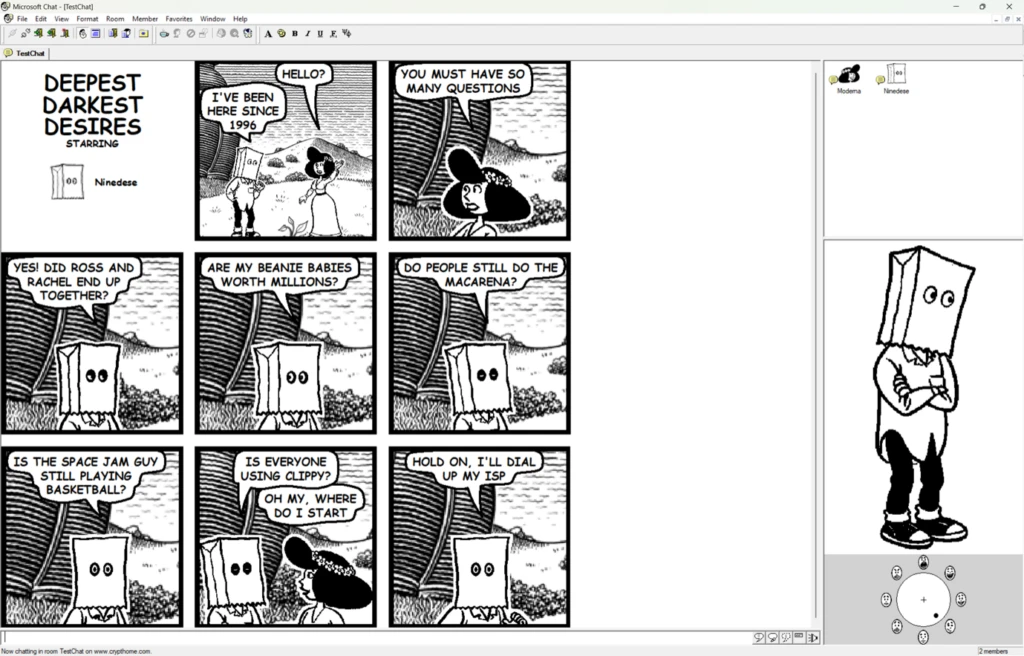
Today, we’re excited to announce the open-source release of Microsoft Comic Chat, the chat client that automatically turned conversations within Internet Relay Chat (IRC) into comic panels featuring illustrated characters, speech bubbles, and expressions, and helped introduce the world to a little font called Comic Sans.
Yes, that Comic Sans. Originally designed by Microsoft typographer Vincent Connare in 1994, Comic Sans found its first real home in Comic Chat, where its informal, hand-lettered feel matched the software’s speech-bubble conversations perfectly.
Explore Microsoft Comic Chat on GitHub
For many people, Comic Chat is a nostalgic artifact from the early days of the internet as we transitioned from technologies like telnet, Usenet, and IRC to the largely visual web that we enjoy today. For others, it’s a legendary piece of Microsoft history they have only heard about in stories, screenshots, and debates about typography. Now, developers, historians, retro computing enthusiasts, and anyone who appreciates a wonderfully unconventional idea can explore the source code for themselves.
A different vision for online communication
Today we’re accustomed to messaging apps with reactions, stickers, GIFs, avatars, video, and AI-generated content. But in the mid-1990s, internet chat was largely walls of scrolling text.Rather than displaying messages as plain text, Comic Chat presented participants as illustrated characters. Conversations unfolded in comic panels, with speech bubbles, expressions, and gestures generated from what people typed. If someone wrote “I like that,” the character might point to itself. If the text suggested anger, the character might frown or cross its arms. It was quirky, ambitious, occasionally chaotic, and surprisingly forward-looking.
Many ideas we now take for granted in online communication can trace some of their spirit to experiments like Comic Chat.
The people who built it
David “DJ” Kurlander, working in the Microsoft Research Virtual Worlds Group, conceived the idea of a new visual representation of conversational histories, and started developing Comic Chat in 1995. Built in Visual C++ 4.0 and MFC, Comic Chat was released in 1996 with the Internet Explorer 3 web browser.Under the hood, Comic Chat was more than a clever skin for IRC. It was able to interpret conversational cues in the text and choose appropriate poses, facial expressions, gestures, and panel layouts. That meant Comic Chat was not simply displaying messages but also making real-time editorial decisions about how a conversation should look and feel as a comic. DJ, Tim Skelly, and David Salesin published a paper on the technology in Comic Chat at SIGGRAPH ’96, a computer graphics conference, describing what they had built as an experiment in automatic illustration construction and layout.
The visual world of Comic Chat was the work of Jim Woodring, a highly regarded independent comic artist whose characters gave the software its distinctive look. The team would hand Jim transcripts of real chat sessions to illustrate, then use the results to figure out whether the whole idea was worth pursuing. It was.
Why open source it now?
Comic Chat represents a fascinating chapter in the evolution of online communication. It emerged during a period when the internet was still discovering what it wanted to become. Many rules had not yet been written, which gave developers permission to try bold concepts that might seem unusual even today.By releasing Comic Chat as open source, we’re preserving an important piece of software history and giving the community an opportunity to explore, learn, and build upon it.
The source is available now for exploration, study, and experimentation. Alongside the original snapshots, we’ve included a few AI-powered modernization attempts that demonstrate what’s possible—getting this 1990s-era C++ and MFC code building with current Visual Studio tools, connecting to modern IRC servers, and running legibly on today’s high-resolution Windows machines. These are not polished re-releases, but worked examples that show Comic Chat can still come alive on modern systems. We’re excited to see what improvements, ports, experiments, and entirely new forms the community brings to it next.
A time capsule of internet optimism
Looking back, Comic Chat captures something special about the era in which it was created.The early web was filled with experimentation. “What if chat rooms looked like comics?” That question sounds wonderfully unreasonable. And yet it was built, shipped, localized into 24 languages, and bundled with Windows 98.
That’s part of what makes Comic Chat memorable decades later. It reminds us that innovation often starts with ideas that are playful, unconventional, and creative.
One last speech bubble
Comic Chat was created during a period when software teams were willing to color outside the lines, literally and figuratively. DJ Kurlander, Tim Skelly, David Salesin, Jim Woodring, and everyone else who touched this project made something that people still remember and still run thirty years later.Take a look at the source code, explore what they built, and use its story as inspiration to come up with new unconventionally delightful things to create.
And if you happen to read the source code in Comic Sans, we promise not to judge.
Source:

Microsoft Comic Chat is now open source | Microsoft Open Source Blog
Microsoft Comic Chat is now open source. Explore the IRC client that turned conversations into comics and helped introduce Comic Sans to the world.
 opensource.microsoft.com