Solved Microsoft Edge - a strange error message which won't allow an update check


Peter B

Well-known member
Member
Local time
11:59 AM
Posts
71
Location
West Yorkshire
OS
Windows 11 Pro 25H2 26200.8524
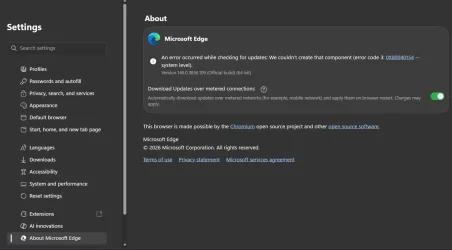
I started seeing the error message on the attached screenshot yesterday and wondered if anyone could give me a workaround, please.

The Microsoft App that the error code directed me to won't troubleshoot it and the Program itself won't allow a repair.

Could someone point me at a solution, please?Screenshot (1).webp
 

My Computer

System One

  • OS
    Windows 11 Pro 25H2 26200.8524
    Computer type
    Laptop
    Manufacturer/Model
    PC Specialist 15.6" Initia
    CPU
    Intel(R) Core(TM) i7-1195G7 @ 2.90GHz
    Memory
    16GB
    Graphics Card(s)
    Intel Iris Xe
    Screen Resolution
    1920 x 1080
    Hard Drives
    M2 PCIe NVMe 250GB
    Internet Speed
    910/105 Mbps
    Browser
    Ecosia Version 148.1.7778.13 (PROD) (64-bit)
    Antivirus
    Microsoft Defender
    Other Info
    Macrium Reflect Home v10.0.8843

Could someone point me at a solution, please?

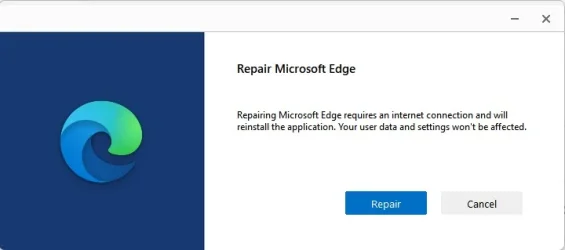
Go to installed apps > Microsoft Edge
On the right side click on the three dots and select modify.
Edge repair should be an option which will reinstall Edge.

Screenshot 2026-04-10 080709.webp
 

My Computer

System One

  • OS
    Windows 11 Pro
Hi KevTech

Thank you for your reply, but neither the Modify, nor Uninstall option is open/clickable...
 

My Computer

System One

  • OS
    Windows 11 Pro 25H2 26200.8524
    Computer type
    Laptop
    Manufacturer/Model
    PC Specialist 15.6" Initia
    CPU
    Intel(R) Core(TM) i7-1195G7 @ 2.90GHz
    Memory
    16GB
    Graphics Card(s)
    Intel Iris Xe
    Screen Resolution
    1920 x 1080
    Hard Drives
    M2 PCIe NVMe 250GB
    Internet Speed
    910/105 Mbps
    Browser
    Ecosia Version 148.1.7778.13 (PROD) (64-bit)
    Antivirus
    Microsoft Defender
    Other Info
    Macrium Reflect Home v10.0.8843

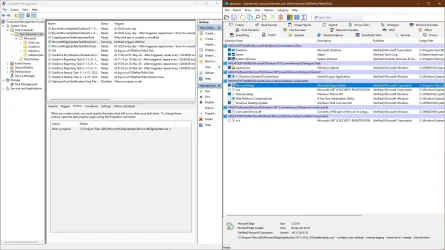
Tweaking can cause issues, it can be blocked by DNS, adblocker, firewall.
But since you have the latest version, I would not worry about it, yet.
Edge has multiple ways to update, if one fails, it will try another.
 

Attachments

  • capture_04102026_174020.webp
    capture_04102026_174020.webp
    205.3 KB · Views: 1

My Computer

System One

  • OS
    Home26H2Can
    Computer type
    PC/Desktop
    CPU
    AMD Ryzen 5 8600G (07/24)
    Motherboard
    ASROCK B650M-HDV/M.2 (07/24) BIOS 4.21 AGESA ComboAM5 1.3.0.1 (04/26)
    Memory
    2x32GB Kingston FURY DDR5 5600 MHz CL36 @5200 CL36 (07/24)
    Graphics Card(s)
    ASROCK Radeon RX 6600 Challenger D 8G @48FPS (08/24)
    Sound Card
    Creative Sound BlasterX AE-5 Plus (05/24)
    Monitor(s) Displays
    24" Philips 24M1N3200ZS/00 (05/24)
    Screen Resolution
    1920×1080@165Hz via DP1.4
    Hard Drives
    Kingston KC3000 NVMe 2TB (05/24)
    ADATA XPG GAMMIX S11 Pro 512GB (07/19)
    PSU
    Seasonic Core GM 550 Gold (04/24)
    Case
    Fractal Design Define 7 Mini with 3x Noctua NF-P14s/12@555rpm (04/24)
    Cooling
    Noctua NH-U12S with Noctua NF-P12 (04/24)
    Keyboard
    HP Pavilion Wired Keyboard 300 (07/24) + Rabalux 76017 Parker (01/24)
    Mouse
    Logitech M330 Silent Plus (01/26)
    Internet Speed
    500/100 Mbps via RouterOS (05/21) & TCP Optimizer
    Browser
    Edge, Brave for YouTube, LibreWolf for FB
    Antivirus
    NextDNS blocking 1/3 Traffic
    Other Info
    Phone: Motorola Moto G86 (02/26)
    Backup: Hasleo Backup Suite (PreOS)
    Headphones: Sennheiser RS170 (09/10)
    Chair: Huzaro Force 4.4 Grey Mesh (05/24)
    Notifier: Xiaomi Mi Band 9 Milanese (10/24)
    FlexCore USB-C 3.2 Gen 1 (M) to LAN (F) (08/25)
Thank you for your reply, but neither the Modify, nor Uninstall option is open/clickable
Try this in admin powershell.

Code:
Get-AppXPackage -AllUsers -Name Microsoft.MicrosoftEdge | Foreach {Add-AppxPackage -DisableDevelopmentMode -Register "$($_.InstallLocation)\AppXManifest.xml" -Verbose}
 

My Computer

System One

  • OS
    Windows 11 Pro
Hi again KevTech - I ran that Powershell command, but nothing seemed to happen at all...
 

My Computer

System One

  • OS
    Windows 11 Pro 25H2 26200.8524
    Computer type
    Laptop
    Manufacturer/Model
    PC Specialist 15.6" Initia
    CPU
    Intel(R) Core(TM) i7-1195G7 @ 2.90GHz
    Memory
    16GB
    Graphics Card(s)
    Intel Iris Xe
    Screen Resolution
    1920 x 1080
    Hard Drives
    M2 PCIe NVMe 250GB
    Internet Speed
    910/105 Mbps
    Browser
    Ecosia Version 148.1.7778.13 (PROD) (64-bit)
    Antivirus
    Microsoft Defender
    Other Info
    Macrium Reflect Home v10.0.8843

have you tried updating Edge via the Microsoft Store
best of luck Steve ..
 

My Computers

System One System Two

  • OS
    Debian Trixie KDE Windows 11 Home
    Computer type
    PC/Desktop
    Manufacturer/Model
    HP 24" AiO
    CPU
    Ryzen 7 5825u
    Motherboard
    HP
    Memory
    64GB DDR4 3200
    Graphics Card(s)
    Ryzen 7 5825u
    Sound Card
    RealTek
    Monitor(s) Displays
    24" HP AiO
    Screen Resolution
    1920 x 1080 @60 Hz
    Hard Drives
    1TB WD Blue SN580 M2 SSD Partitioned.
    2x 1TB USB HDD External Backup/Storage.
    PSU
    90W external power brick
    Case
    24" All in One
    Cooling
    Default Air Cooling
    Keyboard
    HP WiFi UK extended
    Mouse
    HP WiFi 3 Button
    Internet Speed
    1GB full fibre
    Browser
    Edge & Firefox
    Antivirus
    AVG Internet Security/Windows Defender
    Other Info
    Mainly Open Source Software
  • Operating System
    Ubuntu 22.04.5 LTS
    Computer type
    Laptop
    Manufacturer/Model
    Dell 13" Latitude 2017
    CPU
    i5 7200u
    Motherboard
    Dell
    Memory
    16GB DDR4
    Graphics card(s)
    Intel
    Sound Card
    Intel
    Monitor(s) Displays
    13" Dell Laptop
    Hard Drives
    250GB Crucial 2.5" SSD
    Mouse
    Generic WiFi 3 button
    Internet Speed
    WiFi only
    Browser
    Firefox
    Antivirus
    ClamAV TK
    Other Info
    Mainly Open Source Software
XxXxX

When I look in Microsoft Store, it just says it's already installed.
 

My Computer

System One

  • OS
    Windows 11 Pro 25H2 26200.8524
    Computer type
    Laptop
    Manufacturer/Model
    PC Specialist 15.6" Initia
    CPU
    Intel(R) Core(TM) i7-1195G7 @ 2.90GHz
    Memory
    16GB
    Graphics Card(s)
    Intel Iris Xe
    Screen Resolution
    1920 x 1080
    Hard Drives
    M2 PCIe NVMe 250GB
    Internet Speed
    910/105 Mbps
    Browser
    Ecosia Version 148.1.7778.13 (PROD) (64-bit)
    Antivirus
    Microsoft Defender
    Other Info
    Macrium Reflect Home v10.0.8843
I just noticed that version 147.0.3912.60 is now available, but it won't update for me.
 

My Computer

System One

  • OS
    Windows 11 Pro 25H2 26200.8524
    Computer type
    Laptop
    Manufacturer/Model
    PC Specialist 15.6" Initia
    CPU
    Intel(R) Core(TM) i7-1195G7 @ 2.90GHz
    Memory
    16GB
    Graphics Card(s)
    Intel Iris Xe
    Screen Resolution
    1920 x 1080
    Hard Drives
    M2 PCIe NVMe 250GB
    Internet Speed
    910/105 Mbps
    Browser
    Ecosia Version 148.1.7778.13 (PROD) (64-bit)
    Antivirus
    Microsoft Defender
    Other Info
    Macrium Reflect Home v10.0.8843
I've now lost interest and have uninstalled it.
 

My Computer

System One

  • OS
    Windows 11 Pro 25H2 26200.8524
    Computer type
    Laptop
    Manufacturer/Model
    PC Specialist 15.6" Initia
    CPU
    Intel(R) Core(TM) i7-1195G7 @ 2.90GHz
    Memory
    16GB
    Graphics Card(s)
    Intel Iris Xe
    Screen Resolution
    1920 x 1080
    Hard Drives
    M2 PCIe NVMe 250GB
    Internet Speed
    910/105 Mbps
    Browser
    Ecosia Version 148.1.7778.13 (PROD) (64-bit)
    Antivirus
    Microsoft Defender
    Other Info
    Macrium Reflect Home v10.0.8843

Latest Support Threads

Back
Top Bottom