Microsoft Edge loads all your saved passwords into memory in cleartext — even when you’re not using them.


andrew129260

Well-known member
Pro User
VIP
Local time
7:17 AM
Posts
1,793
Location
USA
OS
Windows 11 Pro


What makes this more frustrating is that edge automatically pulls your passwords and history into it sometimes from other browsers automatically. Making all of them vulnerable as well..

Microsoft's response was this was by design....🙄

Yes storing passwords in the browser isn't the safest we have known that for awhile. But again, why let such easy openings like this? Makes no sense.

One could argue that if a user has admin rights, they can already cause havoc on a rig if they have access, and that's true. But something worth considering is that many PC users will have admin rights on their accounts as a default. And even if you have admin rights, you often have to use passwords to get access to password managers, or even use two-factor authentication. Cleartext saved passwords, as argued by International Cyber Digest, means "in shared environments, this turns into a credential harvest."

Edge is the only affected chromium browser so far. Chrome and others are not affected

I am one of the few people that like windows 11 a lot. But there has been a lot of problems lately where Microsoft is ignoring security issues and saying things are by design so we're not fixing it.

Let others around you know and check on your loved ones machines. Make sure they are not affected
 
Last edited:

My Computers My Computers

  • At a glance

    Windows 11 ProRyzen 7 5700 X3D64 GB DDR4 3600mhz Gskill Ripjaws VRTX 4070 Super , 12GB VRAM Asus EVO Overclock
    OS
    Windows 11 Pro
    Computer type
    PC/Desktop
    Manufacturer/Model
    Custom Built
    CPU
    Ryzen 7 5700 X3D
    Motherboard
    MSI MPG B550 GAMING PLUS
    Memory
    64 GB DDR4 3600mhz Gskill Ripjaws V
    Graphics Card(s)
    RTX 4070 Super , 12GB VRAM Asus EVO Overclock
    Monitor(s) Displays
    Gigabyte M27Q (rev. 2.0) 2560 x 1440 @ 170hz HDR
    Hard Drives
    2TB Samsung nvme ssd
    4TB Western Digital nvme ssd
    PSU
    CORSAIR RMx SHIFT Series™ RM750x 80 PLUS Gold Fully Modular ATX Power Supply
    Case
    CORSAIR 3500X ARGB Mid-Tower ATX PC Case – Black
    Cooling
    ID-COOLING FROSTFLOW X 240 CPU Water Cooler
    Keyboard
    Logitech G213
    Mouse
    Logitech G203
    Internet Speed
    1.2gbps Fiber 😎
  • At a glance

    Chrome OSIntel Pentium Quad Core4GB LPDDR4
    Operating System
    Chrome OS
    Computer type
    Laptop
    Manufacturer/Model
    HP Chromebook
    CPU
    Intel Pentium Quad Core
    Memory
    4GB LPDDR4
    Monitor(s) Displays
    14 Inch HD SVA anti glare micro edge display
    Hard Drives
    64 GB emmc
Copying my response to this thread:

Web browser password managers, Cloud password managers, and local password managers all send credentials decrypted.

Out of all the password managers, web browser password manager, and local password managers I researched, Microsoft Edge is the only one where Microsoft keeps all password information loaded in memory in plain text (decrypted) while NOT being used at all. This "work as design" stupidity from Microsoft shows their carelessness of handling sensitive data.

Google Chrome and many other browsers, based on what I have read so far, only decrypts the password information when used and encrypts it back afterwards. I did not see anything whether other browsers retain this information in memory encrypted or decrypted.

Microsoft Edge worldwide market share is around 11.5% where this should not be to big a problem.

Google Chrome worldwide market share is near 72%.
 

My Computers My Computers

  • At a glance

    Windows 11 ProAMD Ryzen AI 7 350 w/ Radeon 860M 50 TOPS32GB LPDDR5X 7500 MT/sAMD Radeon 860M integrated (shared memory)
    OS
    Windows 11 Pro
    Computer type
    Laptop
    Manufacturer/Model
    Dell 16 Plus DB16255
    CPU
    AMD Ryzen AI 7 350 w/ Radeon 860M 50 TOPS
    Motherboard
    Dell 0PKMHG
    Memory
    32GB LPDDR5X 7500 MT/s
    Graphics Card(s)
    AMD Radeon 860M integrated (shared memory)
    Sound Card
    Stereo speakers (2.5 W x 2 = 5 W total peak)/Realtek SounzReal/Dolby Atmos
    Monitor(s) Displays
    Displays: 16" 1920 x 1200 (Full HD+/WUXGA) 300 nits 60Hz *** Samsung - 27” Odyssey FHD IPS 240Hz G-Sync Gaming Monitor
    Screen Resolution
    1920x1080 @ 60Hz
    Hard Drives
    EG6 KIOXIA 1TB NVME
    Case
    Ice Blue
    Cooling
    "dual-fan" or "enhanced" air-cooling system
    Mouse
    Logitech M650 Wireless/Bluetooth
    Internet Speed
    800/600 Fiber
  • Computer type
    Laptop
Glad i pay for a Roboform Password Manager subscription (paid til 2/2028) and no longer use Edge Password Manager.

I did originally use til i decided to purchase Roboform, as in doing my research didn't see any security breaches or such with Roboform. Unlike LastPass that i researched a little bit prior to picking Roboform
 

My Computers My Computers

  • At a glance

    Windows 11 Pro 25H2 26200.8037AMD Ryzen 7700X32GB DDR 5 RGB 5600MhzRadeon 7800XT
    OS
    Windows 11 Pro 25H2 26200.8037
    Computer type
    PC/Desktop
    Manufacturer/Model
    PreBuilt
    CPU
    AMD Ryzen 7700X
    Motherboard
    MSI B650 VC WIfi Rev 1.0
    Memory
    32GB DDR 5 RGB 5600Mhz
    Graphics Card(s)
    Radeon 7800XT
    Sound Card
    Onboard Audio
    Monitor(s) Displays
    Asus VG245H
    Screen Resolution
    1920x1080
    Hard Drives
    Samsung 990 Evo Plus NVMe Boot
    Samsung 990 Pro 1TB Game NVMe


    External
    Western Digital Elements 500GB
    Western Digital My Passport 2TB Blue
    Western Digital My Passport 2TB Red
    Toshiba 2TB in External Enclosure
    Seagate 8TB in External Enclosure
    Seagate 1TB Portable USB 3 External Drive
    Western Digital My Book 8TB (Primary Backup drive)
    Western Digital Black 4TB In External Enclosure
    PSU
    750 Watt High Power
    Case
    Lian Li Lan Cool 216 ARGB Airflow
    Cooling
    2 160MM Front, 1 140MM Rear Exhaust
    Keyboard
    Logitech G513
    Mouse
    Logitech G502 X
    Internet Speed
    Gigabit 1100Mb/35 Upload
    Browser
    MS Edge Chromium and Bing Search
    Antivirus
    Windows Defender, Malwarebytes Premium
    Other Info
    UEFI, Secure Boot, TPM 2.0, Macrium Reflect X
  • At a glance

    Windows 11 Pro 25H2 26200.8037Ryzen 7 7735HS16GB DDR 5AMD Radeon™ 680M & Radeon 7700S
    Operating System
    Windows 11 Pro 25H2 26200.8037
    Computer type
    Laptop
    Manufacturer/Model
    Asus TUF A16 Advantage Edition FA617NT.A16.R7700
    CPU
    Ryzen 7 7735HS
    Motherboard
    OEM Asus Motherboard
    Memory
    16GB DDR 5
    Graphics card(s)
    AMD Radeon™ 680M & Radeon 7700S
    Sound Card
    Onboard
    Monitor(s) Displays
    16inch FHD 165hz
    Screen Resolution
    1920x1080
    Hard Drives
    512GB NVMe Boot Drive
    PSU
    Laptop PSU
    Case
    Laptop Case
    Cooling
    OEM Cooling
    Keyboard
    OEM Laptop Keyboard
    Mouse
    Touchpad & G502 Hero
    Internet Speed
    Gigabit 1100 Download/35 Upload
    Browser
    MS Edge with Bing search
    Antivirus
    Windows Defender & Malwarebytes Premium
    Other Info
    Macrium Reflect X
Finally got a good response from Google Gemini. Microsoft's Copilot answers have changed from this event and seems like Microsoft is forcing Copilot to hide the real answers.

Google Gemini: asked about what browser really protects passwords information in memory (aside from password managers)

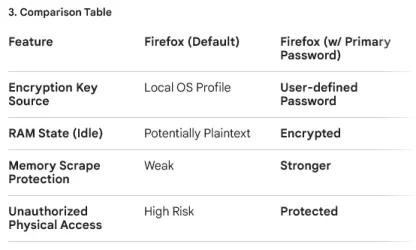
Mozilla Firefox offers a distinct architectural advantage over Brave and Google Chrome regarding memory-level security, but this is only effective if you enable the Primary Password feature.

1. The Key Difference: Application-Level vs. OS-Level​

The primary concern with Brave and Chrome (both built on Chromium) is that they rely on your Operating System (OS) login to "unlock" your passwords.

  • Brave & Chrome: Once you are logged into your Windows/macOS account, the browser has "permission" to decrypt your passwords. If you walk away from your desk while logged in, or if malware gains your OS user privileges, the passwords can be pulled into memory in plaintext because the browser assumes you (the authorized user) are the one asking.
  • Firefox (with Primary Password): Firefox uses its own independent encryption layer. Even if you are logged into your computer, the passwords remain encrypted on your disk AND in your browser's memory until you manually type in your Primary Password.

2. Handling Passwords in Memory (RAM)​

In a technical sense, no browser is perfectly "plaintext-proof" once a password is in active use, but their "idle" states differ:

  • Chromium (Brave/Chrome): Historically, once the browser process is running and the user is authenticated via the OS, the "vault" is essentially open. Credentials can sometimes reside in RAM in a state that memory-scraping malware can target.
  • Firefox: When you use a Primary Password, Firefox acts more like a dedicated manager (e.g., Bitwarden). 1 It keeps the decryption key itself encrypted. 2 When you close the browser, that "session" key is wiped from memory. To see your passwords again, you must re-enter the Primary Password. 3
 

My Computers My Computers

  • At a glance

    Windows 11 ProAMD Ryzen AI 7 350 w/ Radeon 860M 50 TOPS32GB LPDDR5X 7500 MT/sAMD Radeon 860M integrated (shared memory)
    OS
    Windows 11 Pro
    Computer type
    Laptop
    Manufacturer/Model
    Dell 16 Plus DB16255
    CPU
    AMD Ryzen AI 7 350 w/ Radeon 860M 50 TOPS
    Motherboard
    Dell 0PKMHG
    Memory
    32GB LPDDR5X 7500 MT/s
    Graphics Card(s)
    AMD Radeon 860M integrated (shared memory)
    Sound Card
    Stereo speakers (2.5 W x 2 = 5 W total peak)/Realtek SounzReal/Dolby Atmos
    Monitor(s) Displays
    Displays: 16" 1920 x 1200 (Full HD+/WUXGA) 300 nits 60Hz *** Samsung - 27” Odyssey FHD IPS 240Hz G-Sync Gaming Monitor
    Screen Resolution
    1920x1080 @ 60Hz
    Hard Drives
    EG6 KIOXIA 1TB NVME
    Case
    Ice Blue
    Cooling
    "dual-fan" or "enhanced" air-cooling system
    Mouse
    Logitech M650 Wireless/Bluetooth
    Internet Speed
    800/600 Fiber
  • Computer type
    Laptop
The table did not copy in my reponse:

1778023276575.webp
 

My Computers My Computers

  • At a glance

    Windows 11 ProAMD Ryzen AI 7 350 w/ Radeon 860M 50 TOPS32GB LPDDR5X 7500 MT/sAMD Radeon 860M integrated (shared memory)
    OS
    Windows 11 Pro
    Computer type
    Laptop
    Manufacturer/Model
    Dell 16 Plus DB16255
    CPU
    AMD Ryzen AI 7 350 w/ Radeon 860M 50 TOPS
    Motherboard
    Dell 0PKMHG
    Memory
    32GB LPDDR5X 7500 MT/s
    Graphics Card(s)
    AMD Radeon 860M integrated (shared memory)
    Sound Card
    Stereo speakers (2.5 W x 2 = 5 W total peak)/Realtek SounzReal/Dolby Atmos
    Monitor(s) Displays
    Displays: 16" 1920 x 1200 (Full HD+/WUXGA) 300 nits 60Hz *** Samsung - 27” Odyssey FHD IPS 240Hz G-Sync Gaming Monitor
    Screen Resolution
    1920x1080 @ 60Hz
    Hard Drives
    EG6 KIOXIA 1TB NVME
    Case
    Ice Blue
    Cooling
    "dual-fan" or "enhanced" air-cooling system
    Mouse
    Logitech M650 Wireless/Bluetooth
    Internet Speed
    800/600 Fiber
  • Computer type
    Laptop
Bitwarden should be unaffected, since they forcibly ask you to establish a master password to use the manager, otherwise, you can't do anything. They also allow you to use 2FA...
 

My Computers My Computers

  • At a glance

    Windows 11 Pro 25H2AMD Ryzen 5 5600G @ 3.9/4.4Ghz2 x 16 GB DDR4 Kingston Fury Beast 3200 MhzAMD Radeon RX 6600 XT MSI Mech 2X OC Edition ...
    OS
    Windows 11 Pro 25H2
    Computer type
    PC/Desktop
    Manufacturer/Model
    Built PC
    CPU
    AMD Ryzen 5 5600G @ 3.9/4.4Ghz
    Motherboard
    MSI B550M-PRO-WiFi Ver. 1.4
    Memory
    2 x 16 GB DDR4 Kingston Fury Beast 3200 Mhz
    Graphics Card(s)
    AMD Radeon RX 6600 XT MSI Mech 2X OC Edition 8 GB
    Sound Card
    Realtek High Definition Audio (Integrated)
    Monitor(s) Displays
    Samsung C50Rx 27" LED / HP S2031 20" LCD
    Screen Resolution
    1920 x 1080 px / 1600 x 900 px
    Hard Drives
    WD Blue SN570 NVME M.2 SSD [1 TB] -- External Drives: - WD Scorpion Blue 250 GB 5400 RPM (Data Backup) - Hitachi 500 GB 5400 RPM (Software / ISOs Backup) - Toshiba MQ01ABD100 1 TB 5400 RPM (OS Images) - HGST TravelStar 7K1000 1 TB, 7200 RPM USB 3.0 - ADATA SU800 2TB SSD USB 3.0
    PSU
    Corsair RM750e 750W Fully Modular
    Case
    Naceb Hydra NA-1602
    Cooling
    Naceb Orpheus x 3 (Front) + Naceb Cepheus 1200 RPM Max (Rear) + ThemalRight Assasin X 90 SE (CPU)
    Keyboard
    Logitech MK470 Wireless
    Mouse
    Logitech MK470 Wireless
    Internet Speed
    120 MB Symetrical
    Browser
    Firefox / Brave / Edge
    Antivirus
    Windows Defender
    Other Info
    - VMs: WMware Player - Windows 8.1 Pro x64 / Windows 11 Pro
    - Wacom Intuos Pro Small Tablet PTH-460
  • At a glance

    Windows 11 Pro 25H2AMD Ryzen 7 7730U @ 2.0/4.5 Ghz2 x 16 GB Kingston Fury Impact DDR4 3200 MhzRadeon (tm) Graphics Vega 8 (512 MB)
    Operating System
    Windows 11 Pro 25H2
    Computer type
    Laptop
    Manufacturer/Model
    HP Pavilion 15-eh3000la (80M53LA)
    CPU
    AMD Ryzen 7 7730U @ 2.0/4.5 Ghz
    Motherboard
    HP 8BC7
    Memory
    2 x 16 GB Kingston Fury Impact DDR4 3200 Mhz
    Graphics card(s)
    Radeon (tm) Graphics Vega 8 (512 MB)
    Sound Card
    Realtek High Definition Audio (Integrated)
    Monitor(s) Displays
    AU Optronics
    Screen Resolution
    1920 x 1080 px (125% size)
    Hard Drives
    WD Blue SN570 1TB NVME M.2 Drive
    PSU
    45 Watt Charger
    Cooling
    Laptop Cooling Pad
    Keyboard
    Free Wolf Foldable Portable Keyboard
    Mouse
    Free Wolf Wireless Mouse
    Internet Speed
    120 MB Symetrical
    Browser
    Firefox / Brave / Edge
    Antivirus
    Windows Defender
    Other Info
    - 41mWh battery.
    - Wacom Intuos Pro Small Tablet PTH-460
Bitwarden should be unaffected, since they forcibly ask you to establish a master password to use the manager, otherwise, you can't do anything. They also allow you to use 2FA...

I wondered that myself. Password information in any password manager will be in memory in plain text format while sent to the web site. However, third-party password manager immediately clears the memory, like Bitwarden, that still are susceptible. There is a very small chance when compared to the alternative methods (nothing is 100% secure):

In 2026, the short answer is yes. While third-party password managers are significantly more secure than browsers, they are not immune to "memory-scraping" malware.
Because a computer must eventually "read" a password to type it into a website, that password must exist in a decrypted state in your RAM (memory) at some point. Modern infostealers (like the Acreed Stealer or the memory-harvesting variants that emerged in late 2025) specifically target these brief moments of decryption.


1. How They Protect You (and Where They Fail)

Most top-tier managers like Bitwarden, 1Password, and Keeper use a "Zero-Knowledge" architecture, but their memory handling differs:


  • At Rest: Your vault is fully encrypted on your hard drive. Malware cannot simply "copy a file" and read your passwords.
  • In Memory (Unlocked): When you enter your Master Password, the manager creates a decryption key in your RAM. This key is used to unlock your passwords as you need them.
  • The Risk: Sophisticated 2026 malware can "dump" the memory of the password manager's process. If your vault is unlocked, the malware may find the master decryption key or individual passwords that were recently accessed.

2. Specific Vulnerabilities in 2026

Recent research has highlighted specific ways third-party managers are targeted:
  • Process Injection: Malware can inject itself into your browser or password manager process. It then waits for you to "autofill" a password. At that exact millisecond, the password is in plaintext in RAM, and the malware grabs it.


  • The "Idle" Problem: Some managers are better than others at "zeroing out" memory. For example, Bitwarden explicitly states it attempts to purge sensitive data from memory when the vault is locked and reloads its process after 10 seconds of inactivity to ensure "garbage collection" wipes the RAM.


  • 2026 Research (ETH Zurich): A 2026 study found that even popular cloud-based managers (Bitwarden, LastPass, Dashlane) had edge-case vulnerabilities where researchers could extract or even modify vault data by impersonating server responses or exploiting complex code structures in the browser extensions.

3. Comparison: Browser vs. Third-Party Manager

Protection LayerBrowser (Chrome/Brave/Edge)Third-Party Manager (e.g., Bitwarden)
Encryption KeyTied to OS Login (Easy to bypass)Independent Master Password (Hard)
Memory CleanupWeak; often stays in RAM while browser is openAggressive; wipes RAM on lock/timeout
Malware DefenseTargeted by 99% of "infostealers"Targeted by sophisticated "memory harvesters"
Auto-LockUsually NoYes (Essential for memory security)

4. How to Defeat Memory Scrapers in 2026

To protect yourself against malware that "lives" in your RAM, the industry now recommends these three steps:
  1. Strict Auto-Lock: Set your password manager to lock after 1 to 5 minutes of inactivity. When the vault is locked, the decryption keys are purged from RAM, leaving the malware with nothing to find.
  2. Hardware Security (2FA): Use a YubiKey or Passkeys. Even if a hacker scrapes your password from memory, they cannot use it to log in from their own computer because they don't have your physical hardware key.
  3. App-Bound Encryption: If you use Chrome, ensure "App-Bound Encryption" is active. If you use Firefox, always use a Primary Password. These features make it much harder for external processes to "ask" the browser for your keys.

The takeaway: A third-party manager is still your best defense, but its security is only as good as your Auto-Lock settings. If you leave your vault unlocked all day, you are leaving the door open for memory-scraping malware.
 

My Computers My Computers

  • At a glance

    Windows 11 ProAMD Ryzen AI 7 350 w/ Radeon 860M 50 TOPS32GB LPDDR5X 7500 MT/sAMD Radeon 860M integrated (shared memory)
    OS
    Windows 11 Pro
    Computer type
    Laptop
    Manufacturer/Model
    Dell 16 Plus DB16255
    CPU
    AMD Ryzen AI 7 350 w/ Radeon 860M 50 TOPS
    Motherboard
    Dell 0PKMHG
    Memory
    32GB LPDDR5X 7500 MT/s
    Graphics Card(s)
    AMD Radeon 860M integrated (shared memory)
    Sound Card
    Stereo speakers (2.5 W x 2 = 5 W total peak)/Realtek SounzReal/Dolby Atmos
    Monitor(s) Displays
    Displays: 16" 1920 x 1200 (Full HD+/WUXGA) 300 nits 60Hz *** Samsung - 27” Odyssey FHD IPS 240Hz G-Sync Gaming Monitor
    Screen Resolution
    1920x1080 @ 60Hz
    Hard Drives
    EG6 KIOXIA 1TB NVME
    Case
    Ice Blue
    Cooling
    "dual-fan" or "enhanced" air-cooling system
    Mouse
    Logitech M650 Wireless/Bluetooth
    Internet Speed
    800/600 Fiber
  • Computer type
    Laptop
password managers are a trade off
security and convenience

some are better at one thing then the other
but its all down to what the end user wants

hence the push to passkeys and 2FA
and other forms such as biometric
best of luck Steve ..
 

My Computers My Computers

  • At a glance

    Windows 11 HomeRyzen 7 5825u64GB DDR4 3200Ryzen 7 5825u
    OS
    Windows 11 Home
    Computer type
    PC/Desktop
    Manufacturer/Model
    HP 24" AiO
    CPU
    Ryzen 7 5825u
    Motherboard
    HP
    Memory
    64GB DDR4 3200
    Graphics Card(s)
    Ryzen 7 5825u
    Sound Card
    RealTek
    Monitor(s) Displays
    24" HP AiO
    Screen Resolution
    1920 x 1080 @60 Hz
    Hard Drives
    1TB WD Blue SN580 M2 SSD Partitioned.
    2x 1TB USB HDD External Backup/Storage.
    PSU
    90W external power brick
    Case
    24" All in One
    Cooling
    Default Air Cooling
    Keyboard
    HP WiFi UK extended
    Mouse
    HP WiFi 3 Button
    Internet Speed
    1GB full fibre
    Browser
    Edge & Firefox
    Antivirus
    AVG Internet Security/Windows Defender
    Other Info
    Mainly Open Source Software
  • At a glance

    Ubuntu 22.04.5 LTSi5 7200u16GB DDR4Intel
    Operating System
    Ubuntu 22.04.5 LTS
    Computer type
    Laptop
    Manufacturer/Model
    Dell 13" Latitude 2017
    CPU
    i5 7200u
    Motherboard
    Dell
    Memory
    16GB DDR4
    Graphics card(s)
    Intel
    Sound Card
    Intel
    Monitor(s) Displays
    13" Dell Laptop
    Hard Drives
    250GB Crucial 2.5" SSD
    Mouse
    Generic WiFi 3 button
    Internet Speed
    WiFi only
    Browser
    Firefox
    Antivirus
    ClamAV TK
    Other Info
    Mainly Open Source Software
Firefox: When you use a Primary Password, Firefox acts more like a dedicated manager (e.g., Bitwarden). 1 It keeps the decryption key itself encrypted. 2 When you close the browser, that "session" key is wiped from memory. To see your passwords again, you must re-enter the Primary Password. 3
For Firefox, it's better to use a primary password because the passwords are stored on disk encrypted with that primary password, which your computer presumably doesn't have until you enter it.

Unfortunately, once you enter the primary password, the key to decrypt stays in memory until the browser is closed. Some passwords that have been decrypted will most likely remain in plaintext as well. In this sense, it's still better than Edge: passwords on disk can't be lifted in plaintext, passwords in memory stay encrypted while locked, and some passwords (that haven't been used) may remain encrypted while unlocked even if the key is in memory.

For third‑party password managers, have you noticed you can set them up to unlock the vault with a PIN or biometrics? That means while the vault is locked, the passwords are encrypted in memory, but the key still exists somewhere, protected by whatever mechanism you use (PIN or biometrics). If the vault is unlocked, the key to decrypt the vault is in memory, and for some password managers (including Bitwarden), all the passwords will be in plaintext in memory.

If you need to use a password manager, it's better to use a third‑party one because they put more work into keeping it secure in more situations; after all, they don't have to spend time making the browser itself work well.
 

My Computer My Computer

At a glance

Windows 11 Pro 25H2
OS
Windows 11 Pro 25H2
Computer type
PC/Desktop
hence the push to passkeys and 2FA
and other forms such as biometric

I was surprised that Microsoft did not recommend passkeys. Instead Microsoft said working by design.
 

My Computers My Computers

  • At a glance

    Windows 11 ProAMD Ryzen AI 7 350 w/ Radeon 860M 50 TOPS32GB LPDDR5X 7500 MT/sAMD Radeon 860M integrated (shared memory)
    OS
    Windows 11 Pro
    Computer type
    Laptop
    Manufacturer/Model
    Dell 16 Plus DB16255
    CPU
    AMD Ryzen AI 7 350 w/ Radeon 860M 50 TOPS
    Motherboard
    Dell 0PKMHG
    Memory
    32GB LPDDR5X 7500 MT/s
    Graphics Card(s)
    AMD Radeon 860M integrated (shared memory)
    Sound Card
    Stereo speakers (2.5 W x 2 = 5 W total peak)/Realtek SounzReal/Dolby Atmos
    Monitor(s) Displays
    Displays: 16" 1920 x 1200 (Full HD+/WUXGA) 300 nits 60Hz *** Samsung - 27” Odyssey FHD IPS 240Hz G-Sync Gaming Monitor
    Screen Resolution
    1920x1080 @ 60Hz
    Hard Drives
    EG6 KIOXIA 1TB NVME
    Case
    Ice Blue
    Cooling
    "dual-fan" or "enhanced" air-cooling system
    Mouse
    Logitech M650 Wireless/Bluetooth
    Internet Speed
    800/600 Fiber
  • Computer type
    Laptop
I use the paid version of Bitwarden and use 2FA with it.

I make a point of to never install or use anything Google on my system and Edge is removed. If Microsoft treats edge the same way it treats it's Windows updates then Edge is nothing but a F@*ked up mess and a security nightmare. I've never even used it.
 

My Computer My Computer

At a glance

Windows 11 Pro 25H2Intel i9-12900KCorsair Vengeance 64 GB
OS
Windows 11 Pro 25H2
Computer type
PC/Desktop
Manufacturer/Model
self built
CPU
Intel i9-12900K
Motherboard
Gigabyte Z790 Gaming Plus AX
Memory
Corsair Vengeance 64 GB
Screen Resolution
1920x1080
Browser
Firefox
Antivirus
Eset Smart Secuirty
I use the paid version of Bitwarden and use 2FA with it.
My only problems with these third-party password managers is that your passwords are stored in the "cloud" somewhere. I know they have good security layered where the data is supposedly not accessible, but the chance is there like anything else.

I make a point of to never install or use anything Google on my system and Edge is removed. If Microsoft treats edge the same way it treats it's Windows updates then Edge is nothing but a F@*ked up mess and a security nightmare. I've never even used it.
There are always security problems/concerns/issues in whatever browser you use. I switch among them mostly, but primarily use Google Chrome. I keep saying for years that I am going to stop using Google Chrome, but remain on it. I see Google the lesser of the evil right now.

When I run Linux, I use Mozilla Firefox all the time. I feel safer in Linux, but I do not run it all the time.
 

My Computers My Computers

  • At a glance

    Windows 11 ProAMD Ryzen AI 7 350 w/ Radeon 860M 50 TOPS32GB LPDDR5X 7500 MT/sAMD Radeon 860M integrated (shared memory)
    OS
    Windows 11 Pro
    Computer type
    Laptop
    Manufacturer/Model
    Dell 16 Plus DB16255
    CPU
    AMD Ryzen AI 7 350 w/ Radeon 860M 50 TOPS
    Motherboard
    Dell 0PKMHG
    Memory
    32GB LPDDR5X 7500 MT/s
    Graphics Card(s)
    AMD Radeon 860M integrated (shared memory)
    Sound Card
    Stereo speakers (2.5 W x 2 = 5 W total peak)/Realtek SounzReal/Dolby Atmos
    Monitor(s) Displays
    Displays: 16" 1920 x 1200 (Full HD+/WUXGA) 300 nits 60Hz *** Samsung - 27” Odyssey FHD IPS 240Hz G-Sync Gaming Monitor
    Screen Resolution
    1920x1080 @ 60Hz
    Hard Drives
    EG6 KIOXIA 1TB NVME
    Case
    Ice Blue
    Cooling
    "dual-fan" or "enhanced" air-cooling system
    Mouse
    Logitech M650 Wireless/Bluetooth
    Internet Speed
    800/600 Fiber
  • Computer type
    Laptop
Again, for me the main issue is regardless if you use edge or not, it has been known to import passwords and history without consent.

Meaning the passwords stored in other browsers are vulnerable to this "attack" even if you never use edge.

It accidently opens one time? Your screwed because of this.
 
Last edited:

My Computers My Computers

  • At a glance

    Windows 11 ProRyzen 7 5700 X3D64 GB DDR4 3600mhz Gskill Ripjaws VRTX 4070 Super , 12GB VRAM Asus EVO Overclock
    OS
    Windows 11 Pro
    Computer type
    PC/Desktop
    Manufacturer/Model
    Custom Built
    CPU
    Ryzen 7 5700 X3D
    Motherboard
    MSI MPG B550 GAMING PLUS
    Memory
    64 GB DDR4 3600mhz Gskill Ripjaws V
    Graphics Card(s)
    RTX 4070 Super , 12GB VRAM Asus EVO Overclock
    Monitor(s) Displays
    Gigabyte M27Q (rev. 2.0) 2560 x 1440 @ 170hz HDR
    Hard Drives
    2TB Samsung nvme ssd
    4TB Western Digital nvme ssd
    PSU
    CORSAIR RMx SHIFT Series™ RM750x 80 PLUS Gold Fully Modular ATX Power Supply
    Case
    CORSAIR 3500X ARGB Mid-Tower ATX PC Case – Black
    Cooling
    ID-COOLING FROSTFLOW X 240 CPU Water Cooler
    Keyboard
    Logitech G213
    Mouse
    Logitech G203
    Internet Speed
    1.2gbps Fiber 😎
  • At a glance

    Chrome OSIntel Pentium Quad Core4GB LPDDR4
    Operating System
    Chrome OS
    Computer type
    Laptop
    Manufacturer/Model
    HP Chromebook
    CPU
    Intel Pentium Quad Core
    Memory
    4GB LPDDR4
    Monitor(s) Displays
    14 Inch HD SVA anti glare micro edge display
    Hard Drives
    64 GB emmc


What makes this more frustrating is that edge automatically pulls your passwords and history into it sometimes from other browsers automatically. Making all of them vulnerable as well..

Microsoft's response was this was by design....🙄
WOW! One more reason not to let browsers store any passwords! 😒
 

My Computers My Computers

  • At a glance

    Win 11 Pro 25H2, Build 26200.8894Intel Core i5 1450064GB DDR4GeForce RTX 4060
    OS
    Win 11 Pro 25H2, Build 26200.8894
    Computer type
    PC/Desktop
    Manufacturer/Model
    Home Brew
    CPU
    Intel Core i5 14500
    Motherboard
    Gigabyte B760M G P WIFI
    Memory
    64GB DDR4
    Graphics Card(s)
    GeForce RTX 4060
    Sound Card
    Chipset Realtek
    Monitor(s) Displays
    LG 45" Ultragear, Acer 24" 1080p
    Screen Resolution
    5120x1440, 1920x1080
    Hard Drives
    Crucial P310 2TB 2280 PCIe Gen4 3D NAND NVMe M.2 SSD (O/S)
    Silicon Power 2TB US75 NVMe PCIe Gen4 M.2 2280 SSD (backup)
    Crucial BX500 2TB 3D NAND (2nd backup)
    Seagate 4TB Ironwolf, rotating HDD archive files
    External off-line backup Drives: 2 NVMe 4TB drives in external enclosures
    PSU
    Thermaltake Toughpower GF3 750W
    Case
    LIAN LI LANCOOL 216 E-ATX PC Case
    Cooling
    Lots of fans!
    Keyboard
    Microsoft Comfort Curve 2000
    Mouse
    Logitech G305
    Internet Speed
    Verizon FiOS 1GB
    Browser
    Firefox
    Antivirus
    Malware Bytes & Windows Defender Security
  • At a glance

    Win 11 Pro 25H2, Build 26200.8894Intel Core i5 1440032GB DDR5Intel 700 Embedded GPU
    Operating System
    Win 11 Pro 25H2, Build 26200.8894
    Computer type
    PC/Desktop
    Manufacturer/Model
    Home Brew
    CPU
    Intel Core i5 14400
    Motherboard
    Gigabyte B760M DS3H AX
    Memory
    32GB DDR5
    Graphics card(s)
    Intel 700 Embedded GPU
    Sound Card
    Realtek Embedded
    Monitor(s) Displays
    27" HP 1080p
    Screen Resolution
    1920x1080
    Hard Drives
    Crucial P310 2TB 2280 PCIe Gen4 eD NAND PCIe SSD
    Samsung EVO 990 2TB NVMe Gen4 SSD
    Samsung 2TB SATA SSD
    PSU
    Thermaltake Smart BM3 650W
    Case
    Okinos Micro ATX Case
    Cooling
    Fans
    Keyboard
    Microsoft Comfort Curve 2000
    Mouse
    Logitech G305
    Internet Speed
    Verizon FiOS 1GB
    Browser
    Firefox
    Antivirus
    Malware Bytes & Windows Defender Security
  • Nimo N171 17" Laptop, (Intel i3-1215U, 16GB RAM, 2TB NVMe, Win11 Pro)
    Acemagic Vista Mini PC V1 (Intel N150, 16GB RAM, 1TB NVMe, Win11 Pro)
    HP ENVY h8-1540t, (24GB RAM, 2TB SSD, 2TB HDD, Win11 Pro)
Little black book. Less convenience. More secure. The old school way.

And there is this from Tavis Ormandy of Project Zero in his discussion of password managers.
If you want to use an online password manager, I would recommend using the one already built into your browser. They provide the same functionality, and can sidestep these fundamental problems with extensions.

I use Chrome, but the other major browsers like Edge or Firefox are fine too. They can isolate their trusted UI from websites, they don’t break the sandbox security model, they have world-class security teams, and they couldn’t be easier to use.

No doubt there will be many people reading this who don’t like this advice. All I can say is I’ve heard all the arguments, and stand by my conclusions.
Password Managers.
 

My Computer My Computer

At a glance

Windows 11 Pro 25H2 26200.7840Intel Core i3-8145U16GB
OS
Windows 11 Pro 25H2 26200.7840
Computer type
Laptop
Manufacturer/Model
Lenovo IdeaPad L340
CPU
Intel Core i3-8145U
Memory
16GB
Hard Drives
500 GB M2 1 TB HDD
Internet Speed
400 MB
Browser
Chrome | Edge
Antivirus
Microsoft Defender | Block unknown executables | Various ASR rules enabled | Smart App Control
Overlooked with the Edge thing, at least in what I’ve read, is access to the memory. Sure, you normally need to be an admin to dump memory, and no one should relax that requirement. That doesn’t help, however, if there’s a memory leak, and browsers are notoriously leaky (all of them). So if passwords are in memory in cleartext… well that’s fun.
 

My Computer My Computer

At a glance

Windows 11 Enterprise 25H2 [rev. 8893]
OS
Windows 11 Enterprise 25H2 [rev. 8893]
The same question can be extended to e-mail clients. Does your desktop mail app cache passwords in the clear?

I used to support an online service, which had POP servers. We were instructed that absolutely no one (except the admins) would have access to them, because clear text passwords were stored in memory. If there was a crash dump to debug, only one dev was trusted to examine its contents.

This issue isn't strictly limited to browsers, or browser extensions.
 

My Computer My Computer

At a glance

Windows 7
OS
Windows 7
Windows Central also published an article about this issue:
As I understood, the Microsoft's argument is: if you have a memory spy on your PC, which is able to read the decrypted passwords in the browser memory, then your system is already infected. If you are not infected, no reason to worry.

I don't think this is a good point. At least, two lines of defence (antivirus and encryption in memory) is much better than only a single line.
 

My Computer My Computer

At a glance

Windows 11 Pro 25H2AMD Rysen 5 4600H32 GB (2 x 16 GB Samsung SO-DIMM DDR4-3200)GeForce GTX 1650 Ti, 4 GB GDDR6
OS
Windows 11 Pro 25H2
Computer type
Laptop
Manufacturer/Model
Lenovo Legion 5-15ARH05
CPU
AMD Rysen 5 4600H
Memory
32 GB (2 x 16 GB Samsung SO-DIMM DDR4-3200)
Graphics Card(s)
GeForce GTX 1650 Ti, 4 GB GDDR6
Screen Resolution
1920x1080
Hard Drives
SSD M.2 512 GB SAMSUNG MZALQ512; SSD M.2 1 TB Seagate FireCuda 530
Mouse
Logitech M650L in Bluetooth mode
I don't think this is a good point. At least, two lines of defence (antivirus and encryption in memory) is much better than only a single line.
I have a military friend that explains it thusly… tanks don’t rely only on camouflage for defense, but that doesn’t mean we paint the things bright orange either.
 

My Computer My Computer

At a glance

Windows 11 Enterprise 25H2 [rev. 8893]
OS
Windows 11 Enterprise 25H2 [rev. 8893]
I have a military friend that explains it thusly… tanks don’t rely only on camouflage for defense, but that doesn’t mean we paint the things bright orange either.
:lmao: :-)
 

My Computers My Computers

  • At a glance

    Windows 11 Pro 25H2 26200.8894Intel® Core™ Ultra 7 265 1.8GHz to 5.3GHz (Ar...SK Hynix 32GB DDR5 5600 Desktop RAM UDIMM Non...Dell NVIDIA® GeForce RTX™ 4060 8GB GDDR6 & (i...
    OS
    Windows 11 Pro 25H2 26200.8894
    Computer type
    PC/Desktop
    Manufacturer/Model
    Dell Tower Plus EBT2250, DOB: 06/15/2025
    CPU
    Intel® Core™ Ultra 7 265 1.8GHz to 5.3GHz (Arrow Lake)
    Motherboard
    Dell Inc. 02D3NT A00 (U3E1)
    Memory
    SK Hynix 32GB DDR5 5600 Desktop RAM UDIMM Non-ECC PC5-5600B
    Graphics Card(s)
    Dell NVIDIA® GeForce RTX™ 4060 8GB GDDR6 & (iGPU) Integrated Intel® UHD Graphics
    Sound Card
    Chipset Realtek High-Definition Audio with Dolby Atmos
    Monitor(s) Displays
    Dell Ultra Sharp U2515H 25-Inch Screen LED-Lit
    Screen Resolution
    2560 X 1440
    Hard Drives
    Samsung (NVMe PM9C1a 1024GB) M.2 PCIe NVMe Solid State Drive (OS), with Samsung Piccolo (S4LY022) 6-Core 4 Channel Controller.

    Samsung T7 500GB SSD, USB-C External Drive
    PSU
    Dell 460W
    Case
    Dell Tower Plus EBT 2250
    Cooling
    Fan
    Keyboard
    Dell Wired Keyboard - KB216
    Mouse
    Logitech M510
    Internet Speed
    Intel Killer E3100G 2.5 Gigabit Ethernet Controller
    Browser
    Microsoft Edge
    Antivirus
    Microsoft Windows Security
    Other Info
    The Samsung NVMe PM9C1a 1024GB SSD does not use a Phison NAND controller. Instead, it uses Samsung's in-house developed Piccolo (S4LY022) 6-Core 4 Channel Controller. The PM9C1a utilizes a controller built using Samsung's 5-nanometer process and seventh-generation V-NAND technology. 🤔
  • At a glance

    Windows 11 Pro 25H2 26200.889410th Generation Intel Core i7-10510U Processo...16GB DDR4 RAMNVIDIA® GeForce® MX250 with 2GB GDDR5 graphic...
    Operating System
    Windows 11 Pro 25H2 26200.8894
    Computer type
    Laptop
    Manufacturer/Model
    Dell Inspiron 15 7000 (7591) 2-in-1, DOB: 11/30/2019
    CPU
    10th Generation Intel Core i7-10510U Processor (8MB Cache, up to 4.9 GHz) Comet Lake
    Motherboard
    Dell 0NNW5N
    Memory
    16GB DDR4 RAM
    Graphics card(s)
    NVIDIA® GeForce® MX250 with 2GB GDDR5 graphics memory
    Sound Card
    Chipset Realtek ALC3254 🤔
    Monitor(s) Displays
    Dell 15.6-inch UHD Truelife Touch Narrow Border WVA Display with Active Pen support
    Screen Resolution
    3840 x 2160
    Hard Drives
    Intel NVME 512GB SSD with 32GB Intel Optane Memory, M.2 80mm PCIe 3.0 RAID

    SanDisk 256GB Extreme microSDXC UHS-I Memory Card
    PSU
    Dell 4-Cell Battery, 68 Whr (Integrated), 90 Watt AC Adapter
    Case
    Dell Inspiron 15 7000 2-in-1 (7591)
    Cooling
    Standard Dell Case Fan & Havit HV-F2056 USB Powered (3 Fans) Laptop Cooling Pad.
    Keyboard
    Dell
    Mouse
    Logitech Wireless Mouse M650L
    Internet Speed
    Wireless/Wired connectivity (WiFi 6 - 802.11 ax)
    Browser
    Microsoft Edge
    Antivirus
    Microsoft Windows Security
    Other Info
    From Dell: 512GB NVME Solid State Drive accelerated by 32GB Intel Optane Memory are the fastest as compared to NAND SSDs. Intel Optane H10 with SSD offers speedy storage and accelerates opening your programs.

Latest Support Threads

Back
Top Bottom