[Microsoft Edge] Screenshots not saved automatically


CaseyBee

Well-known member
Local time
12:57 AM
Posts
45
OS
Windows 11, ver 23H2
Hi all,

I reluctantly switched over to Microsoft Edge from Mozilla Firefox in December, as Windows Defender was flagging a file in the Firefox cache as a potential Trojan.
I used to use the Firefox download functionality for screenshots a few times a week, but as far as I can tell Microsoft Edge doesn't offer this.

My only option seems to be to paste them into Paint.

Is there any way I can change this?

Many thanks,

Casey
 
Windows Build/Version
23H2, build 22631.3155

My Computer

System One

  • OS
    Windows 11, ver 23H2
    Computer type
    Laptop
    Manufacturer/Model
    Acer - Aspire Vero
    Browser
    Mozilla Firefox
    Antivirus
    Windows Defender
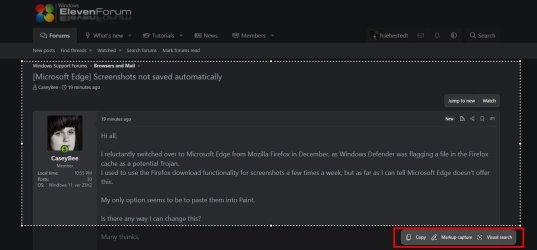
You can capture within Edge by pressing CTRL + SHIFT + S. That will give you an option like this:


Image1.jpg

Once you make your selection, you will have the option to save to your clipboard, markup the capture, or perform a web search based upon the image captured like this:

Image2.jpg

Note that that you can also use the Windows snipping tool by pressing WinKey + SHIFT + S which will give you this:

Image3.jpg

Hope this helps!
 

My Computers

System One System Two

  • OS
    Win11 Pro 25H2 (RTM+)
    Computer type
    PC/Desktop
    Manufacturer/Model
    Acemagic
    CPU
    Intel i7-14650HX
    Memory
    32 GB
    Graphics Card(s)
    No GPU - Built-in Intel Graphics
    Sound Card
    Integrated
    Monitor(s) Displays
    Varies as machine will often be moved to locations with different monitors
    Screen Resolution
    Varies
    Hard Drives
    1 x 1TB Gen 4 NVMe SSD
    PSU
    120W Power Brick
    Keyboard
    Corsair K70 Max RGB Magnetic Keyboard
    Mouse
    Logitech MX Master 3
    Internet Speed
    1Gb Up / 1 Gb Down
    Browser
    Edge
    Antivirus
    Windows Defender
  • Operating System
    Win11 Pro 25H2 (RTM+)
    Computer type
    Laptop
    Manufacturer/Model
    Lenovo ThinkBook 13x Gen 2
    CPU
    Intel i7-1255U
    Memory
    16 GB
    Graphics card(s)
    Intel Iris Xe Graphics
    Sound Card
    Realtek® ALC3306-CG codec
    Monitor(s) Displays
    13.3-inch IPS Display
    Screen Resolution
    WQXGA (2560 x 1600)
    Hard Drives
    2 TB 4 x 4 NVMe SSD
    PSU
    USB-C / Thunderbolt 4 Power / Charging
    Keyboard
    Backlit, spill resistant keyboard
    Mouse
    Buttonless Glass Precision Touchpad
    Internet Speed
    1Gb Up / 1Gb Down
    Browser
    Edge
    Antivirus
    Windows Defender
    Other Info
    WiFi 6e / Bluetooth 5.1 / Facial Recognition / Fingerprint Sensor / ToF (Time of Flight) Human Presence Sensor
Thank you for your message.

So, Edge just doesn't have the functionality that I'm looking for in terms of being able to download a screenshot to your system directly?
 

My Computer

System One

  • OS
    Windows 11, ver 23H2
    Computer type
    Laptop
    Manufacturer/Model
    Acer - Aspire Vero
    Browser
    Mozilla Firefox
    Antivirus
    Windows Defender

Latest Support Threads

Back
Top Bottom