Microsoft Teams Blog:
Every day, hundreds of millions of people depend on Microsoft Teams to connect with colleagues, share ideas, make decisions, and move work forward. Whether they are jumping into a quick chat between meetings, joining a customer call that cannot be missed, or using Copilot to accomplish more, people rely on Teams to be ready the moment they need it.
That trust is what drives our continued investment in performance. We know that every second saved, every interaction that feels more responsive, and every improvement in reliability can have a meaningful impact when multiplied across millions of users and billions of daily interactions. That's why we're continually innovating behind the scenes, not only to make Teams faster today, but to build the systems, practices, and engineering culture that keep it responsive and dependable over time.
In our November 2025 update, we shared gains across video rendering, memory efficiency, and platform-level optimizations that improved the experience across devices and operating systems. Since then, we've continued to raise the bar.
This blog highlights the latest performance improvements delivered during the first half of 2026, from faster chat switching and people search, to enhancements that make Teams feel more responsive, resilient, and reliable across desktop, web, and mobile.
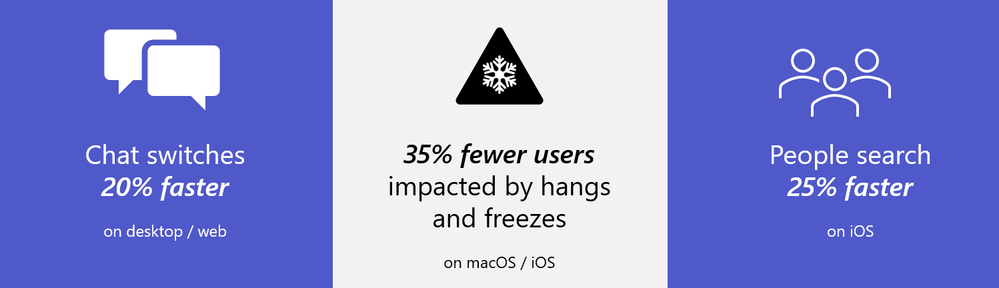
Source: Microsoft Teams performance tracking over 6-week window, May 2026
Making chat switching fast and seamless
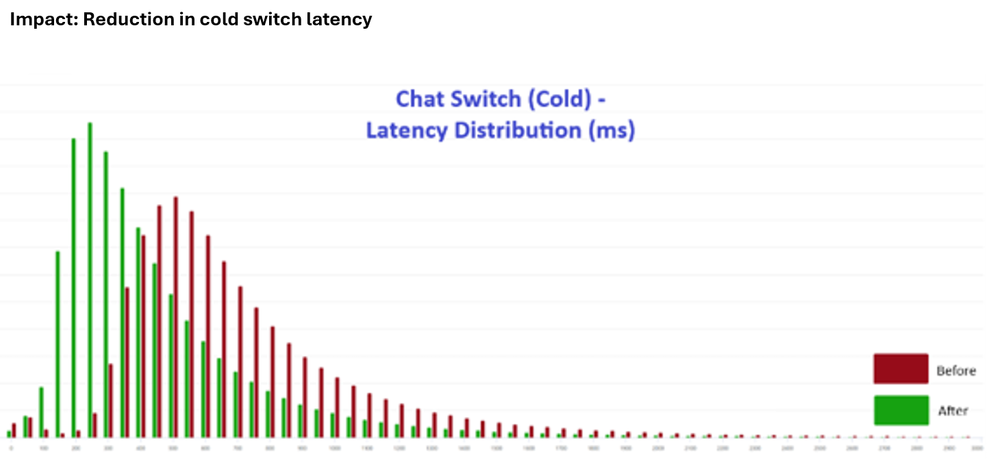
Switching between chats is one of the most common actions people perform in Teams, making it a key focus for performance improvements. During the first half of 2026, we reduced chat switch latency by 20%, building on gains delivered through last year's chat and channels redesign. The result is a smoother, more responsive experience, especially for users on slower networks or older devices.How we did it:
Not all chat switches are equal. When you return to a chat you’ve recently visited, the data is already in memory and the switch is near-instant—we call this a warm switch. But when you open a chat that hasn’t been loaded recently, Teams needs to fetch the conversation data before it can render—a cold switch. At higher percentiles, cold switches dominate the latency distribution, and our earlier rendering optimizations had limited impact on them.
We identified three root causes that negatively impacted cold switch latency:
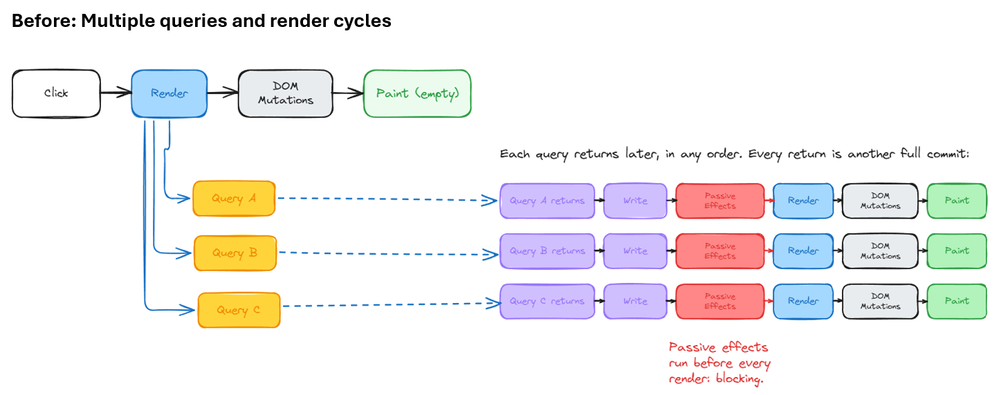
- Data queries were fired too late – The query to fetch conversation data was triggered during the React render cycle, but the main thread was busy with component unmounting and effect cleanup, delaying the processing of data responses.
- Waterfall data responses – Multiple sequential queries were sent to the data layer, each triggering its own round-trip and render cycle. This created a cascade of small delays that added up significantly at the tail.
- Uncontrolled response priority – Non-critical data responses could be processed before critical ones, further blocking the main thread and delaying the content the user was waiting to see.
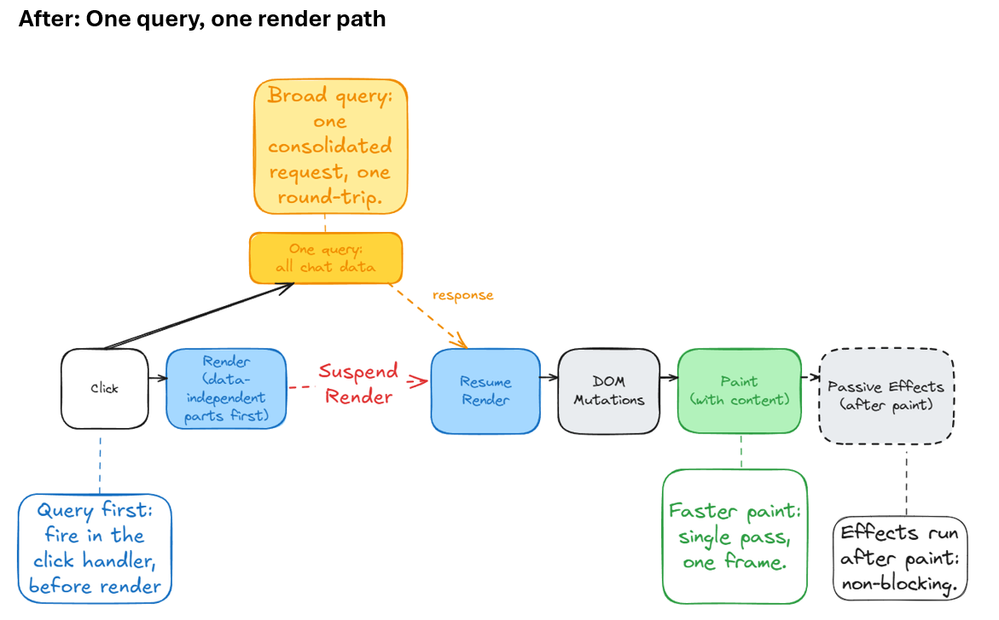
- Query first – Instead of waiting for the React render cycle to request data, we now fire the data query immediately in the click handler—before rendering begins. This gives our data layer a head start, while main thread renders parts that don’t depend on query data.
- Broad query – We consolidated all the data needed for a chat switch into a single query, eliminating the waterfall of sequential requests. One switch now results in exactly one data round-trip.
- Faster paint – We suspend when rendering reaches a point where data is needed. We then resume rendering after the response comes back. After performing a single pass render, we yield to browser to paint the frame.
Reducing app “hangs” on macOS and iOS
Few issues are more disruptive than an app hang. When Teams stops responding to taps, clicks, or scrolling, even briefly, it interrupts the flow of work and creates a frustrating user experience.During the first quarter of 2026, we focused on identifying and eliminating the most common causes of app hangs across macOS and iOS. As a result, the number of daily users impacted by app hangs decreased by 35%.
How we did it (macOS):
At the heart of our approach is the health monitor—a lightweight background thread that continuously checks whether the main thread is responsive. It periodically sends a message to the main thread and waits for a reply. If the main thread is too busy to respond within a set time window, the monitor captures a snapshot of exactly what the main thread is doing—its call stack—and sends that data as telemetry. To make sense of this data at scale we built a StackDecoder tool that symbolicates raw stacks, groups identical patterns using hash classification, and identifies the specific function responsible for each hang. This lets us rank every hang by amount of occurrences and prioritize the ones with highest impact. Some of the top contributors that we fixed were:
- Network status monitoring – The native network status tracker was making a blocking call on the main thread to check connectivity changes. We moved this to a background thread, eliminating the single largest source of macOS freezes.
- WebView2 library loading – Loading the WebView2 dynamic library on the main thread caused 6% of all freezes. Working with the WebView2 team, we enabled a new feature that preloads the library on a background thread, significantly reducing the blocking time during the call to create the WebView2 environment.
- Error reporting – A URL request made during web app error reporting was blocking the main thread. We switched to an asynchronous call, resolving 1.7% of freezes with a straightforward fix.
How we did it (iOS):
Apple’s Hang Rate in Xcode Organizer is a key app performance metric because it quantifies how often—and for how long—an app becomes unresponsive to user input in real-world usage. Hang Rate reflects the perceived responsiveness and fluidity of the user experience—how quickly the app reacts to user actions such as tapping, scrolling, or typing.
Over the past year, the Teams iOS engineering team has made dedicated efforts to reduce main-thread blocking. These efforts include optimizing expensive and repetitive computations—such as app badging, chat list rendering, and Teams list view model calculations—through caching, offloading necessary but costly operations from the main thread, and deferring non-critical work until it is needed.
The team also invested significantly in refining database access patterns, eliminating redundant business logic, and performing deep analysis of UI layout and Core Animation behaviors to address anti-patterns and edge cases. In parallel, we refactored and redesigned how database operations are orchestrated within the iOS app.
By introducing scenario-aware database task queuing, scheduling, and cancellation, we ensured that user-initiated actions are consistently prioritized above all background work. As a result of these combined efforts, the Hang Rate of the Teams iOS app has been reduced, delivering a significantly more responsive and fluid daily experience for our customers.
Faster people search on iOS
Searching for and mentioning colleagues is something Teams users do repeatedly throughout the day. To make these interactions faster and more intuitive, we modernized the people picker experience across chats and channels on iOS.In addition to improving the visual design and usability of the interface, we optimized the underlying search experience, resulting in 25% faster people search results. These enhancements help users find the right people more quickly while also improving the overall responsiveness of the experience.
Behind the scenes, we optimized the query pipeline, reduced database queue congestion, and enhanced overall system throughput. The result is a faster, smoother experience when searching for teammates, mentioning colleagues, or starting new conversations.
What’s next?
Performance is never finished. As Teams continues to evolve, so does our commitment to making every interaction feel responsive, reliable, and effortless for the hundreds of millions of people who depend on Teams every day.We continue to invest in improvements across latency, responsiveness, resource efficiency, and meeting quality. Some of these enhancements will be immediately noticeable, while others will happen behind the scenes, helping Teams remain dependable as the way we work continues to evolve.
As always, your feedback plays a critical role in shaping our priorities, and we look forward to sharing more of our progress in future updates.
Source:

Making Microsoft Teams more responsive, reliable, and ready for work | Microsoft Community Hub
In our November 2025 update, we shared gains across video rendering, memory efficiency, and platform-level optimizations that improved the experience across...
 techcommunity.microsoft.com