Outlook Blog:
At Microsoft, our aim is to provide a modern and secure email experience for our users, leveraging the latest technologies to enhance functionality and ease of use. When it comes to Outlook, we want to ensure our customers' emails, documents, calendar, and contacts are safeguarded from unauthorized access, tampering or loss. Today, we're announcing changes to Outlook for personal use to enhance the security of our consumer customers. These changes are aligned to the Microsoft Secure Future Initiative (SFI). They are:
- The deprecation of Basic Authentication for Outlook personal email accounts effective September 16, 2024
- A reminder of end of support for the Mail & Calendar apps by the end of 2024
- And the deprecation of light version of Outlook web application effective August 19, 2024
To help keep Outlook personal email accounts secure, starting September 16, 2024, Microsoft will no longer support Basic Auth, the method in which a person provides only their username and password to sign into their account. As of September 16, 2024, Outlook will require that all those with a Microsoft email account use a mail or calendar app or the Outlook.com website which supports modern auth, such as the latest versions of Outlook, Apple Mail, or Thunderbird.
While Basic Auth was the standard for quite some time, it also made it easier for bad actors to capture a person’s login information. This increased the risk of those stolen credentials being reused to gain access to a person’s email or personal data. Email-based cyberattacks have only increased with time, so we are requiring modern authentication for all Outlook customers to better help protect their personal accounts.
With Modern Authentication methods we apply additional backend process/tokens that users may not notice that add an extra layer of security. Anyone who is attempting to use an application which does not support modern authentication will no longer be able to access their Outlook.com, Hotmail or Live.com email from those applications.
Here are the steps Outlook users can take to better secure their personal email accounts today:
The easiest way to make sure you are ready and using modern authentication is to download one of the free Outlook apps for iOS, Android, Outlook for Mac, or Outlook for Windows. People can also purchase a new Outlook license or use the Outlook that is included in your Microsoft 365 subscription. People who use Outlook 2021 (build 11601.10000 or higher) are also not affected. People can also purchase a new Outlook license or use the Outlook that is included in your Microsoft 365 subscription. People who use Outlook 2021 (build 11601.10000 or higher) are also not affected.
Additional Details can be found here.

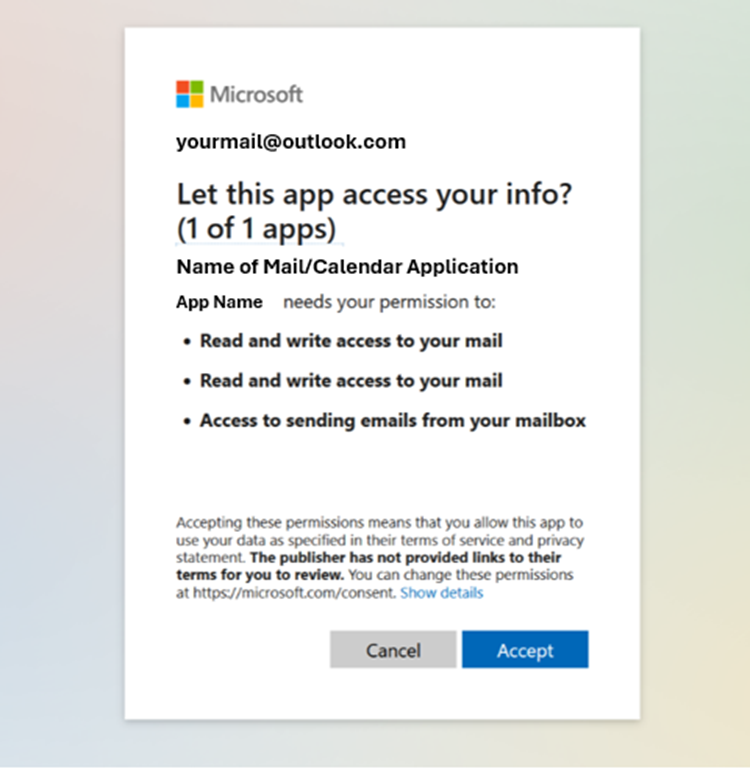
An example of a Modern Authentication sign in. Designed to give the user extra protection and keep them safe.
Windows Mail and Calendar apps will move out of support in 2024
Last year we launched a new version of the Outlook for Windows application, which brings Outlook to everyone on Windows – for free. We’ve seen millions of people move into the new Outlook for Windows since our launch, putting it on par for consumer usage with our classic Outlook for Windows app - in a much shorter time. Most people who were using Mail and Calendar have migrated to Outlook for Windows.
With the evolving cyberthreat landscape and our commitment to providing the most secure email experience to our customers, we want to remind people that the Mail and Calendar apps will no longer be supported or available in the Microsoft Store by the end of 2024.
Outlook for Windows is for everyone – regardless of what email service you use. There is no subscription needed for personal email accounts to use Outlook for Windows and it provides a multitude of features that Mail and Calendar doesn’t include, such as rich message editing, the ability to use Copilot, and reminding you of important conversations. Outlook for Windows also supports Modern Authentication. We are also working on new features in the coming months that will improve Junk Mail filtering and help users better protect themselves from malicious mail.
We encourage all remaining users of the Mail and Calendar apps on Windows to move to Outlook for Windows as soon as possible.
The light Version of the Outlook Web App will no longer be supported after August 19, 2024
We understand accessing your Outlook.com account from anywhere is important. Many customers access Outlook.com from web browsers. While most customers access their personal email accounts through modern and current browsers, we were offering a lightweight version of the Outlook web app that was supported by older browsers. As we accelerate our security efforts to help better protect our customers, we are retiring the light version of the Outlook web app. This means that after 2024 customers will need to run the latest versions of a supported browser to run Outlook.com.
Browser Minimum requirements to run Outlook.com:
- Microsoft Edge (version 79 or later)
- Chrome (version 79 or later)
- Firefox (78 or later)
- Safari (version 16 or later)
- Opera (76 or later)
- Windows OS: Windows 11, Windows 10, Windows Server 2022, Windows Server 2019, or Windows Server 2016
- macOS: macOS Sonoma, macOS Ventura, and macOS Monterey
- Linux: Outlook.com works in both Firefox and Chrome on Linux
In addition to the above, we are retiring the following Outlook features:
- The ability for people to access their Gmail accounts in Outlook.com via the left rail as of June 30, 2024. Users on Windows should use Outlook for Windows, which will enable them to use their Gmail accounts seamlessly. Outlook users on Mac can use Outlook for Mac.
- Last, due to our deprecation of Cortana, all services that depended on it are also being deprecated. For Outlook mobile users that means that Play My Emails and Voice Search will be deprecated at the end of June, 2024. For those affected by this, we ask them to use the native mobile OS features that enable voice commands.
Source:
Keeping our Outlook Personal Email Users Safe: Reinforcing Our Commitment to Security | Microsoft Community Hub
Please, read about some important and mandatory changes coming to Outlook personal email accounts which may impact how you access your email.
 techcommunity.microsoft.com
Read more:
Modern Authentication Methods now needed to continue syncing Outlook Email in non-Microsoft email apps | Microsoft Support
Modern Authentication Methods now needed to continue syncing Outlook Email in non-Microsoft email apps
 support.microsoft.com
Last edited: