Microsoft to stop sending SMS codes to authenticate personal Microsoft accounts


 Microsoft Support:

Microsoft is committed to advancing security standards and as such, we will start phasing out SMS as a method of authentication and account recovery for personal Microsoft accounts.

Why is SMS no longer a method of authentication and account recovery for a personal Microsoft account?

Microsoft believes that the future of authentication is passwordless, secure, and user-friendly.

SMS-based authentication is now a leading source of fraud, and by moving to passwordless accounts, passkeys, and verified email, we're helping you stay ahead of evolving threats while making account access simpler and more seamless.

What can I use instead of SMS to authenticate and verify sign-in?

When you sign in, you will be given an option to "Sign in faster" and create a passkey.
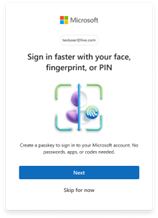
Image for SMS Deprecation


To create a passkey, select Next when prompted, or follow the steps in Signing in with a passkey.


Why are passkeys better than SMS?

Improved security: Passkeys are phishing-resistant and eliminate the risk of fraud.

Faster sign-in: No more waiting for SMS codes - sign in instantly with passkeys utilizing biometrics or device PIN or through utilizing one-click sign-in options using Apple and Google accounts.

Reduced risk: SMS is one of the most targeted vectors for account takeover. Moving away from it significantly reduces exposure.

Better account recovery: Verified email and passkeys ensure users can recover access even if they change phone numbers or lose devices.

FAQs about SMS authentication moving to Passkeys

Why is Microsoft removing SMS authentication?​

Microsoft is committed to advancing security standards through secure by default experiences. By moving to passkeys and verified email, we're helping users to stay ahead of evolving threats—while making account access simpler and more seamless.

Why is SMS authentication not considered secure?​

SMS authentication is vulnerable to phishing and SIM-swap attacks. We’re replacing it with passkeys and verified email for better protection and convenience.

What do I need to do?​

You’ll be guided through a simple process to add a verified email and set up a passkey. This ensures you can sign in and recover your account without relying on SMS.

You can also create a passkey by following the steps in Signing in with a passkey.

Will I still be able to recover my account if I lose my phone?​

Yes. With a verified email and passkey, you’ll have secure and reliable recovery options.

What are passkeys?​

Passkeys are a modern, phishing-resistant way to sign in using your device’s built-in authentication (like Face ID, fingerprint, or PIN). They’re faster and more secure than passwords or SMS codes. Learn more.

Recent updates to Microsoft account sign-in now support passkeys with device biometric authentication, making phishing virtually impossible.

Need more help?

Can't sign in?

If you can't sign into your Microsoft account, most issues can be identified by our sign-in helper tool.

Sign-in helper

Contact Support

For technical support, go to Contact Microsoft Support, enter your problem and select Get Help. If you still need help, select Contact Support to be routed to the best support option.

Important

To protect your account and its contents, our support agents are not allowed to send password reset links, or access and change account details.


 Source:

 
Last edited:
This has been touted by MS for a while now. Long overdue. As Windows Central predict changes will be coming to Windows 11. This latter change is a certainty based on the huge stiffening of security and authentication MS have been making to their enterprise platforms and products.


My Computers My Computers

  • At a glance

    Windows 11 Pro 25H2Intel Core i9 13900KCorsair Dominator Platinum 64gb 5600MT/s DDR5...Sapphire NITRO+ AMD Radeon RX 7900 XTX Vapor-...
    OS
    Windows 11 Pro 25H2
    Computer type
    PC/Desktop
    Manufacturer/Model
    Homebuilt
    CPU
    Intel Core i9 13900K
    Motherboard
    Asus ProArt Z790 Creator WiFi - Bios 3107
    Memory
    Corsair Dominator Platinum 64gb 5600MT/s DDR5 Dual Channel
    Graphics Card(s)
    Sapphire NITRO+ AMD Radeon RX 7900 XTX Vapor-X 24GB
    Sound Card
    External DAC: Cambridge Audio DACMagic200M - Headphone Amp: Topping L50
    Monitor(s) Displays
    Panasonic MX950 Mini LED 55" TV 120hz
    Screen Resolution
    3840 x 2160 120hz
    Hard Drives
    Samsung 980 Pro 2TB (OS)
    Samsung 980 Pro 1TB (Files)
    Lexar NZ790 4TB
    LaCie d2 Professional 6TB external - USB 3.1
    Seagate Expansion 16TB external - USB 3.2
    Seagate One Touch 18TB external HD - USB 3.0
    PSU
    Corsair RM1200x Shift
    Case
    Corsair RGB Smart Case 5000x (white)
    Cooling
    Corsair iCue H150i Elite Capellix XT
    Keyboard
    Incase Ergonomic USB (Microsoft clone)
    Mouse
    Logitech MX Master 3S
    Internet Speed
    Fibre 900/500 Mbps
    Browser
    Microsoft Edge Chromium
    Antivirus
    Bitdefender Total Security
    Other Info
    AMD Radeon Software & Drivers 26.1.1
    Hasleo Backup Suite
    Dashlane password manager
    Kensington Verimark fingerprint reader
    Logitech Brio 4K webcam
    Orico 10-port powered USB 3.0 hub
  • At a glance

    Windows 11 Pro 25H2Intel® Core™ i9-13900H32GB DDR4-3200 Dual channel*Intel Iris Xᵉ Graphics G7
    Operating System
    Windows 11 Pro 25H2
    Computer type
    Laptop
    Manufacturer/Model
    Asus Vivobook X1605VA
    CPU
    Intel® Core™ i9-13900H
    Motherboard
    Asus X1605VA bios 309
    Memory
    32GB DDR4-3200 Dual channel
    Graphics card(s)
    *Intel Iris Xᵉ Graphics G7
    Sound Card
    Realtek | Intel SST Bluetooth & USB
    Monitor(s) Displays
    16.0-inch, WUXGA 16:10 aspect ratio, IPS-level Panel
    Screen Resolution
    1920 x 1200 60hz
    Hard Drives
    512GB M.2 NVMe™ PCIe® 3.0 SSD
    Mouse
    Logitech MX Ergo Trackball
    Antivirus
    Bitdefender Total Security
    Other Info
    720p Webcam
    WiFi & USB to ethernet
This has been touted by MS for a while now. Long overdue. As Windows Central predict changes will be coming to Windows 11. This latter change is a certainty based on the huge stiffening of security and authentication MS have been making to their enterprise platforms and products.

The new policy has already been enacted. I tried to add a second mobile for 2FA yesterday and was offered no option to do so.
 

My Computer My Computer

At a glance

Windows 11 ProCore i7-13700K64 GB Kingston Fury Beast DDR5Gigabyte GeForce RTX 2060 Super Gaming OC 8G
OS
Windows 11 Pro
Computer type
PC/Desktop
Manufacturer/Model
Self build
CPU
Core i7-13700K
Motherboard
Asus TUF Gaming Plus WiFi Z790
Memory
64 GB Kingston Fury Beast DDR5
Graphics Card(s)
Gigabyte GeForce RTX 2060 Super Gaming OC 8G
Sound Card
Realtek S1200A
Monitor(s) Displays
Viewsonic VP2770 & Dell (secondary)
Screen Resolution
2560 x 1440
Hard Drives
Kingston KC3000 2TB NVME SSD & SATA HDDs & SSD
PSU
EVGA SuperNova G2 850W
Case
Nanoxia Deep Silence 1
Cooling
Noctua NH-D14
Keyboard
Microsoft Digital Media Pro
Mouse
Logitech Wireless
Internet Speed
80 Mb / s
Browser
Chrome
Antivirus
Defender, Malwarebytes Free & AdwCleaner
  • Microsoft is phasing out SMS as an authentication method.
  • SMS messages are unencrypted and vulnerable to hackers.
  • Microsoft account owners will be prompted to set up a passkey instead.

When trying to sign-in to or recover one of your online accounts, you'll often receive a text message that prompts you to verify that you're the account owner. But that SMS-based message is not a secure authentication method. Now, Microsoft is putting the brakes on it for anyone who uses a Microsoft account.


My Computer My Computer

At a glance

Win 11 Pro, Win 10 pro, Win 13.7 Pro Chinese Ver12th Gen Intel(R) Core(TM) i9-12900 2.40 GHz64.0 GB of transcendental dimensional RAMNVIDIA GeForce RTX 3070 Ti
OS
Win 11 Pro, Win 10 pro, Win 13.7 Pro Chinese Ver
Computer type
PC/Desktop
Manufacturer/Model
It's a Dell Dude
CPU
12th Gen Intel(R) Core(TM) i9-12900 2.40 GHz
Motherboard
Father is bored too...
Memory
64.0 GB of transcendental dimensional RAM
Graphics Card(s)
NVIDIA GeForce RTX 3070 Ti
Sound Card
N/A
Monitor(s) Displays
27" Samsung Monitor/Alternative Dimensional Viewing Portal
Screen Resolution
Fuzzy after a couple drinks
Hard Drives
2 or 3, depending on if it's a night they're arguing about having a "split personality crisis" because I partitioned the drive.
PSU
Shockingly active
Case
Don't get on my case....man
Cooling
Scotch on the rocks on the weekends.
Keyboard
Steel Series Lighted Glow in the dark something or another
Mouse
Currently being stalked by the cat...
Internet Speed
DSL
Browser
Defeated by Mario...wait...OH...BRowser...
Antivirus
Yep
Back
Top Bottom