Microsoft releases workaround for CVE-2022-0001 Specter Security Vulnerability


 MSRC Blog:

Released: Apr 9, 2024
Last updated: Apr 11, 2024

Assigning CNA:
Intel Corporation
CVE-2022-0001

Impact: Information Disclosure Max Severity: Important
Weakness: CWE-1303: Non-Transparent Sharing of Microarchitectural Resources
CVSS Source: Intel Corporation
CVSS: 3.1 4.7 / 4.1

Executive Summary​

This CVE was assigned by Intel. Please see CVE-2022-0001 on CVE.org for more information.

Exploitability​

The following table provides an exploitability assessment for this vulnerability at the time of original publication.

Publicly disclosedExploitedExploitability assessment
NoNoExploitation Less Likely

FAQ​

Why is this Intel CVE included in the Security Update Guide?
The vulnerability assigned to this CVE is in certain processor models offered by Intel and was initially disclosed March 8, 2022. Intel published updates April 9, 2024 and this CVE is being documented in the Security Update Guide to inform customers of the available mitigation and its potential performance impact. The mitigation for this vulnerability is disabled by default and manual action is required for customers to be protected.

The following documentation was updated by Intel on April 9, 2024 and can be referenced for more information:
What steps are required to protect my system against the vulnerability?
We are providing the following registry information to enable the mitigations for this CVE.

Important: This section, method, or task contains steps that tell you how to modify the registry. However, serious problems might occur if you modify the registry incorrectly. Therefore, make sure that you follow these steps carefully. For added protection, back up the registry before you modify it. Then, you can restore the registry if a problem occurs. For more information about how to back up and restore the registry see How to back up and restore the registry in Windows.

To enable the mitigation for CVE-2022-0001 on Windows devices and clients using Intel Processors:
  • Code:
    reg add "HKEY_LOCAL_MACHINE\SYSTEM\CurrentControlSet\Control\Session Manager\Memory Management" /v FeatureSettingsOverride /t REG_DWORD /d 0x00800000 /f
  • Code:
    reg add "HKEY_LOCAL_MACHINE\SYSTEM\CurrentControlSet\Control\Session Manager\Memory Management" /v FeatureSettingsOverrideMask /t REG_DWORD /d 0x00000003 /f
REG file for the above:

Add: Download

Undo: Download

Customers who wish to implement the mitigation within their systems can also refer to the following for more information.
To enable the mitigation for CVE-2022-0001 on Linux devices and clients using Intel Processors:
Can I expect any performance impact after I configure the registry keys?
In some cases, installing these updates will have a performance impact. In testing Microsoft has seen some performance impact with this mitigation. Microsoft values the security of its software and services but made the decision to allow users and administrators to evaluate the performance impact and risk exposure before deciding to enable the mitigation.


 Read more:


Attachments

Last edited:
Hello.
This subject has always confused me.
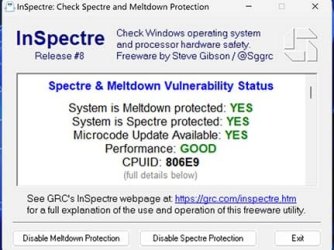
However, I ran the tool posted above by @maur0 and it gave me this result:

1.jpg

I suppose I don't have to do anything else or am I missing something?
Regards!
 

My Computer My Computer

At a glance

Windows 11 Pro 25H2Intel(R) Core(TM) i7-7500U CPU @ 2.70GHz8 GB
OS
Windows 11 Pro 25H2
Computer type
Laptop
Manufacturer/Model
Dell XPS 13 9360
CPU
Intel(R) Core(TM) i7-7500U CPU @ 2.70GHz
Memory
8 GB
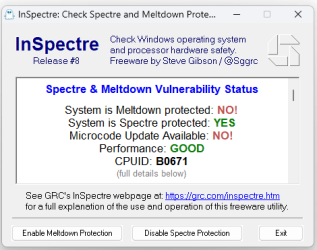
I ran that tool on my Intel i7-13700K CPU (Raptor Lake 13th Generation) with the latest BIOS only issued a few weeks ago. It shows the system has no meltdown protection and the 'Enable Meltdown Protection' button has no effect. Why no meltdown protection?
Screenshot 2024-04-15 130534.png
 

My Computer My Computer

At a glance

Windows 11 ProCore i7-13700K64 GB Kingston Fury Beast DDR5Gigabyte GeForce RTX 2060 Super Gaming OC 8G
OS
Windows 11 Pro
Computer type
PC/Desktop
Manufacturer/Model
Self build
CPU
Core i7-13700K
Motherboard
Asus TUF Gaming Plus WiFi Z790
Memory
64 GB Kingston Fury Beast DDR5
Graphics Card(s)
Gigabyte GeForce RTX 2060 Super Gaming OC 8G
Sound Card
Realtek S1200A
Monitor(s) Displays
Viewsonic VP2770 & Dell (secondary)
Screen Resolution
2560 x 1440
Hard Drives
Kingston KC3000 2TB NVME SSD & SATA HDDs & SSD
PSU
EVGA SuperNova G2 850W
Case
Nanoxia Deep Silence 1
Cooling
Noctua NH-D14
Keyboard
Microsoft Digital Media Pro
Mouse
Logitech Wireless
Internet Speed
80 Mb / s
Browser
Chrome
Antivirus
Defender, Malwarebytes Free & AdwCleaner
I ran that tool on my Intel i7-13700K CPU (Raptor Lake 13th Generation) with the latest BIOS only issued a few weeks ago. It shows the system has no meltdown protection and the 'Enable Meltdown Protection' button has no effect. Why no meltdown protection?
View attachment 93506
My 13900K gives the same reading in InSpectre, with or without the reg hack being applied. So must be something to do with 13th gen CPU's.
Meltdown button has no effect. Also the attack has to be local, so no point in enabling it as I'm the only user.
 

My Computers My Computers

  • At a glance

    Win 11 Pro 25H2Intel Ultra i7 270K PlusKingston Fury Renegrade 2x24 8400 M/tuMSI - GeForce RTX 5070 12 GB GAMING TRIO OC
    OS
    Win 11 Pro 25H2
    Computer type
    PC/Desktop
    Manufacturer/Model
    User Built
    CPU
    Intel Ultra i7 270K Plus
    Motherboard
    Asrock Taichi Z890 OCF
    Memory
    Kingston Fury Renegrade 2x24 8400 M/tu
    Graphics Card(s)
    MSI - GeForce RTX 5070 12 GB GAMING TRIO OC
    Sound Card
    Headphone DAC
    Monitor(s) Displays
    AOC QD OLED 4K 32" + Eizo 32" FlexScan 4K
    Screen Resolution
    3840x2160
    Hard Drives
    1x 9100 Pro 2TB Nvme 1x 990 Pro 2TB 1X 1TB 990 Pro
    PSU
    Be Quiet Pure Power 13 1K Watt ATX 3.1
    Case
    Corsair 5000T Air Flow
    Cooling
    Arctic Freezer 3 360 Pro
    Keyboard
    Cherry G80-3000N
    Mouse
    Corsair
    Internet Speed
    500Mbps
    Browser
    Firefox x64
    Antivirus
    Defender
    Other Info
    Backup software MR ver 10
  • At a glance

    Win 11 Pro 25H2Ultra i7 270K PlusKingston Fury 2x16 7200 M/tuMSI RTX 4070 Super OC 12 GB
    Operating System
    Win 11 Pro 25H2
    Computer type
    PC/Desktop
    Manufacturer/Model
    User Built
    CPU
    Ultra i7 270K Plus
    Motherboard
    Asus Z890 Strix - F
    Memory
    Kingston Fury 2x16 7200 M/tu
    Graphics card(s)
    MSI RTX 4070 Super OC 12 GB
    Sound Card
    Onboard
    Monitor(s) Displays
    KVM switch to AOC 4K 32" QD OLED
    Screen Resolution
    3840x2160
    Hard Drives
    Samsung 990 Pro 4TB+990 Pro 2TB +990 Pro 1TB
    PSU
    Super Flower Ledex 3 ATX 3.1 850 Watts
    Case
    Corsair 500d
    Cooling
    Noctua D15 Cromax
GRCs' InSpectre Software checker's Last Update was Feb 27, 2024 at 21:41

So it might not be checking the newly found issue.
 

My Computer My Computer

At a glance

Windows 10i7-10700F16 DC HyperX FURY DDR4 XMPRTX 2060 S
OS
Windows 10
Computer type
PC/Desktop
Manufacturer/Model
Alienware Aurora R11
CPU
i7-10700F
Motherboard
Alienware
Memory
16 DC HyperX FURY DDR4 XMP
Graphics Card(s)
RTX 2060 S
Sound Card
Realtek
Monitor(s) Displays
ASUS VG278QR
Screen Resolution
1920 x 1080
Hard Drives
PC611 NVMe SK hynix 1TB

2 each 128GB USB drive - staggered backups
PSU
550W Power Supply
Case
Alienware Lunar light
Cooling
CPU Liquid Cooling - AIO
Keyboard
SK-8115
Mouse
MX518
Internet Speed
200 MB
Browser
FF and TOR -- both using Searx for search
Antivirus
Defender
@Brink (or anyone who knows) - what happens to all the other "features" they loaded into those masks for other vulnerabilities? Microsoft has never explained how these important masks works afaik, how are user's supposed to respond? Needs a tutorial I think.
 

My Computers My Computers

  • At a glance

    Windows 11 ProIntel Core i9 14900K 5800/4500 P/E all core96GB (2x48) G.skill Ripjaws 6800 MT/s DDR5Asus ROG Strix 4070 Ti OC
    OS
    Windows 11 Pro
    Computer type
    PC/Desktop
    Manufacturer/Model
    DIY Photoshop/Audio/Game/tinker
    CPU
    Intel Core i9 14900K 5800/4500 P/E all core
    Motherboard
    Asus ROG Maximus Z790 Dark Hero
    Memory
    96GB (2x48) G.skill Ripjaws 6800 MT/s DDR5
    Graphics Card(s)
    Asus ROG Strix 4070 Ti OC
    Sound Card
    Bowers & Wilkins 606 S3 speakers; Audiolabs 7000a integrated amp; RSL 10S Mk2 sub; Creative Pebble Pro Minimilist
    Monitor(s) Displays
    Eizo CG2730 ColorEdge, ViewSonic VP2768, i1 Display Pro calibration puck
    Screen Resolution
    2560 x 1440p x 2
    Hard Drives
    WDC SN850X 4TB nvme, SN850 1TB nvme, SK-Hynix 2 TB P41 nvme,. Sabrent USB-C DS-SC5B 5-bay docking station: 6TB WDC Black, 6TB Ironwolf Pro; 2x 2TB WDC Black HDD
    PSU
    850W Seasonic Vertex PX-850 ATX 3.0/PCI-E 5.0
    Case
    Fractal Design North XL Mesh, Black Walnut
    Cooling
    EK Nucleus black 360 AIO w/Phanteks T30-120 fans, 2 Noctua NF-A14 Chromax case fan, 1 T30-120 fan cooling memory
    Keyboard
    Keychron Q3 Max TKL with custom GMK Redsuns Red Samuri keycaps, TX Stabs
    Mouse
    Logitech G305 wireless gaming
    Internet Speed
    575 Mb/s down | 25 Mb/s up
    Browser
    Firefox
    Antivirus
    Defender, Macrium Reflect X
    Other Info
    Phangkey Amaterasu V2 Desk Mat
  • At a glance

    Apple M1
    Computer type
    Laptop
    Manufacturer/Model
    💻 Apple 13" Macbook Pro 2020 (m1)
    CPU
    Apple M1
    Screen Resolution
    2560x1600
    Browser
    Firefox
Any idea the performance loss after apply this "fix" I am happy to take the risk if the hit is too high.
 

My Computers My Computers

  • At a glance

    Windows 11 25H2Intel i9 14900KF64GB Corsair Vengeance RGBMSI 4090 Suprim X
    OS
    Windows 11 25H2
    Computer type
    PC/Desktop
    Manufacturer/Model
    Custom Built
    CPU
    Intel i9 14900KF
    Motherboard
    ASUS Z790 ProArt Creator WiFi
    Memory
    64GB Corsair Vengeance RGB
    Graphics Card(s)
    MSI 4090 Suprim X
    Sound Card
    Onboard
    Monitor(s) Displays
    1 x Asus 24". 1 x Asus 32"
    Screen Resolution
    1920 x 1080 & 2560 x 1440
    Hard Drives
    Multiple
    PSU
    Corsair 1200HX
    Case
    Corsair 7000D RGB
    Cooling
    Corsair H150I Capellix XT
    Keyboard
    Corsair K70 RGB PRO
    Mouse
    Corsair M55 RGB Pro
    Internet Speed
    1000Mbps
    Browser
    Edge
    Antivirus
    Windows Default
  • At a glance

    Windows 11 25H2Intel i7 6800K32GB DDR4 (Corsair)ASUS GTX 1080ti
    Operating System
    Windows 11 25H2
    Computer type
    PC/Desktop
    Manufacturer/Model
    Custom Built
    CPU
    Intel i7 6800K
    Motherboard
    ASUS Z99 Deluxe
    Memory
    32GB DDR4 (Corsair)
    Graphics card(s)
    ASUS GTX 1080ti
    Sound Card
    Onboard
    Monitor(s) Displays
    1x Viewsonic 24" 1x LG 19"
    Screen Resolution
    1920 x 1080 & 1600 x 900
    Hard Drives
    3 x SATA SSD
    PSU
    650W Gigabyte Bronze
    Case
    Coolermaster HAF-X
    Cooling
    Noctua NH-15 Chroma black
    Keyboard
    Generic RGB
    Mouse
    Microsoft Basic
    Internet Speed
    1000Mbps
    Browser
    Edge
    Antivirus
    Windows Default
I didn't notice any performance drop
 

My Computer My Computer

At a glance

Windows 11
OS
Windows 11
I ran that tool on my Intel i7-13700K CPU (Raptor Lake 13th Generation) with the latest BIOS only issued a few weeks ago. It shows the system has no meltdown protection and the 'Enable Meltdown Protection' button has no effect. Why no meltdown protection?
View attachment 93506
My 13900K gives the same reading in InSpectre, with or without the reg hack being applied. So must be something to do with 13th gen CPU's.
Meltdown button has no effect. Also the attack has to be local, so no point in enabling it as I'm the only user.


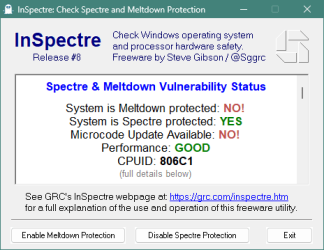
Evidently it doesn't like my Intel 12th Gen Core i7-12700 either. The registry hack has been applied, Meltdown button has no effect and the tool showed the same results before the hack was merged.

Screenshot 2024-04-16 175444.png
 

My Computer My Computer

At a glance

Windows 11 Pro (x64) Version 23H2 Used Enable...2.10 gigahertz Intel 12th Gen Core i7-1270015.78 of 16 Gigabytes Usable Installed MemoryIntel(R) UHD Graphics 770 [Display adapter]
OS
Windows 11 Pro (x64) Version 23H2 Used Enablement Package (build 22631.2861)
Computer type
PC/Desktop
Manufacturer/Model
Acer Aspire TC-1760 1.0
CPU
2.10 gigahertz Intel 12th Gen Core i7-12700
Motherboard
Acer Aspire TC-1760 1.0 Bus: 100 megahertz UEFI: American Megatrends Inc. R01-A4 02/21/2022
Memory
15.78 of 16 Gigabytes Usable Installed Memory
Graphics Card(s)
Intel(R) UHD Graphics 770 [Display adapter]
Sound Card
Realtek(R) Audio
Monitor(s) Displays
Acer KA242Y A (24.0"vis, s/n 6243003C23E00, October 2022)
Screen Resolution
1920 x 1080
Hard Drives
c: (NTFS on drive 1) * 510.74 GB SSD
d: (NTFS on drive 0) 1.00 TB 7200rpm SATA HHD
* Operating System is installed on c:
PSU
300w OEM
Case
OEM
Cooling
OEM
Keyboard
OEM
Mouse
Logitech M325 add-on
Internet Speed
Vz Fios; Png 20ms DL 110.82Mbps UL 122.49Mbps | speedtest
Browser
FireFox (64bit) Updated Regulary, now at 125.0.3 (64bit)
Antivirus
Windows Security | Came with Norton Ultra trial but has since been uninstalled
Other Info
Canon MG3200 Printer
It appears InSpectre has not had an update since Feb 27th 2024 so it hasn't yet been updated to detect this latest vulnerability.

Screenshot 2024-04-16 165202.png
 

My Computers My Computers

  • At a glance

    Windows 11 Pro x 2 + Insider DevIntel Core i9 12900K @ 5.2 GHz2 x Corsair Dominator Platinum RGB (4x16GB To...EVGA GeForce RTX 3080 XC3 ULTRA GAMING 10GB G...
    OS
    Windows 11 Pro x 2 + Insider Dev
    Computer type
    PC/Desktop
    Manufacturer/Model
    My first abomination, I call it the Money Pit One
    CPU
    Intel Core i9 12900K @ 5.2 GHz
    Motherboard
    ASUS ROG MAXIMUS Z690 HERO
    Memory
    2 x Corsair Dominator Platinum RGB (4x16GB Total) DDR5-6200 CL36 Dual Channel Kit
    Graphics Card(s)
    EVGA GeForce RTX 3080 XC3 ULTRA GAMING 10GB GDDR6X
    Sound Card
    ROG SupremeFX ALC4082 with ESS® ES9018Q2C DAC for pinpoint positioning and dynamics
    Monitor(s) Displays
    2 x Samsung 43" HDR Neo QLED Mini-LED Tizen Smart TV (QN43QN90DAFXZC) 2024
    Screen Resolution
    1920 x 1080 @ 150 DPI & 120Hz
    Hard Drives
    2 x Samsung 980 Series - 250GB PCIe Gen3. X4 NVMe 1.4 - M.2 Internal SSD (Windows 11 Pro Dual boot)
    PSU
    Corsair HX1000i 80+ Platinum Modular Power Supply 1000W
    Case
    Phanteks Enthoo Luxe Tempered Glass Full Tower Case - Black
    Cooling
    CORSAIR iCUE H150i RGB Elite 360mm Liquid CPU Cooler
    Keyboard
    Perixx PERIBOARD-732B Wireless Mini Backlit USB Keyboard with Low Profile Keys - US Layout
    Mouse
    Logitech MX Anywhere 2S Wireless Mouse
    Internet Speed
    1000 Mbps
    Browser
    Latest Version Of Firefox & Microsoft Edge Chromium Stable
    Antivirus
    ESET Internet Security
    Other Info
    LG Electronics 14x Sata Blu-ray Disk Rewriter - WH14NS4O
    2 x OREI 4K 4x2 HDMI Matrix Switch With ARC Audio Extraction, HDR & Downscaling (UHD-402D) so I can send the output of my Cable Box, Roku, or any of my 4 computers to either of my TV's separately or simultaneously.
  • At a glance

    Windows 11 Pro x 2Intel Core i9 12900K @ 5.2 GHz2 x Vengeance RGB 32GB DDR5 6400MHz CL32 Dual...ASUS TUF Gaming GeForce RTX 3070 Ti OC Editio...
    Operating System
    Windows 11 Pro x 2
    Computer type
    PC/Desktop
    Manufacturer/Model
    My second abomination, I call it the Money Pit Two
    CPU
    Intel Core i9 12900K @ 5.2 GHz
    Motherboard
    ASUS ROG STRIX Z690-F GAMING WIFI
    Memory
    2 x Vengeance RGB 32GB DDR5 6400MHz CL32 Dual Channel Kit (4x16GB Total) Black
    Graphics card(s)
    ASUS TUF Gaming GeForce RTX 3070 Ti OC Edition 8 GB GDDR6X
    Sound Card
    ROG SupremeFX ALC4082 with ESS® ES9018Q2C DAC for pinpoint positioning and dynamics
    Monitor(s) Displays
    2 x Samsung 43" HDR Neo QLED Mini-LED Tizen Smart TV (QN43QN90DAFXZC) 2024
    Screen Resolution
    1920 x 1080 @ 150 DPI & 120Hz
    Hard Drives
    2 x Samsung 980 Series - 250GB PCIe Gen3. X4 NVMe 1.4 - M.2 Internal SSD (Windows 11 Pro Dual boot)
    PSU
    Corsair AX860 - 860W Modular Power Supply
    Case
    Phanteks Enthoo Pro Tempered Glass Full Tower Case - Black
    Cooling
    CORSAIR iCUE H150i RGB Elite 360mm Liquid CPU Cooler
    Keyboard
    Perixx PERIBOARD-326 Wireless Mini Backlit USB Keyboard with Low Profile Keys - US Layout
    Mouse
    Logitech MX Anywhere 2S Wireless Mouse
    Internet Speed
    1000 Mbps
    Browser
    Latest Version Of Firefox & EDGE Chromium Stable
    Antivirus
    ESET Internet Security
    Other Info
    LG Electronics 14x Sata Blu-ray Disk Rewriter - WH14NS4O
    2 x OREI 4K 4x2 HDMI Matrix Switch With ARC Audio Extraction, HDR & Downscaling (UHD-402D) so I can send the output of my Cable Box, Roku, or any of my 4 computers to either of my TV's separately or simultaneously.
  • 2021 ASUS TUF Gaming A17 - FA706QM Gaming Laptop with a AMD Ryzen™ 7 5800H Mobile Processor, NVIDIA GeForce RTX 3060 Laptop GPU and AMD Graphics (512 MB), 17.3-inch, FHD (1920 x 1080) 16:9, Value IPS-level, Anti-glare display, 2 x 8GB DDR4 3200 SDRAM, Samsung 980 Series - 250GB PCIe Gen3. X4 NVMe 1.4 - M.2 Internal SSD running Windows 11 Pro , Backlit Chiclet Keyboard 1-Zone RGB, Touchpad, 720P HD camera, Wi-Fi 6(802.11ax) (Dual band) 2*2 + Bluetooth® 5.3 Wireless Card

    External Keyboard: Perixx PERIBOARD-326 Wireless Mini Backlit USB Keyboard with Low Profile Keys - US Layout

    External Mouse: Logitech MX Anywhere 2S Wireless Mouse

    External Monitor: Samsung 43" HDR Neo QLED Mini-LED Tizen Smart TV (QN43QN90DAFXZC) 2024
My i9 14900 shows it's not protected from any of the vulnerabilities, using this tool. Is this correct?
 

My Computers My Computers

  • At a glance

    Windows 11 25H2Intel i9 14900KF64GB Corsair Vengeance RGBMSI 4090 Suprim X
    OS
    Windows 11 25H2
    Computer type
    PC/Desktop
    Manufacturer/Model
    Custom Built
    CPU
    Intel i9 14900KF
    Motherboard
    ASUS Z790 ProArt Creator WiFi
    Memory
    64GB Corsair Vengeance RGB
    Graphics Card(s)
    MSI 4090 Suprim X
    Sound Card
    Onboard
    Monitor(s) Displays
    1 x Asus 24". 1 x Asus 32"
    Screen Resolution
    1920 x 1080 & 2560 x 1440
    Hard Drives
    Multiple
    PSU
    Corsair 1200HX
    Case
    Corsair 7000D RGB
    Cooling
    Corsair H150I Capellix XT
    Keyboard
    Corsair K70 RGB PRO
    Mouse
    Corsair M55 RGB Pro
    Internet Speed
    1000Mbps
    Browser
    Edge
    Antivirus
    Windows Default
  • At a glance

    Windows 11 25H2Intel i7 6800K32GB DDR4 (Corsair)ASUS GTX 1080ti
    Operating System
    Windows 11 25H2
    Computer type
    PC/Desktop
    Manufacturer/Model
    Custom Built
    CPU
    Intel i7 6800K
    Motherboard
    ASUS Z99 Deluxe
    Memory
    32GB DDR4 (Corsair)
    Graphics card(s)
    ASUS GTX 1080ti
    Sound Card
    Onboard
    Monitor(s) Displays
    1x Viewsonic 24" 1x LG 19"
    Screen Resolution
    1920 x 1080 & 1600 x 900
    Hard Drives
    3 x SATA SSD
    PSU
    650W Gigabyte Bronze
    Case
    Coolermaster HAF-X
    Cooling
    Noctua NH-15 Chroma black
    Keyboard
    Generic RGB
    Mouse
    Microsoft Basic
    Internet Speed
    1000Mbps
    Browser
    Edge
    Antivirus
    Windows Default
It appears InSpectre has not had an update since Feb 27th 2024
That's not that long ago but malware moves at the speed of light.

Is this correct?
I'm not sure. but I'd lean towards the fact that the registry merge is real and designed to protect our machines. It's reassuring to see an app that verifies our actions and even though Gibson is good he's not infallible.


Time to read the article in @Brink's first post.
 

My Computer My Computer

At a glance

Windows 11 Pro (x64) Version 23H2 Used Enable...2.10 gigahertz Intel 12th Gen Core i7-1270015.78 of 16 Gigabytes Usable Installed MemoryIntel(R) UHD Graphics 770 [Display adapter]
OS
Windows 11 Pro (x64) Version 23H2 Used Enablement Package (build 22631.2861)
Computer type
PC/Desktop
Manufacturer/Model
Acer Aspire TC-1760 1.0
CPU
2.10 gigahertz Intel 12th Gen Core i7-12700
Motherboard
Acer Aspire TC-1760 1.0 Bus: 100 megahertz UEFI: American Megatrends Inc. R01-A4 02/21/2022
Memory
15.78 of 16 Gigabytes Usable Installed Memory
Graphics Card(s)
Intel(R) UHD Graphics 770 [Display adapter]
Sound Card
Realtek(R) Audio
Monitor(s) Displays
Acer KA242Y A (24.0"vis, s/n 6243003C23E00, October 2022)
Screen Resolution
1920 x 1080
Hard Drives
c: (NTFS on drive 1) * 510.74 GB SSD
d: (NTFS on drive 0) 1.00 TB 7200rpm SATA HHD
* Operating System is installed on c:
PSU
300w OEM
Case
OEM
Cooling
OEM
Keyboard
OEM
Mouse
Logitech M325 add-on
Internet Speed
Vz Fios; Png 20ms DL 110.82Mbps UL 122.49Mbps | speedtest
Browser
FireFox (64bit) Updated Regulary, now at 125.0.3 (64bit)
Antivirus
Windows Security | Came with Norton Ultra trial but has since been uninstalled
Other Info
Canon MG3200 Printer
That's not that long ago but malware moves at the speed of light.


I'm not sure. but I'd lean towards the fact that the registry merge is real and designed to protect our machines. It's reassuring to see an app that verifies our actions and even though Gibson is good he's not infallible.


Time to read the article in @Brink's first post.
I thought newer processors were designed to not be vulnerable to the earlier exploits?
 

My Computers My Computers

  • At a glance

    Windows 11 25H2Intel i9 14900KF64GB Corsair Vengeance RGBMSI 4090 Suprim X
    OS
    Windows 11 25H2
    Computer type
    PC/Desktop
    Manufacturer/Model
    Custom Built
    CPU
    Intel i9 14900KF
    Motherboard
    ASUS Z790 ProArt Creator WiFi
    Memory
    64GB Corsair Vengeance RGB
    Graphics Card(s)
    MSI 4090 Suprim X
    Sound Card
    Onboard
    Monitor(s) Displays
    1 x Asus 24". 1 x Asus 32"
    Screen Resolution
    1920 x 1080 & 2560 x 1440
    Hard Drives
    Multiple
    PSU
    Corsair 1200HX
    Case
    Corsair 7000D RGB
    Cooling
    Corsair H150I Capellix XT
    Keyboard
    Corsair K70 RGB PRO
    Mouse
    Corsair M55 RGB Pro
    Internet Speed
    1000Mbps
    Browser
    Edge
    Antivirus
    Windows Default
  • At a glance

    Windows 11 25H2Intel i7 6800K32GB DDR4 (Corsair)ASUS GTX 1080ti
    Operating System
    Windows 11 25H2
    Computer type
    PC/Desktop
    Manufacturer/Model
    Custom Built
    CPU
    Intel i7 6800K
    Motherboard
    ASUS Z99 Deluxe
    Memory
    32GB DDR4 (Corsair)
    Graphics card(s)
    ASUS GTX 1080ti
    Sound Card
    Onboard
    Monitor(s) Displays
    1x Viewsonic 24" 1x LG 19"
    Screen Resolution
    1920 x 1080 & 1600 x 900
    Hard Drives
    3 x SATA SSD
    PSU
    650W Gigabyte Bronze
    Case
    Coolermaster HAF-X
    Cooling
    Noctua NH-15 Chroma black
    Keyboard
    Generic RGB
    Mouse
    Microsoft Basic
    Internet Speed
    1000Mbps
    Browser
    Edge
    Antivirus
    Windows Default
I thought newer processors were designed to not be vulnerable to the earlier exploits?
There are newer CPU's that have been hardened and that trend is expanding.
 

My Computer My Computer

At a glance

Windows 11 Pro (x64) Version 23H2 Used Enable...2.10 gigahertz Intel 12th Gen Core i7-1270015.78 of 16 Gigabytes Usable Installed MemoryIntel(R) UHD Graphics 770 [Display adapter]
OS
Windows 11 Pro (x64) Version 23H2 Used Enablement Package (build 22631.2861)
Computer type
PC/Desktop
Manufacturer/Model
Acer Aspire TC-1760 1.0
CPU
2.10 gigahertz Intel 12th Gen Core i7-12700
Motherboard
Acer Aspire TC-1760 1.0 Bus: 100 megahertz UEFI: American Megatrends Inc. R01-A4 02/21/2022
Memory
15.78 of 16 Gigabytes Usable Installed Memory
Graphics Card(s)
Intel(R) UHD Graphics 770 [Display adapter]
Sound Card
Realtek(R) Audio
Monitor(s) Displays
Acer KA242Y A (24.0"vis, s/n 6243003C23E00, October 2022)
Screen Resolution
1920 x 1080
Hard Drives
c: (NTFS on drive 1) * 510.74 GB SSD
d: (NTFS on drive 0) 1.00 TB 7200rpm SATA HHD
* Operating System is installed on c:
PSU
300w OEM
Case
OEM
Cooling
OEM
Keyboard
OEM
Mouse
Logitech M325 add-on
Internet Speed
Vz Fios; Png 20ms DL 110.82Mbps UL 122.49Mbps | speedtest
Browser
FireFox (64bit) Updated Regulary, now at 125.0.3 (64bit)
Antivirus
Windows Security | Came with Norton Ultra trial but has since been uninstalled
Other Info
Canon MG3200 Printer
i5-1135G7 InSpectre.png i7-13650HX InSpectre.png
 

My Computers My Computers

  • At a glance

    11 Homei7 13650HX16GB DDR5GeForce RTX 4060 Mobile
    OS
    11 Home
    Computer type
    Laptop
    Manufacturer/Model
    Asus TUF Gaming F16 (2024)
    CPU
    i7 13650HX
    Memory
    16GB DDR5
    Graphics Card(s)
    GeForce RTX 4060 Mobile
    Sound Card
    Eastern Electric MiniMax DAC Supreme; Emotiva UMC-200; Astell & Kern AK240
    Monitor(s) Displays
    Sony Bravia XR-55X90J
    Screen Resolution
    3840×2160
    Hard Drives
    512GB SSD internal
    37TB external
    PSU
    Li-ion
    Cooling
    2× Arc Flow Fans, 4× exhaust vents, 5× heatpipes
    Keyboard
    Logitech K800
    Mouse
    Logitech G402
    Internet Speed
    30Mbit/s up, 500Mbit/s down
    Browser
    FF
    Antivirus
    What's an antivirus?
  • At a glance

    11 Homei5 1135G716GB DDR4Intel Iris Xe
    Operating System
    11 Home
    Computer type
    Laptop
    Manufacturer/Model
    Medion S15450
    CPU
    i5 1135G7
    Memory
    16GB DDR4
    Graphics card(s)
    Intel Iris Xe
    Sound Card
    Eastern Electric MiniMax DAC Supreme; Emotiva UMC-200; Astell & Kern AK240
    Monitor(s) Displays
    Sony Bravia XR-55X90J
    Screen Resolution
    3840×2160
    Hard Drives
    2TB SSD internal
    37TB external
    PSU
    Li-ion
    Keyboard
    Logitech K800
    Mouse
    Logitech G402
    Internet Speed
    30Mbit/s up, 500Mbit/s down
    Browser
    FF
For me (Windows 10) the Enable Meltdown Protection button has never worked and that is for years and different systems. I always assumed it was because a BIOS update was required

A Guy
 

My Computers My Computers

  • At a glance

    Windows 10 Home x64INTEL Core i5-11400KINGSTON HyperX Fury Black DDR4 16GB (2 x 8GB...EVGA GeForce GTX 750 Superclocked 1GB 128-Bit...
    OS
    Windows 10 Home x64
    Computer type
    PC/Desktop
    Manufacturer/Model
    Custom
    CPU
    INTEL Core i5-11400
    Motherboard
    ASUS PRIME H570-PLUS
    Memory
    KINGSTON HyperX Fury Black DDR4 16GB (2 x 8GB) 3200MHz, CL16
    Graphics Card(s)
    EVGA GeForce GTX 750 Superclocked 1GB 128-Bit GDDR5
    Monitor(s) Displays
    LG 32MA68HY 32" IPS
    Screen Resolution
    1920 x 1080
    Hard Drives
    SAMSUNG 250GB 970 EVO Plus NVMe, M.2 SSD, Crucial 250GB MX500, SEAGATE 500GB Barracuda® 7200.12, SATA 3 Gb/s, 7200 RPM, 16MB cache
    PSU
    CORSAIR RM550x 80 PLUS Gold 550W
    Case
    ANTEC P10 FLUX
    Cooling
    be quiet! Pure Rock 2, 5 x 120 mm Case Fans
    Internet Speed
    480 + Mbps Up/ 12+ Mbps Down
    Browser
    Vivaldi Snapshot
    Antivirus
    Avast
  • At a glance

    Windows 10 Home x64Intel Core i5-750Kingston HyperX Fury Black 8GB (2x4GB) DDR3-1...MSI GeForce GT 240 N240GT-MD1G/D5 1 GB DDR5
    Operating System
    Windows 10 Home x64
    Computer type
    PC/Desktop
    Manufacturer/Model
    Custom
    CPU
    Intel Core i5-750
    Motherboard
    ASUS P7P55D
    Memory
    Kingston HyperX Fury Black 8GB (2x4GB) DDR3-1600MHz CL8
    Graphics card(s)
    MSI GeForce GT 240 N240GT-MD1G/D5 1 GB DDR5
    Monitor(s) Displays
    LG 32MA68HY 32" IPS
    Screen Resolution
    1980x1040
    Hard Drives
    Samsung Electronics 840 EVO 120GB, SEAGATE 500GB Barracuda® 7200.12, SATA 3 Gb/s, 7200 RPM, 16MB cache
    PSU
    Antec TruePower New TP-550 550W
    Case
    Antec 300
    Cooling
    Cooler Master Hyper 212+, 4 Noctua NF-P12 120mm, 1 Noctua NF-P14 FLX
    Internet Speed
    480+ Mbps Down/12+Mbps Up
    Browser
    Vivaldi Snapshot
    Antivirus
    Avast
I always assumed it was because a BIOS update was required
Sounds reasonable. IIRC I have one waiting.

This may explain some of the readings and the Meltdown button:
Q: On some of the computers, one or the other or both of the Enable/Disable Protection buttons are grayed out and disabled so that they cannot be used. What's going on?

A: Either of the Protection Enable/Disable buttons will be disabled when the button's respective vulnerability cannot be enabled or disabled by its user. For example, Since AMD processors have never been subject to the Meltdown vulnerability, the Meltdown button will be disabled because there's no way for its protection to be disabled. This would also be true (in the other direction) when a system has an Intel processor and any version of Windows that has not been updated for the Meltdown vulnerability. In that case the system is vulnerable and there's no way for the button to make it invulnerable.

Similarly, any computer whose firmware has not been updated will be vulnerable to Spectre attacks and, again, the button cannot make it invulnerable.

So, InSpectre will enable those buttons when the system's conditions allow the operating system to protect against the respective vulnerability, but the user may wish to disable that protection, where possible.
Source: InSpectre | Gibson
 

My Computer My Computer

At a glance

Windows 11 Pro (x64) Version 23H2 Used Enable...2.10 gigahertz Intel 12th Gen Core i7-1270015.78 of 16 Gigabytes Usable Installed MemoryIntel(R) UHD Graphics 770 [Display adapter]
OS
Windows 11 Pro (x64) Version 23H2 Used Enablement Package (build 22631.2861)
Computer type
PC/Desktop
Manufacturer/Model
Acer Aspire TC-1760 1.0
CPU
2.10 gigahertz Intel 12th Gen Core i7-12700
Motherboard
Acer Aspire TC-1760 1.0 Bus: 100 megahertz UEFI: American Megatrends Inc. R01-A4 02/21/2022
Memory
15.78 of 16 Gigabytes Usable Installed Memory
Graphics Card(s)
Intel(R) UHD Graphics 770 [Display adapter]
Sound Card
Realtek(R) Audio
Monitor(s) Displays
Acer KA242Y A (24.0"vis, s/n 6243003C23E00, October 2022)
Screen Resolution
1920 x 1080
Hard Drives
c: (NTFS on drive 1) * 510.74 GB SSD
d: (NTFS on drive 0) 1.00 TB 7200rpm SATA HHD
* Operating System is installed on c:
PSU
300w OEM
Case
OEM
Cooling
OEM
Keyboard
OEM
Mouse
Logitech M325 add-on
Internet Speed
Vz Fios; Png 20ms DL 110.82Mbps UL 122.49Mbps | speedtest
Browser
FireFox (64bit) Updated Regulary, now at 125.0.3 (64bit)
Antivirus
Windows Security | Came with Norton Ultra trial but has since been uninstalled
Other Info
Canon MG3200 Printer
I do not see any 13/14 gen cpus listed under known affected configs
 

My Computer My Computer

At a glance

11-25h2amd 9850x3d64gb 6000cl26pny 5090 oc
OS
11-25h2
CPU
amd 9850x3d
Motherboard
asus x870e apex
Memory
64gb 6000cl26
Graphics Card(s)
pny 5090 oc
Sound Card
creative x5
Monitor(s) Displays
dell aw3225qf
Hard Drives
4tb samsung 9100 pro
4tb samsung 990 pro
4tb wd black sn850x
2tb samsung 980 pro (usb)
PSU
phanteks 1600w
Case
phanteks nv9 mk2
Cooling
phanteks 420x2
Mitigation for Transaction Asynchronous Abort vulnerability, Microarchitectural Data Sampling, Spectre, Meltdown, MMIO, Speculative Store Bypass Disable (SSBD), and L1 Terminal Fault (L1TF) with Hyper-Threading disabled + Mitigation for CVE-2022-0001 on Intel processors

reg add "HKEY_LOCAL_MACHINE\SYSTEM\CurrentControlSet\Control\Session Manager\Memory Management" /v FeatureSettingsOverride /t REG_DWORD /d 0x00802048 /f

reg add "HKEY_LOCAL_MACHINE\SYSTEM\CurrentControlSet\Control\Session Manager\Memory Management" /v FeatureSettingsOverrideMask /t REG_DWORD /d 0x00000003 /f

Mitigation for Transaction Asynchronous Abort vulnerability, Microarchitectural Data Sampling, Spectre, Meltdown, MMIO, Speculative Store Bypass Disable (SSBD), and L1 Terminal Fault (L1TF) without Hyper-Threading disabled + Mitigation for CVE-2022-0001 on Intel processors

reg add "HKEY_LOCAL_MACHINE\SYSTEM\CurrentControlSet\Control\Session Manager\Memory Management" /v FeatureSettingsOverride /t REG_DWORD /d 0x00800048 /f

reg add "HKEY_LOCAL_MACHINE\SYSTEM\CurrentControlSet\Control\Session Manager\Memory Management" /v FeatureSettingsOverrideMask /t REG_DWORD /d 0x00000003 /f


Microsoft example NOTE: 8264 (in Decimal) = 0x2048 (in Hex)
To enable BHI along with other existing settings, you will need to use bitwise OR of current value with 8,388,608 (0x800000).
0x800000 OR 0x2048(8264 in decimal) and it will become 8,396,872 (0x802048). Same with FeatureSettingsOverrideMask.

I simply added 72 instead of 8264 for the second command. (8388608 + 72 = 8388680 (800048 in HEX)
 
Last edited:

My Computer My Computer

At a glance

Windows 11 ProIntel Core i7-13700KF16GB DDR4-3731 / PC4-29800 DDR4 SDRAM UDIMMNVIDIA GeForce RTX 4060 TI
OS
Windows 11 Pro
Computer type
PC/Desktop
Manufacturer/Model
ASUS
CPU
Intel Core i7-13700KF
Motherboard
ASUS TUF GAMING B660M-PLUS D4
Memory
16GB DDR4-3731 / PC4-29800 DDR4 SDRAM UDIMM
Graphics Card(s)
NVIDIA GeForce RTX 4060 TI
Sound Card
RealTek ALC897
Monitor(s) Displays
ASUS TUF Gaming VG32V
Screen Resolution
2560 x 1440
Hard Drives
Corsair MP600 CORE XT 4TB
PSU
650 W
Case
Cooler Master Elite 300
Cooling
Thermalright Phantom Spirit 120 Evo
Keyboard
Dell Keyboard
Mouse
Alienware Mouse
Internet Speed
500 mb/s
Browser
Edge
Antivirus
Kaspersky Plus
Other Info
CineBench R23
28851
I do not see any 13/14 gen cpus listed under known affected configs

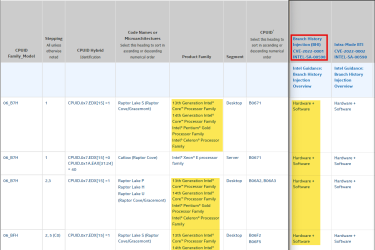
According to Intel they are.


Go to this page on the Intel website and type in 'raptor' in the search box (without quotes) and the table will filter out the information . I've edited the two screenshots together because of the formatting of the page.

There is a key at the end of the page about the terminology and types of fixes that can be used. When viewing the table on the page use horizontal scrolling to view the Branch History Injection information.

cve-2022-001.png
 

My Computers My Computers

  • At a glance

    Windows 11 Pro 25H2Intel Core i9 13900KCorsair Dominator Platinum 64gb 5600MT/s DDR5...Sapphire NITRO+ AMD Radeon RX 7900 XTX Vapor-...
    OS
    Windows 11 Pro 25H2
    Computer type
    PC/Desktop
    Manufacturer/Model
    Homebuilt
    CPU
    Intel Core i9 13900K
    Motherboard
    Asus ProArt Z790 Creator WiFi - Bios 3107
    Memory
    Corsair Dominator Platinum 64gb 5600MT/s DDR5 Dual Channel
    Graphics Card(s)
    Sapphire NITRO+ AMD Radeon RX 7900 XTX Vapor-X 24GB
    Sound Card
    External DAC: Cambridge Audio DACMagic200M - Headphone Amp: Topping L50
    Monitor(s) Displays
    Panasonic MX950 Mini LED 55" TV 120hz
    Screen Resolution
    3840 x 2160 120hz
    Hard Drives
    Samsung 980 Pro 2TB (OS)
    Samsung 980 Pro 1TB (Files)
    Lexar NZ790 4TB
    LaCie d2 Professional 6TB external - USB 3.1
    Seagate Expansion 16TB external - USB 3.2
    Seagate One Touch 18TB external HD - USB 3.0
    PSU
    Corsair RM1200x Shift
    Case
    Corsair RGB Smart Case 5000x (white)
    Cooling
    Corsair iCue H150i Elite Capellix XT
    Keyboard
    Incase Ergonomic USB (Microsoft clone)
    Mouse
    Logitech MX Master 3S
    Internet Speed
    Fibre 900/500 Mbps
    Browser
    Microsoft Edge Chromium
    Antivirus
    Bitdefender Total Security
    Other Info
    AMD Radeon Software & Drivers 26.1.1
    Hasleo Backup Suite
    Dashlane password manager
    Kensington Verimark fingerprint reader
    Logitech Brio 4K webcam
    Orico 10-port powered USB 3.0 hub
  • At a glance

    Windows 11 Pro 25H2Intel® Core™ i9-13900H32GB DDR4-3200 Dual channel*Intel Iris Xᵉ Graphics G7
    Operating System
    Windows 11 Pro 25H2
    Computer type
    Laptop
    Manufacturer/Model
    Asus Vivobook X1605VA
    CPU
    Intel® Core™ i9-13900H
    Motherboard
    Asus X1605VA bios 309
    Memory
    32GB DDR4-3200 Dual channel
    Graphics card(s)
    *Intel Iris Xᵉ Graphics G7
    Sound Card
    Realtek | Intel SST Bluetooth & USB
    Monitor(s) Displays
    16.0-inch, WUXGA 16:10 aspect ratio, IPS-level Panel
    Screen Resolution
    1920 x 1200 60hz
    Hard Drives
    512GB M.2 NVMe™ PCIe® 3.0 SSD
    Mouse
    Logitech MX Ergo Trackball
    Antivirus
    Bitdefender Total Security
    Other Info
    720p Webcam
    WiFi & USB to ethernet
Mitigation for Transaction Asynchronous Abort vulnerability, Microarchitectural Data Sampling, Spectre, Meltdown, MMIO, Speculative Store Bypass Disable (SSBD), and L1 Terminal Fault (L1TF) with Hyper-Threading disabled + Mitigation for CVE-2022-0001 on Intel processors

reg add "HKEY_LOCAL_MACHINE\SYSTEM\CurrentControlSet\Control\Session Manager\Memory Management" /v FeatureSettingsOverride /t REG_DWORD /d 0x00802048 /f

reg add "HKEY_LOCAL_MACHINE\SYSTEM\CurrentControlSet\Control\Session Manager\Memory Management" /v FeatureSettingsOverrideMask /t REG_DWORD /d 0x00000003 /f

Mitigation for Transaction Asynchronous Abort vulnerability, Microarchitectural Data Sampling, Spectre, Meltdown, MMIO, Speculative Store Bypass Disable (SSBD), and L1 Terminal Fault (L1TF) without Hyper-Threading disabled + Mitigation for CVE-2022-0001 on Intel processors

reg add "HKEY_LOCAL_MACHINE\SYSTEM\CurrentControlSet\Control\Session Manager\Memory Management" /v FeatureSettingsOverride /t REG_DWORD /d 0x00800048 /f

reg add "HKEY_LOCAL_MACHINE\SYSTEM\CurrentControlSet\Control\Session Manager\Memory Management" /v FeatureSettingsOverrideMask /t REG_DWORD /d 0x00000003 /f


Microsoft example NOTE: 8264 (in Decimal) = 0x2048 (in Hex)
To enable BHI along with other existing settings, you will need to use bitwise OR of current value with 8,388,608 (0x800000).
0x800000 OR 0x2048(8264 in decimal) and it will become 8,396,872 (0x802048). Same with FeatureSettingsOverrideMask.

I simply added 72 instead of 8264 for the second command. (8388608 + 72 = 8388680 (800048 in HEX)

This one is working but the vulnerability is increase the cve to 5 and also critical for 0x00802048 value but using 8264 value create only low vulnerability and only 1 CVE for windows server 2016

reg add "HKEY_LOCAL_MACHINE\SYSTEM\CurrentControlSet\Control\Session Manager\Memory Management" /v FeatureSettingsOverride /t REG_DWORD /d 0x00802048 /f

Any suggestion to resolve this CVE-2022-0001
 

My Computer My Computer

At a glance

windows server
OS
windows server
Back
Top Bottom