Solved Microsoft Weather opens blank and circles without displaying forecast


Robls501

Member
Member
Local time
10:01 AM
Posts
42
OS
Windows 10 Pro
Microsoft Weather app opens blank and circles without displaying forecast. I tried all the usual fixes recommended, Including uninstalling and re-installing the app, scan now, disc, registry edits, network settings, etc... and nothing helped.
Any other suggestions would be appreciated. Thanks.
 
Windows Build/Version
Windows 11 Pro Version 24H2 (OS Build 26100.6725)

My Computer

System One

  • OS
    Windows 10 Pro
    Computer type
    Laptop
    Manufacturer/Model
    Dell XPS 17 L702X
    CPU
    Intel Core i7-26700QM CPU @ 2.20 GHz
    Motherboard
    Dell Inc. 0K4H3G
    Memory
    8 GB
    Graphics Card(s)
    NVIDIA GeForce GT550M
    Sound Card
    Realtek Audio
    Monitor(s) Displays
    1
    Screen Resolution
    1920 x 1080
    Hard Drives
    1 Samsung SSD. 1 Original Dell HHD.
    PSU
    N/A
    Case
    N/A
    Cooling
    N/A
    Keyboard
    Built in
    Mouse
    Track Pad
    Internet Speed
    300 Gb
Microsoft Weather app opens blank and circles without displaying forecast. I tried all the usual fixes recommended, Including uninstalling and re-installing the app, scan now, disc, registry edits, network settings, etc... and nothing helped.
Any other suggestions would be appreciated. Thanks.
Hi @Robls501 ,
Do you think you could post a screenshot of what you see please?
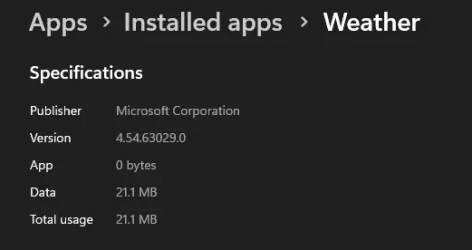
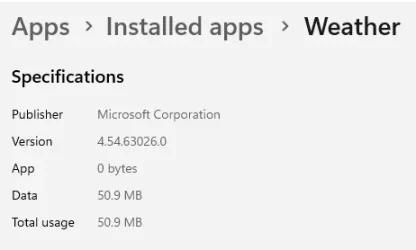
Also what is the version of the weather app please?


Screenshot 2025-10-07 181202.webp
 

My Computers

System One System Two

  • OS
    All Branches but Release
    Computer type
    Laptop
    Manufacturer/Model
    Acer Nitro ANV15-51
    CPU
    AMD Ryzen 7 7735HS 3200-4500 Mhz 8 cores x 2
    Motherboard
    Sportage_RBH
    Memory
    32 GB DDR5
    Graphics Card(s)
    Radeon Graphic / NVIDIA GeForce RTX 4060 8 GB GDDR6
    Sound Card
    AMD/Realtek(R) Audio
    Monitor(s) Displays
    Integrated Monitor (15.3"vis)
    Screen Resolution
    FHD 1920X1080 16:9 144Hz
    Hard Drives
    KINGSTON OM8SEP4512Q-AA 1TB
    Western Digital 256GB
    PSU
    19V DC 6.32 A 120 W
    Cooling
    Dual Fans
    Mouse
    MS Bluetooth
    Internet Speed
    Fiber 1GB Cox -us & 1GB Orange-fr
    Browser
    Edge Canary- Firefox Nightly-Chrome Dev-Chrome Dev
    Antivirus
    Windows Defender
  • Operating System
    Windows 11 Beta
    Computer type
    Laptop
    Manufacturer/Model
    Asus X751BP
    CPU
    AMD A9-9420
    Memory
    8 GB of DDR4
    Graphics card(s)
    AMD Radeon R5
    Screen Resolution
    1600x900
    Hard Drives
    Seagate 1 TB
If you are speaking of The MSN Weather App, I am have no issues with it.
 

My Computers

System One System Two

  • OS
    Windows11 Pro 26200.8524
    Computer type
    PC/Desktop
    Manufacturer/Model
    Dell Alienware Aurora R16
    CPU
    Intel Core i9 14900F (24 -Core, 68 MB Total Cache)
    Motherboard
    Dell Alienware
    Memory
    32GB DDR5
    Graphics Card(s)
    RTX 4080 Super w/581.95
    Sound Card
    Realtec
    Monitor(s) Displays
    Corsair XENEON 32QHD165
    Screen Resolution
    2560 X 1440
    Hard Drives
    1-2TB Samsung 990 Pro PCIe NVMe M2 SSD
    1-4TB Samsung 990 Pro PCIe NVMe M2 SSD
    PSU
    1000 Watt Platinum Dell
    Case
    Alienware
    Cooling
    Liquid Closed Loop
    Keyboard
    Logitech MK270 Wireless Keyboard
    Mouse
    Logitech MK270 Wireless
    Internet Speed
    100Gb's Down-20 Up
    Browser
    Firefox 151.0.2
    Antivirus
    Defender
    Other Info
    Very Quiet And Fast
    CyberPower UPS CP1500PFCLCD
  • Operating System
    PClinuxOS Mate (2025.7)
    Computer type
    PC/Desktop
    Manufacturer/Model
    Intel
    CPU
    13th Gen Inter(R) Core(TM) i3-1315U
    Motherboard
    Intel
    Memory
    64 GB DDR4 @3200 MHz.
    Graphics card(s)
    Internal
    Sound Card
    None
    Monitor(s) Displays
    Dell 2419HGCF
    Screen Resolution
    1920 X 1080
    Hard Drives
    SAMSUNG 980 PRO SSD 2TB, PCIe 4.0 M.2 2280
    PSU
    Chicony 30 Watt
    Case
    Small
    Keyboard
    Dell
    Mouse
    Razor
    Internet Speed
    1GB
    Browser
    Slimjet
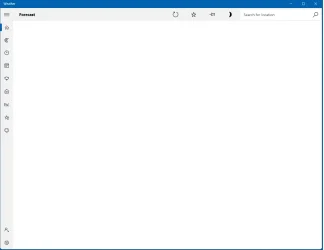
Here is a screenshot.
1759855179163.webp
 

My Computer

System One

  • OS
    Windows 10 Pro
    Computer type
    Laptop
    Manufacturer/Model
    Dell XPS 17 L702X
    CPU
    Intel Core i7-26700QM CPU @ 2.20 GHz
    Motherboard
    Dell Inc. 0K4H3G
    Memory
    8 GB
    Graphics Card(s)
    NVIDIA GeForce GT550M
    Sound Card
    Realtek Audio
    Monitor(s) Displays
    1
    Screen Resolution
    1920 x 1080
    Hard Drives
    1 Samsung SSD. 1 Original Dell HHD.
    PSU
    N/A
    Case
    N/A
    Cooling
    N/A
    Keyboard
    Built in
    Mouse
    Track Pad
    Internet Speed
    300 Gb
Here is a screenshot of the app opened.
1759855534513.webp
 

My Computer

System One

  • OS
    Windows 10 Pro
    Computer type
    Laptop
    Manufacturer/Model
    Dell XPS 17 L702X
    CPU
    Intel Core i7-26700QM CPU @ 2.20 GHz
    Motherboard
    Dell Inc. 0K4H3G
    Memory
    8 GB
    Graphics Card(s)
    NVIDIA GeForce GT550M
    Sound Card
    Realtek Audio
    Monitor(s) Displays
    1
    Screen Resolution
    1920 x 1080
    Hard Drives
    1 Samsung SSD. 1 Original Dell HHD.
    PSU
    N/A
    Case
    N/A
    Cooling
    N/A
    Keyboard
    Built in
    Mouse
    Track Pad
    Internet Speed
    300 Gb

My Computers

System One System Two

  • OS
    Windows11 Pro 26200.8524
    Computer type
    PC/Desktop
    Manufacturer/Model
    Dell Alienware Aurora R16
    CPU
    Intel Core i9 14900F (24 -Core, 68 MB Total Cache)
    Motherboard
    Dell Alienware
    Memory
    32GB DDR5
    Graphics Card(s)
    RTX 4080 Super w/581.95
    Sound Card
    Realtec
    Monitor(s) Displays
    Corsair XENEON 32QHD165
    Screen Resolution
    2560 X 1440
    Hard Drives
    1-2TB Samsung 990 Pro PCIe NVMe M2 SSD
    1-4TB Samsung 990 Pro PCIe NVMe M2 SSD
    PSU
    1000 Watt Platinum Dell
    Case
    Alienware
    Cooling
    Liquid Closed Loop
    Keyboard
    Logitech MK270 Wireless Keyboard
    Mouse
    Logitech MK270 Wireless
    Internet Speed
    100Gb's Down-20 Up
    Browser
    Firefox 151.0.2
    Antivirus
    Defender
    Other Info
    Very Quiet And Fast
    CyberPower UPS CP1500PFCLCD
  • Operating System
    PClinuxOS Mate (2025.7)
    Computer type
    PC/Desktop
    Manufacturer/Model
    Intel
    CPU
    13th Gen Inter(R) Core(TM) i3-1315U
    Motherboard
    Intel
    Memory
    64 GB DDR4 @3200 MHz.
    Graphics card(s)
    Internal
    Sound Card
    None
    Monitor(s) Displays
    Dell 2419HGCF
    Screen Resolution
    1920 X 1080
    Hard Drives
    SAMSUNG 980 PRO SSD 2TB, PCIe 4.0 M.2 2280
    PSU
    Chicony 30 Watt
    Case
    Small
    Keyboard
    Dell
    Mouse
    Razor
    Internet Speed
    1GB
    Browser
    Slimjet

My Computers

System One System Two

  • OS
    All Branches but Release
    Computer type
    Laptop
    Manufacturer/Model
    Acer Nitro ANV15-51
    CPU
    AMD Ryzen 7 7735HS 3200-4500 Mhz 8 cores x 2
    Motherboard
    Sportage_RBH
    Memory
    32 GB DDR5
    Graphics Card(s)
    Radeon Graphic / NVIDIA GeForce RTX 4060 8 GB GDDR6
    Sound Card
    AMD/Realtek(R) Audio
    Monitor(s) Displays
    Integrated Monitor (15.3"vis)
    Screen Resolution
    FHD 1920X1080 16:9 144Hz
    Hard Drives
    KINGSTON OM8SEP4512Q-AA 1TB
    Western Digital 256GB
    PSU
    19V DC 6.32 A 120 W
    Cooling
    Dual Fans
    Mouse
    MS Bluetooth
    Internet Speed
    Fiber 1GB Cox -us & 1GB Orange-fr
    Browser
    Edge Canary- Firefox Nightly-Chrome Dev-Chrome Dev
    Antivirus
    Windows Defender
  • Operating System
    Windows 11 Beta
    Computer type
    Laptop
    Manufacturer/Model
    Asus X751BP
    CPU
    AMD A9-9420
    Memory
    8 GB of DDR4
    Graphics card(s)
    AMD Radeon R5
    Screen Resolution
    1600x900
    Hard Drives
    Seagate 1 TB
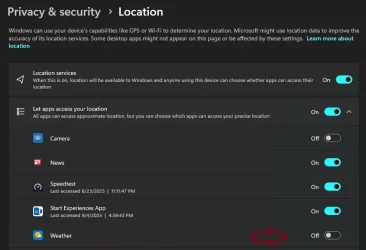
The location was set originally. I decided to let the app run for awhile, and it fills in after about a minute. Strange.
Any reason it would take so long, after it opening right away in the past?

I have location services turned on. And when I type my location it shows up.
 

My Computer

System One

  • OS
    Windows 10 Pro
    Computer type
    Laptop
    Manufacturer/Model
    Dell XPS 17 L702X
    CPU
    Intel Core i7-26700QM CPU @ 2.20 GHz
    Motherboard
    Dell Inc. 0K4H3G
    Memory
    8 GB
    Graphics Card(s)
    NVIDIA GeForce GT550M
    Sound Card
    Realtek Audio
    Monitor(s) Displays
    1
    Screen Resolution
    1920 x 1080
    Hard Drives
    1 Samsung SSD. 1 Original Dell HHD.
    PSU
    N/A
    Case
    N/A
    Cooling
    N/A
    Keyboard
    Built in
    Mouse
    Track Pad
    Internet Speed
    300 Gb
The location was set originally. I decided to let the app run for awhile, and it fills in after about a minute. Strange.
Any reason it would take so long, after it opening right away in the past?

I have location services turned on. And when I type my location it shows up.
Another MS App called Maps was discontinued so maybe it had to wait for your input to confirm your location.
Who knows.
If it's working, could you mark this thread as solved?
 

My Computers

System One System Two

  • OS
    All Branches but Release
    Computer type
    Laptop
    Manufacturer/Model
    Acer Nitro ANV15-51
    CPU
    AMD Ryzen 7 7735HS 3200-4500 Mhz 8 cores x 2
    Motherboard
    Sportage_RBH
    Memory
    32 GB DDR5
    Graphics Card(s)
    Radeon Graphic / NVIDIA GeForce RTX 4060 8 GB GDDR6
    Sound Card
    AMD/Realtek(R) Audio
    Monitor(s) Displays
    Integrated Monitor (15.3"vis)
    Screen Resolution
    FHD 1920X1080 16:9 144Hz
    Hard Drives
    KINGSTON OM8SEP4512Q-AA 1TB
    Western Digital 256GB
    PSU
    19V DC 6.32 A 120 W
    Cooling
    Dual Fans
    Mouse
    MS Bluetooth
    Internet Speed
    Fiber 1GB Cox -us & 1GB Orange-fr
    Browser
    Edge Canary- Firefox Nightly-Chrome Dev-Chrome Dev
    Antivirus
    Windows Defender
  • Operating System
    Windows 11 Beta
    Computer type
    Laptop
    Manufacturer/Model
    Asus X751BP
    CPU
    AMD A9-9420
    Memory
    8 GB of DDR4
    Graphics card(s)
    AMD Radeon R5
    Screen Resolution
    1600x900
    Hard Drives
    Seagate 1 TB
Done. Thanks for your help.
 

My Computer

System One

  • OS
    Windows 10 Pro
    Computer type
    Laptop
    Manufacturer/Model
    Dell XPS 17 L702X
    CPU
    Intel Core i7-26700QM CPU @ 2.20 GHz
    Motherboard
    Dell Inc. 0K4H3G
    Memory
    8 GB
    Graphics Card(s)
    NVIDIA GeForce GT550M
    Sound Card
    Realtek Audio
    Monitor(s) Displays
    1
    Screen Resolution
    1920 x 1080
    Hard Drives
    1 Samsung SSD. 1 Original Dell HHD.
    PSU
    N/A
    Case
    N/A
    Cooling
    N/A
    Keyboard
    Built in
    Mouse
    Track Pad
    Internet Speed
    300 Gb
  • Like
Reactions: OAT

Latest Support Threads

Back
Top Bottom