Microsoft Word 2021 Auto-Complete feature quit working for me in Windows 11


Rumpl

Member
Local time
8:51 PM
Posts
6
OS
Windows 11 Pro version 21H2 build 22000.856
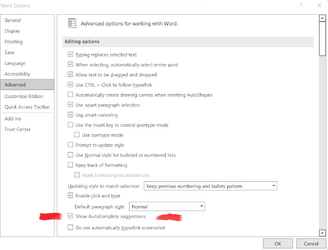
Here is what Word 2021 used to do before I had to have a new hard drive installed and Windows 11 re-installed. I also re-installed Microsoft Office 2021 Professional Plus. After the repairs, Word 2021 Auto-complete stopped working. I checked my settings and AutoComplete is still checked.

1. Open Word and select New Document.
2. In the new document, I start typing the current day of the week (today is Sunday, for example) so I type Sun
3. As I begin typing the name of the day, the auto-complete feature should present a "tool-tip" very close to the text cursor within Word 2021. The tool-tip is the completed name of the day you are typing. You can press the ENTER key to acknowledge the tool-tip, which tells Word to complete the word you are typing with the text in the tool-tip. Therefore, Sunday will be auto-completed.
4. If you follow the name of the day with a comma (regardless of if you accepted the auto-complete), the auto-complete feature should present another tool-tip with the full current date. (Example: September 4, 2022) I can press the ENTER key to acknowledge the tool-tip, causing Word to enter the full date as if I had typed it.

Any ideas on how to fix the problem will be appreciated.
 

Attachments
  • Auto-complete Screenshot 2022-09-04 110105.png
    Auto-complete Screenshot 2022-09-04 110105.png
    36.9 KB · Views: 4

My Computer My Computer

At a glance

Windows 11 Pro version 21H2 build 22000.85611th Gen Intel(R) Core(TM) i7-11800H @ 2.30GH...16.0 GB (15.7 GB usable)NVID1A GeForce RTX 3050 Ti Laptop GPU
OS
Windows 11 Pro version 21H2 build 22000.856
Computer type
Laptop
Manufacturer/Model
Dell XPS 15 9510
CPU
11th Gen Intel(R) Core(TM) i7-11800H @ 2.30GHz 2.30 G
Memory
16.0 GB (15.7 GB usable)
Graphics Card(s)
NVID1A GeForce RTX 3050 Ti Laptop GPU
Browser
Firefox
Antivirus
Bitdefender Total Security Suite
I also have office 2021 version 2208 build 15601.20088. Auto complete works fine for me. Check that you have the latest version installed. You might try uninstall and reinstall.
 

My Computers My Computers

  • At a glance

    Windows 11 Pro 25H2 26200.9168i9-10900 10 core 20 threads32 gbnone-Intel UHD Graphics 630
    OS
    Windows 11 Pro 25H2 26200.9168
    Computer type
    PC/Desktop
    Manufacturer/Model
    Dell Optiplex 7080
    CPU
    i9-10900 10 core 20 threads
    Motherboard
    DELL 0J37VM
    Memory
    32 gb
    Graphics Card(s)
    none-Intel UHD Graphics 630
    Sound Card
    Integrated Realtek
    Monitor(s) Displays
    Benq 27
    Screen Resolution
    2560x1440
    Hard Drives
    2x1tb Solidigm m.2 nvme /External drives 512gb Samsung m.2 sata+2tb Kingston m2.nvme
    PSU
    500w
    Case
    MT
    Cooling
    Dell Premium
    Keyboard
    Logitech wired
    Mouse
    Logitech wireless
    Internet Speed
    so slow I'm too embarrassed to tell
    Browser
    #1 Edge #2 Firefox
    Antivirus
    Defender+MWB Premium
  • At a glance

    Windows 11 Pro 24H2 26200.9168AMD Ryzen 7 6800U32 gbintegrated
    Operating System
    Windows 11 Pro 24H2 26200.9168
    Computer type
    PC/Desktop
    Manufacturer/Model
    Beelink Mini PC SER5
    CPU
    AMD Ryzen 7 6800U
    Memory
    32 gb
    Graphics card(s)
    integrated
    Sound Card
    integrated
    Monitor(s) Displays
    Benq 27
    Screen Resolution
    2560x1440
    Hard Drives
    1TB Crucial nvme
    Keyboard
    Logitech wired
    Mouse
    Logitech wireless
    Internet Speed
    still too embarrassed to tell
    Browser
    Firefox
    Antivirus
    Defender
  • System 3 is non compliant Dell 9020 i7-4770/24gb ram Win11 PRO 26200.9168
Here is what Word 2021 used to do before I had to have a new hard drive installed and Windows 11 re-installed. I also re-installed Microsoft Office 2021 Professional Plus. After the repairs, Word 2021 Auto-complete stopped working. I checked my settings and AutoComplete is still checked.

1. Open Word and select New Document.
2. In the new document, I start typing the current day of the week (today is Sunday, for example) so I type Sun
3. As I begin typing the name of the day, the auto-complete feature should present a "tool-tip" very close to the text cursor within Word 2021. The tool-tip is the completed name of the day you are typing. You can press the ENTER key to acknowledge the tool-tip, which tells Word to complete the word you are typing with the text in the tool-tip. Therefore, Sunday will be auto-completed.
4. If you follow the name of the day with a comma (regardless of if you accepted the auto-complete), the auto-complete feature should present another tool-tip with the full current date. (Example: September 4, 2022) I can press the ENTER key to acknowledge the tool-tip, causing Word to enter the full date as if I had typed it.

Any ideas on how to fix the problem will be appreciated.
@Rumpl From what you have said, it looks like you have the stand alone version of Microsoft Office 2021 Pro Plus.

@glasskuter from what you have said, it looks to me like you may have the subscription to Microsoft Office 2021.

I'm not trying to nitpick, but to clarify whether there is a difference between your two Office 2021s. Especially since Microsoft frequently updates the subscription version while the stand alone version rarely gets an update, if ever.

I have a subscription to Microsoft 365, and when it auto completes something, I have to press tab rather than enter. So far, it is working properly.

Disclaimer: It could be that both tab and enter work for autocomplete.
 

My Computers My Computers

  • At a glance

    Windows 11 23H2 22631.2861Intel(R) Core(TM) i7-10700 CPU @ 2.90GHz 2.90...16384 MBytesIntel UHD Graphics 630
    OS
    Windows 11 23H2 22631.2861
    Computer type
    PC/Desktop
    Manufacturer/Model
    HP Envy TE01-1xxx
    CPU
    Intel(R) Core(TM) i7-10700 CPU @ 2.90GHz 2.90 GHz
    Motherboard
    16.0GB Dual-Channel Unknown @ 1463MHz (21-21-21-47)
    Memory
    16384 MBytes
    Graphics Card(s)
    Intel UHD Graphics 630
    Sound Card
    Realtek High Definition Audio
    Monitor(s) Displays
    Monitor 1 - Acer 27" Monitor 2 - Acer 27"
    Screen Resolution
    1920 x 1080
    Hard Drives
    WDC PC SN530 SDBPNPZ-512G-1006 (SSD)
    Seagate ST1000DM003-1SB102
    Seagate BUP Slim SCSI Disk Device (SSD)
    PSU
    HP
    Case
    HP
    Cooling
    Standard
    Keyboard
    Logitech Wave K350
    Mouse
    Logitech M705
    Internet Speed
    500 mbps
    Browser
    Firefox
    Antivirus
    Windows Defender
    Other Info
    That's all Folks!
  • At a glance

    Windows 11Intel Core i7 (10th gen) 1070016 GBIntel UHD Graphics 630
    Operating System
    Windows 11
    Computer type
    PC/Desktop
    Manufacturer/Model
    HP
    CPU
    Intel Core i7 (10th gen) 10700
    Motherboard
    Intel
    Memory
    16 GB
    Graphics card(s)
    Intel UHD Graphics 630
    Sound Card
    Built-in
    Monitor(s) Displays
    Acer 27" & Samsung 24"
    Screen Resolution
    1920 x
    Hard Drives
    SSD (512 GB)
    HDD (1 TB)
    Seagate
    PSU
    Intel i7 10th Generation
    Case
    HP
    Cooling
    HP/Intel?
    Keyboard
    Logitech Wave K350
    Mouse
    Logitech M705
    Internet Speed
    50 mbps
    Browser
    Firefox 90.2
    Antivirus
    Windows Defender
    Other Info
    Headphone/Microphone Combo
    SuperSpeed USB Type-A (4 on front)
    HP 3-in-One Card Readr
    SuperSpeed USB Type-C
    DVD Writer

My Computers My Computers

  • At a glance

    Windows 11 Pro 25H2 26200.9168i9-10900 10 core 20 threads32 gbnone-Intel UHD Graphics 630
    OS
    Windows 11 Pro 25H2 26200.9168
    Computer type
    PC/Desktop
    Manufacturer/Model
    Dell Optiplex 7080
    CPU
    i9-10900 10 core 20 threads
    Motherboard
    DELL 0J37VM
    Memory
    32 gb
    Graphics Card(s)
    none-Intel UHD Graphics 630
    Sound Card
    Integrated Realtek
    Monitor(s) Displays
    Benq 27
    Screen Resolution
    2560x1440
    Hard Drives
    2x1tb Solidigm m.2 nvme /External drives 512gb Samsung m.2 sata+2tb Kingston m2.nvme
    PSU
    500w
    Case
    MT
    Cooling
    Dell Premium
    Keyboard
    Logitech wired
    Mouse
    Logitech wireless
    Internet Speed
    so slow I'm too embarrassed to tell
    Browser
    #1 Edge #2 Firefox
    Antivirus
    Defender+MWB Premium
  • At a glance

    Windows 11 Pro 24H2 26200.9168AMD Ryzen 7 6800U32 gbintegrated
    Operating System
    Windows 11 Pro 24H2 26200.9168
    Computer type
    PC/Desktop
    Manufacturer/Model
    Beelink Mini PC SER5
    CPU
    AMD Ryzen 7 6800U
    Memory
    32 gb
    Graphics card(s)
    integrated
    Sound Card
    integrated
    Monitor(s) Displays
    Benq 27
    Screen Resolution
    2560x1440
    Hard Drives
    1TB Crucial nvme
    Keyboard
    Logitech wired
    Mouse
    Logitech wireless
    Internet Speed
    still too embarrassed to tell
    Browser
    Firefox
    Antivirus
    Defender
  • System 3 is non compliant Dell 9020 i7-4770/24gb ram Win11 PRO 26200.9168
No, I have 2021 Pro Plus
Ah, standalone, of course? Thanks for straightening me out. Normally when I see a build number, it makes me think it is a subscription. Sorry 'bout dat!
 

My Computers My Computers

  • At a glance

    Windows 11 23H2 22631.2861Intel(R) Core(TM) i7-10700 CPU @ 2.90GHz 2.90...16384 MBytesIntel UHD Graphics 630
    OS
    Windows 11 23H2 22631.2861
    Computer type
    PC/Desktop
    Manufacturer/Model
    HP Envy TE01-1xxx
    CPU
    Intel(R) Core(TM) i7-10700 CPU @ 2.90GHz 2.90 GHz
    Motherboard
    16.0GB Dual-Channel Unknown @ 1463MHz (21-21-21-47)
    Memory
    16384 MBytes
    Graphics Card(s)
    Intel UHD Graphics 630
    Sound Card
    Realtek High Definition Audio
    Monitor(s) Displays
    Monitor 1 - Acer 27" Monitor 2 - Acer 27"
    Screen Resolution
    1920 x 1080
    Hard Drives
    WDC PC SN530 SDBPNPZ-512G-1006 (SSD)
    Seagate ST1000DM003-1SB102
    Seagate BUP Slim SCSI Disk Device (SSD)
    PSU
    HP
    Case
    HP
    Cooling
    Standard
    Keyboard
    Logitech Wave K350
    Mouse
    Logitech M705
    Internet Speed
    500 mbps
    Browser
    Firefox
    Antivirus
    Windows Defender
    Other Info
    That's all Folks!
  • At a glance

    Windows 11Intel Core i7 (10th gen) 1070016 GBIntel UHD Graphics 630
    Operating System
    Windows 11
    Computer type
    PC/Desktop
    Manufacturer/Model
    HP
    CPU
    Intel Core i7 (10th gen) 10700
    Motherboard
    Intel
    Memory
    16 GB
    Graphics card(s)
    Intel UHD Graphics 630
    Sound Card
    Built-in
    Monitor(s) Displays
    Acer 27" & Samsung 24"
    Screen Resolution
    1920 x
    Hard Drives
    SSD (512 GB)
    HDD (1 TB)
    Seagate
    PSU
    Intel i7 10th Generation
    Case
    HP
    Cooling
    HP/Intel?
    Keyboard
    Logitech Wave K350
    Mouse
    Logitech M705
    Internet Speed
    50 mbps
    Browser
    Firefox 90.2
    Antivirus
    Windows Defender
    Other Info
    Headphone/Microphone Combo
    SuperSpeed USB Type-A (4 on front)
    HP 3-in-One Card Readr
    SuperSpeed USB Type-C
    DVD Writer
Just an FYI . . . Word is doing is doing the auto complete for me, but does not allow enter to complete the auto complete. Only tab will work in my subscription, so i'm guessing that Microsoft changed things up.
 

My Computers My Computers

  • At a glance

    Windows 11 23H2 22631.2861Intel(R) Core(TM) i7-10700 CPU @ 2.90GHz 2.90...16384 MBytesIntel UHD Graphics 630
    OS
    Windows 11 23H2 22631.2861
    Computer type
    PC/Desktop
    Manufacturer/Model
    HP Envy TE01-1xxx
    CPU
    Intel(R) Core(TM) i7-10700 CPU @ 2.90GHz 2.90 GHz
    Motherboard
    16.0GB Dual-Channel Unknown @ 1463MHz (21-21-21-47)
    Memory
    16384 MBytes
    Graphics Card(s)
    Intel UHD Graphics 630
    Sound Card
    Realtek High Definition Audio
    Monitor(s) Displays
    Monitor 1 - Acer 27" Monitor 2 - Acer 27"
    Screen Resolution
    1920 x 1080
    Hard Drives
    WDC PC SN530 SDBPNPZ-512G-1006 (SSD)
    Seagate ST1000DM003-1SB102
    Seagate BUP Slim SCSI Disk Device (SSD)
    PSU
    HP
    Case
    HP
    Cooling
    Standard
    Keyboard
    Logitech Wave K350
    Mouse
    Logitech M705
    Internet Speed
    500 mbps
    Browser
    Firefox
    Antivirus
    Windows Defender
    Other Info
    That's all Folks!
  • At a glance

    Windows 11Intel Core i7 (10th gen) 1070016 GBIntel UHD Graphics 630
    Operating System
    Windows 11
    Computer type
    PC/Desktop
    Manufacturer/Model
    HP
    CPU
    Intel Core i7 (10th gen) 10700
    Motherboard
    Intel
    Memory
    16 GB
    Graphics card(s)
    Intel UHD Graphics 630
    Sound Card
    Built-in
    Monitor(s) Displays
    Acer 27" & Samsung 24"
    Screen Resolution
    1920 x
    Hard Drives
    SSD (512 GB)
    HDD (1 TB)
    Seagate
    PSU
    Intel i7 10th Generation
    Case
    HP
    Cooling
    HP/Intel?
    Keyboard
    Logitech Wave K350
    Mouse
    Logitech M705
    Internet Speed
    50 mbps
    Browser
    Firefox 90.2
    Antivirus
    Windows Defender
    Other Info
    Headphone/Microphone Combo
    SuperSpeed USB Type-A (4 on front)
    HP 3-in-One Card Readr
    SuperSpeed USB Type-C
    DVD Writer
To clarify, I have the stand-alone version of Microsoft Office Professional Plus 2021. I do not have the subscription. Also, when it worked, the prompt I got said "Press Enter to auto-complete". Perhaps pressing the TAB key would have worked also.

This is not a "show stopper" issue for me; it is just something that used to work properly and now it doesn't. 🤷‍♂️
 

My Computer My Computer

At a glance

Windows 11 Pro version 21H2 build 22000.85611th Gen Intel(R) Core(TM) i7-11800H @ 2.30GH...16.0 GB (15.7 GB usable)NVID1A GeForce RTX 3050 Ti Laptop GPU
OS
Windows 11 Pro version 21H2 build 22000.856
Computer type
Laptop
Manufacturer/Model
Dell XPS 15 9510
CPU
11th Gen Intel(R) Core(TM) i7-11800H @ 2.30GHz 2.30 G
Memory
16.0 GB (15.7 GB usable)
Graphics Card(s)
NVID1A GeForce RTX 3050 Ti Laptop GPU
Browser
Firefox
Antivirus
Bitdefender Total Security Suite

To clarify, I have the stand-alone version of Microsoft Office Professional Plus 2021. I do not have the subscription. Also, when it worked, the prompt I got said "Press Enter to auto-complete". Perhaps pressing the TAB key would have worked also.

This is not a "show stopper" issue for me; it is just something that used to work properly and now it doesn't. 🤷‍♂️
It wouldn't be a show stopper for me either, but with an Injured finger, when voice typing failed, it's really tough.o_O
 

My Computers My Computers

  • At a glance

    Windows 11 23H2 22631.2861Intel(R) Core(TM) i7-10700 CPU @ 2.90GHz 2.90...16384 MBytesIntel UHD Graphics 630
    OS
    Windows 11 23H2 22631.2861
    Computer type
    PC/Desktop
    Manufacturer/Model
    HP Envy TE01-1xxx
    CPU
    Intel(R) Core(TM) i7-10700 CPU @ 2.90GHz 2.90 GHz
    Motherboard
    16.0GB Dual-Channel Unknown @ 1463MHz (21-21-21-47)
    Memory
    16384 MBytes
    Graphics Card(s)
    Intel UHD Graphics 630
    Sound Card
    Realtek High Definition Audio
    Monitor(s) Displays
    Monitor 1 - Acer 27" Monitor 2 - Acer 27"
    Screen Resolution
    1920 x 1080
    Hard Drives
    WDC PC SN530 SDBPNPZ-512G-1006 (SSD)
    Seagate ST1000DM003-1SB102
    Seagate BUP Slim SCSI Disk Device (SSD)
    PSU
    HP
    Case
    HP
    Cooling
    Standard
    Keyboard
    Logitech Wave K350
    Mouse
    Logitech M705
    Internet Speed
    500 mbps
    Browser
    Firefox
    Antivirus
    Windows Defender
    Other Info
    That's all Folks!
  • At a glance

    Windows 11Intel Core i7 (10th gen) 1070016 GBIntel UHD Graphics 630
    Operating System
    Windows 11
    Computer type
    PC/Desktop
    Manufacturer/Model
    HP
    CPU
    Intel Core i7 (10th gen) 10700
    Motherboard
    Intel
    Memory
    16 GB
    Graphics card(s)
    Intel UHD Graphics 630
    Sound Card
    Built-in
    Monitor(s) Displays
    Acer 27" & Samsung 24"
    Screen Resolution
    1920 x
    Hard Drives
    SSD (512 GB)
    HDD (1 TB)
    Seagate
    PSU
    Intel i7 10th Generation
    Case
    HP
    Cooling
    HP/Intel?
    Keyboard
    Logitech Wave K350
    Mouse
    Logitech M705
    Internet Speed
    50 mbps
    Browser
    Firefox 90.2
    Antivirus
    Windows Defender
    Other Info
    Headphone/Microphone Combo
    SuperSpeed USB Type-A (4 on front)
    HP 3-in-One Card Readr
    SuperSpeed USB Type-C
    DVD Writer
Not sure how to start a new thread, so this is the closest I found. I was trying to see if I could put a sort of Excel comment into Word. I sort of did so the first time, but after that it eluded me. The first (successful) result looked just like a regular word. Double click and it opened a notepad file with info and a scroll bar if it didn't fit the page. Click outside and it went back to the word.

I loaded the notepad file as "object". I was able to use the crop tool to get the icon out. I renamed to the word I used to click on. As I couldn't get it to drag anywhere, I cut and pasted into a text box. Had to zero all margins, and the end result looked just like a regular word. I think I used the crop tool to make the word fit properly next to all the regular text words.

So, I tried again, but didn't get anywhere. I can double click to open, and it does even with a Wordpad text and picture.

However, even though I have zeroed the margins and position, there is still a very large gap for the Object bounding box. Worse yet, I can somewhat make the object inside a textbox smaller. It opens fine but if I open it again it doubles in size compared to what I had, and looks really bad.

The first try was so great, don't know why I couldn't do it again. This also worked in Excel with the first try. The next ones opened in Excel but had the same problems as in Word.

Anyone have any ideas?
 

My Computer My Computer

At a glance

Windows 10 physical Windows 11 virtual12128Nvidia
OS
Windows 10 physical Windows 11 virtual
Computer type
PC/Desktop
Manufacturer/Model
Custom Built
CPU
12
Motherboard
Asus
Memory
128
Graphics Card(s)
Nvidia
Screen Resolution
1360x768
Hard Drives
2
PSU
850
Case
Cooler Master
Cooling
fans
Keyboard
ergonomic
Mouse
wired
Browser
several
Antivirus
abast
Not sure how to start a new thread, so this is the closest I found. I was trying to see if I could put a sort of Excel comment into Word. I sort of did so the first time, but after that it eluded me. The first (successful) result looked just like a regular word. Double click and it opened a notepad file with info and a scroll bar if it didn't fit the page. Click outside and it went back to the word.

I loaded the notepad file as "object". I was able to use the crop tool to get the icon out. I renamed to the word I used to click on. As I couldn't get it to drag anywhere, I cut and pasted into a text box. Had to zero all margins, and the end result looked just like a regular word. I think I used the crop tool to make the word fit properly next to all the regular text words.

So, I tried again, but didn't get anywhere. I can double click to open, and it does even with a Wordpad text and picture.

However, even though I have zeroed the margins and position, there is still a very large gap for the Object bounding box. Worse yet, I can somewhat make the object inside a textbox smaller. It opens fine but if I open it again it doubles in size compared to what I had, and looks really bad.

The first try was so great, don't know why I couldn't do it again. This also worked in Excel with the first try. The next ones opened in Excel but had the same problems as in Word.

Anyone have any ideas?
Edited to add, I am finding the Insert Object works much better in Excel. If Microsoft could make the Object icon blank in a textbox, we could put any word in there we want and able to drag and drop anywhere we want. Just think - with this we can have multiple comments in Word. I use Excel for my ancestry projects. With multiple sheets in a workbook I can keep my research in there and never lose it again. And with the Object trick, I can insert into Excel, leave the size as is, then double click to open. Everything is at my fingertips. I can keep web links in an Excel sheet, put pictures of each family into different workbooks. No limit to what Excel can do. If MS would only make it more text friendly.
 

My Computer My Computer

At a glance

Windows 10 physical Windows 11 virtual12128Nvidia
OS
Windows 10 physical Windows 11 virtual
Computer type
PC/Desktop
Manufacturer/Model
Custom Built
CPU
12
Motherboard
Asus
Memory
128
Graphics Card(s)
Nvidia
Screen Resolution
1360x768
Hard Drives
2
PSU
850
Case
Cooler Master
Cooling
fans
Keyboard
ergonomic
Mouse
wired
Browser
several
Antivirus
abast
Edited to add, I am finding the Insert Object works much better in Excel. If Microsoft could make the Object icon blank in a textbox, we could put any word in there we want and able to drag and drop anywhere we want. Just think - with this we can have multiple comments in Word. I use Excel for my ancestry projects. With multiple sheets in a workbook I can keep my research in there and never lose it again. And with the Object trick, I can insert into Excel, leave the size as is, then double click to open. Everything is at my fingertips. I can keep web links in an Excel sheet, put pictures of each family into different workbooks. No limit to what Excel can do. If MS would only make it more text friendly.
I got the Insert Object to do what I want. With a lot of research materials, I can keep track so much better. Just double click and it opens. Wonderful! However, now there is a stumbling block that only the Microsoft Gods can fix. And that is size. While I can link to an object, it appears at full size and not the fit in a cell that I want. So embed it is. But now, size can grow very fast, plus an underpowered laptop would never be able to handle all this.
So: what about saving Excel files similar to Microsoft Onenote? The Sections are saved individually and not as a whole file.
All that is needed is to have each tab in a Workbook saved separately like Onenote does. This way we can still have many tabs show in the Workbook.
Maybe we can even shift/click on any tab to open a worksheet and divide into further tabs, each one being saved individually (or not, but still there). If MS can do this for Onenote then they should be able to do so for Excel.

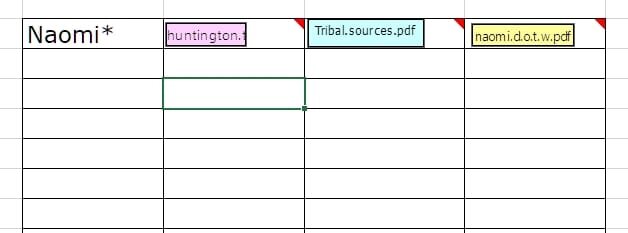
The following jpeg is what I have been working on. Very pleased with this. In addition, I can still insert comments for more info, the weblink where I found it, etc.
 

Attachments

  • object.jpg
    object.jpg
    12.3 KB · Views: 2

My Computer My Computer

At a glance

Windows 10 physical Windows 11 virtual12128Nvidia
OS
Windows 10 physical Windows 11 virtual
Computer type
PC/Desktop
Manufacturer/Model
Custom Built
CPU
12
Motherboard
Asus
Memory
128
Graphics Card(s)
Nvidia
Screen Resolution
1360x768
Hard Drives
2
PSU
850
Case
Cooler Master
Cooling
fans
Keyboard
ergonomic
Mouse
wired
Browser
several
Antivirus
abast

Latest Support Threads

Back
Top Bottom