Solved Missing folder info.


What is the path to Z if it's a mounted path, or
Is Z a simple local disk that has been allocated that drive letter?

I'd still like to see the result of opening that file location & its parent folders.
And I'd like to see the folder & file that you clicked on to run that audio track. It must have been visible for you to have clicked on it.

I cannot get rid of the feeling that there's a misunderstanding between us.


Denis
 

My Computer

System One

  • OS
    Windows 11 Home x64 Version 25H2 Build 26200.8037
This I don't understand how to do"The same file path in File explorer"
Like this . . .

Right Click > Open File Location


1772568769533.webp

Then a screen capture of the actual File location . . .

1772568901289.webp

But yours will look different because I just happen to be in Windows 7 when I did this
 

My Computers

System One System Two

  • OS
    Windows 11 (up to date)
    Computer type
    PC/Desktop
    Manufacturer/Model
    Custom
    CPU
    Intel i5 12400
    Motherboard
    Gigabyte Z690 UA
    Memory
    Corsair Vengeance LPX 16GB
    Graphics Card(s)
    On Board the Z690
    Sound Card
    On Board
    Monitor(s) Displays
    43" Samsung tu7000
    Screen Resolution
    2560 x 1440
    Hard Drives
    SAMSUNG SSD 1TB NVMe M.2
    PSU
    Thermaltake smart 500w 80+
    Case
    LIAN LANCOOL_205M
    Cooling
    Bunch of fans . . . :o) (lights dont work)
    Keyboard
    Unicomp: Ultra Classic White Buckling Spring USB
    Mouse
    M510
    Internet Speed
    50mbps on Ethernet
    Browser
    Fire Fox
    Antivirus
    Windows
    Other Info
    Love this computer but I still prefer Win-7 like I love my old Lazy Boy Recliner . . . it just feels better.
  • Operating System
    WIN-7-64BIT and Win-11 pro for testing on unsupported hardware
    Computer type
    PC/Desktop
    Manufacturer/Model
    Home built
    CPU
    i5-3570K CPU @ 3.40GHz, 3801 Mhz, 4 Core(s), 4 Logical Processor(s)
    Motherboard
    GA-Z77-HD3
    Memory
    16 GB - Crucial Ballistick 4GB PC3-14900 DDR3-1333 MHz
    Graphics card(s)
    NVIDIA GeForce GTX 1050
    Sound Card
    On Board
    Monitor(s) Displays
    ASUS VP278
    Screen Resolution
    1920 x 1080
    Hard Drives
    4 - internal Samsung 2.5" SSD, 1 WD HDD 7200 and some external drives
    PSU
    EVGA 550w
    Case
    Old Gygabyte Tower
    Cooling
    Yes
    Keyboard
    Unicomp - UNIOP4A USB (like the old IBM Model H that I started with)
    Mouse
    M510
    Internet Speed
    50mbps
    Browser
    Firefox
    Antivirus
    Windows
    Other Info
    The only thing it lack is USB-3.2 on the front face but it has 3.0 on the back
As stated, In File (Windows) Explorer. Browse to Z:\ drive, Is there a Music-2 folder? Inside this is there a Music folder? Inside that, is there a Folk folder? Inside that is there True Colors folder?
(ie) Z;\Music-2\Music\Folk\True Colors? Open this folder and take a screenshot of it and attach it in your next post
 

My Computer

System One

  • OS
    Windows 11 Pro Insider 64 bit 25H2 26200.5742
    Computer type
    PC/Desktop
    Manufacturer/Model
    Gigabyte Z390 UD
    CPU
    Intel Core i7 9700K 3.60
    Motherboard
    Gigabyte Z390 UD
    Memory
    16 GB
    Graphics Card(s)
    nVidia GEForce RTX 2060 Super
    Sound Card
    onboard
    Monitor(s) Displays
    Two 27" Dell 4K monitors
    Screen Resolution
    3840 x 2160
    Hard Drives
    M.2 NVME SSD, 500 GB; Two 2TB Mechanical HDD's
    PSU
    850w PSU
    Case
    Cyberpower PC
    Cooling
    Water cooled
    Keyboard
    Backlit Cyberpower gaming keyboard
    Mouse
    Backlit Cyberpower gaming mouse
    Internet Speed
    1 GB mbps
    Browser
    Brave
    Antivirus
    Windows Security
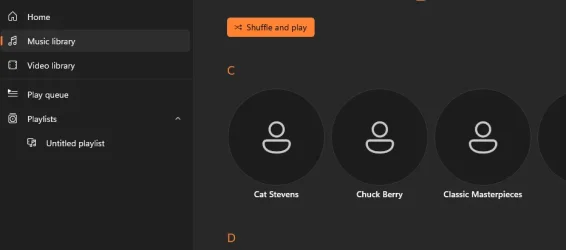
The Media player shows the albums like this, I click on it and it plays. If I right click on a song it gives me the path I sent you.
 

Attachments

  • 2026-03-03 17_12_01-.webp
    2026-03-03 17_12_01-.webp
    12.3 KB · Views: 1

My Computer

System One

  • OS
    Win 11
    Computer type
    PC/Desktop
    CPU
    ?
    Motherboard
    ?
    Memory
    16
    Graphics Card(s)
    ?
Your picture in post #20 shows the path of one of your tunes, and that is the information we needed. We also need a screenshot using the instructions in the quote below to compare side by side
As stated, In File (Windows) Explorer. Browse to Z:\ drive, Is there a Music-2 folder? Inside this is there a Music folder? Inside that, is there a Folk folder? Inside that is there True Colors folder?
(ie) Z;\Music-2\Music\Folk\True Colors? Open this folder and take a screenshot of it and attach it in your next post
Now, Please go to the yellow folder in the taskbar (ie) File Explorer and follow the instructions in the quote above and post that Screenshot
 

My Computer

System One

  • OS
    Windows 11 Pro Insider 64 bit 25H2 26200.5742
    Computer type
    PC/Desktop
    Manufacturer/Model
    Gigabyte Z390 UD
    CPU
    Intel Core i7 9700K 3.60
    Motherboard
    Gigabyte Z390 UD
    Memory
    16 GB
    Graphics Card(s)
    nVidia GEForce RTX 2060 Super
    Sound Card
    onboard
    Monitor(s) Displays
    Two 27" Dell 4K monitors
    Screen Resolution
    3840 x 2160
    Hard Drives
    M.2 NVME SSD, 500 GB; Two 2TB Mechanical HDD's
    PSU
    850w PSU
    Case
    Cyberpower PC
    Cooling
    Water cooled
    Keyboard
    Backlit Cyberpower gaming keyboard
    Mouse
    Backlit Cyberpower gaming mouse
    Internet Speed
    1 GB mbps
    Browser
    Brave
    Antivirus
    Windows Security
Check Disk Management, make sure Z is Online...

12647.webp
 

My Computers

System One System Two

  • OS
    Windows 11 Pro
    Computer type
    PC/Desktop
    Manufacturer/Model
    ASUS ROG Strix
  • Operating System
    Windows 11 Pro
    Computer type
    Laptop
    Manufacturer/Model
    ASUS VivoBook
Spunk, Thank you! I did what you suggested and I think I figured out my problem. Thanx again, much appreciated everybody!
 

My Computer

System One

  • OS
    Win 11
    Computer type
    PC/Desktop
    CPU
    ?
    Motherboard
    ?
    Memory
    16
    Graphics Card(s)
    ?
What was the problem & how did you fix it?
Posting that could help somebody in the future who lands on this thread after searching online about the same problem.


All the best,
Denis
 

My Computer

System One

  • OS
    Windows 11 Home x64 Version 25H2 Build 26200.8037
It was merely a problem with my storage and inventory skills, or lack thereof.
 

My Computer

System One

  • OS
    Win 11
    Computer type
    PC/Desktop
    CPU
    ?
    Motherboard
    ?
    Memory
    16
    Graphics Card(s)
    ?
It was merely a problem with my storage and inventory skills, or lack thereof.
If you care to elaborate, tell us step by step what you did. You may help other people in the future with the same problem. Then please mark this thread Solved at the top.
 

My Computer

System One

  • OS
    Windows 11 Pro Insider 64 bit 25H2 26200.5742
    Computer type
    PC/Desktop
    Manufacturer/Model
    Gigabyte Z390 UD
    CPU
    Intel Core i7 9700K 3.60
    Motherboard
    Gigabyte Z390 UD
    Memory
    16 GB
    Graphics Card(s)
    nVidia GEForce RTX 2060 Super
    Sound Card
    onboard
    Monitor(s) Displays
    Two 27" Dell 4K monitors
    Screen Resolution
    3840 x 2160
    Hard Drives
    M.2 NVME SSD, 500 GB; Two 2TB Mechanical HDD's
    PSU
    850w PSU
    Case
    Cyberpower PC
    Cooling
    Water cooled
    Keyboard
    Backlit Cyberpower gaming keyboard
    Mouse
    Backlit Cyberpower gaming mouse
    Internet Speed
    1 GB mbps
    Browser
    Brave
    Antivirus
    Windows Security
Back
Top Bottom