MONITORS: No video upon wake-up.


BackSpace

Well-known member
Member
Local time
6:30 PM
Posts
26
Location
Vancouver, B.C.
OS
Version 21H2 (OS Build 22000.2538)
The SLEEP button on my keyboard is assigned to the MONITOR SLEEP function.
There is no problem going to SLEEP. On mouse movement, the monitors are
turned back ON BUT the only visible content is the cursor. With ALL monitors
(3) remaining permanently black, (no matter what I try), the only way back
in is to do a forced power shutdown. This is NOT an intermittent problem.
A solution would be much appreciated.

Thank you for reading
Peter, Vancouver, B.C.
Windows 11 Pro 21H2 (Build 22000.613)
CPU: Dell Inc. OptiPlex 9020 01
VID: Intel(R) HD Graphics 4600
 

My Computer My Computer

At a glance

Version 21H2 (OS Build 22000.2538)Intel(R) Core(TM) i7-4770 CPU @ 3.40GHz32 GigabytesIntel(R) HD Graphics 4600
OS
Version 21H2 (OS Build 22000.2538)
Computer type
PC/Desktop
Manufacturer/Model
Dell Inc. OptiPlex 9020 01
CPU
Intel(R) Core(TM) i7-4770 CPU @ 3.40GHz
Motherboard
Dell Inc. 0PC5F7 A03
Memory
32 Gigabytes
Graphics Card(s)
Intel(R) HD Graphics 4600
Sound Card
Realtek High Definition Audio
Monitor(s) Displays
(#1) Samsung SMS27A550H, (#2) Samsung S24D330, (#3) Samsung SyncMaster SA550
Screen Resolution
(#1) 3840x2160, (#2) 1920x1080, (#3) 1920x1080
Hard Drives
C: D: Fanxiang S101Q 1TB (1024.2 GB) ssd
E: WDC WDS100T2B0A-00SM50 (1000.2 GB) ssd
F: WDC WD10SPZX-21Z10T0 (1000.2 GB) hdd
G: HAJAAN HS512E 512GB (512.1 GB) ssd
PSU
Standard 255 Watt
Case
Tower
Cooling
Fans
Keyboard
PS/2
Mouse
PS/2
Internet Speed
955 Mbps Down, 18 Mbps Up
Browser
Firefox 150.0 (64-bit)
Antivirus
Malwarebytes
Hello and welcome to the forum. Does the same issue occur when you put the computer to sleep the normal way by using the power menu rather than the keyboard sleep button?
(If you don't know, it's on your start menu, power icon in bottom right corner.)
 

My Computers My Computers

  • At a glance

    Windows 11 Pro 25H2 26200.8655i9-10900 10 core 20 threads32 gbnone-Intel UHD Graphics 630
    OS
    Windows 11 Pro 25H2 26200.8655
    Computer type
    PC/Desktop
    Manufacturer/Model
    Dell Optiplex 7080
    CPU
    i9-10900 10 core 20 threads
    Motherboard
    DELL 0J37VM
    Memory
    32 gb
    Graphics Card(s)
    none-Intel UHD Graphics 630
    Sound Card
    Integrated Realtek
    Monitor(s) Displays
    Benq 27
    Screen Resolution
    2560x1440
    Hard Drives
    2x1tb Solidigm m.2 nvme /External drives 512gb Samsung m.2 sata+2tb Kingston m2.nvme
    PSU
    500w
    Case
    MT
    Cooling
    Dell Premium
    Keyboard
    Logitech wired
    Mouse
    Logitech wireless
    Internet Speed
    so slow I'm too embarrassed to tell
    Browser
    #1 Edge #2 Firefox
    Antivirus
    Defender+MWB Premium
  • At a glance

    Windows 11 Pro 24H2 26200.8457AMD Ryzen 7 6800U32 gbintegrated
    Operating System
    Windows 11 Pro 24H2 26200.8457
    Computer type
    PC/Desktop
    Manufacturer/Model
    Beelink Mini PC SER5
    CPU
    AMD Ryzen 7 6800U
    Memory
    32 gb
    Graphics card(s)
    integrated
    Sound Card
    integrated
    Monitor(s) Displays
    Benq 27
    Screen Resolution
    2560x1440
    Hard Drives
    1TB Crucial nvme
    Keyboard
    Logitech wired
    Mouse
    Logitech wireless
    Internet Speed
    still too embarrassed to tell
    Browser
    Firefox
    Antivirus
    Defender
    Other Info
    System 3 is non compliant Dell 9020 i7-4770/24gb ram Win11 PRO 26200.8457
Good day, glasskuter,
Thank you for your welcome and for jumping in.

Re: ... using the power menu rather than the keyboard sleep button?
Yes. The problem is identical as previously described. Also, when using
the command line "NirCmd.exe monitor off" (as written by NirSoft.net).

I should point out that this is a Triple Boot System . . . Windows 10 /
Windows 11 / ZORIN. The monitor SLEEP problem is non-existent when
using Windows 10. It's only a problem when using Windows 11.

And one last thing . . . Hibernate is not in use and has been"disabled".

Peter
 

My Computer My Computer

At a glance

Version 21H2 (OS Build 22000.2538)Intel(R) Core(TM) i7-4770 CPU @ 3.40GHz32 GigabytesIntel(R) HD Graphics 4600
OS
Version 21H2 (OS Build 22000.2538)
Computer type
PC/Desktop
Manufacturer/Model
Dell Inc. OptiPlex 9020 01
CPU
Intel(R) Core(TM) i7-4770 CPU @ 3.40GHz
Motherboard
Dell Inc. 0PC5F7 A03
Memory
32 Gigabytes
Graphics Card(s)
Intel(R) HD Graphics 4600
Sound Card
Realtek High Definition Audio
Monitor(s) Displays
(#1) Samsung SMS27A550H, (#2) Samsung S24D330, (#3) Samsung SyncMaster SA550
Screen Resolution
(#1) 3840x2160, (#2) 1920x1080, (#3) 1920x1080
Hard Drives
C: D: Fanxiang S101Q 1TB (1024.2 GB) ssd
E: WDC WDS100T2B0A-00SM50 (1000.2 GB) ssd
F: WDC WD10SPZX-21Z10T0 (1000.2 GB) hdd
G: HAJAAN HS512E 512GB (512.1 GB) ssd
PSU
Standard 255 Watt
Case
Tower
Cooling
Fans
Keyboard
PS/2
Mouse
PS/2
Internet Speed
955 Mbps Down, 18 Mbps Up
Browser
Firefox 150.0 (64-bit)
Antivirus
Malwarebytes
There are so many things that can cause this that instead of me writing it all, refer to the possible fixes in this article. It covers them all. Screen stays black after waking computer from Sleep Mode

I might add, when you get down to the step of removing your graphics driver, after restart if it assigns the default MS driver, put the system to sleep and see if it will wake up. If it works correctly using the MS driver, that pretty much points to the Intel driver being the problem. I might also add it could be your chipset drivers.

I feel it is going to be a problem with the graphics driver you are using in 11 or your power settings, but run through all the suggestions to try to narrow it down.
If nothing works, report back.
PS: thanks for posting the detailed computer specs. It's a big help.

Edited: Since you are using multiple monitors, it would behoove you to disconnect each of the additional monitors and troubleshoot using only one.
 

My Computers My Computers

  • At a glance

    Windows 11 Pro 25H2 26200.8655i9-10900 10 core 20 threads32 gbnone-Intel UHD Graphics 630
    OS
    Windows 11 Pro 25H2 26200.8655
    Computer type
    PC/Desktop
    Manufacturer/Model
    Dell Optiplex 7080
    CPU
    i9-10900 10 core 20 threads
    Motherboard
    DELL 0J37VM
    Memory
    32 gb
    Graphics Card(s)
    none-Intel UHD Graphics 630
    Sound Card
    Integrated Realtek
    Monitor(s) Displays
    Benq 27
    Screen Resolution
    2560x1440
    Hard Drives
    2x1tb Solidigm m.2 nvme /External drives 512gb Samsung m.2 sata+2tb Kingston m2.nvme
    PSU
    500w
    Case
    MT
    Cooling
    Dell Premium
    Keyboard
    Logitech wired
    Mouse
    Logitech wireless
    Internet Speed
    so slow I'm too embarrassed to tell
    Browser
    #1 Edge #2 Firefox
    Antivirus
    Defender+MWB Premium
  • At a glance

    Windows 11 Pro 24H2 26200.8457AMD Ryzen 7 6800U32 gbintegrated
    Operating System
    Windows 11 Pro 24H2 26200.8457
    Computer type
    PC/Desktop
    Manufacturer/Model
    Beelink Mini PC SER5
    CPU
    AMD Ryzen 7 6800U
    Memory
    32 gb
    Graphics card(s)
    integrated
    Sound Card
    integrated
    Monitor(s) Displays
    Benq 27
    Screen Resolution
    2560x1440
    Hard Drives
    1TB Crucial nvme
    Keyboard
    Logitech wired
    Mouse
    Logitech wireless
    Internet Speed
    still too embarrassed to tell
    Browser
    Firefox
    Antivirus
    Defender
    Other Info
    System 3 is non compliant Dell 9020 i7-4770/24gb ram Win11 PRO 26200.8457
Hi again, glasskuter,

No luck (thus far). I read your recommended article and tried the following . . .

1) Check whether the device is allowed to wake the computer or not. [YES /mouse]
2) Run Power Troubleshooter. [Couldn't find this one]
3) Turn Off Fast Startup. [Looked hi and low... couldn't find it]
4) Rollback the display driver. [I cheated and rolled them forward]
from Intel v20.19.15.4835 to v20.19.15.5063 (dated 2018.10.29)
5) Update your system BIOS. [No thanks. The last time I did that, it aborted half way.]
If you know anyone that needs an almost new brick, let me know.
6) Run Black Screen Troubleshooter. [Never found that one either]

Well, I'll have to shove this one on the back burner for now. I'll install a HOTKEY
to a black screensaver temporarily and hope to find an answer down the road.

Thanks for trying,
Peter
 

My Computer My Computer

At a glance

Version 21H2 (OS Build 22000.2538)Intel(R) Core(TM) i7-4770 CPU @ 3.40GHz32 GigabytesIntel(R) HD Graphics 4600
OS
Version 21H2 (OS Build 22000.2538)
Computer type
PC/Desktop
Manufacturer/Model
Dell Inc. OptiPlex 9020 01
CPU
Intel(R) Core(TM) i7-4770 CPU @ 3.40GHz
Motherboard
Dell Inc. 0PC5F7 A03
Memory
32 Gigabytes
Graphics Card(s)
Intel(R) HD Graphics 4600
Sound Card
Realtek High Definition Audio
Monitor(s) Displays
(#1) Samsung SMS27A550H, (#2) Samsung S24D330, (#3) Samsung SyncMaster SA550
Screen Resolution
(#1) 3840x2160, (#2) 1920x1080, (#3) 1920x1080
Hard Drives
C: D: Fanxiang S101Q 1TB (1024.2 GB) ssd
E: WDC WDS100T2B0A-00SM50 (1000.2 GB) ssd
F: WDC WD10SPZX-21Z10T0 (1000.2 GB) hdd
G: HAJAAN HS512E 512GB (512.1 GB) ssd
PSU
Standard 255 Watt
Case
Tower
Cooling
Fans
Keyboard
PS/2
Mouse
PS/2
Internet Speed
955 Mbps Down, 18 Mbps Up
Browser
Firefox 150.0 (64-bit)
Antivirus
Malwarebytes
Last edited:

My Computers My Computers

  • At a glance

    Win 11 Pro 25H2 26200.8737Intel® Core™ i7-14700KG.SKILL Ripjaws S5 Series 64GB (2 x 32GB) DDR5ASUS GeForce RTX 4070 Super 12GB
    OS
    Win 11 Pro 25H2 26200.8737
    Computer type
    PC/Desktop
    Manufacturer/Model
    Self Built
    CPU
    Intel® Core™ i7-14700K
    Motherboard
    ASUS TUF Z690-PLUS WIFI BIOS 4505 11/29/25
    Memory
    G.SKILL Ripjaws S5 Series 64GB (2 x 32GB) DDR5
    Graphics Card(s)
    ASUS GeForce RTX 4070 Super 12GB
    Sound Card
    Sound Blaster AE-5 Plus
    Monitor(s) Displays
    ASUS TUF Gaming 27" 2K HDR Gaming
    Screen Resolution
    2560 x 1440
    Hard Drives
    Samsung 990 Pro 1TB NVMe (Win 11 25H2)
    SK hynix P41 500GB NVMe 25H2 DEV/Games
    SK hynix P41 2TB NVMe (x3)
    Crucial P3 Plus 4TB
    PSU
    Corsair RM850x Shift
    Case
    Antec Dark Phantom DP502 FLUX
    Cooling
    Corsair Nautilus 360 RS AIO
    Keyboard
    Logitech MK 320
    Mouse
    Razer Basilisk V3
    Internet Speed
    750Mbs
    Browser
    Firefox
    Antivirus
    Winows Security
    Other Info
    MR 8.1 Home
  • At a glance

    Win 11 Pro 25H2 26200.8737Intel Core i7-11700F64 GB DDR4MSI GeForce RTX 3060 Ventus 2X 12GB
    Operating System
    Win 11 Pro 25H2 26200.8737
    Computer type
    PC/Desktop
    Manufacturer/Model
    Self Built
    CPU
    Intel Core i7-11700F
    Motherboard
    Asus TUF Gaming Z590 Plus WiFi (BIOS 2803)
    Memory
    64 GB DDR4
    Graphics card(s)
    MSI GeForce RTX 3060 Ventus 2X 12GB
    Sound Card
    SoundBlaster Audigy Fx V2
    Monitor(s) Displays
    Samsung F27T350
    Screen Resolution
    1920x1080
    Hard Drives
    Samsung 980 Pro 1TB
    Samsung 970 EVO Plus 2TB
    Samsung 870 EVO 500GB SSD
    PSU
    Corsair HX750
    Case
    Cougar MX330-G Window
    Cooling
    Thermalright Frozen Edge 240 Black AIO
    Internet Speed
    350Mbps
    Browser
    Firefox
    Antivirus
    Windows Security
  • System Three
    Win 11 Pro 25H2 26200.8737
    ASUS PRIME Z370-P II BIOS 3004 7/12/21
    Intel Core i7-8700 CPU @ 3.20GHz
    32GB DDR4 RAM (4x8)
    iGPU Intel UHD Graphics 630
    Mid-Tower Desktop
Hello Scott from beautiful Maui,

There would appear to be a minor disagreement between your documentation and my eyeballs.
The differences may well be a function of what the hardware makes available. Since I'm not a
laptop, of course I would have neither a main battery nor a "lid" to close. Regarding "Fast Boot",
maybe I can't find it because the hardware told the software that it's simply unavailable.
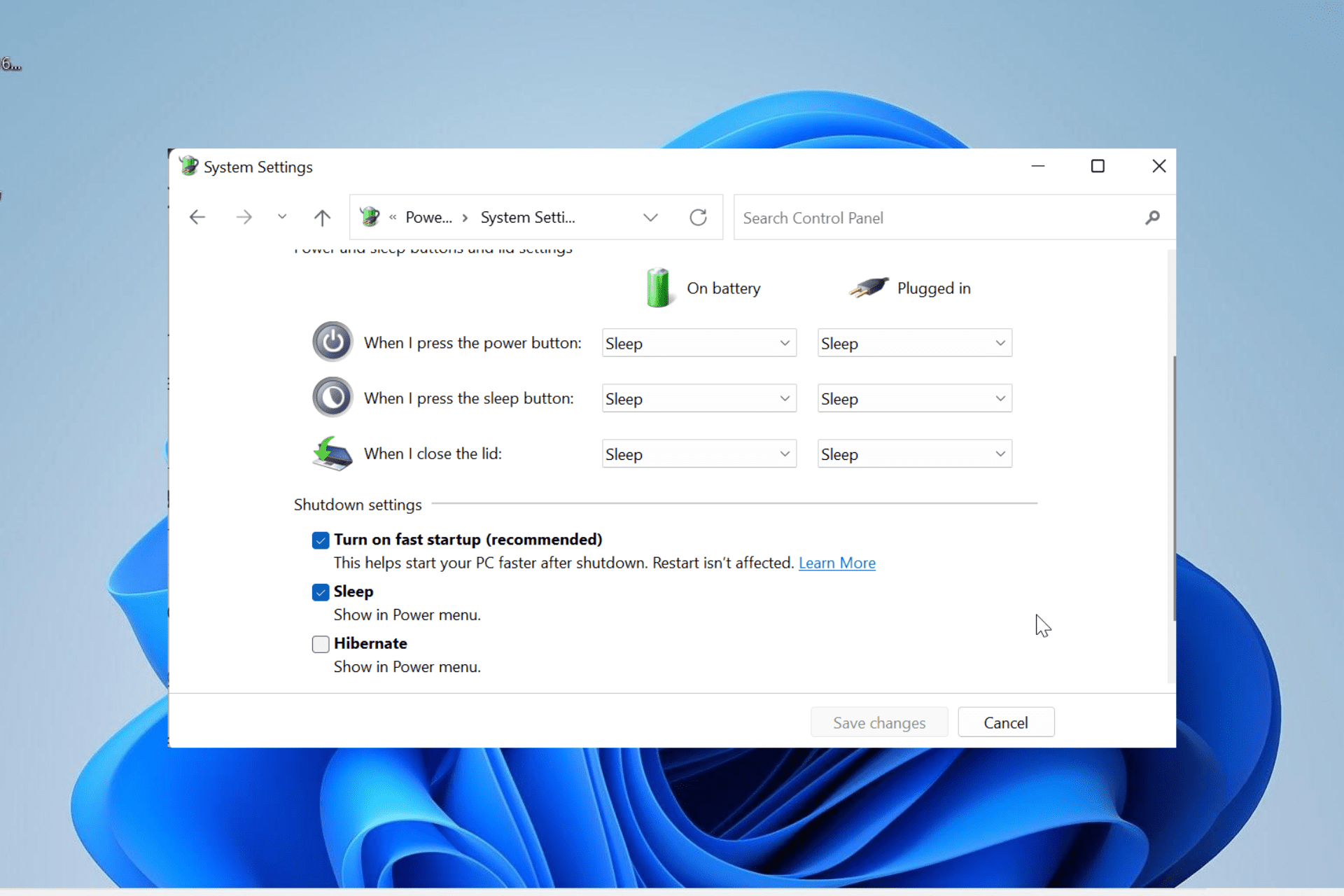
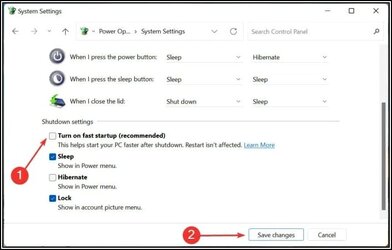
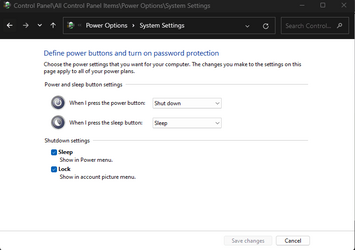
FastStart1.jpg
Above is your sample screenshot and, yes, I see the "Fast Boot" option.
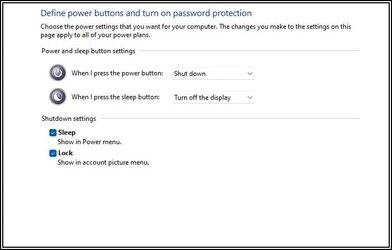
FastStart2.jpg
Here's what my system looks like to me. No option offered. (Hibernate was intentionally disabled)
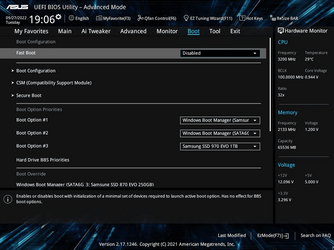
As for the BIOS, there IS something with a similar name and a range of settings. Since it's not an
ON/OFF thingy, I'll leave it alone until I've done more homework.

Wouldn't it be nice if we all saw the same things?
Thanks Scott. Good try.
Peter
 

My Computer My Computer

At a glance

Version 21H2 (OS Build 22000.2538)Intel(R) Core(TM) i7-4770 CPU @ 3.40GHz32 GigabytesIntel(R) HD Graphics 4600
OS
Version 21H2 (OS Build 22000.2538)
Computer type
PC/Desktop
Manufacturer/Model
Dell Inc. OptiPlex 9020 01
CPU
Intel(R) Core(TM) i7-4770 CPU @ 3.40GHz
Motherboard
Dell Inc. 0PC5F7 A03
Memory
32 Gigabytes
Graphics Card(s)
Intel(R) HD Graphics 4600
Sound Card
Realtek High Definition Audio
Monitor(s) Displays
(#1) Samsung SMS27A550H, (#2) Samsung S24D330, (#3) Samsung SyncMaster SA550
Screen Resolution
(#1) 3840x2160, (#2) 1920x1080, (#3) 1920x1080
Hard Drives
C: D: Fanxiang S101Q 1TB (1024.2 GB) ssd
E: WDC WDS100T2B0A-00SM50 (1000.2 GB) ssd
F: WDC WD10SPZX-21Z10T0 (1000.2 GB) hdd
G: HAJAAN HS512E 512GB (512.1 GB) ssd
PSU
Standard 255 Watt
Case
Tower
Cooling
Fans
Keyboard
PS/2
Mouse
PS/2
Internet Speed
955 Mbps Down, 18 Mbps Up
Browser
Firefox 150.0 (64-bit)
Antivirus
Malwarebytes
Just a hint. When you can't find something, just type into the search box. 99% of the time, the search results will lead you right to it.
 

My Computers My Computers

  • At a glance

    Windows 11 Pro 25H2 26200.8655i9-10900 10 core 20 threads32 gbnone-Intel UHD Graphics 630
    OS
    Windows 11 Pro 25H2 26200.8655
    Computer type
    PC/Desktop
    Manufacturer/Model
    Dell Optiplex 7080
    CPU
    i9-10900 10 core 20 threads
    Motherboard
    DELL 0J37VM
    Memory
    32 gb
    Graphics Card(s)
    none-Intel UHD Graphics 630
    Sound Card
    Integrated Realtek
    Monitor(s) Displays
    Benq 27
    Screen Resolution
    2560x1440
    Hard Drives
    2x1tb Solidigm m.2 nvme /External drives 512gb Samsung m.2 sata+2tb Kingston m2.nvme
    PSU
    500w
    Case
    MT
    Cooling
    Dell Premium
    Keyboard
    Logitech wired
    Mouse
    Logitech wireless
    Internet Speed
    so slow I'm too embarrassed to tell
    Browser
    #1 Edge #2 Firefox
    Antivirus
    Defender+MWB Premium
  • At a glance

    Windows 11 Pro 24H2 26200.8457AMD Ryzen 7 6800U32 gbintegrated
    Operating System
    Windows 11 Pro 24H2 26200.8457
    Computer type
    PC/Desktop
    Manufacturer/Model
    Beelink Mini PC SER5
    CPU
    AMD Ryzen 7 6800U
    Memory
    32 gb
    Graphics card(s)
    integrated
    Sound Card
    integrated
    Monitor(s) Displays
    Benq 27
    Screen Resolution
    2560x1440
    Hard Drives
    1TB Crucial nvme
    Keyboard
    Logitech wired
    Mouse
    Logitech wireless
    Internet Speed
    still too embarrassed to tell
    Browser
    Firefox
    Antivirus
    Defender
    Other Info
    System 3 is non compliant Dell 9020 i7-4770/24gb ram Win11 PRO 26200.8457
:D Aw yes, glasskuter. It is true that one occasionally
needs to point out the obvious to us oldies however . . .

(2022.09.28) 11.37.25.gif
Search for Fast Startup (been there, done that)

(2022.09.28) 11.36.39.gif
and a search for Fast Boot :unsure:
 

My Computer My Computer

At a glance

Version 21H2 (OS Build 22000.2538)Intel(R) Core(TM) i7-4770 CPU @ 3.40GHz32 GigabytesIntel(R) HD Graphics 4600
OS
Version 21H2 (OS Build 22000.2538)
Computer type
PC/Desktop
Manufacturer/Model
Dell Inc. OptiPlex 9020 01
CPU
Intel(R) Core(TM) i7-4770 CPU @ 3.40GHz
Motherboard
Dell Inc. 0PC5F7 A03
Memory
32 Gigabytes
Graphics Card(s)
Intel(R) HD Graphics 4600
Sound Card
Realtek High Definition Audio
Monitor(s) Displays
(#1) Samsung SMS27A550H, (#2) Samsung S24D330, (#3) Samsung SyncMaster SA550
Screen Resolution
(#1) 3840x2160, (#2) 1920x1080, (#3) 1920x1080
Hard Drives
C: D: Fanxiang S101Q 1TB (1024.2 GB) ssd
E: WDC WDS100T2B0A-00SM50 (1000.2 GB) ssd
F: WDC WD10SPZX-21Z10T0 (1000.2 GB) hdd
G: HAJAAN HS512E 512GB (512.1 GB) ssd
PSU
Standard 255 Watt
Case
Tower
Cooling
Fans
Keyboard
PS/2
Mouse
PS/2
Internet Speed
955 Mbps Down, 18 Mbps Up
Browser
Firefox 150.0 (64-bit)
Antivirus
Malwarebytes


My Computers My Computers

  • At a glance

    Windows 11 Pro 25H2 26200.8655i9-10900 10 core 20 threads32 gbnone-Intel UHD Graphics 630
    OS
    Windows 11 Pro 25H2 26200.8655
    Computer type
    PC/Desktop
    Manufacturer/Model
    Dell Optiplex 7080
    CPU
    i9-10900 10 core 20 threads
    Motherboard
    DELL 0J37VM
    Memory
    32 gb
    Graphics Card(s)
    none-Intel UHD Graphics 630
    Sound Card
    Integrated Realtek
    Monitor(s) Displays
    Benq 27
    Screen Resolution
    2560x1440
    Hard Drives
    2x1tb Solidigm m.2 nvme /External drives 512gb Samsung m.2 sata+2tb Kingston m2.nvme
    PSU
    500w
    Case
    MT
    Cooling
    Dell Premium
    Keyboard
    Logitech wired
    Mouse
    Logitech wireless
    Internet Speed
    so slow I'm too embarrassed to tell
    Browser
    #1 Edge #2 Firefox
    Antivirus
    Defender+MWB Premium
  • At a glance

    Windows 11 Pro 24H2 26200.8457AMD Ryzen 7 6800U32 gbintegrated
    Operating System
    Windows 11 Pro 24H2 26200.8457
    Computer type
    PC/Desktop
    Manufacturer/Model
    Beelink Mini PC SER5
    CPU
    AMD Ryzen 7 6800U
    Memory
    32 gb
    Graphics card(s)
    integrated
    Sound Card
    integrated
    Monitor(s) Displays
    Benq 27
    Screen Resolution
    2560x1440
    Hard Drives
    1TB Crucial nvme
    Keyboard
    Logitech wired
    Mouse
    Logitech wireless
    Internet Speed
    still too embarrassed to tell
    Browser
    Firefox
    Antivirus
    Defender
    Other Info
    System 3 is non compliant Dell 9020 i7-4770/24gb ram Win11 PRO 26200.8457
A new observation:
I was just mucking about with an ACER Aspire C24 with Windows 11 (21H2)
and, guess what? NO PROBLEMS AT ALL with the monitor sleeping AND
waking using the sleep button. Therefore... Hardware or Firmware or BIOS?
Peter
 

My Computer My Computer

At a glance

Version 21H2 (OS Build 22000.2538)Intel(R) Core(TM) i7-4770 CPU @ 3.40GHz32 GigabytesIntel(R) HD Graphics 4600
OS
Version 21H2 (OS Build 22000.2538)
Computer type
PC/Desktop
Manufacturer/Model
Dell Inc. OptiPlex 9020 01
CPU
Intel(R) Core(TM) i7-4770 CPU @ 3.40GHz
Motherboard
Dell Inc. 0PC5F7 A03
Memory
32 Gigabytes
Graphics Card(s)
Intel(R) HD Graphics 4600
Sound Card
Realtek High Definition Audio
Monitor(s) Displays
(#1) Samsung SMS27A550H, (#2) Samsung S24D330, (#3) Samsung SyncMaster SA550
Screen Resolution
(#1) 3840x2160, (#2) 1920x1080, (#3) 1920x1080
Hard Drives
C: D: Fanxiang S101Q 1TB (1024.2 GB) ssd
E: WDC WDS100T2B0A-00SM50 (1000.2 GB) ssd
F: WDC WD10SPZX-21Z10T0 (1000.2 GB) hdd
G: HAJAAN HS512E 512GB (512.1 GB) ssd
PSU
Standard 255 Watt
Case
Tower
Cooling
Fans
Keyboard
PS/2
Mouse
PS/2
Internet Speed
955 Mbps Down, 18 Mbps Up
Browser
Firefox 150.0 (64-bit)
Antivirus
Malwarebytes
View attachment 40643
Here's what my system looks like to me. No option offered. (Hibernate was intentionally disabled)
As for the BIOS, there IS something with a similar name and a range of settings. Since it's not an
ON/OFF thingy, I'll leave it alone until I've done more homework.

Wouldn't it be nice if we all saw the same things?
Thanks Scott. Good try.
Peter

Actually, that's all I see too. I thought it was a 22H2 thing, but you're still on 21H2. Hmm....

1664427180018.png
 

My Computers My Computers

  • At a glance

    Win 11 Pro 25H2 26200.8737Intel® Core™ i7-14700KG.SKILL Ripjaws S5 Series 64GB (2 x 32GB) DDR5ASUS GeForce RTX 4070 Super 12GB
    OS
    Win 11 Pro 25H2 26200.8737
    Computer type
    PC/Desktop
    Manufacturer/Model
    Self Built
    CPU
    Intel® Core™ i7-14700K
    Motherboard
    ASUS TUF Z690-PLUS WIFI BIOS 4505 11/29/25
    Memory
    G.SKILL Ripjaws S5 Series 64GB (2 x 32GB) DDR5
    Graphics Card(s)
    ASUS GeForce RTX 4070 Super 12GB
    Sound Card
    Sound Blaster AE-5 Plus
    Monitor(s) Displays
    ASUS TUF Gaming 27" 2K HDR Gaming
    Screen Resolution
    2560 x 1440
    Hard Drives
    Samsung 990 Pro 1TB NVMe (Win 11 25H2)
    SK hynix P41 500GB NVMe 25H2 DEV/Games
    SK hynix P41 2TB NVMe (x3)
    Crucial P3 Plus 4TB
    PSU
    Corsair RM850x Shift
    Case
    Antec Dark Phantom DP502 FLUX
    Cooling
    Corsair Nautilus 360 RS AIO
    Keyboard
    Logitech MK 320
    Mouse
    Razer Basilisk V3
    Internet Speed
    750Mbs
    Browser
    Firefox
    Antivirus
    Winows Security
    Other Info
    MR 8.1 Home
  • At a glance

    Win 11 Pro 25H2 26200.8737Intel Core i7-11700F64 GB DDR4MSI GeForce RTX 3060 Ventus 2X 12GB
    Operating System
    Win 11 Pro 25H2 26200.8737
    Computer type
    PC/Desktop
    Manufacturer/Model
    Self Built
    CPU
    Intel Core i7-11700F
    Motherboard
    Asus TUF Gaming Z590 Plus WiFi (BIOS 2803)
    Memory
    64 GB DDR4
    Graphics card(s)
    MSI GeForce RTX 3060 Ventus 2X 12GB
    Sound Card
    SoundBlaster Audigy Fx V2
    Monitor(s) Displays
    Samsung F27T350
    Screen Resolution
    1920x1080
    Hard Drives
    Samsung 980 Pro 1TB
    Samsung 970 EVO Plus 2TB
    Samsung 870 EVO 500GB SSD
    PSU
    Corsair HX750
    Case
    Cougar MX330-G Window
    Cooling
    Thermalright Frozen Edge 240 Black AIO
    Internet Speed
    350Mbps
    Browser
    Firefox
    Antivirus
    Windows Security
  • System Three
    Win 11 Pro 25H2 26200.8737
    ASUS PRIME Z370-P II BIOS 3004 7/12/21
    Intel Core i7-8700 CPU @ 3.20GHz
    32GB DDR4 RAM (4x8)
    iGPU Intel UHD Graphics 630
    Mid-Tower Desktop

Latest Support Threads

Back
Top Bottom